FHIR R4 Integration for US Health Tech Startups: A Founder's Guide


Create engaging, high-performance mobile applications tailored to your business needs. We craft future-ready apps that offer smooth user experiences on all devices.
Build robust and scalable websites and CMS platforms that help you manage content effortlessly. Our development ensures a seamless digital presence.
Launch secure, feature-rich online stores with intuitive shopping experiences. We build tailored eCommerce platforms designed for growth.
Design captivating games with immersive gameplay and stunning graphics. From concept to launch, we build engaging experiences that players love.
Enhance your customer relationships with customized Salesforce implementations. Drive growth and efficiency with smarter CRM solutions.
Harness artificial intelligence and machine learning to automate workflows and gain actionable insights. Our AI transforms data into smart decisions.
Accelerate your software delivery lifecycle with continuous integration, delivery, and infrastructure automation to boost efficiency.

In August 2022, a Boston-based clinical workflow startup came to us mid-project. Series A, $14M raised, building a care coordination platform for large primary care groups. Their core value proposition depended on pulling patient problem lists, medication records, and recent lab results from their customers’ Epic installations, surfacing them in a unified care coordinator dashboard.
Their previous engineering team had estimated six weeks for the Epic FHIR integration. Nine months later, they had a partial integration that worked in Epic’s sandbox environment but consistently failed in production. Three of their four pilot customers had not gone live. Their Series B was on hold pending a working integration.
The failure was not a code failure. The code was technically correct, it implemented FHIR R4 resource requests accurately. The failure was an understanding failure. The team had treated Epic’s FHIR API as a clean, well-documented REST API that would behave consistently across implementations. It is not.
Epic’s FHIR implementation is a complex, version-specific, customer-configuration-dependent system where every health system runs a slightly different configuration, every upgrade cycle introduces breaking changes, and the gap between sandbox behavior and production behavior is wide enough to drive a product roadmap through.
They came to us with nine months of sunk cost, three pilot customers waiting, and a Series B dependent on a working integration. We rebuilt the integration layer in eleven weeks. The architecture was different from what they had built, a FHIR abstraction layer that normalized Epic’s idiosyncrasies rather than integrating directly against Epic’s API, and it has held up through two Epic upgrade cycles since.
The lesson I took from that engagement: FHIR R4 integration is one of the most underestimated technical challenges in health tech. Not because FHIR is complex as a specification, it is well-designed and well-documented. But because the gap between the FHIR specification and the production reality of any specific EHR’s FHIR implementation is where health tech products go to die.
This guide is the one I wish that the Boston founder had read before they started.
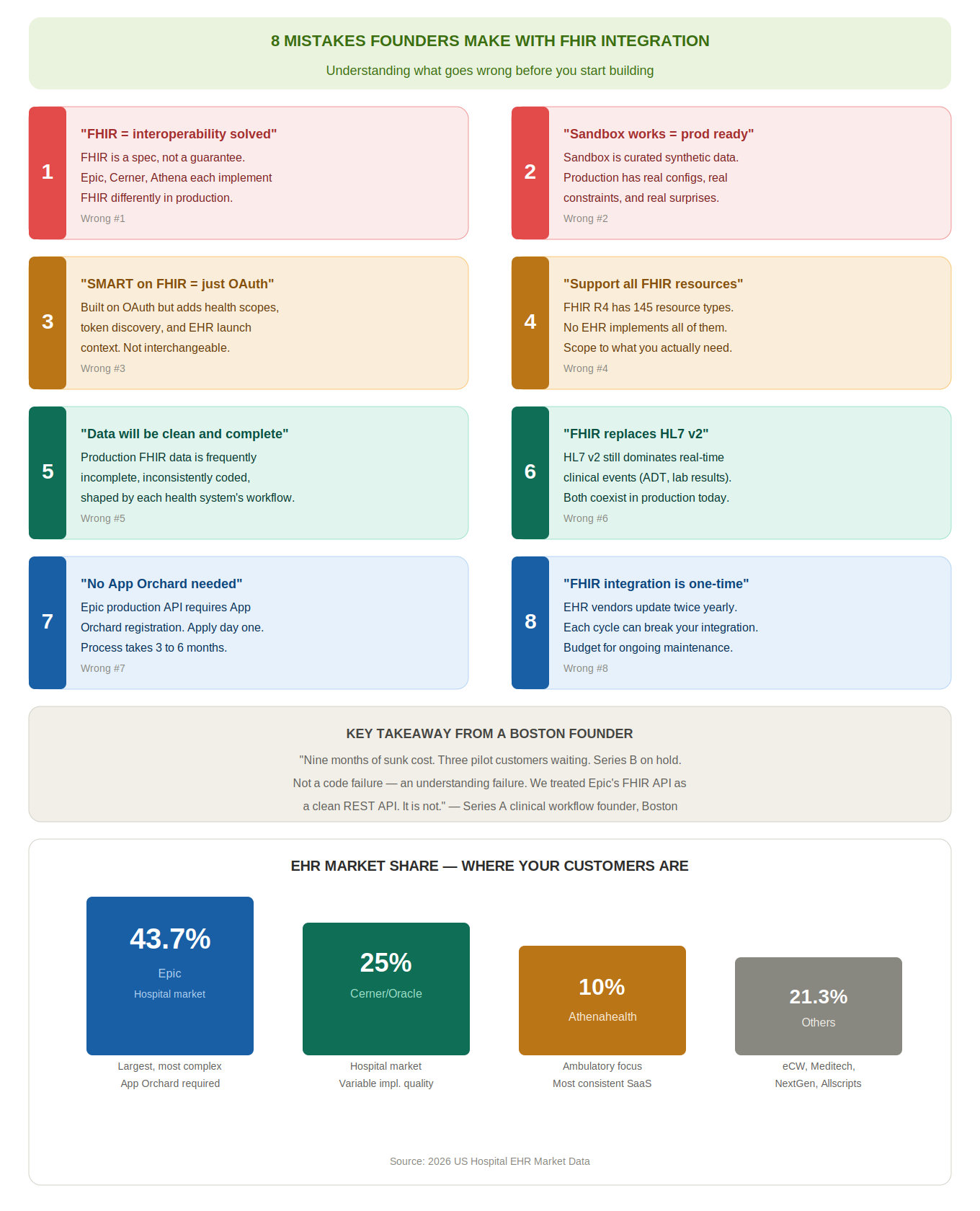
FHIR R4 is a specification that defines a standard for health data exchange. It does not guarantee that every EHR implements it consistently, completely, or in a way that your product can consume without customization. Epic’s FHIR implementation, Cerner’s FHIR implementation, and Athenahealth’s FHIR implementation each have different supported resource types, different search parameter support, different pagination behaviors, and different authentication nuances. “We support FHIR” from an EHR vendor is the beginning of the integration conversation, not the end of it.
Epic’s sandbox environment, Cerner’s sandbox, and Athena’s sandbox are carefully curated test environments with synthetic data and predictable behavior. Production environments have real patient data, real clinical configurations, real performance constraints, and real behaviors that the sandbox does not surface. Every production FHIR integration we have built has required debugging and adjustment after sandbox testing passed. Plan for production validation time separately from sandbox validation time.
SMART on FHIR is built on OAuth 2.0, but it adds health-specific authorization scopes, a specific token endpoint discovery mechanism, and an EHR launch context that standard OAuth 2.0 implementations do not handle. Every EHR implements SMART on FHIR with its own specific configuration, Epic’s SMART on FHIR launch sequence has specific parameters that Cerner’s does not, and vice versa. Treating SMART on FHIR as generic OAuth 2.0 is the single most common cause of authorization failures in FHIR integration projects.
FHIR R4 defines 145 resource types. No EHR implements all of them. No health tech startup needs all of them. Define the specific FHIR resources your product actually needs, Patient, Observation, Condition, MedicationRequest, Encounter, DiagnosticReport, and build and test against those specific resources. “Full FHIR support” is not a product feature. It is a vague commitment that leads to underestimated scope and over budget integration projects.
FHIR data from production EHR environments is frequently incomplete, inconsistently coded, and shaped by the clinical workflow decisions of the health system that generated it. A patient’s problem list in Epic at Massachusetts General Hospital looks different from the same patient’s problem list in Epic at a rural critical access hospital, not because the data is wrong, but because the two health systems have different clinical workflows, different coding standards, and different levels of documentation rigor. Your product must handle incomplete and inconsistent FHIR data gracefully, not assume completeness.
FHIR does not replace HL7 v2 in production healthcare environments. HL7 v2 messages are still the dominant interface protocol for real-time clinical event notifications, ADT (admission, discharge, transfer), lab results, radiology reports, in most US health systems. If your product needs to respond to real-time clinical events, you likely need HL7 v2 processing alongside FHIR R4 data access. The two standards coexist in production environments and serve different purposes.
Epic’s production API access requires that your application be registered in Epic’s App Orchard, either as a certified application (full App Orchard certification, significant time and cost) or through your customer’s Epic instance configuration (customer-activated access, which varies by health system’s willingness to activate third-party apps). You cannot access a production Epic FHIR API without explicit authorization from the health system and compliance with Epic’s application requirements. Plan for this in your go-to-market timeline.
FHIR integration is an ongoing maintenance commitment. EHR vendors release updates that change their FHIR implementations, new supported resources, changed search parameter behavior, modified authentication flows. Epic’s upgrade cycle happens twice per year. Each upgrade can introduce breaking changes to your integration. Budget for ongoing FHIR integration maintenance, it is not a one-time build, it is an ongoing engineering investment.
FHIR stands for Fast Healthcare Interoperability Resources. It is a specification developed by HL7 International that defines:
FHIR R4 is the fourth major version of the specification, released in 2019, and is the version required by the ONC’s 21st Century Cures Act interoperability rules (which mandate that certified EHRs expose a FHIR R4 API for patient data access). It is the version you are building against in 2026.
FHIR is not a database. It is an API specification. Behind every FHIR API is an EHR’s proprietary data store, Epic’s database, Cerner’s database, Athena’s database. FHIR defines how you access data through the API. It does not define how the data is stored, how complete it is, or how consistently it is documented.
FHIR is not a real-time event streaming protocol. FHIR’s subscription mechanism (FHIR Subscriptions, a relatively new addition to the spec) allows for push notifications when resource data changes. But for real-time clinical event notification, a patient is admitted, a lab result is resulted, a medication is prescribed, most production health systems still use HL7 v2 ADT and ORU messages, not FHIR Subscriptions.
FHIR is not guaranteed to be the same across EHR implementations. The FHIR specification defines what a conformant implementation must support. It also defines optional elements and optional behaviors. EHR implementations vary widely in which optional elements they support, which search parameters they implement, and how they handle edge cases.
US Core is a FHIR implementation guide that defines a subset of FHIR R4 that all ONC-certified EHRs must support, but US Core coverage is a floor, not a ceiling, and the data you can reliably pull from US Core-compliant APIs is less than the full FHIR R4 resource set.
The ONC’s 21st Century Cures Act final rule (effective April 2021) requires that:
The practical implication for health tech startups: patients have a federally protected right to access their health data through standardized FHIR APIs, and EHR vendors and health systems are legally required to make that data available.
This right, and the enforcement mechanism behind it, is what makes FHIR integration commercially viable for health tech products. The law is on your side. The implementation complexity is what you are navigating.
From a US founder call: “I thought FHIR meant interoperability was solved. I thought I could pull any patient’s data from any EHR with a FHIR API call. My first production integration with a community hospital’s Epic instance took eleven weeks instead of three. Not because the spec was wrong, the spec was fine.
Because the hospital’s Epic configuration only exposed twelve of the thirty resource types I needed, their search parameters were a subset of what the sandbox supported, and their SMART on FHIR token endpoint had a non-standard configuration that our authentication library did not handle. FHIR solves the standard. It does not solve the implementation.”, Series A clinical workflow founder, Boston.
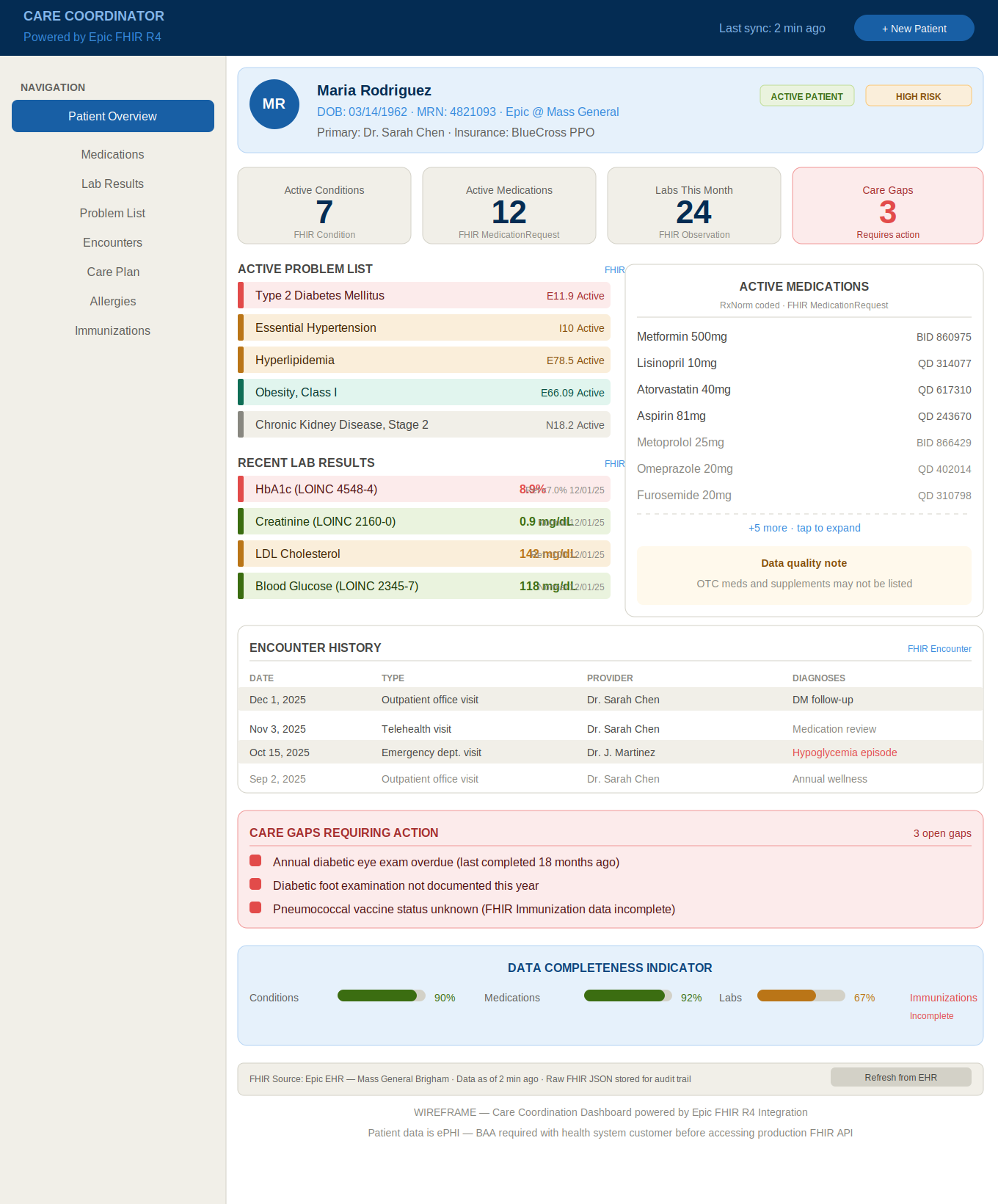
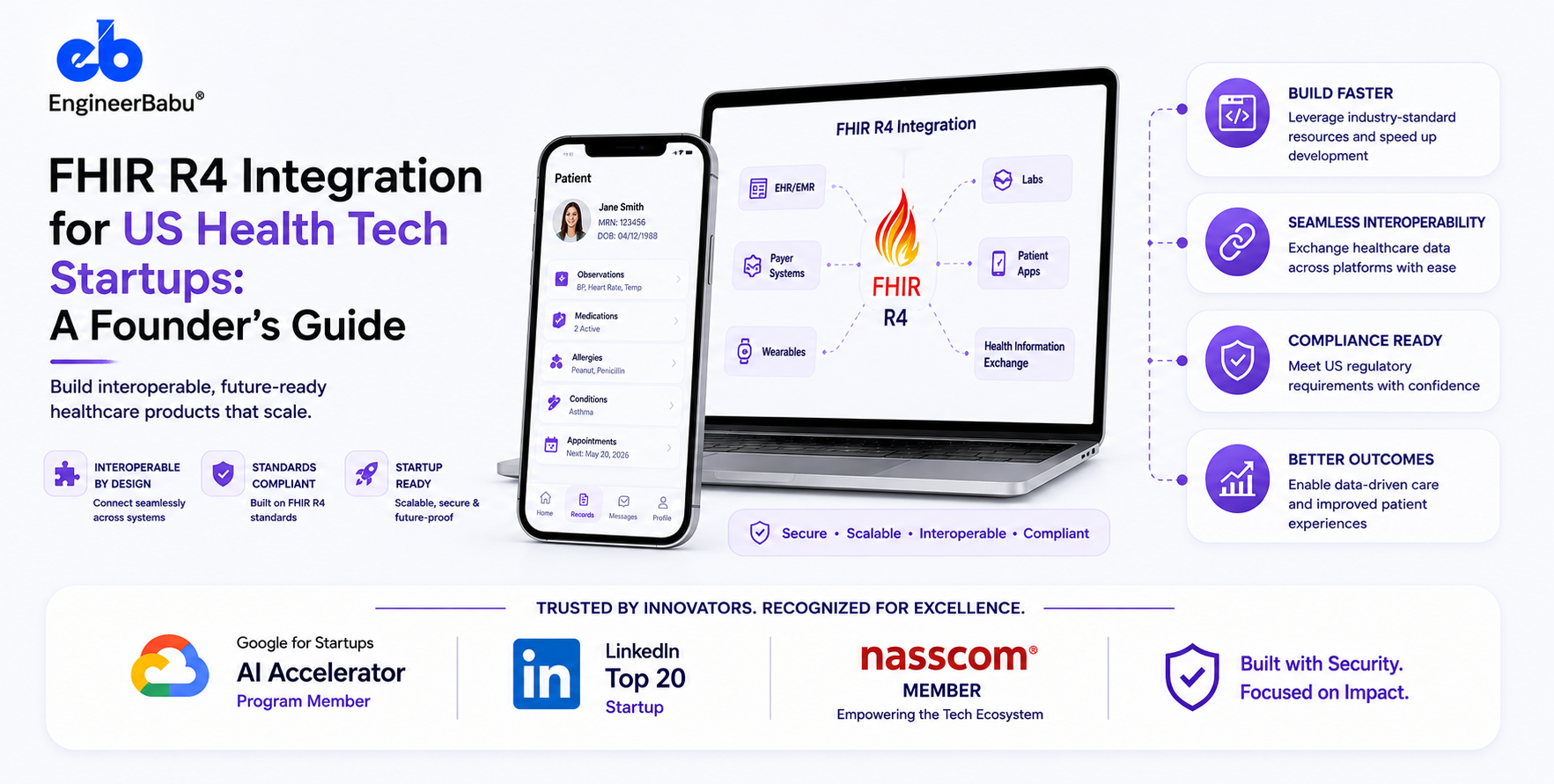
FHIR R4 defines 145 resource types. Here are the ones that matter for the most common health tech use cases, what they contain, and where the implementation gaps typically are.
The foundational resource. Contains: patient identifier (MRN), name, date of birth, gender, address, contact information, primary language, race and ethnicity (US Core extension), and identifiers from other systems (SSN, typically not exposed, insurance ID).
Implementation reality: Patient identifiers vary by health system. A patient’s MRN in Epic at Hospital A is different from their MRN in Epic at Hospital B. Matching patients across health systems requires Master Patient Index (MPI) logic, your platform must handle patient identity matching, not assume that the FHIR Patient ID is a universal identifier.
The most commonly used FHIR resource for health tech products. Contains: vital signs (blood pressure, heart rate, weight, height, temperature, oxygen saturation), laboratory results, social history observations (smoking status, pregnancy status), and any other clinical measurement. Observations are coded with LOINC (Logical Observation Identifiers Names and Codes), a standard coding system for lab tests and clinical measurements.
Implementation reality: LOINC code coverage varies dramatically by health system and by test. A comprehensive metabolic panel result in one Epic implementation uses LOINC codes consistently. The same panel in a smaller health system’s implementation may use local codes that require mapping to LOINC. Your product must handle LOINC-coded observations, locally-coded observations, and observations with missing or incorrect codes.
Patient diagnoses and health problems. Contains: ICD-10 or SNOMED CT coded condition, clinical status (active, resolved, inactive), onset date, and the provider who recorded it.
Implementation reality: Problem lists are among the most inconsistently maintained data elements in clinical EHRs. A patient’s “active problem list” in Epic may contain conditions entered years ago that are clinically resolved, duplicated entries for the same condition coded differently, and missing conditions that are documented in clinical notes but not coded in the problem list. Do not assume that a patient’s FHIR Condition list is complete or current.
Current and historical medication prescriptions. Contains: medication (coded with RxNorm), dosage, frequency, prescriber, and status (active, completed, stopped, on-hold).
Implementation reality: Medication data is frequently the most complete and most reliably coded FHIR data in a production EHR, medication orders are a critical clinical workflow and are generally well-maintained. However: over-the-counter medications and supplements are often absent (patients do not report them, providers do not document them). Historical medications may be listed as “active” because they were never explicitly stopped in the EHR.
Clinical visits and interactions. Contains: encounter type (inpatient, outpatient, emergency, telehealth), date, provider, location, diagnoses assigned at the encounter, and disposition.
Implementation reality: Encounter data is generally reliable for inpatient and outpatient visits. Telehealth encounters are coded inconsistently, some systems use encounter type “telehealth,” others use “outpatient” with a telehealth modifier, others have no standard approach. For products that need to distinguish telehealth from in-person encounters, the encounter type coding must be validated against the specific health system’s configuration.
Laboratory reports, radiology reports, and pathology reports. Contains: the report type (LOINC coded), the result status, the individual observations that make up the report, and in some cases the narrative report text.
Implementation reality: DiagnosticReport is one of the most variable FHIR resources across implementations. Some health systems expose full structured laboratory results through DiagnosticReport + Observation resources. Others expose only the narrative report text (a PDF or HTML document) without structured results. Radiology and pathology reports are frequently narrative-only in FHIR, the structured data lives in the radiology information system (RIS) or laboratory information system (LIS), not in the EHR’s FHIR API.
Patient allergies and adverse reactions. Contains: the substance (coded with RxNorm for medications, SNOMED CT for non-medication allergies), reaction type, severity, and clinical status.
Implementation reality: Allergy data is generally reliable for medication allergies, these are clinically critical and are maintained with care. Non-medication allergies (food, environmental, latex) are less consistently maintained.
Patient immunization records. Contains: vaccine administered (CVX coded), date administered, administrator, and status.
Implementation reality: Immunization records in EHRs are frequently incomplete, patients receive immunizations from multiple providers (primary care, pharmacy, urgent care) and the records are not always consolidated in a single EHR. For immunization completeness, health information exchanges (HIEs) or immunization registries are often better data sources than a single EHR’s FHIR API.
Clinical procedures performed. Contains: procedure type (CPT or SNOMED CT coded), date, performer, and status.
Implementation reality: Procedure data in FHIR is frequently less complete than billing-level procedure data. Surgical procedures and invasive procedures are generally documented. Minor office procedures are inconsistently documented.
Structured care plans, including goals, activities, and team members. Introduced in FHIR R4. Increasingly used for care coordination products.
Implementation reality: CarePlan support is highly variable across EHR implementations. Many health systems expose limited or no CarePlan data through their FHIR API, even if care plans exist in the EHR. This is an area where FHIR implementation maturity is still developing.
References to clinical documents, discharge summaries, referral letters, clinical notes, that may be in PDF, HTML, or structured CDA format.
Implementation reality: Document reference is one of the most commonly supported but most variable FHIR resources. The document itself may be a scanned PDF (not machine-readable), a structured CDA document (complex XML format requiring its own parser), or occasionally a structured FHIR document. For products that need clinical note content in machine-readable form, DocumentReference is frequently disappointing in production.
Work through these fourteen questions before your engineering team writes a line of FHIR integration code.
List them. Specifically. Not “patient data”, Patient, Observation (which LOINC codes?), Condition (active problem list only, or historical?), MedicationRequest (active medications only, or full history?). The more precisely you scope your FHIR resource needs, the more accurately you can estimate integration complexity and cost.
Custom, Epic, Cerner (Oracle Health), Athenahealth, eClinicalWorks, NextGen, Meditech, Allscripts, Veradigm? Each has a different FHIR implementation. Each has a different certification and access process. Prioritize your EHR integration targets based on your customer base, not based on which EHR has the best FHIR documentation.
A health system’s Epic implementation is not the same as Epic’s reference implementation. The health system’s specific configuration, which apps are activated, which FHIR resources are exposed, which search parameters are enabled, matters more than the EHR vendor’s general FHIR documentation. Get access to your first customer’s sandbox environment before you complete your architecture design.
Patient-facing FHIR access uses the SMART on FHIR patient launch flow, the patient authorizes your app to access their own data. Provider-facing FHIR access uses the SMART on FHIR EHR launch flow, the provider launches your app from within their EHR session. System-to-system access uses SMART on FHIR backend services, no user authorization, server-to-server with client credentials. Each has a different authorization flow, different scope requirements, and different implementation complexity.
If your product needs to react to real-time clinical events, a lab result being resulted, a patient being admitted, FHIR Subscriptions or HL7 v2 ADT integration may be required. If your product needs to display the patient’s current medication list when they log in, polling the FHIR API on each login is sufficient. The difference between real-time and batch data access changes the architecture significantly.
US Core defines the minimum data elements and must-support flags for FHIR R4 resources in the US context. US Core is what ONC-certified EHRs are required to implement. Before assuming a data element will be available in a FHIR API, verify that it is in the US Core profile for that resource. Data elements outside US Core may not be consistently available.
Epic’s production FHIR API requires App Orchard registration. The App Orchard process, application submission, review, sandbox testing, production validation, takes 3–6 months for a new application. It must run in parallel with your development work, not sequentially. Apply the day you commit to an Epic integration.
FHIR Patient IDs are local to each health system’s EHR. A patient who sees providers at two different Epic health systems has two different FHIR Patient IDs. If your product aggregates data from multiple sources, you need a patient identity matching strategy, using name, date of birth, address, and other demographic identifiers to match patient records across systems.
How does your product handle incomplete FHIR data, missing LOINC codes, empty Condition lists, medication records with unknown stop dates? Your product must handle data gaps gracefully, not assume completeness.
FHIR write access (POST and PUT operations) is significantly more complex to obtain than read access. Most EHRs limit write access to specific resource types and require additional certification and review. If your product needs to write clinical data back to the EHR, creating Observations, updating CarePlans, writing clinical notes, plan for a longer certification process and more restrictive access.
If your product receives ePHI through a FHIR API, and most FHIR data is ePHI, your HIPAA obligations apply. The EHR vendor is not your Business Associate (they are the Covered Entity or the Covered Entity’s contractor). But any third-party service that processes the FHIR data you receive, your analytics platform, your AI pipeline, your cloud infrastructure, must have BAA coverage.
The ONC information blocking rule has eight regulatory exceptions, legitimate reasons why an actor might restrict data access without it being considered information blocking. Understanding which exceptions apply to your use case helps you navigate situations where a health system declines to share data, and helps you distinguish legitimate exceptions from actual information blocking.
EHR vendors release updates that can break FHIR integrations, changed API behavior, deprecated endpoints, new required parameters. How will you detect when an upgrade has broken your integration? How quickly can you respond? Your integration maintenance plan must include EHR upgrade monitoring.
If you need real-time clinical event notifications (lab results, ADT events), or if your target customers have legacy interface engines that only support HL7 v2, plan for HL7 v2 processing in your architecture. FHIR R4 and HL7 v2 are not mutually exclusive, most production health tech architectures use both.
SMART on FHIR (Substitutable Medical Applications, Reusable Technologies) is the authorization framework that governs how third-party applications access FHIR APIs. It is built on OAuth 2.0 and OpenID Connect, but it adds health-specific extensions that you must understand to implement correctly.
The patient initiates the authorization from your application, not from within the EHR. Your application redirects the patient to the EHR’s authorization endpoint. The patient logs in with their EHR patient portal credentials and grants your application permission to access their data. Your application receives an authorization code, exchanges it for an access token, and uses the token to access FHIR APIs.
Use case: patient-facing health apps (PHR apps, patient engagement apps, consumer health apps) that access a patient’s own health data with their consent.
SMART scopes for patient standalone: patient/*.read (read all resource types for the patient) or specific resource scopes: patient/Patient.read, patient/Observation.read, patient/MedicationRequest.read.
The provider launches your application from within their EHR workflow, clicking a button in Epic that opens your application in a new window. The EHR passes a launch token and the FHIR server base URL to your application. Your application uses the launch token to obtain an access token that is scoped to the current patient context and the current provider session.
Use case: provider-facing clinical decision support apps, care coordination tools, clinical workflow automation that launches from within the EHR.
SMART scopes for EHR launch: launch (required for EHR launch), patient/*.read or specific resource scopes, user/*.read for provider identity information.
The EHR launch is the most complex SMART flow to implement. Each EHR vendor implements the launch sequence with vendor-specific parameters and behaviors. Epic’s EHR launch sequence has specific requirements for the iss parameter, the launch context claims, and the token endpoint discovery that differ from Cerner’s implementation.
No user is involved in the authorization. Your server authenticates to the FHIR server using a client credentials flow with a JSON Web Token (JWT) signed with your private key. The FHIR server validates the JWT against your registered public key and returns an access token. Your server uses the access token to access FHIR APIs.
Use case: bulk data access for population health analytics, system-to-system data exchange between your platform and a health system, automated data pipelines that do not require per-user authorization.
SMART backend services requires: registration of your application’s public key with the FHIR server, JWT signing with your private key for each token request, and system-level scopes (system/*.read) rather than patient-level or user-level scopes.
SMART on FHIR defines a .well-known/smart-configuration endpoint that your application must query before initiating any authorization flow. This endpoint returns the FHIR server’s authorization endpoint URL, token endpoint URL, supported scopes, and supported SMART capabilities.
Your application must dynamically discover these endpoints rather than hardcoding them, because they differ across EHR instances, across health system configurations, and can change between EHR upgrades.
Hardcoding the Epic authorization endpoint URL is one of the most common FHIR integration mistakes. When Epic’s upgrade changes the token endpoint configuration, your hardcoded URL breaks. Dynamically discover the endpoints from .well-known/smart-configuration on every authorization flow initiation.
SMART on FHIR scopes define what data your application can access. The principle of minimum necessary access (which also applies under HIPAA §164.502(b)) requires that you request only the scopes necessary for your application’s function.
Do not request patient/*.read if you only need Patient, Observation, and MedicationRequest. Request patient/Patient.read patient/Observation.read patient/MedicationRequest.read. EHR authorization systems, and the health systems that configure them, are increasingly scrutinizing scope requests. Overly broad scope requests are a reason for application rejection in Epic’s App Orchard review.
SMART on FHIR access tokens are short-lived, typically 1 hour for patient and provider flows, up to 15 minutes for backend services. Your integration must implement token refresh logic, using a refresh token (for patient and provider flows) to obtain a new access token before the current token expires. Token refresh failure is a common cause of intermittent FHIR integration failures in production, the user’s session appears active in your application, but the FHIR access token has expired.
Compliance trap: SMART on FHIR refresh tokens for patient-facing applications must be stored securely, encrypted at rest, with access controls that prevent unauthorized token use. A refresh token grants persistent access to a patient’s FHIR data until it expires or is revoked. Storing refresh tokens in browser localStorage (accessible to any JavaScript on the page) or in an unencrypted database field is a security vulnerability that violates both HIPAA Security Rule requirements and SMART on FHIR security best practices.
This is the section that most FHIR integration guides skip, because the honest answer requires saying things that EHR vendors would prefer not to be said publicly. I am going to say them anyway, because the founders who succeed with FHIR integration are the ones who understand the implementation reality before they start building.
Epic holds approximately 43.7% of the US hospital EHR market and a significant share of the large physician group market. If you are building for health systems or large medical groups, you are almost certainly building an Epic integration.
Epic’s FHIR implementation as of 2026 is robust and reasonably well-documented. Epic has invested significantly in its FHIR API since the 21st Century Cures Act mandated open APIs. Here is the production reality:
App Orchard: Epic’s application marketplace. Every third-party application that accesses Epic’s production FHIR API must be registered in App Orchard, either as a certified application (full App Orchard review, $5,000–$25,000/year listing fee depending on app tier) or through customer-activated “MyApps” access (the health system activates your application in their Epic instance without requiring full App Orchard certification, but limiting you to that health system’s Epic instance).
The App Orchard certification process: submit application for review, demonstrate SMART on FHIR compliance, pass security review, complete sandbox testing with Epic’s test environment, validate in a production Epic environment with a partner health system.
Timeline: 3–6 months minimum for new applications. Run this process in parallel with development, do not wait until your integration is built to start the App Orchard process.
Supported resources: Epic supports a broad set of FHIR R4 resources, including all US Core required resources and many additional resources. Epic’s FHIR documentation (open.epic.com) is one of the better EHR FHIR documentation resources available. Read it before you build, not after.
Customer configuration variability: Every health system that runs Epic has their own configuration, which apps are activated, which FHIR resources are exposed, which extensions are enabled. The Epic instance at Mass General Brigham is configured differently from the Epic instance at a rural critical access hospital. Your integration must handle configuration variability gracefully.
The Epic upgrade cycle: Epic releases major updates twice per year (spring and fall upgrade). Each upgrade can introduce changes to FHIR API behavior, new supported resources, changed search parameters, modified authentication flows. Your integration must be tested against Epic’s upgrade release notes before each upgrade cycle and regression-tested after each health system customer upgrades.
Production vs. sandbox gap: Epic’s sandbox environment (FHIR.epic.com) uses synthetic data and a reference Epic configuration. Production health systems have real patient data and their own configuration. Behaviors that work in sandbox, specific search parameter combinations, specific resource structures, may not work in every production configuration. Always validate in a production Epic environment (with a partner health system) before signing a customer contract.
Cerner (now Oracle Health following Oracle’s 2022 acquisition) holds approximately 25% of the US hospital EHR market. Cerner’s FHIR implementation is DSTU2 and R4 based, with R4 becoming the primary focus since the 21st Century Cures Act.
Cerner Code: Cerner’s developer program (code.cerner.com). Application registration, sandbox access, and certification through the Cerner Code program. The process is similar to Epic’s App Orchard but with different requirements and timelines.
Implementation reality: Cerner’s FHIR R4 implementation has historically been less consistent than Epic’s, more variability between the spec and the production implementation, less complete documentation in some resource areas. Oracle’s acquisition has brought investment in the FHIR infrastructure, but migration complexity means the variability persists in 2026.
Millennium vs. Oracle Health: Cerner’s legacy platform is Cerner Millennium. Oracle Health is the next-generation platform being rolled out across the Cerner customer base. The FHIR implementations differ between Millennium and Oracle Health. Your integration may need to handle both versions if your customers are in different migration states.
Ignite APIs: Cerner’s branded name for its FHIR APIs. Cerner Ignite for R4. Different Ignite versions support different FHIR R4 resource sets. Know which Ignite version your target health systems are running.
Athenahealth holds approximately 10% of the ambulatory (outpatient) EHR market, predominantly independent physician practices and smaller medical groups. Less common in hospital settings.
Marketplace: Athenahealth’s developer program (developer.athenahealth.com). Application registration and API access through the Athenahealth Marketplace.
FHIR implementation: Athenahealth’s FHIR R4 implementation covers the US Core required resources with reasonable consistency. Athena’s API documentation has improved significantly since 2020. The FHIR API coexists with Athena’s legacy proprietary REST API, some data is only accessible through the legacy API, some through FHIR R4.
Production reality: Athenahealth’s FHIR implementation is more consistent across customer instances than Epic’s, because Athenahealth’s SaaS model gives them more control over the deployment configuration. Fewer configuration surprises in production than with Epic. The trade-off: less customizability for individual practices.
The legacy API coexistence: Athena’s FHIR API does not expose all the data available through their legacy proprietary API. For products that need data not yet exposed through FHIR, certain appointment data, certain billing data, the legacy API must be used alongside FHIR R4. Design for dual-API access if Athena is a target integration.
eClinicalWorks is the dominant EHR in independent primary care practices and community health centers (FQHCs). Less sophisticated FHIR implementation than Epic, Cerner, or Athena, but important for products targeting community health or value-based care in independent practice settings.
FHIR implementation: eCW’s FHIR R4 implementation covers US Core required resources with variable quality. The eCW FHIR API has been the subject of DOJ settlement and ONC enforcement actions related to information blocking and API certification, their implementation history has compliance baggage that affects the reliability of their API. Validate eCW FHIR data quality carefully before committing to an eCW integration.
Meditech (community hospitals, critical access hospitals), Allscripts/Veradigm (ambulatory, specialty), NextGen (ambulatory specialty practices), and others each have their own FHIR implementations with variable quality and documentation. For products targeting these EHRs, the integration approach is the same, SMART on FHIR authorization, US Core resource access, but the implementation variability is higher and the documentation is less complete.
The multi-EHR abstraction layer:
For products that need to integrate with multiple EHRs, the highest-leverage architectural decision is building a FHIR abstraction layer between your application logic and the EHR-specific FHIR implementations. The abstraction layer:
This is the architecture that saved the Boston founder from a nine-month failure. Build the abstraction layer first. Add EHR-specific adapters as you add EHR integrations. The upfront investment in the abstraction layer pays back on every subsequent EHR integration.
Red flag: Any engineering team that proposes to build direct point-to-point FHIR integrations with each EHR, no abstraction layer, no normalization, is building a maintenance nightmare. The second EHR integration costs the same as the first. The third costs the same as the second. The abstraction layer makes each subsequent integration incrementally cheaper. Build it from the start.
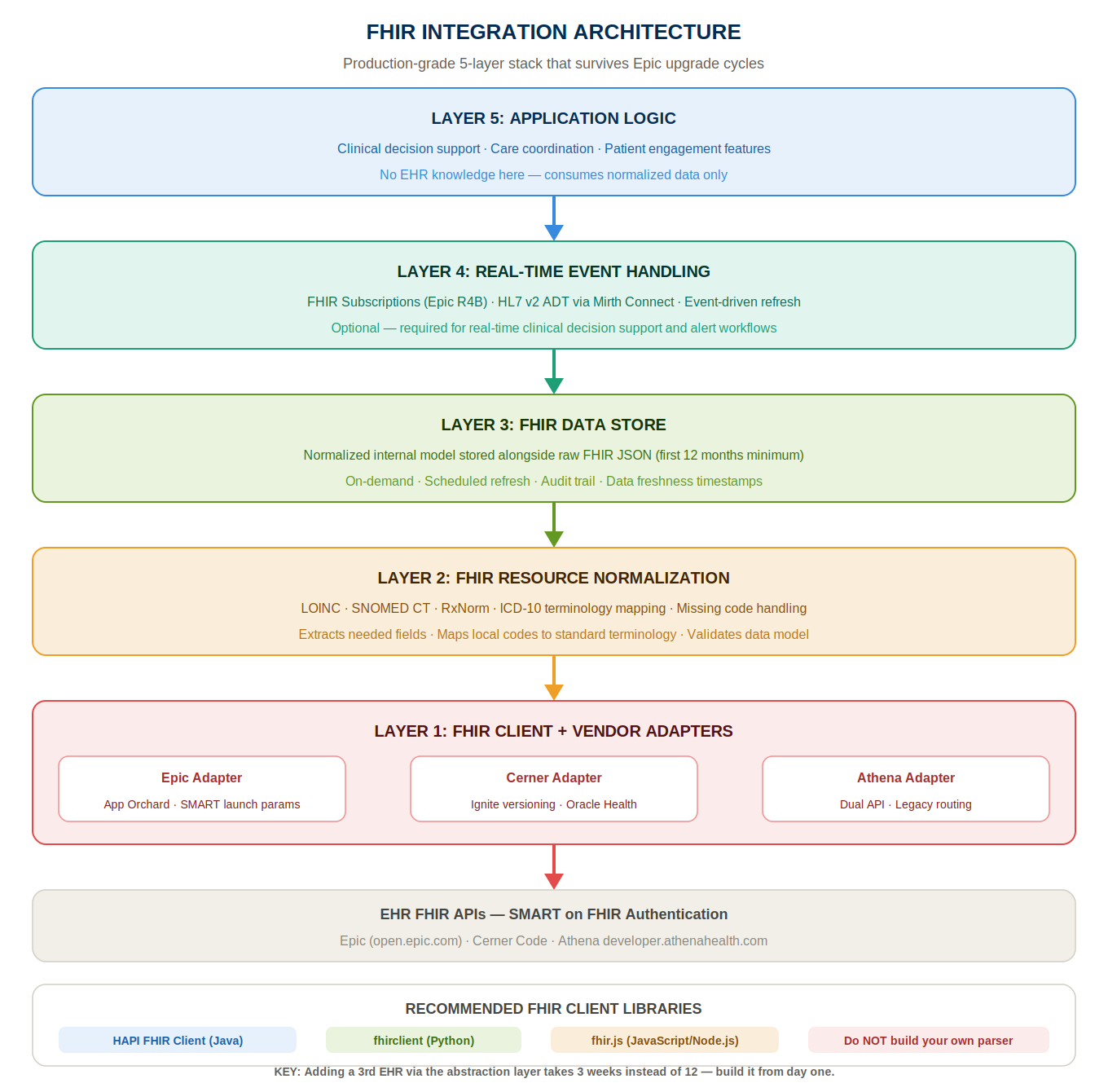
Here is the architecture we use for production FHIR integrations that have survived Epic upgrade cycles, Cerner migrations, and production variability across dozens of health system configurations.
The bottom layer of the stack. One FHIR client library that handles the HTTP communication, JSON parsing, and SMART on FHIR authentication flows. On top of the FHIR client, vendor-specific adapters that handle EHR-specific behaviors:
FHIR client libraries we use: HAPI FHIR Client (Java), fhirclient (Python), fhir.js (JavaScript/Node.js). Do not build your own FHIR parsing library. The spec is complex enough that rolling your own is a reliability risk and a maintenance burden.
The raw FHIR resources from Layer 1, which look different across EHR implementations, may have missing fields, may use different coding systems, are normalized into your application’s internal data model in Layer 2.
The normalization layer:
The normalization layer is where the gap between “FHIR R4 says this field is required” and “this specific EHR’s production API frequently returns this field as null” is handled. Build explicit handling for every known data quality gap in your target EHR implementations.
Normalized FHIR data is stored in your application’s data store after normalization. Two options:
Store the normalized representation only: Your application stores only the data elements it needs, in your internal data model. The raw FHIR resource is processed and discarded. Simpler storage model, less storage overhead, but if you later discover you needed a field from the original FHIR resource, you cannot retrieve it.
Store the raw FHIR resource alongside the normalized representation: Your application stores both the raw FHIR JSON resource and the normalized internal model. More storage overhead, but complete auditability, you can always go back to the original FHIR resource to debug normalization issues, re-normalize with an updated normalization logic, or extract fields you did not initially need.
Our recommendation: store the raw FHIR resource for the first 12 months of a new integration. The debugging value alone justifies the storage cost. After 12 months of stable integration, evaluate whether to continue storing raw resources.
For integrations that need real-time or near-real-time data, clinical decision support that needs to respond when a lab result is resulted, care coordination that needs to respond when a patient is admitted, the subscription layer handles incoming FHIR notifications.
FHIR R4 Subscriptions: the EHR pushes a notification to your application’s webhook endpoint when a specified resource changes. Not all EHRs support FHIR Subscriptions fully in production. Epic supports R4B Subscriptions in recent versions. Cerner support is variable.
For EHRs without production FHIR Subscription support: HL7 v2 interface engines (Mirth Connect, Rhapsody, Iguana) receive HL7 v2 ADT and ORU messages from the health system and convert them to your application’s internal event format. This is the most reliable real-time event mechanism for most production health systems in 2026.
Your application’s business logic, the clinical decision support, the care coordination workflow, the patient engagement feature, sits above the FHIR integration layers and consumes the normalized, stored FHIR data. The application logic should have no knowledge of which EHR the data came from or how the normalization was performed. It receives a normalized Patient, a list of normalized Observations, a list of normalized Conditions, and processes them according to your clinical or operational logic.
This separation, application logic above, FHIR integration below, is what allows you to add a new EHR integration without touching your application logic, and to update your FHIR normalization logic without touching your application logic.
FHIR data refresh strategy:
How often does your application refresh FHIR data from the EHR? The answer depends on your use case:
Most health tech products use a hybrid: scheduled nightly refresh for baseline data, on-demand refresh when a user actively views a patient record, and event-driven refresh for time-sensitive clinical alerts.
From a US founder call: “We built our Epic integration without an abstraction layer, direct point-to-point from our application to Epic’s FHIR API. When we added a Cerner integration six months later, we had to rebuild 60% of our FHIR code to handle Cerner’s different resource structures. When Epic’s spring upgrade changed two search parameter behaviors, we had to patch our integration in three places.
When we eventually rebuilt with an abstraction layer, our third EHR integration, Athenahealth, took three weeks instead of twelve. The abstraction layer is not optional if you are integrating with more than one EHR.”, Series A care coordination founder, Chicago.
Clinical data in FHIR resources is coded using standardized clinical terminologies. Understanding these terminologies, what they cover, how they are used in FHIR, and where their limitations are, is essential for building a FHIR integration that handles real-world clinical data correctly.
LOINC is the standard coding system for laboratory tests, clinical measurements, and observations. Every Observation resource in a FHIR API should have a LOINC code identifying what was measured.
LOINC codes you will encounter most often:
LOINC reality: not every Observation in a production EHR has a LOINC code. Local lab codes, EHR-specific codes, and missing codes are common. Your normalization layer must handle: (1) LOINC-coded observations (use the LOINC code directly), (2) locally-coded observations with a text description (attempt mapping to LOINC via the description, flag for manual review if mapping is uncertain), (3) observations with no code (log for data quality review, handle gracefully in application logic).
SNOMED CT is the standard coding system for clinical conditions, findings, and procedures. FHIR Condition resources may use SNOMED CT for diagnosis coding, and some Procedure and Observation resources use SNOMED CT.
SNOMED CT in practice: ICD-10 is more commonly used for diagnosis coding in US EHRs (because ICD-10 is required for billing), but SNOMED CT is increasingly used for problem list conditions in Epic and other EHRs. Your normalization layer must handle both SNOMED CT and ICD-10 coded conditions, and potentially map between them for application logic that requires a single coding system.
ICD-10-CM is the US-specific modification of ICD-10 used for diagnosis coding in clinical billing and in many EHR problem lists. FHIR Condition resources in US EHRs frequently use ICD-10-CM codes alongside or instead of SNOMED CT.
ICD-10 reality: ICD-10-CM has 70,000+ diagnosis codes. Your application likely cares about a subset, the codes relevant to the conditions your product monitors or manages. Build a condition code hierarchy in your normalization layer: define the ICD-10-CM code ranges that represent each condition you care about (hypertension: I10-I16, diabetes: E08-E13, heart failure: I50) and map incoming codes to your internal condition categories.
RxNorm is the standard coding system for medications in US clinical systems. FHIR MedicationRequest resources should use RxNorm codes to identify medications.
RxNorm concepts relevant to FHIR:
RxNorm reality: medication data in FHIR is frequently the most reliably coded data element, medication orders are a critical clinical workflow and medication coding is generally maintained carefully.
However: NDC codes in FHIR resources require mapping to RxNorm ingredient or clinical drug codes for application logic. The RxNorm API (provided by the National Library of Medicine) supports NDC-to-RxNorm mapping. Build NDC-to-RxNorm mapping into your normalization layer.
CVX codes are used for immunization coding in FHIR Immunization resources. The CDC maintains the CVX code set. For products that need immunization data, CVX is the relevant coding system.
The terminology mapping challenge:
In production FHIR data, you will encounter: correctly LOINC-coded observations, locally-coded observations with text descriptions, incorrectly coded observations (wrong LOINC code applied), observations coded with the EHR’s internal codes (not standard), and observations with no code at all.
Your normalization layer must implement a terminology mapping strategy:
Building and maintaining the terminology mapping tables is an ongoing operational task, not a one-time build. Clinical coding systems update annually (new ICD-10 codes each October, new LOINC codes each release cycle). Your mapping tables must be kept current.
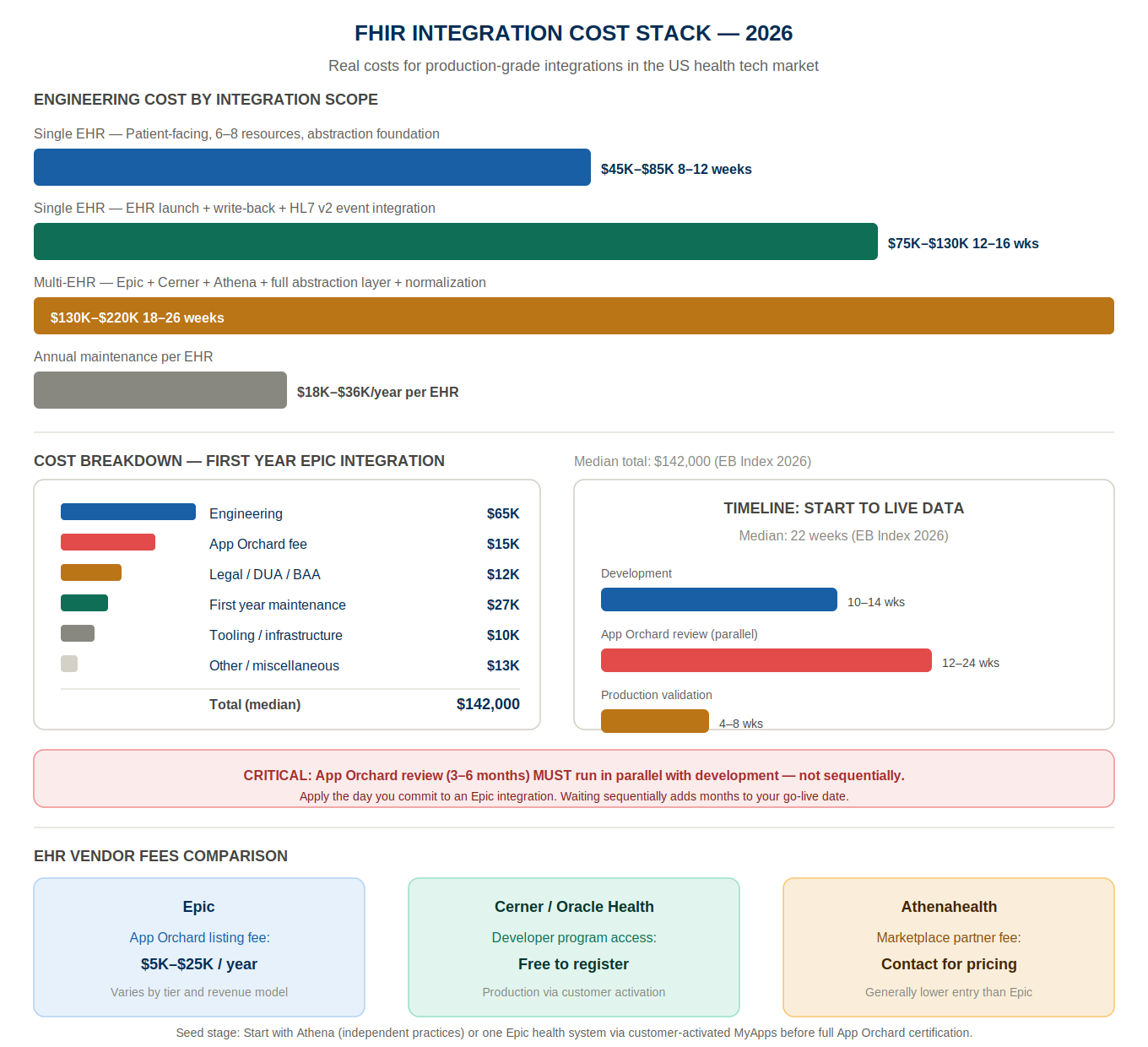
Single EHR integration (Epic or Cerner or Athena), patient-facing SMART on FHIR, 6–8 FHIR resource types, abstraction layer foundation: $45K–$85K / 8–12 weeks
Single EHR integration with EHR launch (provider-facing), write-back capability, HL7 v2 event integration: $75K–$130K / 12–16 weeks
Multi-EHR integration (Epic + Cerner + Athena), abstraction layer, normalization layer, bulk FHIR: $130K–$220K / 18–26 weeks
Ongoing FHIR integration maintenance per EHR per year (upgrade monitoring, regression testing, incident response): $18K–$36K/year per EHR
Epic App Orchard listing fee: $5,000–$25,000/year (varies by app tier and revenue model) Epic sandbox access: Free for App Orchard registered applications Epic production access per health system: Through App Orchard certification or health-system-specific customer-activated access
Cerner Code program: Generally free for developer registration and sandbox access. Production API access through health system customer activation.
Athenahealth Marketplace: Contact for partner program fees. Generally lower entry cost than Epic.
Clinical terminology services (LOINC, SNOMED CT, RxNorm API): Free (NLM APIs) for reasonable usage volumes. Commercial NLP-based terminology mapping (Azure Health Bot, AWS Comprehend Medical): $0.01–$0.05 per API call.
FHIR validation tooling (HAPI FHIR Validator, Inferno testing framework): Open source, free. ONC Inferno certification testing: Required for some FHIR implementation certifications.
If your integration needs data from HIEs, CommonWell, Carequality, state-level HIEs, membership and connection fees apply. CommonWell membership: $5,000–$15,000/year for technology vendors. Carequality implementation guide compliance: through a Carequality-certified network participant.
Data use agreements with health systems for FHIR API access: $3K–$8K legal review per health system Business Associate Agreements for each health system customer: Standard part of the customer contract; legal review $2K–$5K per contract Information blocking compliance review: $3K–$8K (healthcare attorney)
EB Index 2026: The median total first-year cost for a production-grade Epic FHIR integration, engineering, App Orchard fees, legal, and first-year maintenance, was $142,000. The median time from project start to first production Epic API call with a live customer was 22 weeks. The two biggest timeline drivers: App Orchard certification (3–6 months, must run in parallel) and production validation with a partner health system (4–8 weeks after sandbox certification).
What we’d cut: For a Seed-stage health tech startup building its first EHR integration: start with Athenahealth if your target customers are independent physician practices, or with a single health system’s Epic instance using customer-activated MyApps access (bypassing full App Orchard certification for the first customer).
Get a working integration with one health system before pursuing full App Orchard certification. The learning from one production integration is worth more than the breadth of a multi-EHR integration built before you understand the production reality.
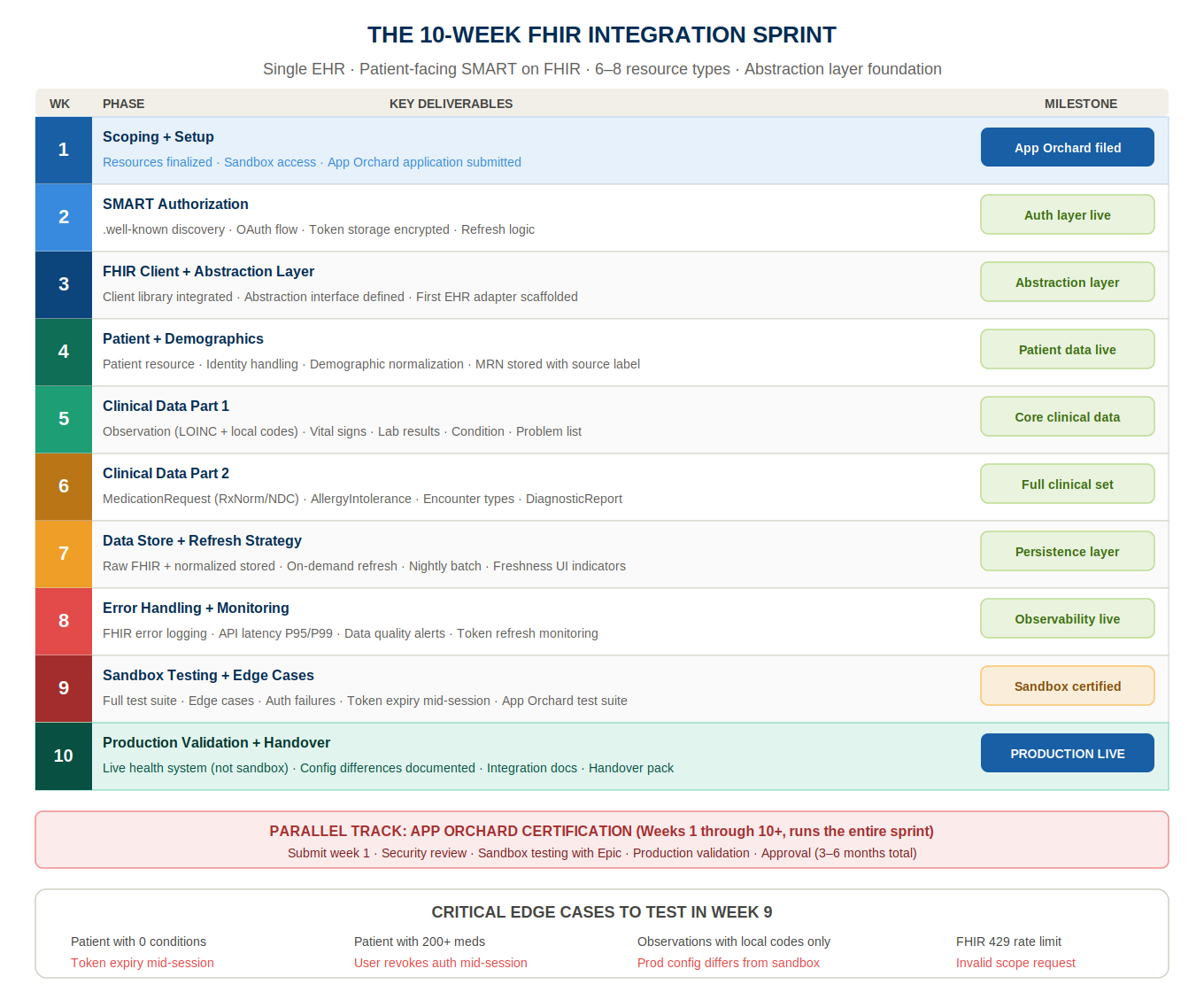
This is our standard timeline for a single-EHR FHIR integration with patient-facing SMART on FHIR authorization, covering 6–8 FHIR resource types, with an abstraction layer foundation.
Specific FHIR resource types finalized. SMART on FHIR launch flow selected (patient standalone, EHR launch, or backend services). Target EHR’s developer documentation reviewed in full, not skimmed, reviewed. Sandbox access obtained (Epic: FHIR.epic.com; Cerner: Code sandbox; Athendeveloper.athenahealth.com sandbox). App Orchard application submitted (Epic), this process runs the entire sprint duration in parallel. Test patient records identified in sandbox environment for each use case.
.well-known/smart-configuration endpoint queried and authorization/token endpoints discovered. OAuth 2.0 authorization code flow implemented for the selected launch type. SMART on FHIR scope requests defined, minimum necessary scopes only. Token storage implemented, access token and refresh token encrypted at rest. Token refresh logic implemented, proactive refresh before token expiry. Authorization error handling implemented, expired tokens, invalid scopes, user denial.
FHIR client library integrated (HAPI FHIR, fhirclient, or fhir.js depending on language stack). Abstraction layer interface defined, the interface your application logic will consume, independent of EHR-specific implementations. First EHR-specific adapter scaffolded. HTTP error handling for FHIR API responses, 200 (success), 400 (bad request), 401 (unauthorized), 403 (forbidden), 404 (not found), 429 (rate limited), 500 (server error). Rate limit handling with exponential backoff.
Patient resource pull and normalization. Patient identity handling, storing the EHR’s FHIR Patient ID with clear labeling of its source system. Demographic data normalization, name, date of birth, gender, address, contact information. Patient search (if backend services or provider-facing) by MRN or demographic identifiers.
Observation resource pull with LOINC code handling, LOINC-coded observations, locally-coded observations, missing-code observations. Vital signs normalization (blood pressure systolic and diastolic split from panel, weight, height, BMI calculated if not provided). Lab result normalization with reference range extraction. Condition resource pull with ICD-10 and SNOMED CT handling. Problem list active conditions filtered from historical conditions.
MedicationRequest resource pull with RxNorm coding, NDC-to-RxNorm mapping. Active medications filtered from historical. AllergyIntolerance resource pull with severity and reaction type extraction. Encounter resource pull with telehealth vs. in-person encounter type normalization. DiagnosticReport pull with structured vs. narrative report handling.
Normalized FHIR data stored in application data store, raw FHIR resource stored alongside normalized representation. On-demand refresh logic implemented (pull fresh data when user views patient record). Scheduled refresh logic implemented (nightly batch pull for all active patients). Data freshness indicators in the application UI, “Last updated: [timestamp]” for FHIR-sourced data.
Comprehensive error logging for FHIR API failures, EHR-specific error codes, HTTP status codes, FHIR OperationOutcome parsing. FHIR API response time monitoring, P50, P95, P99 latency per resource type per EHR. Data quality logging, missing LOINC codes, missing RxNorm codes, empty resource lists that are unexpected. Alert configuration, FHIR API error rate above threshold triggers alert to engineering on-call.
Full test suite against sandbox environment, every resource type, every error condition, every edge case. Patient with no conditions, patient with 200+ medications, patient with no lab results in the last 2 years, patient with locally-coded observations, all tested. SMART on FHIR authorization edge cases tested, token expiry mid-session, user revokes authorization, invalid scope request. Epic App Orchard test suite run if certification is in progress.
Production FHIR API tested with first customer health system (not sandbox, production). Production-specific behaviors documented, any configuration differences from sandbox, any missing resource types, any search parameter limitations. Integration documentation written, how to add a new EHR adapter, how to add a new FHIR resource type, how to debug common error conditions. Handover pack delivered.
FHIR data is the richest structured clinical data available for AI applications in healthcare. Here is how we use it.
The most common AI use case with FHIR datproviding clinical context to an LLM for clinical decision support, care gap identification, or patient communication personalization.
The architecture: pull the patient’s FHIR data (Conditions, MedicationRequests, recent Observations, Encounters), normalize it through the FHIR integration layer, and construct a structured clinical context document that is included in the LLM prompt. The LLM generates a clinical summary, a care gap analysis, or a personalized patient communication based on the clinical context.
HIPAA requirement: the FHIR data included in the LLM prompt is ePHI. The LLM provider must have a BAA covering this use case. AWS Bedrock (covered under the AWS BAA) is the default recommendation for clinical AI features that process FHIR-sourced ePHI.
FHIR DiagnosticReport resources frequently contain unstructured narrative text, radiology reports, pathology reports, discharge summaries. Clinical NLP (Amazon Comprehend Medical, Azure Text Analytics for Health, or custom NLP pipelines) can extract structured clinical entities from narrative text, diagnoses, medications, procedures, anatomy references, and add them to the structured FHIR data store.
HIPAA requirement: clinical NLP services that process ePHI require BAA coverage. Amazon Comprehend Medical is covered under the AWS BAA.
ML models trained on FHIR data to identify patients at risk for specific outcomes, hospital readmission, disease progression, care gap accumulation. The FHIR data provides the features: diagnosis history, medication adherence indicators (refill patterns from MedicationRequest data), vital sign trends (Observation time series), encounter frequency.
Clinical validation requirement: risk stratification models trained on FHIR data must be validated against clinical outcome data before deployment in a production clinical environment. The FDA’s AI/ML-based SaMD guidance applies if the model makes clinical recommendations that influence treatment decisions.
Bulk FHIR, formally the FHIR Bulk Data Access Implementation Guide, defines a mechanism for exporting large volumes of FHIR data for population health analytics, research, and ML model training. Standard FHIR REST APIs are designed for per-patient, on-demand access. Bulk FHIR is designed for population-level, asynchronous data export.
Your application sends a $export request to the FHIR server’s Bulk Data Export endpoint, specifying the resource types and the patient population. The server initiates an asynchronous export job, generating NDJSON (newline-delimited JSON) files containing all matching FHIR resources. When the export is complete, the server returns URLs for downloading the NDJSON files. Your application downloads the files and processes them.
The export operation is asynchronous because population-level exports can take minutes to hours for large patient populations.
Bulk FHIR uses the SMART on FHIR Backend Services authorization flow, server-to-server, with system-level scopes (system/*.read). This requires your application to be registered with the FHIR server with a public key, and your application to sign JWT tokens with its private key for each token request.
Epic: Bulk FHIR supported for US Core resources. Available through App Orchard certification with bulk data export permissions. Health system must activate bulk data export for your application.
Cerner: Bulk FHIR support is available but variable across Millennium and Oracle Health versions. Confirm support with your target health system.
Athenahealth: Limited Bulk FHIR support as of 2026, Athena’s FHIR implementation is primarily optimized for per-patient access rather than population-level export.
NDJSON files from Bulk FHIR exports can be large, a health system with 100,000 patients and full FHIR resource export can produce gigabytes of NDJSON. Your processing pipeline must handle:
Bulk FHIR data is population-level ePHI. The same HIPAA requirements apply as for per-patient FHIR access, BAA with the health system, encrypted storage, audit logging. Additionally: Bulk FHIR exports for research or ML model training require appropriate data use agreements with the health system and potentially IRB approval for research use.
FHIR integration is not a build-once-deploy-forever project. It requires ongoing maintenance investment. Here is what that looks like in practice.
Epic releases major updates twice per year (spring: February–March, fall: August–September). Before each upgrade, Epic publishes release notes that describe changes to FHIR API behavior, new resources, changed search parameters, modified authentication flows, deprecated endpoints.
Your maintenance process for each Epic upgrade:
For Cerner: Oracle Health releases updates on a different cycle from Epic. Monitor the Oracle Health developer communications for API changes.
Your FHIR integration must have production monitoring that catches failures before your customers report them:
Every time you onboard a new health system customer, their specific EHR configuration is different from every health system you have integrated with before. Run a full regression test against the new customer’s sandbox environment before going live, testing every FHIR resource type your integration uses, every search parameter, every edge case.
Epic’s App Orchard certification requires periodic renewal, demonstrating continued compliance with Epic’s integration requirements, updated security posture, and compatibility with the current Epic version. Plan for annual certification renewal as an ongoing engineering and business process.
FHIR R4 is the current standard. FHIR R5 was released in 2023 and is being incrementally adopted by EHR vendors. Your integration architecture must be designed to support FHIR version coexistence, some health systems will remain on R4 for years after others have moved to R5. The abstraction layer approach handles this: the adapter for each EHR handles the version-specific behaviors, and your application logic consumes the normalized output regardless of the underlying FHIR version.
An Indian engineering partner is the wrong call for your FHIR integration if: your integration requires daily, in-person coordination with the health system’s Epic analysts, who are typically only available during US business hours and who manage the EHR configuration decisions that determine what your FHIR API can access.
If your integration requires physical presence at the health system for on-site validation, some health systems require vendor presence for production go-live validation. If your target health system’s IT security policy prohibits offshore access to their FHIR sandbox environment, uncommon but not unheard of for federal health systems or highly security-conscious academic medical centers.
If your App Orchard certification review requires in-person meetings with Epic’s partner team, Epic’s certification process is primarily remote, but some partnership tiers involve in-person engagement at Epic’s headquarters in Verona, Wisconsin.
For the vast majority of health tech founders building FHIR integrations for US health systems, the remote, async-first model with a defined US-overlap window works well for FHIR integration development. We have built more than twenty FHIR integrations from Indore for US health tech clients across Epic, Cerner, Athena, eCW, and others.
The technical work, SMART on FHIR implementation, resource normalization, abstraction layer architecture, is engineering work that is well-suited to the remote collaboration model.
The one honest limitation: health system IT analyst conversations, which are critical for understanding a specific health system’s EHR configuration, work best during US business hours. We staff a US-based client lead for these conversations on every health tech engagement. That is a real cost. It is also a real value.
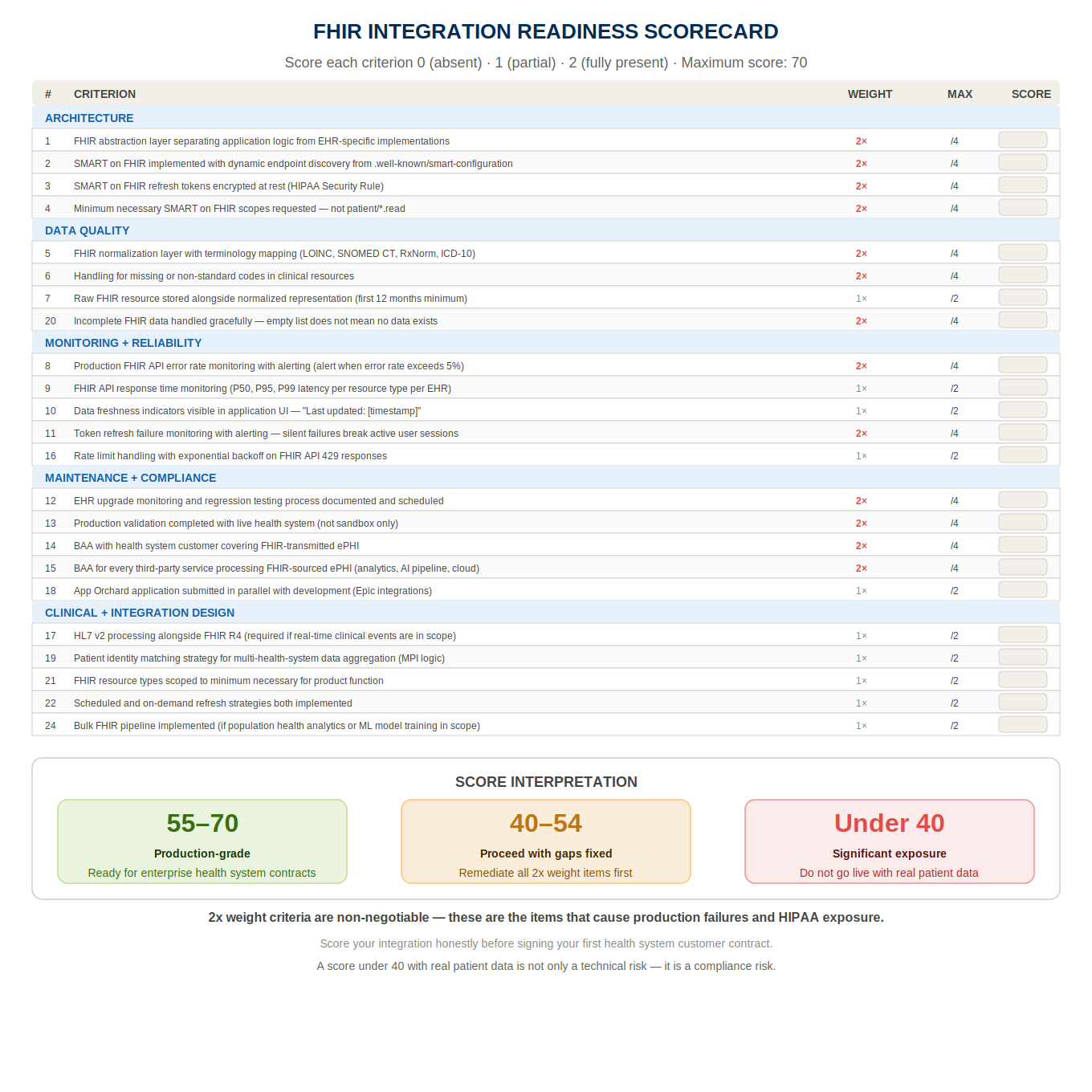
Score each row 0 (absent), 1 (partial), or 2 (fully present). Maximum score: 70.
| # | Criterion | Weight | Your Score |
| 1 | FHIR abstraction layer separating application logic from EHR-specific implementations | 2× | /4 |
| 2 | SMART on FHIR authorization implemented with dynamic endpoint discovery from .well-known/smart-configuration | 2× | /4 |
| 3 | SMART on FHIR refresh tokens encrypted at rest | 2× | /4 |
| 4 | Minimum necessary SMART on FHIR scopes requested | 2× | /4 |
| 5 | FHIR normalization layer with terminology mapping (LOINC, SNOMED CT, RxNorm, ICD-10) | 2× | /4 |
| 6 | Handling for missing or non-standard codes in clinical resources | 2× | /4 |
| 7 | Raw FHIR resource stored alongside normalized representation (first 12 months minimum) | 1× | /2 |
| 8 | Production FHIR API error rate monitoring with alerting | 2× | /4 |
| 9 | FHIR API response time monitoring | 1× | /2 |
| 10 | Data freshness indicators in application UI | 1× | /2 |
| 11 | Token refresh failure monitoring with alerting | 2× | /4 |
| 12 | EHR upgrade monitoring and regression testing process documented | 2× | /4 |
| 13 | Production validation completed with live health system (not sandbox only) | 2× | /4 |
| 14 | BAA with health system customer for FHIR-transmitted ePHI | 2× | /4 |
| 15 | BAA for any third-party service processing FHIR-sourced ePHI | 2× | /4 |
| 16 | Rate limit handling with exponential backoff | 1× | /2 |
| 17 | HL7 v2 processing alongside FHIR R4 (if real-time events required) | 1× | /2 |
| 18 | App Orchard application submitted in parallel with development (Epic) | 1× | /2 |
| 19 | Patient identity matching strategy for multi-health-system data | 1× | /2 |
| 20 | Incomplete FHIR data handled gracefully (not assumed complete) | 2× | /4 |
| 21 | FHIR resource types scoped to minimum necessary for product function | 1× | /2 |
| 22 | Scheduled and on-demand refresh strategies implemented | 1× | /2 |
| 23 | FHIR write-back certification obtained (if write-back in scope) | 1× | /2 |
| 24 | Bulk FHIR pipeline implemented (if population health analytics in scope) | 1× | /2 |
| 25 | MSA with health system customers governed by US law | 1× | /2 |
Score interpretation:
FHIR R4 integration is the technical foundation that separates health tech products with real clinical workflows from health tech products with demo-ready interfaces. The EHR is where clinical data lives. FHIR is how you access it.
And the gap between the FHIR specification and the production reality of any specific EHR’s implementation is where underprepared engineering teams spend six months that the specification says should take six weeks.
The founders who navigate this successfully share one trait: they understood the implementation reality before they started building. They read Epic’s production documentation, not just the FHIR spec.
They applied for App Orchard the day they committed to an Epic integration. They built the abstraction layer before the first EHR-specific adapter. They validated in production before they signed the customer contract.
The founders who pay the expensive lesson, the nine-month integration that works in sandbox and fails in production, the three pilot customers waiting for a go-live that keeps slipping, are the ones who treated FHIR as a solved problem because the specification exists.
FHIR is the standard. The implementation is the product.
If you want 30 minutes to talk through your FHIR integration, which EHRs your customers use, which resources you actually need, what the right architecture looks like for where you are, book a call with me or Aditi. No slides. No pitch. Just the integration conversation.
FHIR R4 is the fourth version of the Fast Healthcare Interoperability Resources specification, developed by HL7 International. It defines a standard RESTful API for health data exchange, how third-party applications access patient data from EHRs. The ONC’s 21st Century Cures Act final rule requires all certified EHRs to expose a FHIR R4 API for patient data access, making FHIR R4 the regulatory-mandated standard for health data interoperability in the US. For health tech startups, FHIR R4 is the primary mechanism for accessing structured clinical data from health system EHRs.
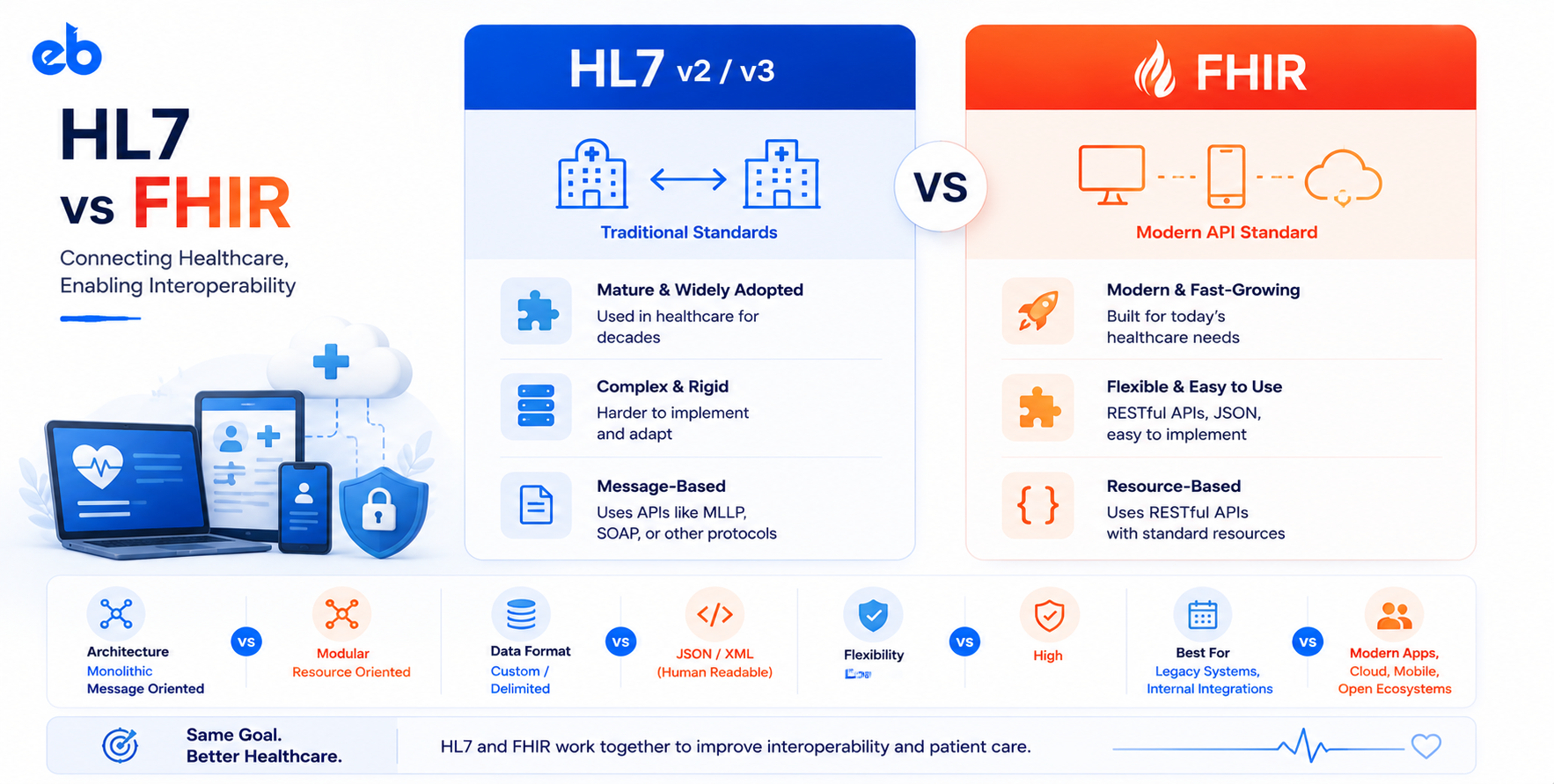
FHIR R4 and HL7 v2 serve different purposes. FHIR R4 is a RESTful API standard for structured data access, pulling a patient’s medication list, querying for lab results, accessing the problem list. HL7 v2 is a message-based protocol primarily used for real-time clinical event notifications, a patient is admitted (ADT message), a lab result is resulted (ORU message), an order is placed (ORM message). Both coexist in most production health system environments. FHIR does not replace HL7 v2 in 2026, they serve complementary functions.
SMART on FHIR is an authorization framework built on OAuth 2.0 that adds health-specific extensions, healthcare-specific authorization scopes, a launch context for EHR-embedded applications, and a discovery mechanism for dynamically finding authorization endpoints from a .well-known/smart-configuration endpoint. Standard OAuth 2.0 does not include these health-specific elements. Every EHR FHIR API uses SMART on FHIR for authorization, and each EHR’s SMART on FHIR implementation has vendor-specific behaviors that require EHR-specific handling.
The Epic App Orchard certification process takes 3–6 months minimum for new applications. The process includes application submission, security review, sandbox testing with Epic’s reference environment, and production validation with a partner health system. The process must run in parallel with your development work, not sequentially. Apply for App Orchard on the day you commit to an Epic integration.
The US Core Implementation Guide defines the minimum set of FHIR R4 resources and data elements that ONC-certified EHRs must support. US Core-required resources include: Patient, AllergyIntolerance, CarePlan, CareTeam, Condition, Device, DiagnosticReport, DocumentReference, Goal, Immunization, Location, Medication, MedicationRequest, Observation (vital signs, laboratory results, smoking status), Organization, Pediatric BMI for Age, Pediatric Weight for Height, Practitioner, PractitionerRole, Procedure, Provenance, and Questionnaire Response. Resources outside US Core may or may not be available depending on the specific EHR’s implementation.
FHIR data from production EHRs is frequently incomplete and inconsistently coded. The FHIR normalization layer must handle missing LOINC codes (attempt mapping from text descriptions, flag for manual review), missing RxNorm codes (map from NDC using the NLM RxNorm API), empty resource lists that should have content (log for data quality monitoring, display gracefully in the UI), and duplicate records (patient identity matching to consolidate duplicate entries). Never assume FHIR data is complete or assume that an empty list means the patient has no data, it may mean the data is in the EHR but not exposed through the FHIR API.
FHIR write access (HTTP POST and PUT operations) is significantly more complex to obtain than read access. Most EHRs limit write access to specific resource types and require additional certification. Epic’s App Orchard has separate certification requirements for write-back applications. Write-back use cases that are more commonly supported: writing Observations (patient-reported outcomes, remote monitoring data), creating Appointments, updating CarePlans. Write-back use cases that are more restricted: creating or modifying clinical notes, modifying problem lists, creating medication orders. Plan for a longer certification timeline and more restrictive access if write-back is in scope.
Bulk FHIR is an asynchronous data export mechanism defined in the FHIR Bulk Data Access Implementation Guide. It allows population-level export of FHIR resources as NDJSON files, designed for population health analytics, research, and ML model training rather than per-patient, on-demand access. Use Bulk FHIR when you need data for more than a few hundred patients, when you need a point-in-time snapshot of a patient population, or when you are building a data warehouse for analytics. Use standard FHIR REST APIs for per-patient, on-demand data access.