How to Integrate Your App with Epic EHR Using FHIR in the USA: The Honest Builder's Guide (2026)


Create engaging, high-performance mobile applications tailored to your business needs. We craft future-ready apps that offer smooth user experiences on all devices.
Build robust and scalable websites and CMS platforms that help you manage content effortlessly. Our development ensures a seamless digital presence.
Launch secure, feature-rich online stores with intuitive shopping experiences. We build tailored eCommerce platforms designed for growth.
Design captivating games with immersive gameplay and stunning graphics. From concept to launch, we build engaging experiences that players love.
Enhance your customer relationships with customized Salesforce implementations. Drive growth and efficiency with smarter CRM solutions.
Harness artificial intelligence and machine learning to automate workflows and gain actionable insights. Our AI transforms data into smart decisions.
Accelerate your software delivery lifecycle with continuous integration, delivery, and infrastructure automation to boost efficiency.
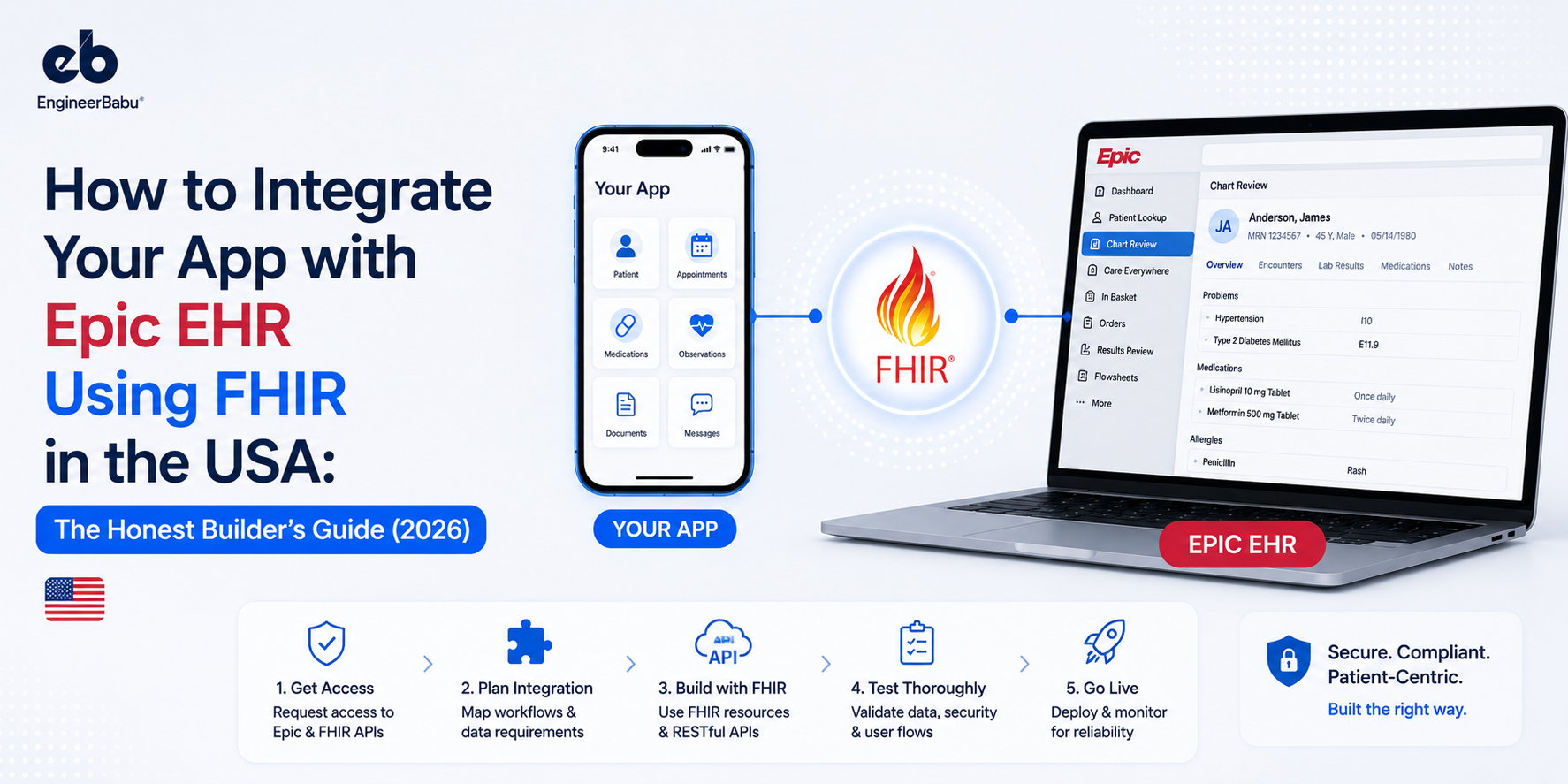
A healthtech founder told me his Epic integration was “basically done” when he got on a call with me. He’d completed the sandbox testing. The FHIR calls were working. He was ready to go live with his first hospital client.
What he hadn’t done: submitted an Interoperability Request to get production API access. Hadn’t initiated the per-site review with the hospital’s IT team. Hadn’t completed Epic’s security questionnaire. Hadn’t registered in Epic Showroom. The hospital’s IT lead had told him they’d only proceed once he was “listed in App Orchard”, which no longer exists as a program.
He was looking at another 4 months minimum.
I’ve seen this pattern enough times that I now consider “my Epic integration is almost ready” to be one of the most expensive phrases in health tech. What follows is the guide I wish that founder had read before he scoped his timeline.
I’m Mayank Pratap, co-founder of EngineerBabu, a CMMI Level 5 team that has shipped EHR integrations for healthcare clients including Apollo Hospitals, ResMed/Somnoware, and US-based digital health startups. FHIR integrations, HL7 interfaces, bidirectional Epic write-back, we’ve built them all in production, not in sandboxes.
Epic FHIR integration is the process of connecting a third-party healthcare application to Epic’s electronic health record system using FHIR R4 APIs and the SMART on FHIR authorization framework.
It enables apps to securely read patient demographics, clinical data, medications, lab results, and documents from Epic and in some cases write data back.
As of 2026, Epic is installed across 42.3% of US acute care hospitals, covering 250+ million patient records. Thus, making it the most strategically critical EHR integration for any US healthcare software product.
Epic’s market position in US healthcare is not a preference, it’s infrastructure. Hospitals where Epic is deployed include Mayo Clinic, Johns Hopkins, Kaiser Permanente, Cleveland Clinic, and most major academic medical centers.
If your product targets hospital systems, specialty practices operating on Epic, or any patient population that receives care in an Epic-powered facility, integration is not a differentiator. It is a prerequisite for the deal.
The 21st Century Cures Act information blocking provisions, now fully in effect, require Epic to provide API access to patient data via FHIR. This was the regulatory forcing function that made Epic’s previously closed ecosystem far more accessible to developers.
What was extremely difficult to access before 2020 is now technically available, the FHIR R4 APIs are real, well-documented, and increasingly comprehensive.
The challenge is not technical access. The challenge is the organizational, bureaucratic, and per-site complexity that sits between “I have API access in sandbox” and “I am live in production at Hospital X.”
As Brendan Keeler, a widely cited EHR integration analyst, puts it: “Integration is 20% development, 80% negotiation.”
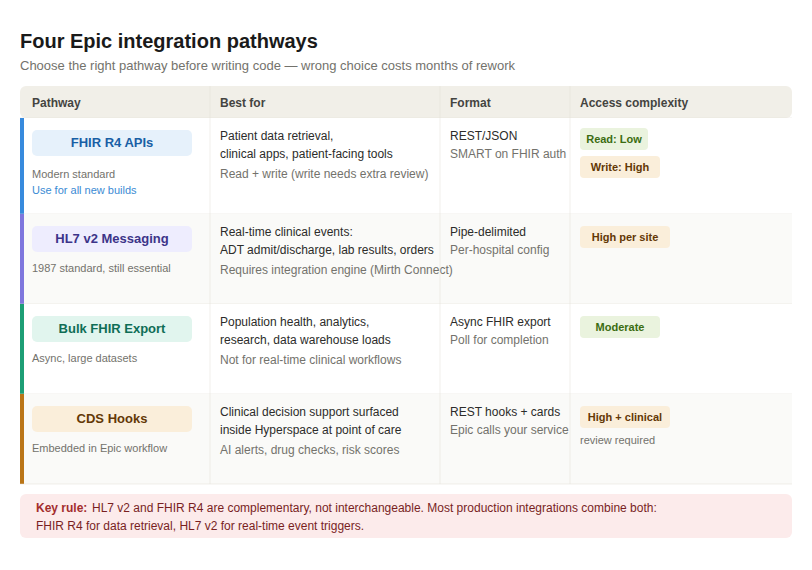
Epic supports four distinct integration pathways. Choosing the right one before you integrate with Epic FHIR API in the USA saves months of rework.
RESTful APIs returning JSON, structured around FHIR R4 resources. This is what you build against for new healthcare apps. Supports reading patient demographics, conditions, medications, allergies, lab results, vital signs, appointments, clinical notes, immunizations, and procedures. Accessed via SMART on FHIR authorization.
.Read access is more accessible. Write access, creating clinical notes, updating problem lists, placing orders, modifying appointments, requires additional review, additional scopes, and individual approval at each site.
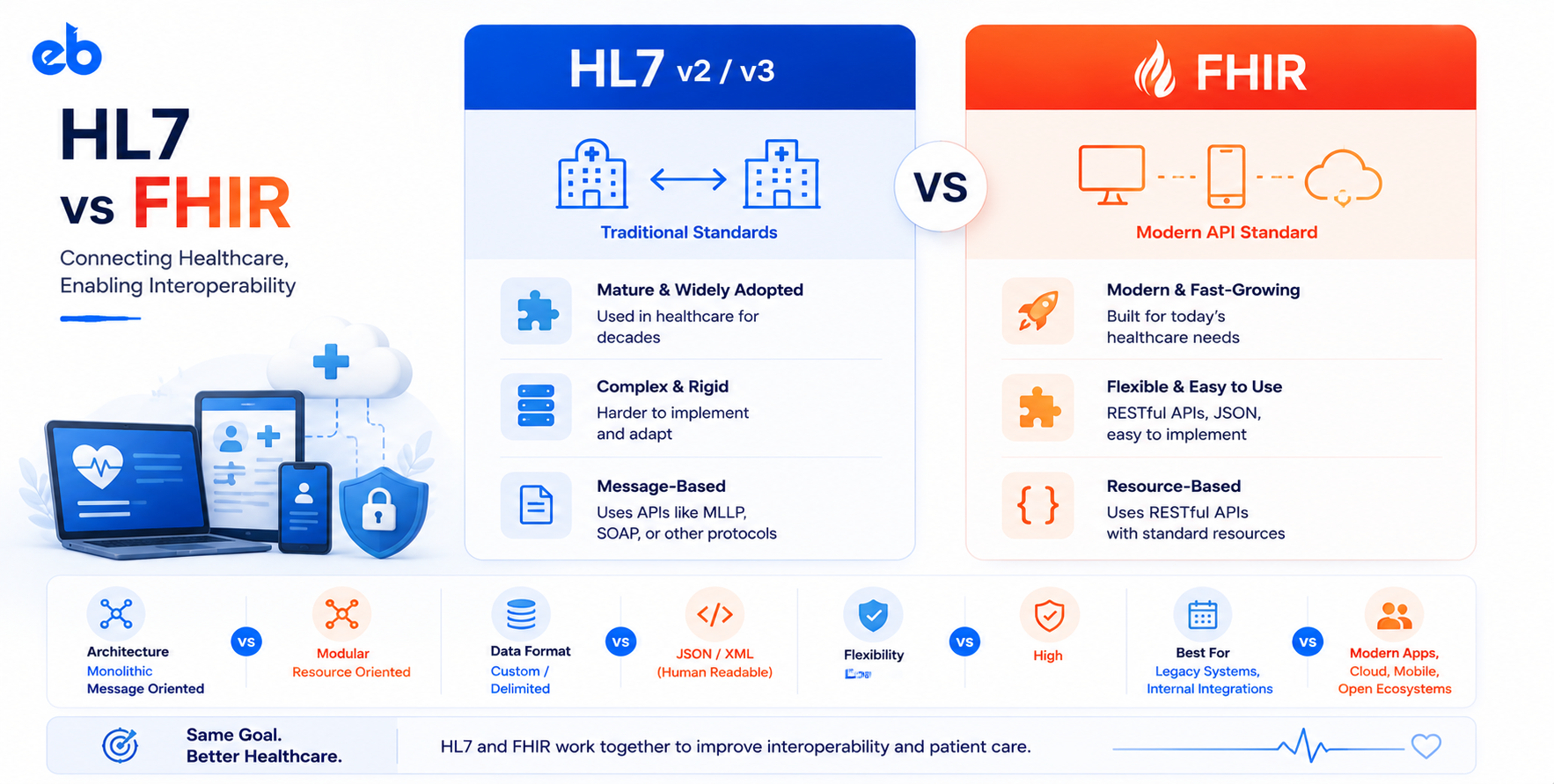
HL7 v2 is the 1987-era messaging standard that still powers the real-time clinical event layer in hospitals. If you need to know the moment a patient is admitted (ADT message), a lab result is available, or an order is placed, this is your pathway. FHIR R4 is better for data retrieval; HL7 v2 is still the mechanism for event-driven workflows.
HL7 v2 integration with Epic requires an integration engine. Mirth Connect is the most widely used open-source option. The messages use pipe-delimited format, every hospital configures segment content differently, and every new hospital site essentially requires its own integration build.
For analytics platforms, population health tools, and research applications that need to process data across thousands or millions of patients, FHIR Bulk Data Export allows asynchronous export of large datasets.
You request the export, Epic processes it asynchronously, and you poll for completion. Essential for data warehouse integrations but not appropriate for real-time clinical workflows.
CDS Hooks is the standard for embedding real-time clinical decision support directly into Epic’s Hyperspace clinical workflow.
When a physician opens a patient chart, places an order, or performs a specific action, Epic calls your service and you return information cards that appear directly in the clinician’s Epic workspace.
Used for AI-assisted diagnosis, drug interaction alerts, prior authorization checks, and risk stratification tools that need to surface at the point of care.
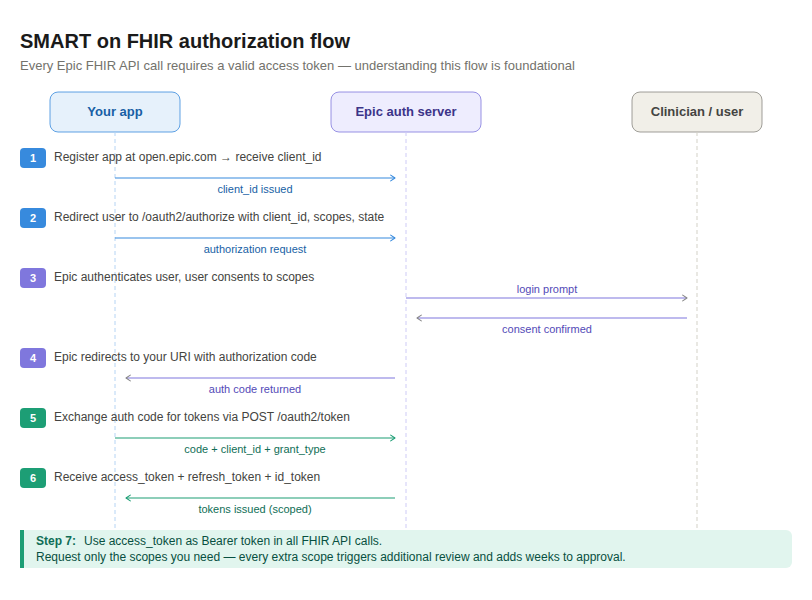
Every FHIR API call to Epic requires authentication via SMART on FHIR, an authorization framework layered on OAuth 2.0 and OpenID Connect.
Understanding this before you start building saves you from the authentication rework that kills most early Epic integration projects.
Requesting only the scopes you genuinely need is not just a principle of minimum necessary access under HIPAA. It is a practical strategy for getting approved faster. The broader your scope requests, the longer the review process. I’ve watched teams get held up for 8 weeks because they included user/DiagnosticReport.write in their scope list “for future use” and triggered additional clinical safety review.
/oauth2/authorize?response_type=code
&client_id={your_client_id}
&redirect_uri={your_uri}
&scope={your_scopes}
&state={random_state}
&aud={fhir_base_url}
Include: code, client_id, redirect_uri,
grant_type=authorization_code
For backend services (no user interaction), Epic supports the Backend Services authorization flow using JWT assertions signed with your private key. This is the pathway for bulk data exports and system-to-system integrations.
Epic provides approximately 450 FHIR R4 API endpoints across 55 resource types. In practice, the resources you’ll actually use in the majority of clinical app integrations fall into a much smaller set:
Clinical data, most commonly needed:
| Resource | What it contains | Common use |
| Patient | Demographics, contact info, MRN | Identity verification, patient matching |
| Condition | Active and historical diagnoses (ICD-10) | Problem list, clinical context |
| MedicationRequest | Prescribed medications, dosing | Medication reconciliation, safety checks |
| Observation | Lab results, vital signs, social history | Clinical decision support, monitoring |
| AllergyIntolerance | Drug and food allergies | Safety alerts, prescription validation |
| DiagnosticReport | Lab result summary reports | Clinical review |
| Appointment | Scheduled visits | Scheduling apps, care coordination |
| DocumentReference | Clinical notes, discharge summaries | Chart review, ambient documentation |
| Immunization | Vaccination records | Preventive care, public health |
| Procedure | Procedures performed | Clinical history, coding support |
The optionality problem: Not every patient has structured allergies. Not every observation has a valueQuantity. Not every medication has a structured dosageInstruction.
Epic returns what it has, which varies by how the clinical encounter was documented. Your application must be defensively coded to treat missing fields as expected, not exceptional.
An app that crashes because Observation.valueQuantity is null will fail in production even though it worked perfectly in sandbox.
This is the single most important distinction in Epic FHIR integration that most developers don’t internalize until they’ve scoped a project incorrectly.
Read access: Querying patient data from Epic is relatively accessible. The FHIR R4 read endpoints are well-documented at open.epic.com, the sandbox is publicly available, and the approval process, while not instant, is structured.
Write access: Creating or modifying data in Epic is a fundamentally different category. Writing clinical notes, placing orders, updating the problem list, modifying appointment records, each of these carries clinical liability implications that Epic and individual hospital sites take seriously.
Write access requires:
The practical implication: if your product roadmap includes writing anything back to Epic, ambient documentation posting notes, prior auth status updating patient records, AI-generated coding suggestions modifying claims build that into your timeline as a 2–4 month additional process per site. Not per integration type. Per site.
Epic has gone through three iterations of its third-party developer program since 2016, and the resulting confusion is actively costing healthtech teams months of wasted time.
App Orchard (2016–2021): Epic’s original third-party app marketplace. Charged developers up to 30% revenue share. Was widely criticized for slow processing and outright pauses on new applications for months at a time.
App Market (2021–2022): A rebranding of App Orchard. Shut down entirely in 2022.
Showroom (2024–present): Epic’s current marketplace, featuring three tiers:
The crucial confusion still happening today: Hospital IT leads frequently tell vendors “we’ll only consider you once you’re listed in App Orchard.” App Orchard no longer exists. Epic Vendor Services (the developer program) has no direct connection to Showroom listing. Yet this belief persists widely in hospital IT departments and is delaying integrations across the industry.
If a hospital IT lead tells you this, send them to showroom.epic.com and explain the distinction between Vendor Services registration (required for production API access) and Connection Hub listing (recommended but separate).
The practical guidance: Register with Epic Vendor Services to get production API access. Submit a Connection Hub listing in Showroom for discovery and to reduce friction in hospital IT conversations. Start both processes on Day 1 of your integration project, not after development is complete.
The review queues are backlogged. Early submission consistently beats late submission by 6–10 weeks.
This is the part of Epic integration that most cost and timeline guides mention briefly and most founders don’t truly internalize until it’s too late.
Epic is configured differently at every organization. The FHIR base URL is different. The custom SmartData Elements are different. The scope of locally available FHIR resources varies. The internal governance process who needs to approve a new third-party integration varies. The hospital IT team’s availability varies.
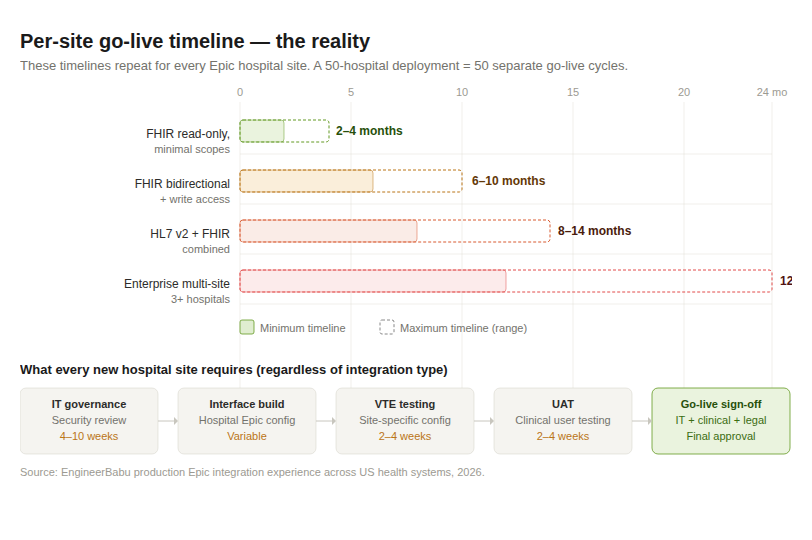
Every new Epic customer site requires:
| Scenario | Timeline |
| FHIR read-only, minimal scopes, simple app | 2–4 months |
| FHIR bidirectional + write access | 6–10 months |
| HL7 v2 + FHIR combined (clinical events + data) | 8–14 months |
| Enterprise multi-site (3+ hospitals) | 12–24 months |
That timeline repeats, in modified form, for every Epic hospital site you want to go live with. A 50-hospital deployment is not one integration, it is 50 integrations, each with its own IT approval cycle, each with its own Epic configuration quirks, each with its own go-live queue.
| Component | Cost Range | Notes |
| Epic Showroom Connection Hub listing | $500/year | Discovery; not required but strongly recommended |
| Initial FHIR read integration build | $15,000–$40,000 | Sandbox → production API access → first site live |
| Bidirectional integration (read + write) | $40,000–$80,000 | Write scopes dramatically increase review complexity |
| Per additional site go-live | $5,000–$20,000 | Configuration, VTE testing, UAT, IT governance |
| HL7 v2 integration (Mirth Connect) | $20,000–$50,000 | Integration engine setup, message mapping, per-hospital HL7 profile |
| Enterprise multi-site (5+ hospitals) | $100,000–$500,000+ | Developer cost + per-site fees + management overhead |
| Annual maintenance (FHIR version updates, Epic quarterly upgrades) | 15–20% of build | Epic releases updates regularly; integrations must evolve |
The hidden cost most teams miss: Epic releases quarterly updates. FHIR endpoints change. Resource types are added. HL7 message profiles are updated. Your integration is not finished when it goes live, it requires ongoing maintenance to stay current with Epic’s release cadence.
Budget 15–20% of your initial build cost annually for maintenance, whether you’re building or buying the integration layer.
The Epic public sandbox at open.epic.com is an excellent development environment. It is not representative of individual hospital configurations. Medication resources that return perfectly in sandbox return empty in some hospital configurations because of how those sites configured drug database references. Test against the specific hospital site’s Vendor Test Environment before assuming your integration will work.
Every write scope you request triggers additional review. If your v1 product only reads patient data to display it in your UI, request only read scopes. Add write scopes in a subsequent approval cycle when you’re ready to use them. Requesting user/MedicationRequest.write “for future use” can add 8–12 weeks to your approval timeline.
Epic’s Interoperability Request process, submitting your API requirements for Epic technical review is a prerequisite for production API access. Starting this on the day your development completes puts you 6–10 weeks behind where you could have been. Submit your Interoperability Request during week 2 of development.
Hospitals running older Epic deployments may be on FHIR DSTU2 or STU3, not R4. FHIR R4 should be your primary build target for everything new, but if your hospital client base includes any organizations on older Epic versions, you need an adapter layer that normalizes resource structures across FHIR versions. Discovering this after you’ve built an R4-only application means rewriting significant portions of your data layer.
Especially for any application that writes to Epic, ambient documentation, clinical decision support, prior authorization, hospital clinical informatics committees review the application before approving go-live. These committees include physicians, nursing leadership, and pharmacists who evaluate whether your application’s write-backs could introduce clinical risk. Their approval timeline is independent of IT and is typically 4–8 weeks. It cannot be accelerated by your sales team.
Three architecture decisions made at the start of an Epic integration project have outsized impact on long-term velocity:
Build a FHIR-normalized data layer. Instead of writing Epic-specific code throughout your application, build a translation layer that converts Epic’s FHIR resources into your application’s internal data model. When you add Cerner or Athenahealth integration later, you add a new translation layer and not rewrite the application. This is the single highest-leverage architecture decision for a product that will integrate with multiple EHRs.
Gate features by site capability. Build a per-site conformance registry, a configuration file that records which FHIR resources, which scopes, and which FHIR version each hospital site supports. Your application routes around missing capabilities rather than failing. This is what production-grade EHR integration at scale looks like.
Treat each hospital site as a separate deployment. This is not just a mindset shift, it’s an operational reality that needs to be reflected in your project management. A dedicated go-live checklist per site. A site-specific configuration file. A site-specific test plan. Teams that treat Epic integration as a single project and not a template for repeated site deployments consistently underestimate the operational overhead.
When you try to integrate with Epic FHIR API in the USA, you realize it is a technical problem wrapped inside an organizational, bureaucratic, and governance problem and the organizational layer typically takes longer than the technical layer.
The teams that succeed with Epic integration consistently do three things differently:
The 21st Century Cures Act made the data technically accessible. The per-site reality of 250 million patient records spread across hundreds of differently configured hospital Epic deployments means the work of actually reaching those patients is an 80% organizational challenge with 20% code.
The EngineerBabu team has shipped FHIR integrations, bidirectional Epic write-back systems, and HL7 v2 interfaces for healthcare clients across the USA.
If you’re scoping an Epic integration and want to understand the timeline and organizational dependencies before you commit to a product roadmap, that’s exactly the kind of conversation I have before a project begins. Reach me at mayank@engineerbabu.com.
Author: Mayank Pratap Co-Founder, EngineerBabu Google AI Accelerator 2024 · CMMI Level 5 · 500+ Products · 20+ Countries LinkedIn
A simple FHIR read-only integration for a single hospital site takes 2–4 months from starting development to production go-live. Bidirectional integration with write access takes 6–10 months. HL7 v2 combined with FHIR for event-driven workflows takes 8–14 months. These timelines include Epic Vendor Services review, per-site IT governance, Vendor Test Environment testing, and UAT not just development time.
A basic FHIR read integration for the first site costs $15,000–$40,000. Bidirectional integration costs $40,000–$80,000. Each additional hospital site go-live adds $5,000–$20,000 in configuration, testing, and IT governance costs. Enterprise multi-site deployments (5+ hospitals) run $100,000–$500,000+. Annual maintenance is 15–20% of build cost.
App Orchard no longer exists, it was replaced by Epic Showroom with Connection Hub, Toolbox, and Workshop tiers. You do not technically require a Connection Hub listing to integrate with Epic, but it substantially reduces friction with hospital IT teams. Many hospital IT leads still ask for “App Orchard” listing, explaining that the Connection Hub listing on Showroom is the current equivalent.
Read access is accessible with standard SMART on FHIR authorization and Epic Vendor Services registration. Write access requires additional scope approvals, clinical safety review, and individual hospital governance approval at each site. Write access adds 2–4 months to the per-site approval process.
SMART on FHIR is the authorization framework that governs how apps access Epic’s FHIR APIs. Built on OAuth 2.0, it provides launch context (which patient, which encounter, which user), issues scoped access tokens, and supports both clinician-launched apps inside Epic Hyperspace and standalone patient-facing apps.