How to Build a Real Estate CRM, Lead Management, Site Visit Tracking, Channel Partner Portal, and Sales Automation 2026


Create engaging, high-performance mobile applications tailored to your business needs. We craft future-ready apps that offer smooth user experiences on all devices.
Build robust and scalable websites and CMS platforms that help you manage content effortlessly. Our development ensures a seamless digital presence.
Launch secure, feature-rich online stores with intuitive shopping experiences. We build tailored eCommerce platforms designed for growth.
Design captivating games with immersive gameplay and stunning graphics. From concept to launch, we build engaging experiences that players love.
Enhance your customer relationships with customized Salesforce implementations. Drive growth and efficiency with smarter CRM solutions.
Harness artificial intelligence and machine learning to automate workflows and gain actionable insights. Our AI transforms data into smart decisions.
Accelerate your software delivery lifecycle with continuous integration, delivery, and infrastructure automation to boost efficiency.

Featured Image
Indian real estate sold 3.18 lakh units in 2025, one of the highest annual volumes in a decade. Every one of those sales moved through a process that most developers still manage with spreadsheets, WhatsApp groups, and disconnected telecalling software.
The developer who knows which leads came from which channel, which sales executive converted the most site visits, and which broker brought in the most revenue, and can see all of it in one place, has a structural advantage over every competitor still running on gut and manual follow-up.
A real estate CRM is not a generic sales CRM with a property field added. The workflows are different. The lead sources are different. The sales cycle, from first enquiry to booking to registration, spans weeks to months with dozens of touchpoints.
The channel partner ecosystem is a business-within-a-business that needs its own portal, its own commission tracking, and its own performance intelligence.
This guide covers how to build a real estate CRM that handles the full sales lifecycle, from lead capture through site visit, booking, payment plan, and channel partner management, with the intelligence layer that tells sales heads where to focus and finance heads where the money is.
EngineerBabu has built product platforms for 500+ companies across real estate, fintech, and enterprise verticals. CMMI Level 5. Google AI Accelerator 2024 Top 20. Contact: mayank@engineerbabu.com
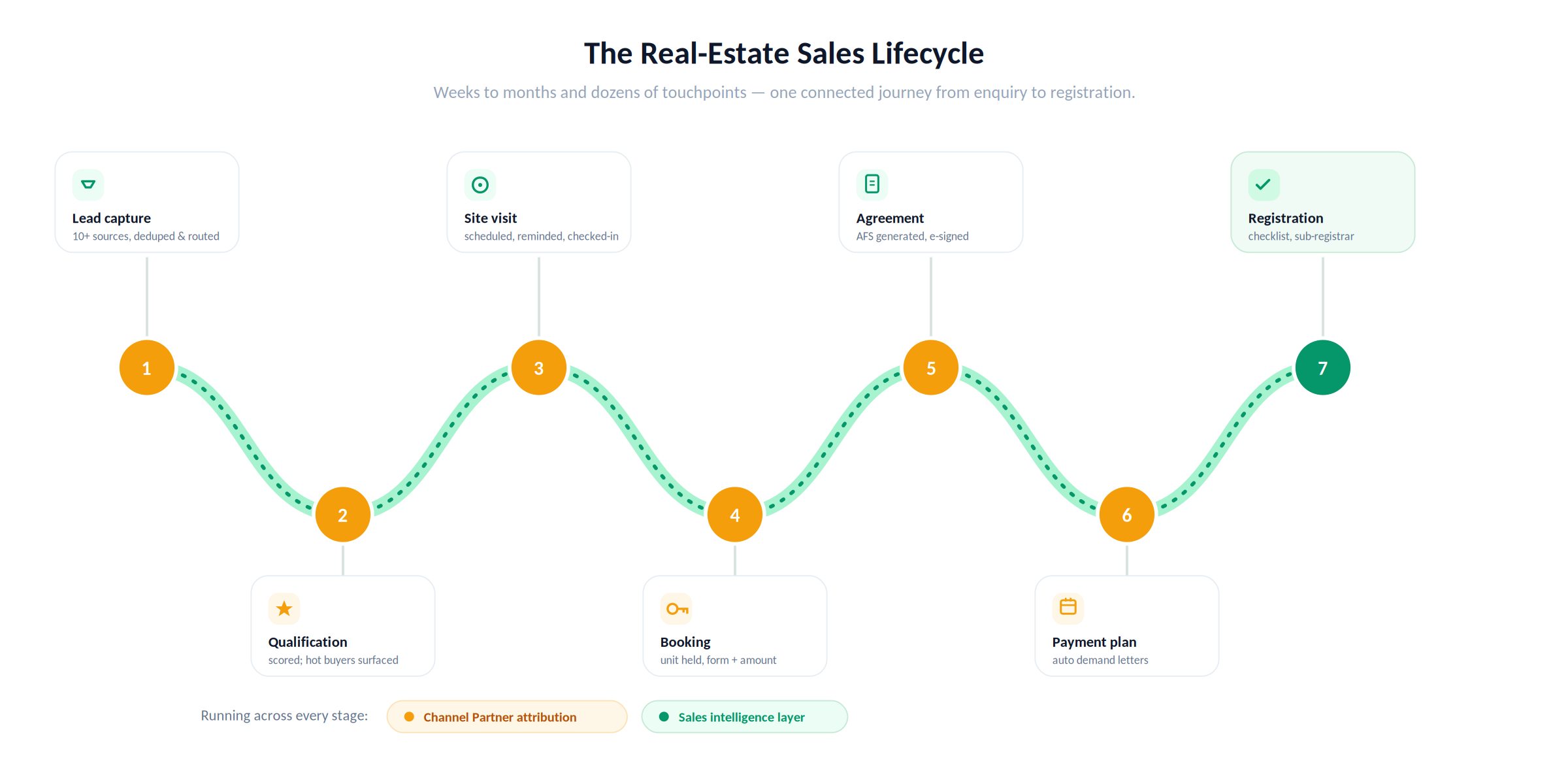
Generic CRMs fail real estate because they treat every deal the same. Real estate has a specific, structured journey that every lead must travel, and every step has its own data requirements, its own communication logic, and its own management visibility need.
| Stage | What Happens | CRM Function |
| Lead capture | Enquiry comes in from any channel | Source attribution, deduplication, instant assignment |
| Lead qualification | Is this a genuine buyer? Budget, timeline, preference? | Qualification workflow, scoring, prioritisation |
| Site visit scheduling | Buyer visits the project site | Scheduling, reminder automation, visit tracking |
| Follow-up management | Post-visit engagement | Task management, call logging, WhatsApp automation |
| Booking | Buyer commits to a unit | Unit inventory hold, booking form, payment collection |
| Agreement | Legal documentation | Document generation, e-sign, milestone tracking |
| Payment plan | Instalment schedule management | Demand letter automation, payment tracking |
| Registration | Property registration coordination | Document checklist, registration status |
| Channel partner | Broker/CP brought the lead | CP attribution, commission calculation, portal access |
| Management intelligence | What is happening across the funnel | Dashboards, conversion analytics, team performance |
Every stage is a module. Missing one means a spreadsheet fills the gap, and every spreadsheet is a data accuracy problem waiting to become a sales dispute.
A developer running a project in 2026 receives leads from ten or more sources simultaneously, Google Ads, Meta Ads, 99acres, Housing.com, MagicBricks, walk-ins, referrals, channel partners, IVR calls, and WhatsApp. The CRM must capture all of them, attribute each lead to its exact source, and route it to the right sales executive within seconds.
Lead source integrations:
| Source | Integration Method | Data Captured |
| Google Ads | Google Ads API + UTM parameter parsing | Campaign, ad group, keyword, landing page |
| Meta Ads (Facebook/Instagram) | Meta Lead Ads API | Form data, campaign, ad set, creative |
| 99acres / Housing / MagicBricks | Portal API or webhook | Enquiry details, portal tracking ID |
| Website enquiry form | Webhook to CRM API | Form fields, UTM parameters, page URL |
| IVR / phone enquiry | Telephony API (Exotel, MyOperator) | Caller number, IVR path, call recording |
| Walk-in | Manual entry by front desk | Source marked as walk-in, reception notes |
| WhatsApp enquiry | WhatsApp Business API | Message content, timestamp, number |
| Channel partner | CP portal submission | Partner ID, lead details, project interest |
| Referral | Tracked referral link or manual entry | Referring customer ID, referral bonus eligibility |
Lead deduplication:
The same buyer often enquires from multiple sources, they fill the Google Ads form, then call the IVR, then send a WhatsApp message. Without deduplication, the same person becomes three separate leads assigned to three different executives who call the same buyer simultaneously.
The deduplication engine matches on phone number, email, and name combination. When a duplicate is detected, the new enquiry is merged into the existing lead record rather than creating a new one.
Lead assignment rules:
| Rule Type | Logic | Example |
| Round robin | Leads distributed equally across team | All Google Ads leads rotate across 5 executives |
| Source-based | Specific sources assigned to specific teams | Portal leads go to inbound team, walk-ins to site team |
| Geography-based | Lead location determines executive | Leads from Bandra assigned to Western suburb team |
| Priority-based | High-budget leads go to senior executives | Leads with budget > ₹5Cr assigned to luxury sales team |
| Language-based | Language preference determines executive | Gujarati-speaking leads assigned to Gujarati-speaking executive |
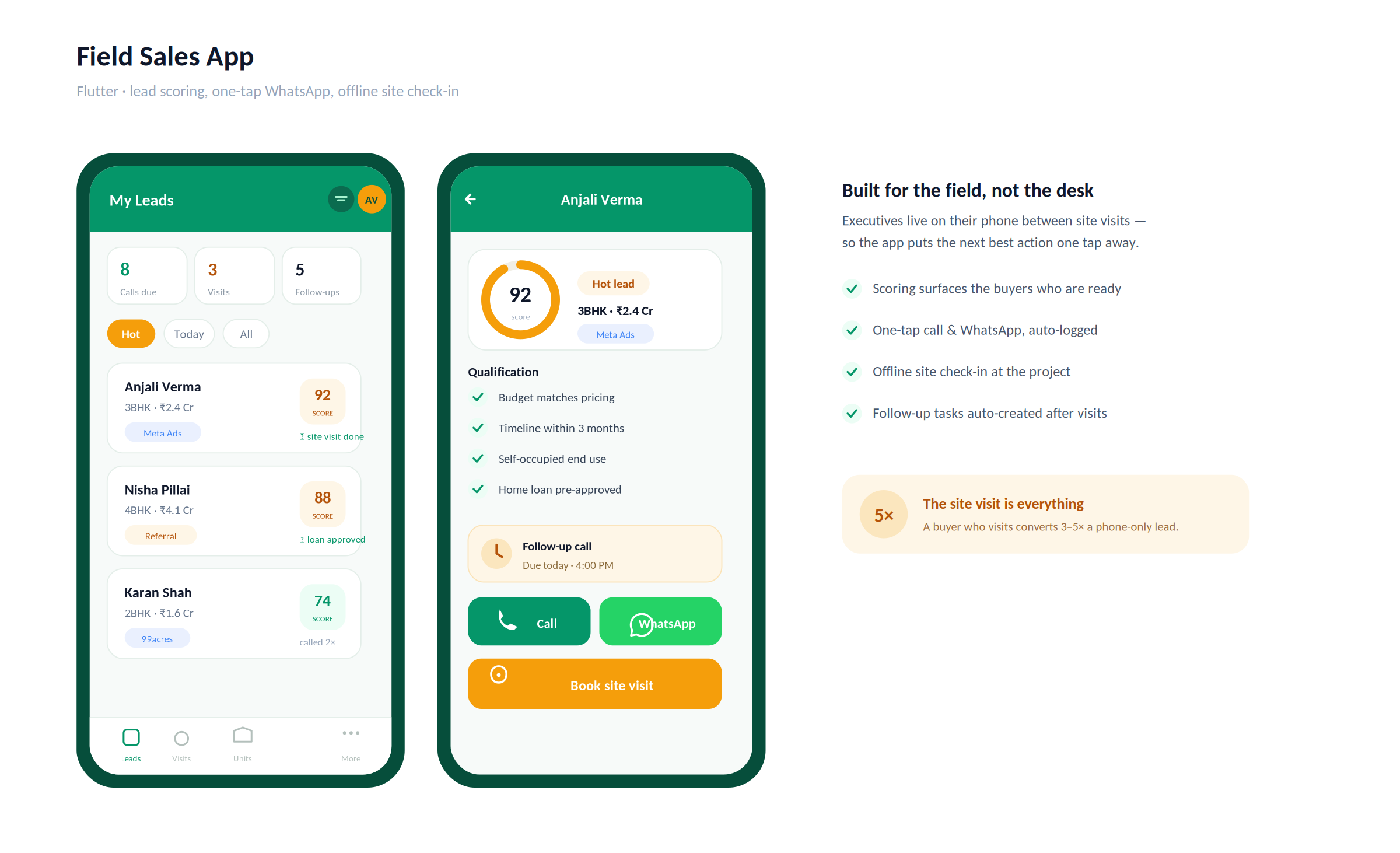
Not every enquiry is a genuine buyer. A real estate project receiving 500 leads per month may have 80 genuinely qualified buyers in that pool. The sales team that spends equal time on all 500 is inefficient. The CRM’s lead scoring engine identifies the 80 and surfaces them first.
The lead scoring model:
| Signal | Score Points | Data Source |
| Budget stated and matches project pricing | +25 | Qualification call |
| Timeline within 6 months | +20 | Qualification call |
| End-use is self-occupied (not investment) | +15 | Qualification call |
| Loan pre-approval in place | +20 | Document upload |
| Site visit completed | +30 | CRM visit record |
| Responded to follow-up calls (3+ touchpoints) | +15 | Call log |
| Referred by existing customer | +20 | Source attribution |
| Price negotiation initiated | +25 | Meeting note |
| Budget vague or not matching | -15 | Qualification call |
| No response after 5 attempts | -30 | Activity log |
The qualification call script (structured capture):
The CRM provides a guided qualification call interface, not a script the executive reads verbatim, but a structured set of fields they complete during the call. Budget range. Configuration preference (1BHK, 2BHK, 3BHK). Timeline.
End-use. Current living situation. Finance status. Previous site visits at competitor projects. This structured capture means qualification data is comparable across the team, not stored in personal notes that go missing when a salesperson leaves.
The site visit is the highest-conversion touchpoint in a real estate sales cycle. A buyer who visits the site converts at 3 to 5 times the rate of a buyer who has only had phone conversations. Managing site visits, scheduling, confirmation, on-site experience, and post-visit follow-up, is one of the highest-leverage activities a sales head can optimise.
The site visit workflow:
| Step | Action | CRM Function |
| Visit scheduled | Executive books a slot with the buyer | Calendar slot created, assigned to site executive |
| Confirmation sent | 24 hours before, WhatsApp + SMS | Automated reminder with directions and site contact |
| Day-of reminder | 2 hours before | Automated WhatsApp reminder |
| Visitor check-in | Buyer arrives at site | Reception check-in on CRM tablet, visit marked started |
| Unit walkthrough | Site executive shows units | Unit shown recorded in CRM during visit |
| Post-visit feedback | Captured immediately after visit | Structured form, interest level, concerns, pricing feedback |
| Follow-up task created | Auto-created for the assigned executive | Task due within 24 hours of visit |
The visit intelligence layer:
Over time, the CRM analyses which visit patterns correlate with booking conversion:
Which units shown most frequently convert best, should those units be shown first? Which site executives have the highest post-visit conversion rate, what are they doing differently?
Which day of week and time of day has the highest conversion from visit to booking? Which buyer profiles (budget range, configuration preference, geography) convert fastest after visiting?
This intelligence feeds back into site visit scheduling and assignment decisions.
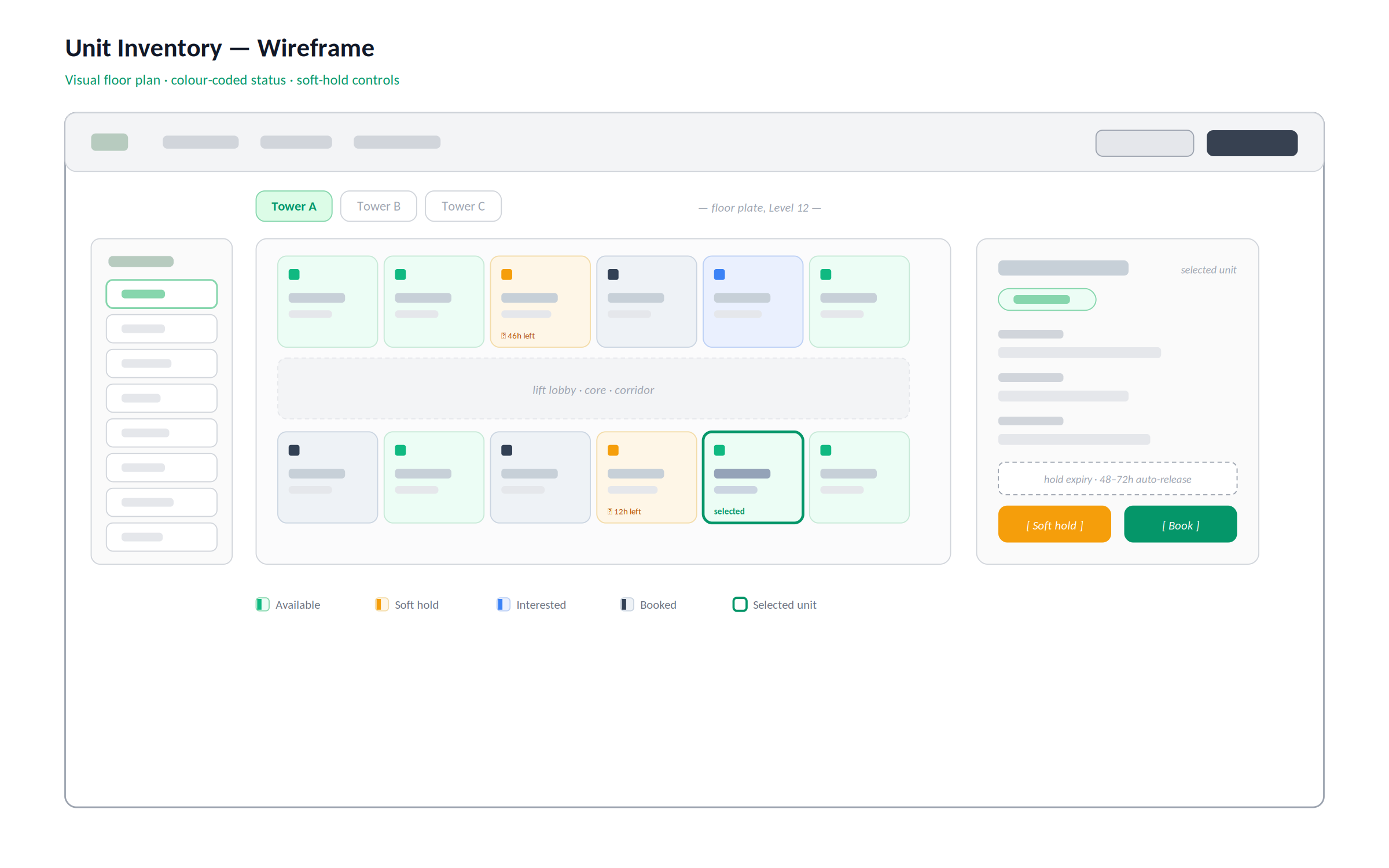
A real estate CRM must be connected to the project’s unit inventory. A sales executive offering a unit to a buyer must know instantly whether that unit is available, under discussion with another buyer, on hold, or already booked.
Unit inventory status model:
| Status | Meaning | Who Can See |
| Available | No active interest or hold | All executives |
| Interested | One or more buyers have expressed interest | Sales management only |
| Soft hold | Executive has placed a temporary hold for a buyer | Executive + manager |
| Booking in progress | Booking form submitted, payment pending | Management |
| Booked | Booking amount received, unit committed | All, shown as sold |
| Agreement signed | Legal agreement executed | Management + legal |
| Registered | Property registration complete | Management + accounts |
| Cancelled | Booking cancelled, unit returned to available | Management |
The hold management system:
Soft holds are time-limited. If a buyer has held a unit but has not progressed to booking within a defined window, typically 48 to 72 hours, the hold expires automatically and the unit returns to available.
The executive receives an alert to either extend the hold or release it. This prevents inventory from sitting locked while other buyers are available.
The floor plan integration:
The inventory view shows a visual floor plan of each building. Each unit is colour-coded by status, green for available, yellow for soft hold, red for booked. Sales executives and the management team can see at a glance how inventory is moving across the entire project.
Channel partners (brokers, real estate agents, DSAs) bring a significant portion of real estate sales in most Indian markets, typically 30 to 60% of total bookings.
Managing them through WhatsApp groups and manual commission calculations is the most common and most expensive operational failure in real estate sales.
What the channel partner portal provides:
| Feature | Details |
| CP registration and onboarding | RERA registration verification, KYC, agreement execution |
| Lead submission | CP submits buyer leads through the portal with contact details |
| Lead status tracking | CP can see exactly where their lead is in the sales funnel |
| Unit availability view | Current availability for CP to present to buyers |
| Brochures and price lists | Always-current marketing materials downloadable from portal |
| Commission calculator | CP enters a configuration and sees their commission instantly |
| Commission statement | Monthly statement showing confirmed bookings and earned commission |
| Payment tracking | When commissions are due and when they have been paid |
| Performance ranking | How this CP ranks against others on the developer’s network |
The CP attribution logic:
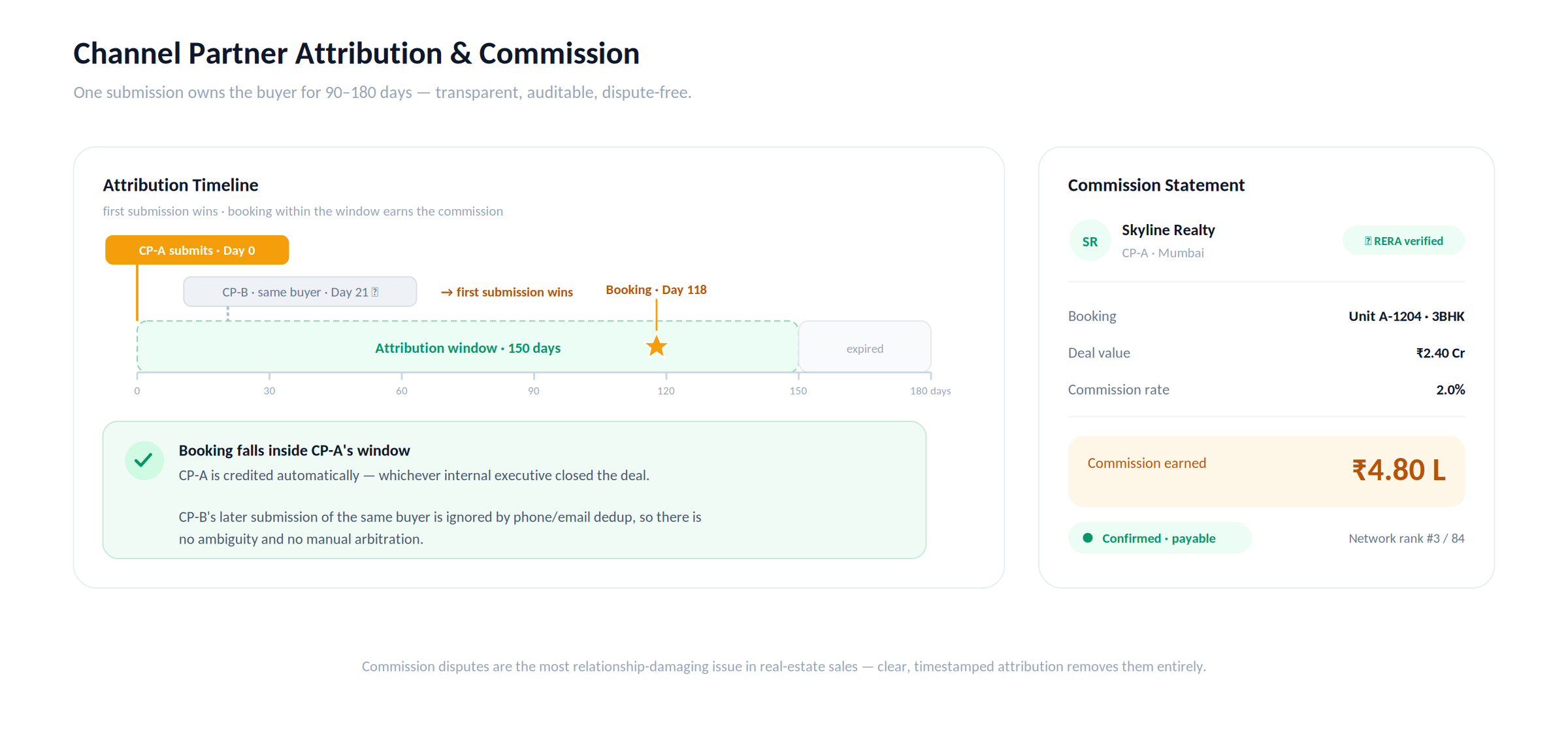
When a CP submits a lead, the CRM assigns a CP attribution window, typically 90 to 180 days. If the buyer books within that window, the CP earns the commission regardless of which internal executive managed the subsequent process.
If another CP submits the same buyer, the first submission wins. This logic must be transparent and auditable, CP commission disputes are one of the most common and most relationship-damaging issues in real estate sales management.
When a buyer decides to book, the CRM transitions from a sales tool to a transaction management tool. The booking process, payment plan administration, demand letter generation, and document management must be handled in the same platform.
The booking workflow:
| Step | Action | Document Generated |
| Booking form | Buyer details, unit selection, pricing confirmed | Booking form PDF |
| Booking amount collection | Payment received and confirmed | Payment receipt |
| Allotment letter | Unit formally allotted to buyer | Allotment letter PDF |
| Payment plan setup | Instalment schedule created based on scheme | Payment plan statement |
| Demand letter schedule | Future demand dates set | Calendar of demand letters |
| Agreement for sale | Legal agreement prepared | Draft AFS for legal review |
| Agreement execution | Signed by buyer and developer | Executed AFS, stored in DMS |
| Registration coordination | Documents prepared for sub-registrar office | Registration checklist |
Automated demand letter generation:
Based on the payment plan schedule, the CRM automatically generates demand letters, formal payment requests, on each due date and delivers them to the buyer via email and WhatsApp.
The letter shows the outstanding amount, the due date, the bank account details, and the payment instructions. When payment is received, the CRM marks the instalment as paid and queues the next demand letter.
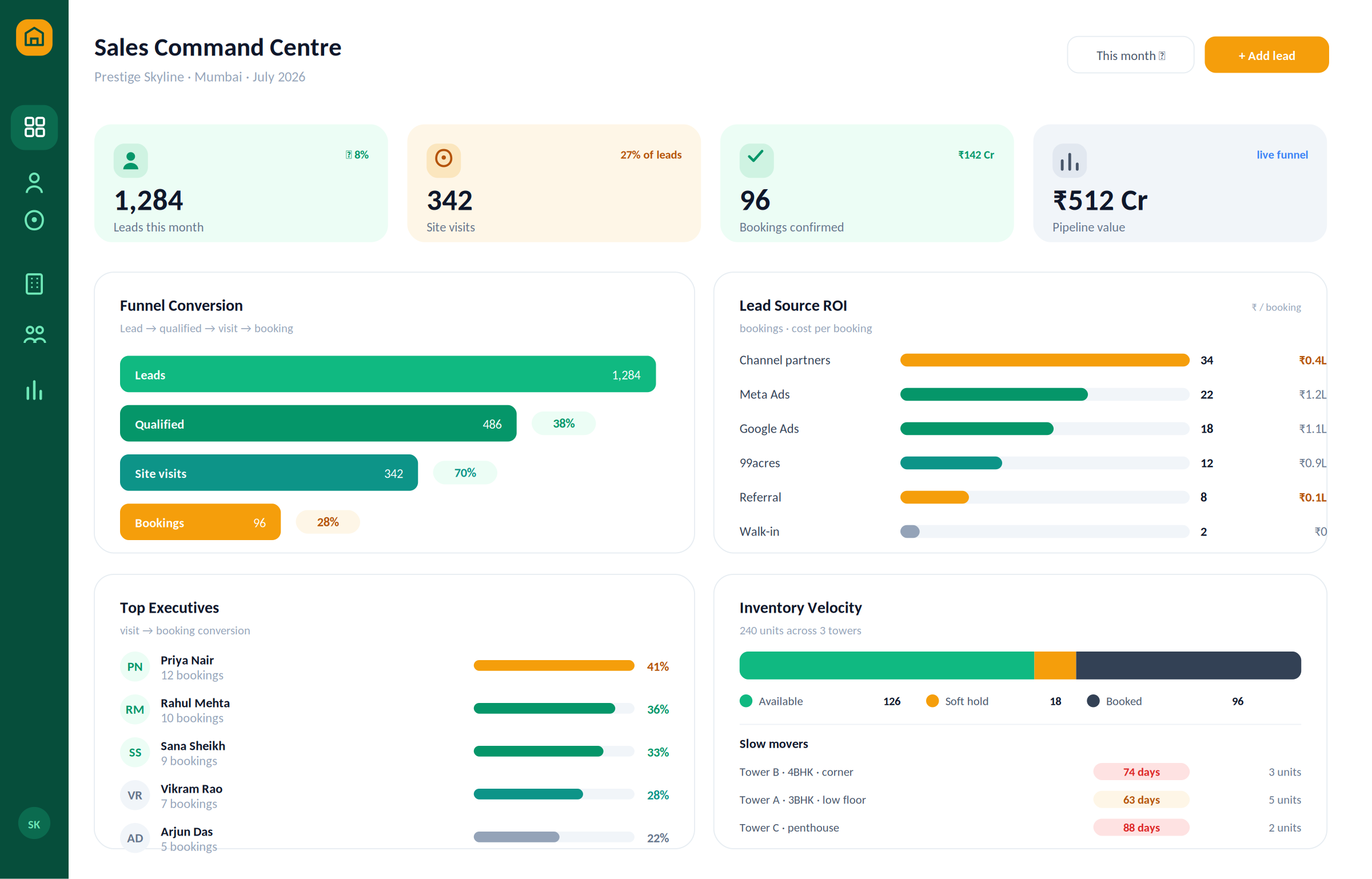
The intelligence layer is what separates a CRM from a data entry system. The management team needs answers, not reports they have to interpret themselves.
Dashboard views:
| View | Business Question Answered |
| Funnel conversion | Of 1,000 leads this month, how many became site visits? Of those, how many became bookings? |
| Lead source ROI | Which lead source is generating the most bookings per rupee spent? |
| Executive performance | Which sales executives have the highest site visit conversion rate? |
| CP performance | Which channel partners bring the most bookings? |
| Inventory velocity | Which units are moving fastest? Which have been available for more than 60 days? |
| Pipeline value | Total value of leads currently in the funnel at each stage |
| Daily activity | Calls made, visits completed, follow-ups pending, per executive per day |
| Overdue tasks | Leads with no activity in the last 7 days, at risk of going cold |
| Module | Cost Range (USD) | Notes |
| Lead capture + source attribution + deduplication | $8K – $15K | Multi-source integration, UTM parsing |
| Lead scoring + qualification workflow | $5K – $10K | |
| Site visit scheduling + management | $6K – $12K | Calendar, reminders, check-in |
| Unit inventory management + floor plan | $8K – $15K | Visual inventory, hold management |
| Channel partner portal | $10K – $18K | Registration, attribution, commission |
| Booking + payment plan + demand letter engine | $8K – $15K | Document generation, payment tracking |
| WhatsApp automation (Meta API) | $5K – $10K | |
| Sales intelligence dashboard | $6K – $12K | Funnel, source ROI, team performance |
| Mobile app for field executives (Flutter) | $8K – $15K | |
| AWS + VAPT + Year 1 ops | $5K – $10K | |
| Total | $69K – $132K | Full real estate CRM |
Contact: mayank@engineerbabu.com
A generic CRM is built for B2B or e-commerce sales cycles, repeatable transactions with relatively short cycles and standard deal stages. Real estate has fundamentally different requirements: unit inventory that must be managed in real time with hold logic to prevent overbooking, channel partner attribution windows that span months and require auditable commission calculation, site visit management tied to physical locations, demand letter automation tied to instalment schedules, and government compliance documentation for booking and registration. Configuring a generic CRM to handle all of this requires expensive customisation that often exceeds the cost of building a purpose-built platform. A real estate CRM built specifically for the industry handles these requirements natively.
Channel partner attribution assigns credit for a booking to the broker or agent who submitted the buyer’s lead, provided the booking happens within a defined attribution window, typically 90 to 180 days from lead submission. The CRM timestamps every lead submission with the submitting CP’s ID and tracks the buyer’s journey from that point. If the buyer books within the window, the CP is automatically credited regardless of which internal executive managed the process after submission. If two CPs submit the same buyer, identified by phone number or email deduplication, the first submission wins. The attribution logic is transparent to CPs through the partner portal, which shows them exactly when their lead was submitted and when the attribution window expires.
A soft hold is a temporary reservation of a specific unit for a buyer who has expressed serious interest but has not yet completed the booking process. The sales executive places a soft hold through the CRM, which changes the unit’s status from Available to Soft Hold and makes it invisible to other executives as an available option. Soft holds are time-limited, typically 48 to 72 hours, after which they expire automatically and the unit returns to available status. This prevents inventory from being locked by executives who are overoptimistic about a buyer’s readiness, while giving genuine high-interest buyers enough time to complete their internal decision without losing the unit to another buyer.