How to Integrate AI Into Your Existing EHR System in the USA: The 2026 Technical Guide


Create engaging, high-performance mobile applications tailored to your business needs. We craft future-ready apps that offer smooth user experiences on all devices.
Build robust and scalable websites and CMS platforms that help you manage content effortlessly. Our development ensures a seamless digital presence.
Launch secure, feature-rich online stores with intuitive shopping experiences. We build tailored eCommerce platforms designed for growth.
Design captivating games with immersive gameplay and stunning graphics. From concept to launch, we build engaging experiences that players love.
Enhance your customer relationships with customized Salesforce implementations. Drive growth and efficiency with smarter CRM solutions.
Harness artificial intelligence and machine learning to automate workflows and gain actionable insights. Our AI transforms data into smart decisions.
Accelerate your software delivery lifecycle with continuous integration, delivery, and infrastructure automation to boost efficiency.
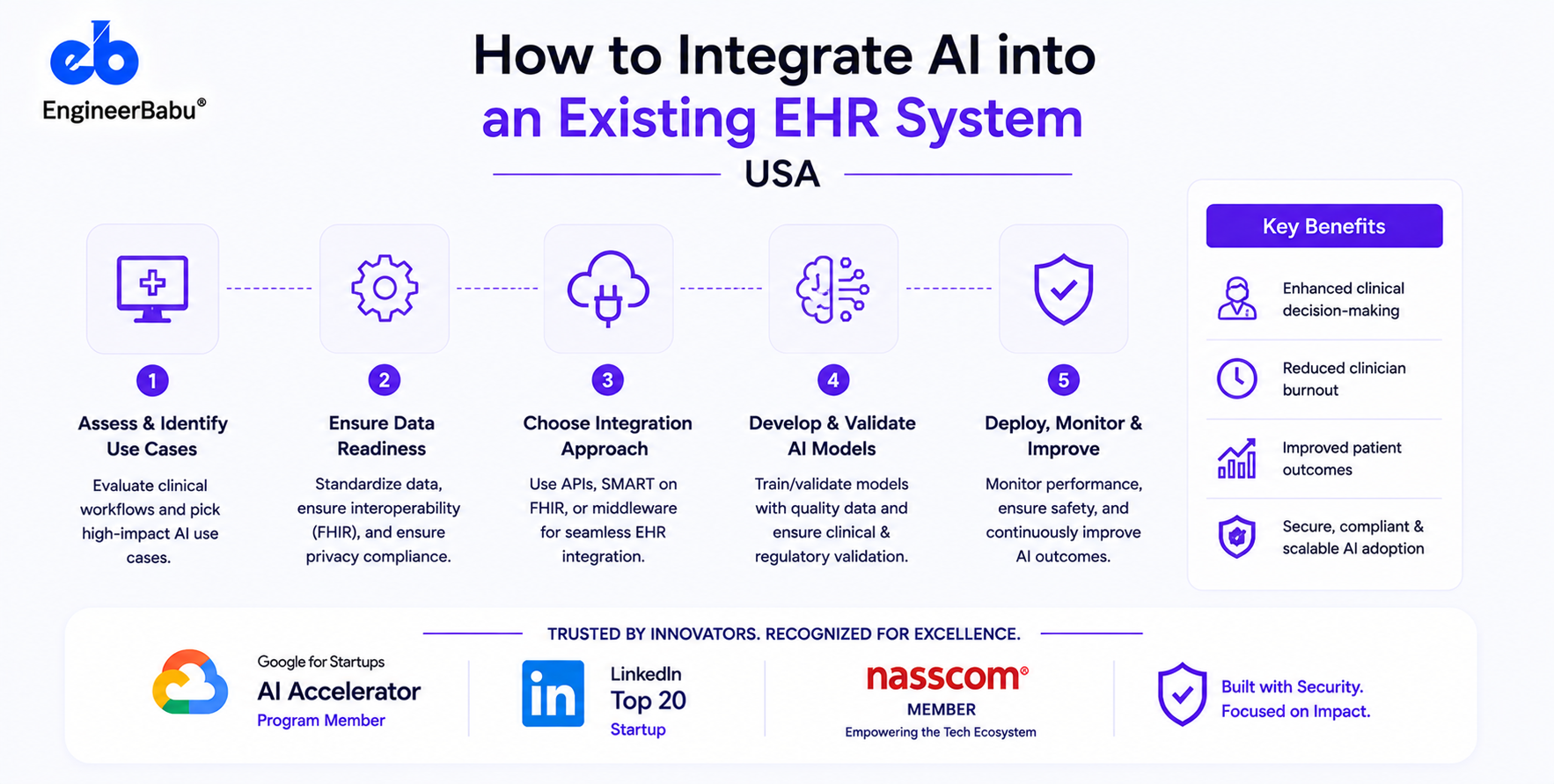
Most US health systems that want AI in their clinical workflows are not starting from scratch. They have Epic, Cerner, or Athenahealth. They have years of patient data. They have established clinical workflows they cannot disrupt.
They don’t need a new EHR. They need AI layered on top of the one they have.
This is a different engineering challenge from building a healthcare app from scratch. It requires understanding the EHR’s integration surfaces, working within Epic’s or Cerner’s governance processes, and building AI services that can respond within the latency windows that EHR workflows impose.
AI integrates with existing EHR systems through four primary pathways: CDS Hooks (real-time decision support embedded in clinical workflows), SMART on FHIR apps (third-party AI applications launched from within the EHR context), FHIR Bulk Data Export (asynchronous population-level data access for training AI models and population health analytics), and ambient documentation integration (AI-generated clinical notes written back to the EHR via FHIR DocumentReference or Epic-specific note write-back APIs).
Each pathway has different technical requirements, EHR approval processes, and latency constraints.
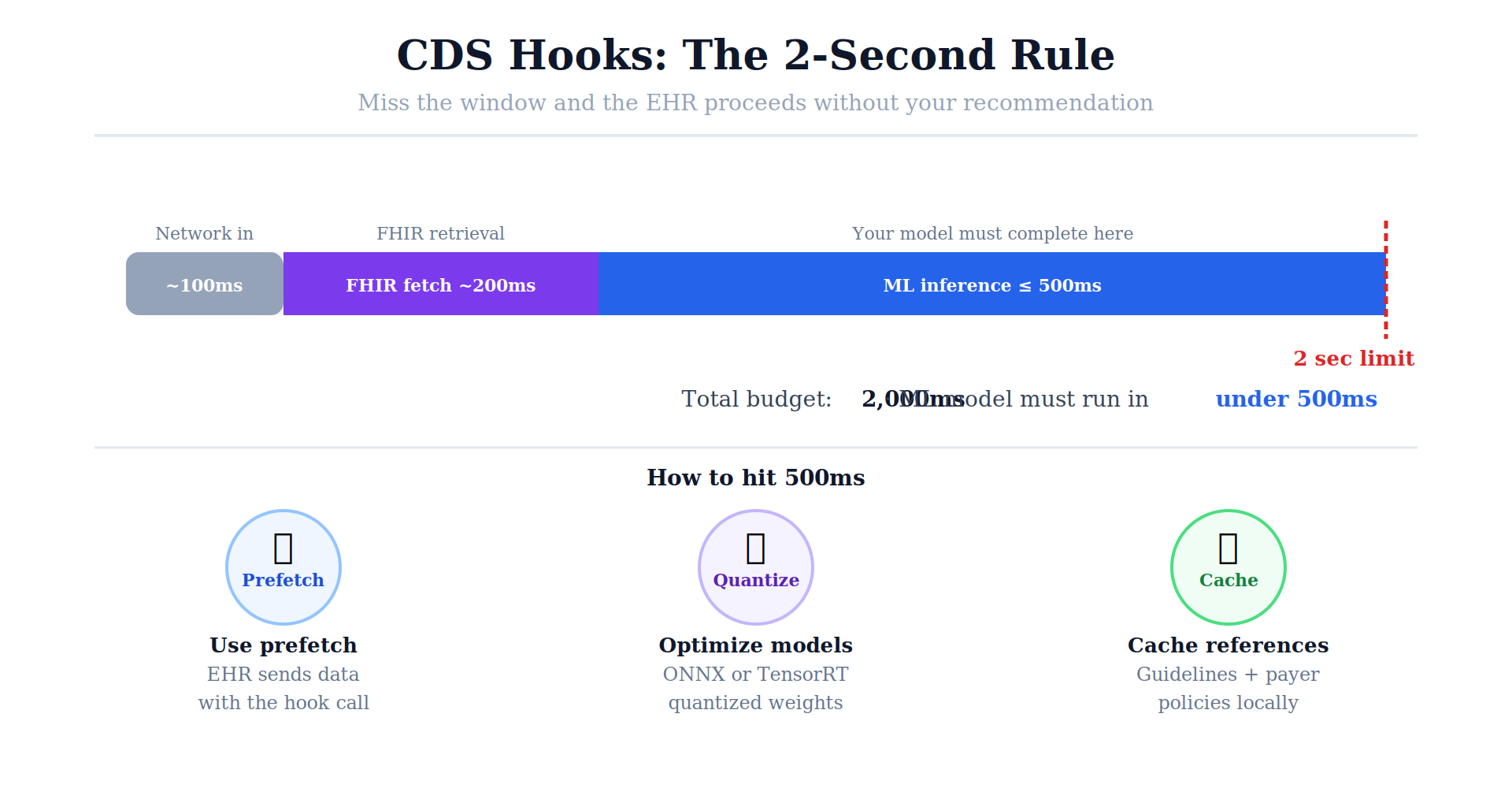
CDS Hooks fires at specific clinical events, opening a chart, placing an order, starting an encounter and your AI service receives patient FHIR context and must return actionable recommendations within 2–3 seconds.
Best for: Risk stratification (sepsis, readmission, fall risk), drug interaction enhancement, care gap alerts, prior authorization pre-check.
Technical requirements:
Epic-specific process: Register your CDS Hooks service in Epic’s Vendor Services program, submit an Interoperability Request specifying which hooks you need, receive approval, configure at each site. Each hospital site goes through its own IT governance approval.
Code skeleton: CDS Hooks service:
from fastapi import FastAPI
from pydantic import BaseModel
import json
app = FastAPI()
class CDSHookRequest(BaseModel):
hookInstance: str
hook: str
context: dict
prefetch: dict = {}
@app.post(“/cds-services/sepsis-risk”)
async def sepsis_risk_assessment(request: CDSHookRequest):
# Extract FHIR patient context
patient_id = request.context.get(“patientId”)
vitals = request.prefetch.get(“vitals”, {})
labs = request.prefetch.get(“labs”, {})
# Run ML model (must complete in < 500ms)
risk_score = sepsis_model.predict(vitals, labs)
# Return CDS Cards
if risk_score > 0.7:
return {
“cards”: [{
“summary”: f”Sepsis Risk Score: {risk_score:.0%}”,
“indicator”: “critical”,
“detail”: “Elevated sepsis risk. Consider blood cultures and lactate.”,
“source”: {“label”: “AI Sepsis Monitor”},
“suggestions”: [{
“label”: “Order sepsis bundle”,
“uuid”: “sepsis-bundle-suggestion”,
“actions”: [{
“type”: “create”,
“description”: “Order sepsis bundle”,
“resource”: {
“resourceType”: “ServiceRequest”,
“status”: “draft”,
“code”: {“coding”: [{“system”: “http://loinc.org”, “code”: “600-7”}]}
}
}]
}]
}]
}
return {“cards”: []}
A full web application embedded within the EHR’s interface, launched from a button or sidebar in Epic Hyperspace or Cerner PowerChart. The app receives launch context (patient, encounter, user) and can read and write FHIR resources.
Best for: Ambient documentation review, complex clinical decision support requiring a rich UI, specialty-specific clinical tools, AI documentation assistance.
Technical requirements:
This is the most flexible integration, your app has a rich UI/UX design surface and can interact with complex FHIR data. The limitation: the iFrame rendering environment constrains some UI capabilities.
For AI models that need to train on or analyze population-level data, population health analytics, model training, quality measure analysis, cohort identification for clinical trials.
FHIR Bulk Data Export allows asynchronous export of large patient datasets across your entire population, rather than querying individual patients one at a time.
# Initiate bulk export
import requests
# Kick off the export
response = requests.get(
f”{FHIR_BASE_URL}/Patient/$export?_type=Patient,Condition,Observation,MedicationRequest”,
headers={
“Authorization”: f”Bearer {access_token}”,
“Accept”: “application/fhir+json”,
“Prefer”: “respond-async”
}
)
# Get status URL from Content-Location header
status_url = response.headers[“Content-Location”]
# Poll for completion
import time
while True:
status_response = requests.get(status_url, headers={“Authorization”: f”Bearer {access_token}”})
if status_response.status_code == 200:
output_urls = status_response.json()[“output”]
break
elif status_response.status_code == 202:
time.sleep(30) # Still processing
else:
raise Exception(f”Export failed: {status_response.status_code}”)
# Download exported NDJSON files
for output in output_urls:
download_response = requests.get(output[“url”], headers={“Authorization”: f”Bearer {access_token}”})
# Process NDJSON data
for line in download_response.text.splitlines():
resource = json.loads(line)
# Process FHIR resource
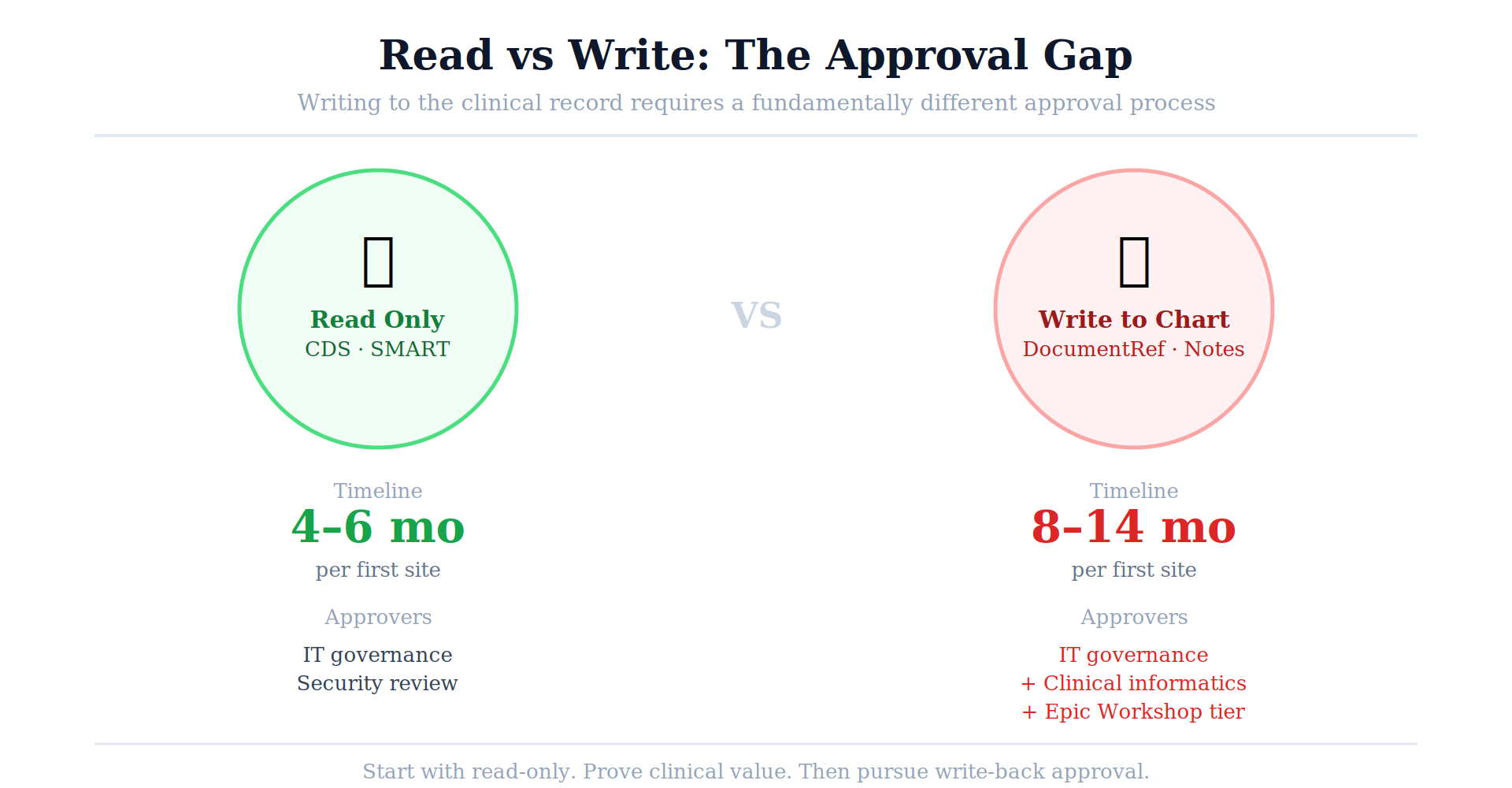
The AI ambient scribe use case: AI listens to the encounter, generates a clinical note, and writes it back to the EHR for physician review and co-signature.
Write-back mechanisms:
The write-back approval challenge: Writing clinical notes into an EHR creates patient records. EHRs, especially Epic, require additional approval, security review, and per-site clinical informatics committee sign-off for any AI that writes to the chart. Read-only integrations get approved faster than write integrations.
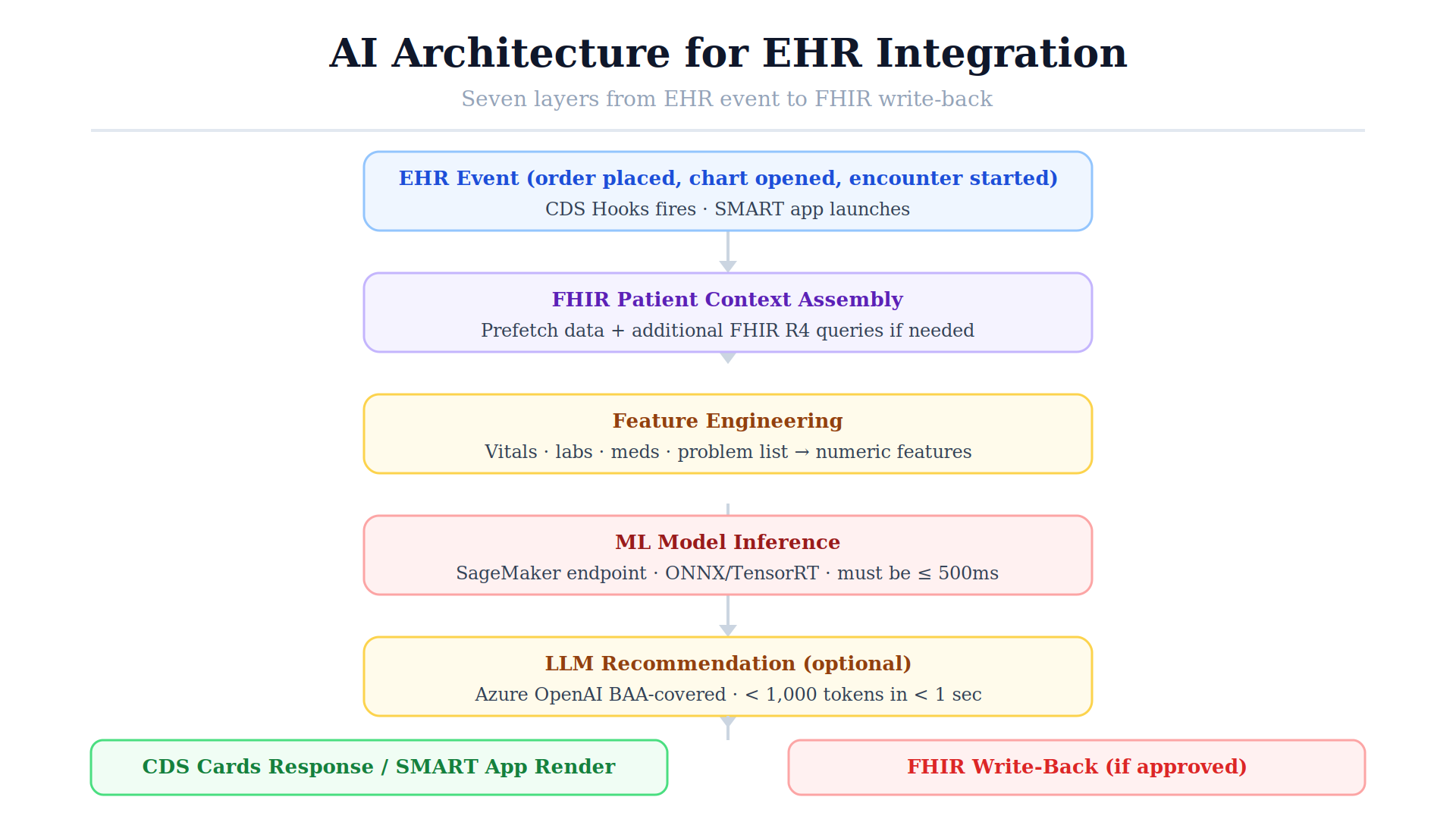
Not all AI architectures work within EHR integration constraints. The latency window (2–3 seconds for CDS Hooks) and the data privacy requirements (PHI cannot leave the HIPAA-compliant environment) shape what’s feasible.
Recommended architecture for EHR-integrated AI:
EHR Event → CDS Hooks/SMART Launch
↓
FHIR Patient Context Assembly
↓
Feature Engineering (from FHIR resources)
↓
ML Model Inference (SageMaker endpoint or local Docker)
↓
LLM Recommendation Generation (Azure OpenAI, BAA-covered)
↓
CDS Cards Response / SMART App Render
↓
FHIR Write-Back (if approved)
Latency optimization:
For Epic specifically, every AI integration requires:
This process cannot be parallelized or compressed significantly. Plan for 4–8 months from starting vendor registration to first production go-live at a single Epic site. Each additional site adds 2–4 months.
Author: Mayank Pratap | Co-Founder, EngineerBabu | Google AI Accelerator 2024 · CMMI Level 5
CDS Hooks with read-only FHIR access is the fastest path to production AI in an existing EHR workflow. It requires registration with the EHR vendor, per-site IT approval, but no write-back permissions. A CDS Hooks sepsis prediction or care gap alert can go from development to production in 4–6 months for a single site.
Yes, via FHIR DocumentReference write-back or Epic’s native note APIs. Both require additional approvals beyond read-only integration, particularly clinical informatics committee review at each site. The deep note write-back (writing into Epic’s native note types) requires Epic Workshop partnership, reserved for select ambient documentation vendors.
FHIR Bulk Data Export provides async access to population-level patient data for training. The data must be de-identified (HIPAA Safe Harbor or Expert Determination) before use in model training on infrastructure not covered by a BAA. For HIPAA-covered training (training on identifiable data within a compliant environment), use AWS SageMaker on HIPAA-eligible infrastructure with a signed AWS BAA.
CDS Hooks responses must arrive within 2–3 seconds of the hook firing or the EHR may time out and proceed without displaying your recommendations. ML model inference must complete in under 500ms to leave room for network latency and FHIR data retrieval. LLM-based components should generate responses of under 1,000 tokens within 1 second using Azure OpenAI’s GPT-4o or equivalent.