How to Build a Yard Management System, Gate Control, Dock Scheduling, Trailer Tracking, and Dwell Time Management 2026



Create engaging, high-performance mobile applications tailored to your business needs. We craft future-ready apps that offer smooth user experiences on all devices.
Build robust and scalable websites and CMS platforms that help you manage content effortlessly. Our development ensures a seamless digital presence.
Launch secure, feature-rich online stores with intuitive shopping experiences. We build tailored eCommerce platforms designed for growth.
Design captivating games with immersive gameplay and stunning graphics. From concept to launch, we build engaging experiences that players love.
Enhance your customer relationships with customized Salesforce implementations. Drive growth and efficiency with smarter CRM solutions.
Harness artificial intelligence and machine learning to automate workflows and gain actionable insights. Our AI transforms data into smart decisions.
Accelerate your software delivery lifecycle with continuous integration, delivery, and infrastructure automation to boost efficiency.
Hire app developers ready to turn your ideas into sleek, high-performing mobile apps for any platform.
Bring in frontend pros who craft smooth, beautiful, and user-friendly interfaces that your visitors will love.
Get backend developers who build fast, secure, and reliable systems to keep everything running behind the scenes.
Hire eCommerce developers who build secure, scalable online stores designed to offer seamless shopping and grow your sales.
Get dedicated developers committed to your projects, delivering consistent quality and speed as an extension of your team.
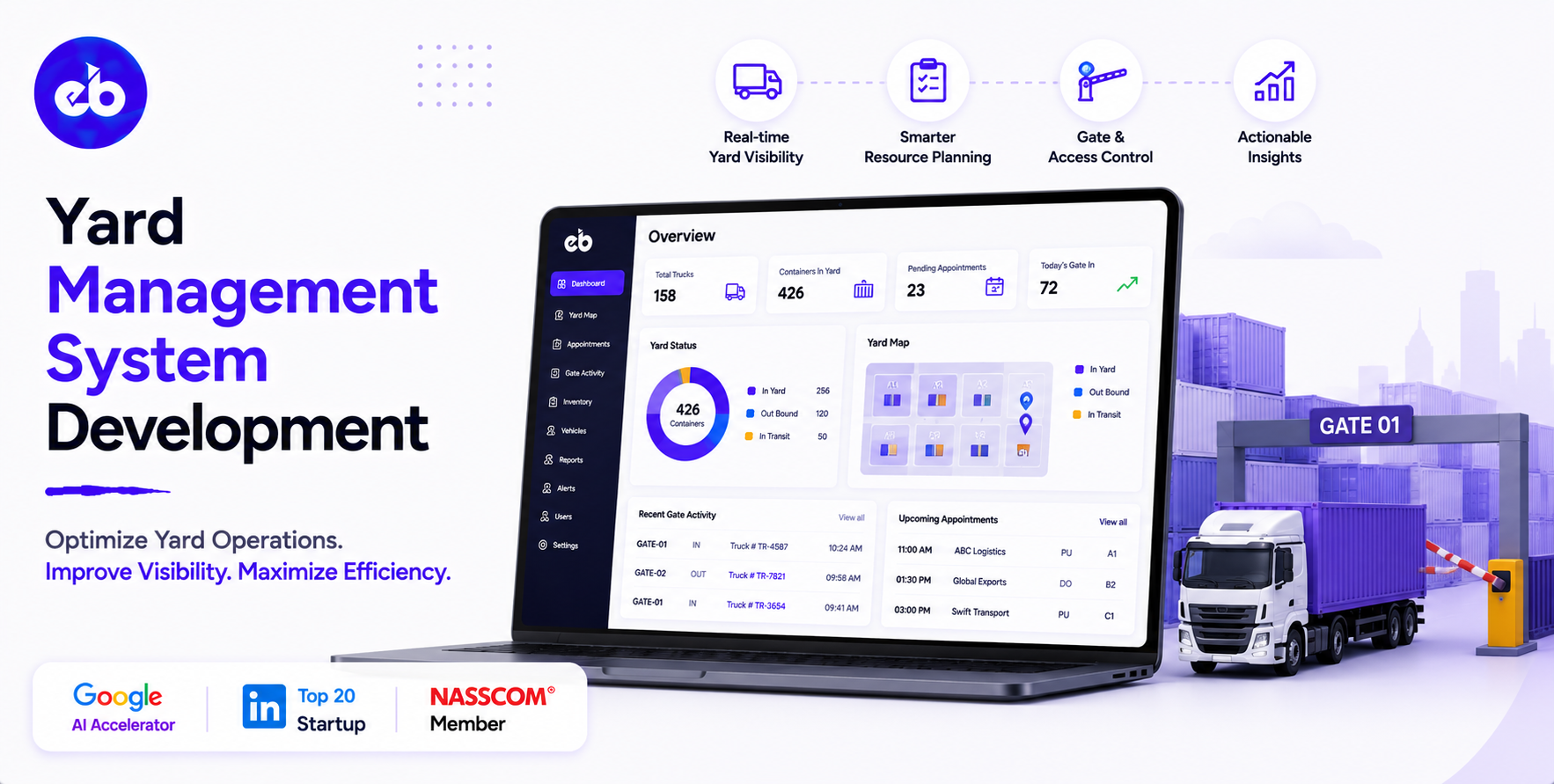
The yard is the most overlooked bottleneck in logistics operations. Executives invest millions in warehouse automation, TMS platforms, and carrier optimisation, then let trucks idle in the yard for 3 to 4 hours waiting for a dock door that could have been scheduled, a trailer that could have been spotted, and a gate process that could have taken 4 minutes instead of 25.
In a high-volume distribution centre processing 200 to 500 truck movements per day, unmanaged yard operations cost an average of $800 to $1,200 per truck in dwell time, driver detention fees, carrier penalty charges, and delayed outbound shipments.
A Yard Management System development brings scheduling, visibility, and coordination to the yard typically reduces dwell time by 30 to 50% in the first six months.
The global yard management system market is projected to reach $7.27 billion by 2033 at a CAGR of 13.2%. The buyers are large distribution centres, manufacturing plants with high-frequency inbound and outbound truck movements, port operators, and 3PLs managing multi-tenant facilities.
EngineerBabu built enterprise operations management for Adani Group and logistics technology for Serman Logistics. CMMI Level 5. Google AI Accelerator 2024 Top 20. Contact: mayank@engineerbabu.com
| Function | Module |
| Appointment scheduling | Carrier and driver appointment booking, inbound and outbound |
| Gate control | Driver check-in, document verification, gate pass |
| Yard map | Visual representation of yard, dock doors, trailer spots, staging areas |
| Trailer tracking | Real-time location of every trailer in the yard |
| Dock door management | Dock assignment, door status, turnaround tracking |
| Spotter / shunter management | Task assignment for moving trailers within the yard |
| Carrier communication | Notifications, check-in links, status updates |
| Dwell time monitoring | Time-in-yard per truck, detention alert |
| Inbound/outbound coordination | Sync with WMS for receiving and dispatch |
| Analytics | Dwell time, dock utilisation, gate throughput |
Why unmanaged truck arrivals destroy dock efficiency:
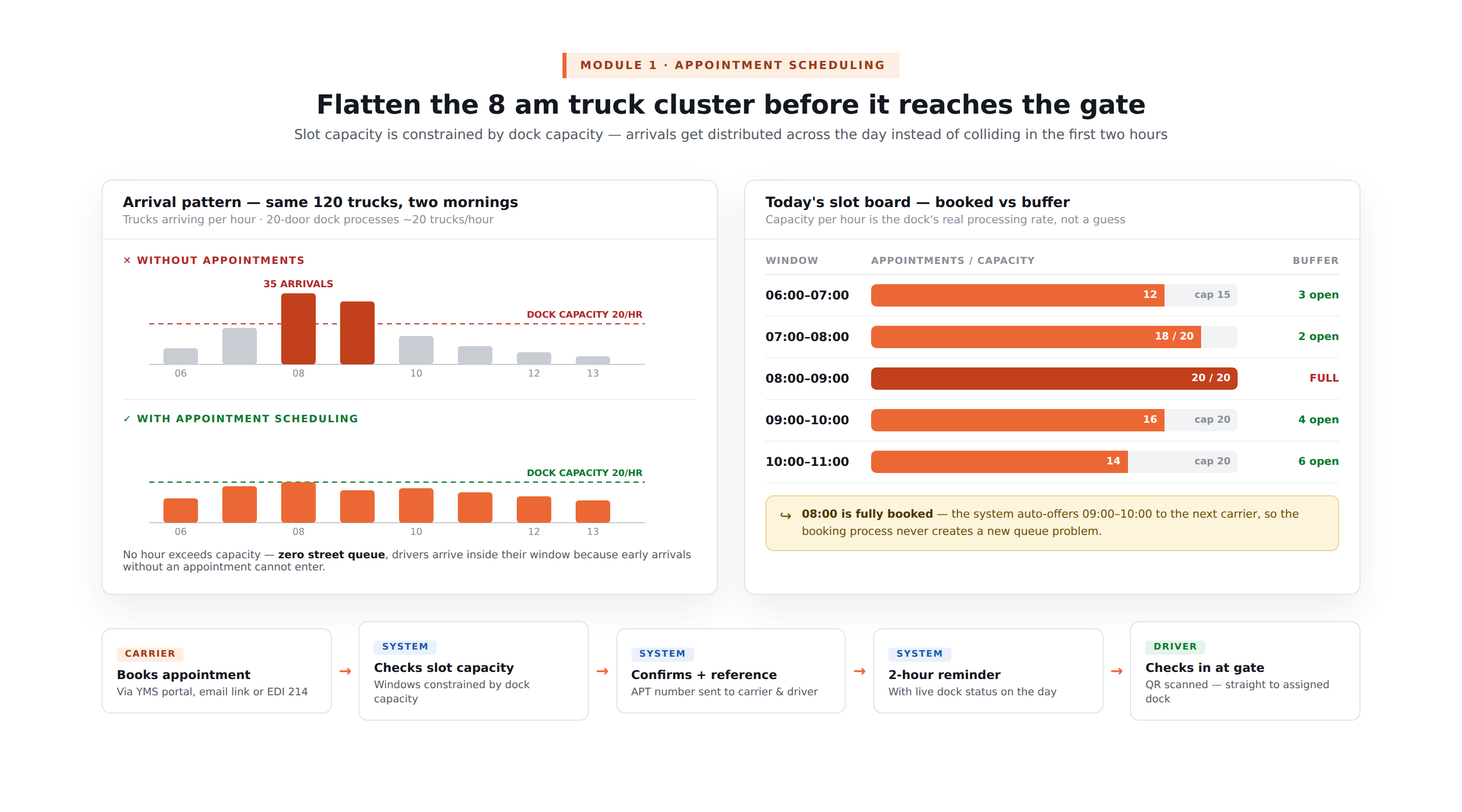
Without appointment scheduling, trucks arrive when they want to, and they tend to arrive in clusters. Carriers departing early in the morning all reach the DC between 8am and 10am. The dock has 20 doors. 35 trucks arrive in 2 hours.
15 trucks queue in the yard or on the street, drivers idle with engines running, and the dock team is overwhelmed trying to process everything simultaneously.
Appointment scheduling distributes arrivals across the day, matching inbound truck volume to dock capacity at every hour.
The appointment booking workflow:
| Step | Actor | Action |
| Appointment request | Carrier or shipper | Books appointment through YMS portal, email link, or EDI |
| Slot availability check | System | Shows available appointment windows, constrained by dock capacity |
| Appointment confirmation | System | Confirms slot, generates appointment reference number |
| Pre-arrival notification | System | Sends carrier driver the appointment details and gate check-in instructions |
| Day-of reminder | System | 2-hour pre-appointment reminder with real-time dock status |
| Arrival check-in | Driver | Checks in at gate, appointment reference scanned or entered |
Appointment slot capacity:
| Hour | Dock Capacity | Appointments Scheduled | Buffer |
| 06:00–07:00 | 15 | 12 | 3 |
| 07:00–08:00 | 20 | 18 | 2 |
| 08:00–09:00 | 20 | 20 | 0, fully booked |
| 09:00–10:00 | 20 | 16 | 4 |
When a slot is fully booked, the system offers the next available slot automatically, preventing the appointment booking process from creating a new queue problem.
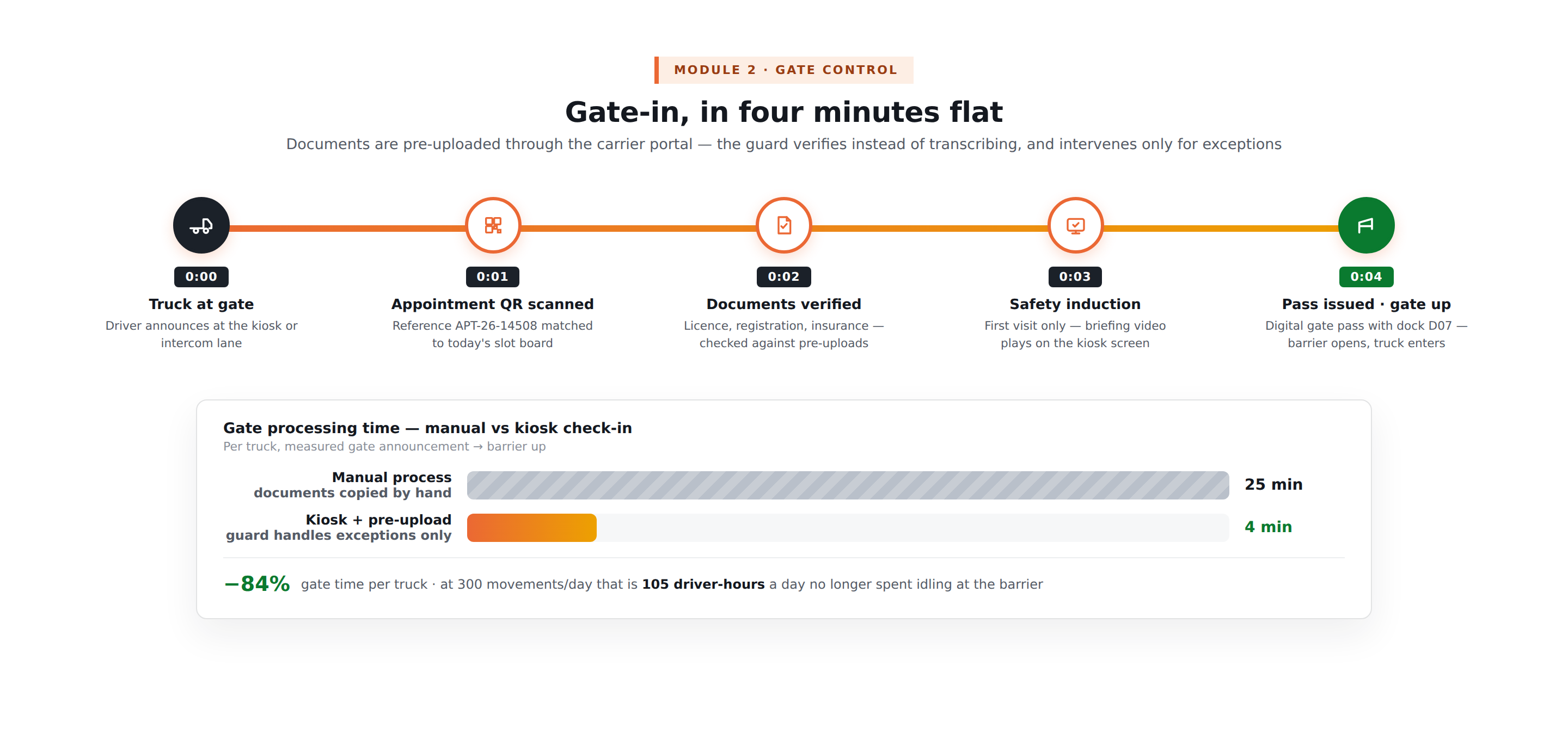
The gate workflow:
| Step | Time | Action |
| Driver arrives at gate | 0:00 | Driver announces at gate intercom or kiosk |
| Appointment verification | 0:01 | Security scans appointment QR or enters reference number |
| Document verification | 0:02 | Driver’s licence, vehicle registration, carrier credentials |
| Safety induction | 0:03 | If first visit, safety briefing video on kiosk screen |
| Gate pass issued | 0:04 | Printed or digital gate pass with dock assignment |
| Gate raised | 0:04 | Barrier opens, truck enters yard |
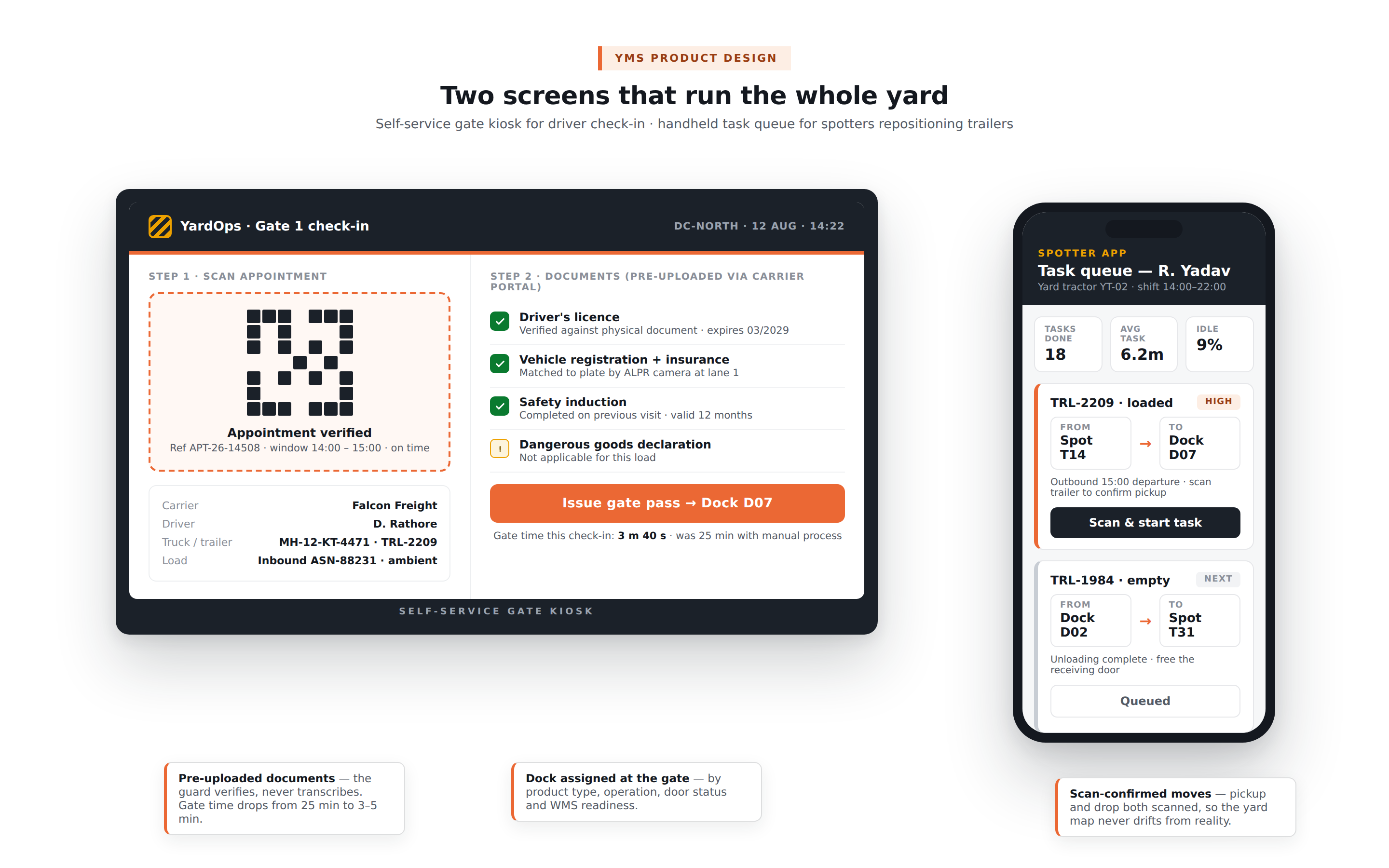
The self-service gate kiosk:
For high-volume DCs, a self-service kiosk at the gate reduces the security team’s involvement. The driver scans the appointment QR code from their phone, the system verifies documents uploaded in advance, and the gate pass is issued automatically.
The security guard monitors the process and intervenes only for exceptions.
Document pre-upload:
Carriers are required to upload driver documents, licence, vehicle registration, insurance certificate, dangerous goods declaration if applicable, through the carrier portal before the appointment.
At gate check-in, the security guard verifies the pre-uploaded documents against the physical documents rather than copying them manually. This reduces gate processing time from 15 to 25 minutes to 3 to 5 minutes.
The yard map:
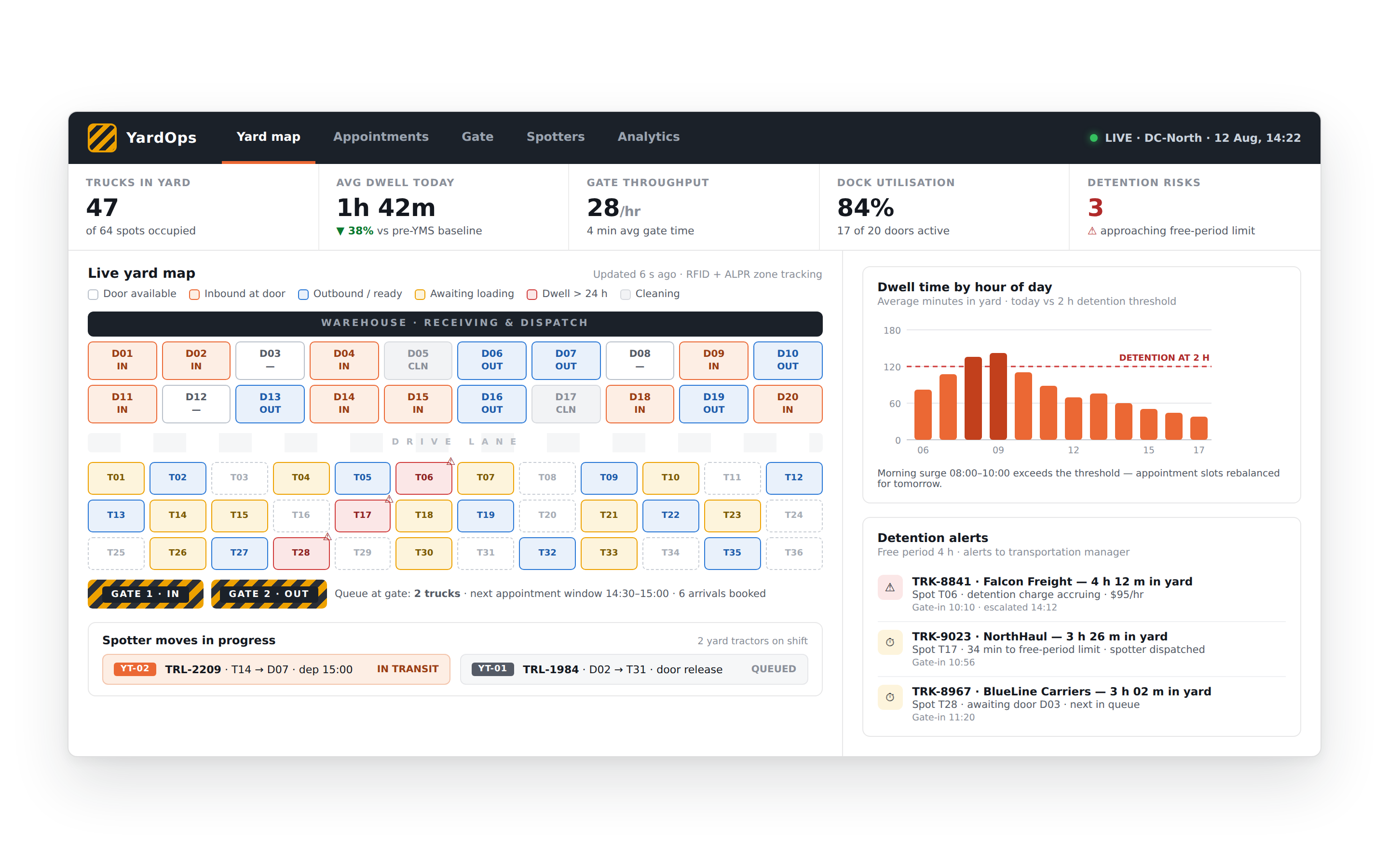
The yard map is a visual representation of the facility, dock doors, trailer spots (numbered parking positions for loaded and empty trailers), staging areas, fuel points, weigh bridges, and driving lanes. Every asset in the yard has a location on the map, updated in real time.
Trailer tracking methods:
| Method | Technology | Accuracy | Cost |
| Manual yard check | Security guard walks the yard | Low, spot check only | Zero hardware |
| RFID tags on trailers | RFID readers at zone boundaries | Zone-level (which area) | Medium |
| GPS tracker on trailer | Cellular GPS device on trailer | Exact location | Medium-high |
| Camera + AIPR (AI licence plate recognition) | Camera at each zone entry | Zone-level + time-stamped | Medium-high |
| Bluetooth low energy (BLE) | BLE tag on trailer + fixed readers | Zone-level | Low-medium |
The live yard map view:
The yard coordinator sees a map of every dock door and every trailer spot, colour-coded by status. An empty trailer spot is green. A trailer awaiting loading is yellow. A loaded trailer ready for departure is blue.
A trailer that has been in the yard more than 24 hours without movement is red, a detention risk that needs immediate attention.
The dock assignment logic:
When a truck is cleared at the gate, the system assigns a specific dock door based on:
| Assignment Factor | Logic |
| Product type | Refrigerated dock for cold chain, standard dock for ambient |
| Operation type | Inbound receiving docks vs outbound dispatch docks |
| Carrier and door proximity | Assign the door closest to where the truck is currently parked |
| WMS coordination | The door where the receiving or dispatch team is ready |
| Door availability | Current door status, occupied, available, cleaning |
Dock door status lifecycle:
| Status | Meaning |
| Available | Empty door, ready for next truck |
| Scheduled | Appointment assigned to this door |
| Occupied, inbound | Truck at door, receiving in progress |
| Occupied, outbound | Truck at door, loading in progress |
| Cleaning | Post-operation cleaning in progress |
| Maintenance | Door equipment under repair |
| Blocked | Door unavailable, out of service |
Dock turnaround time tracking:
The system records the timestamp at every dock status change, when the truck arrived at the door, when loading or unloading started, when it completed, and when the truck departed. The turnaround time per dock operation is the primary metric for identifying bottlenecks, is the delay in the yard or inside the warehouse?
What a spotter does:
A spotter (or shunter) drives a yard tractor, a specialised vehicle for moving trailers without a road truck, to reposition trailers within the yard. Tasks include: moving a loaded trailer from staging to a dock door for departure, relocating an unloaded trailer from a receiving dock to the empty trailer parking area, positioning trailers in specific dock doors in advance of scheduled appointments.
The spotter task queue:
When a trailer needs to be moved, the system creates a spotter task, from location, to location, trailer ID, priority. Tasks are assigned to the next available spotter through their handheld device.
The spotter confirms task receipt, confirms pickup (scanning the trailer ID), and confirms delivery (scanning the destination location barcode).
Spotter productivity tracking:
| Metric | Calculation |
| Tasks completed per shift | Total tasks confirmed in the shift |
| Average task time | From task assignment to delivery confirmation |
| Idle time | Time between task completion and next assignment |
| Distance travelled | GPS-tracked mileage per shift |
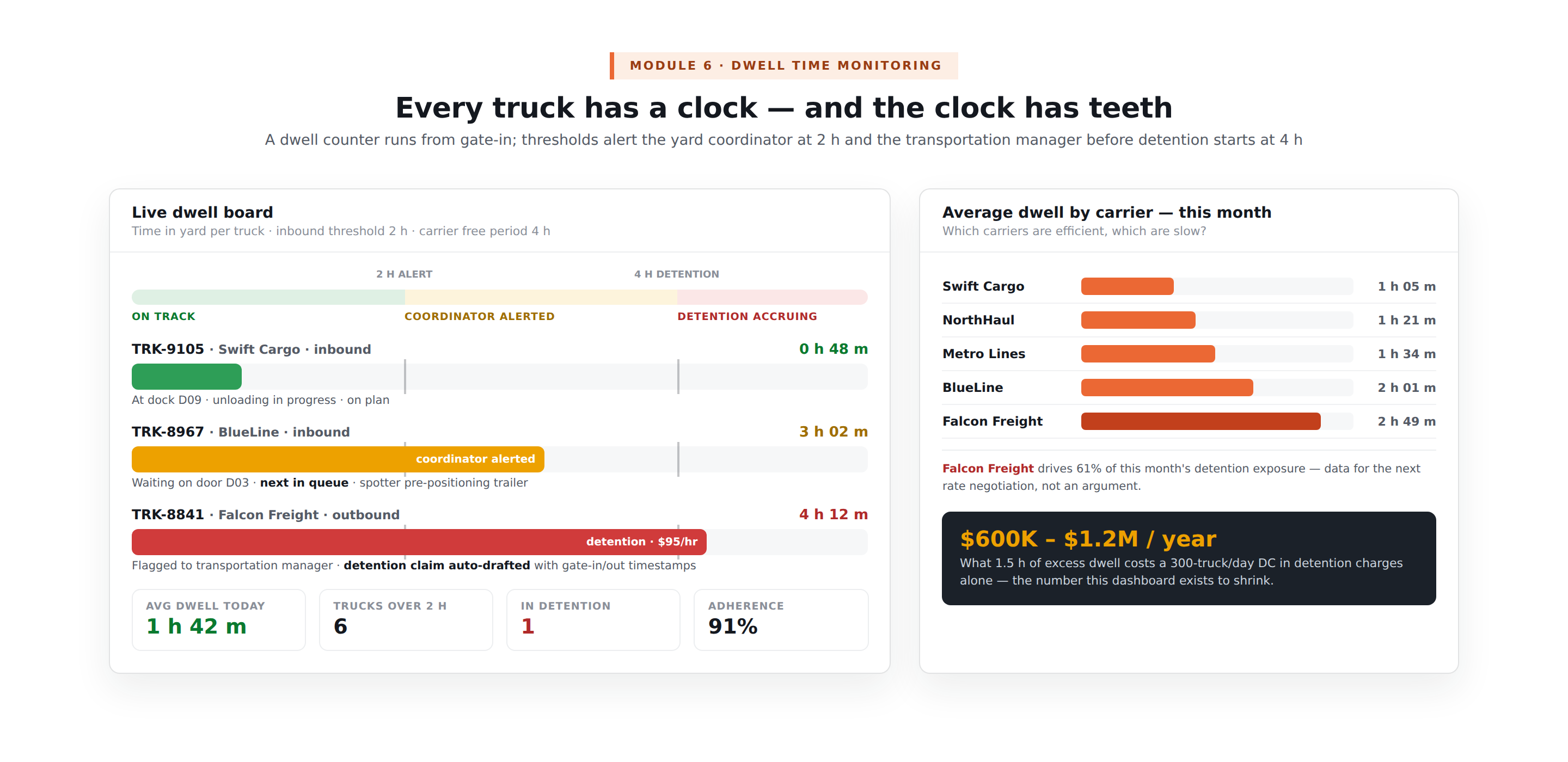
The dwell time alert:
Every truck in the yard has a dwell time counter running from gate-in. When dwell time exceeds a threshold, typically 2 hours for inbound, 3 hours for outbound, the system alerts the yard coordinator.
When it exceeds the carrier detention-free period, typically 4 hours, the system alerts the transportation manager and flags the truck for a detention charge claim.
The dwell time analytics dashboard:
| Report | Business Question |
| Average dwell time by carrier | Which carriers are efficient, which are slow? |
| Average dwell time by operation type | Is inbound or outbound the bottleneck? |
| Average dwell time by hour of day | When is yard congestion at its worst? |
| Detention charges by carrier | How much is inefficient carrier scheduling costing? |
| Dock utilisation rate | What percentage of dock time is being used productively? |
| Appointment adherence rate | What percentage of carriers arrive within their appointment window? |
| Module | Cost Range (USD) | Notes |
| Appointment scheduling + slot management | $8K – $15K | Carrier portal, EDI 214 integration |
| Gate control + document verification | $6K – $12K | Kiosk integration, document upload |
| Yard map builder + visual interface | $8K – $15K | SVG-based drag-drop map |
| Trailer tracking (RFID or GPS) | $6K – $12K | Hardware integration layer |
| Dock door management + assignment | $6K – $12K | Status lifecycle, WMS integration |
| Spotter task management + mobile app | $6K – $12K | |
| Carrier communication + notifications | $4K – $8K | WhatsApp, SMS, email |
| Dwell time monitoring + detention alerts | $5K – $10K | |
| WMS integration (inbound/outbound sync) | $6K – $12K | |
| Analytics dashboard | $5K – $10K | Dwell, utilisation, adherence |
| AWS + VAPT + Year 1 ops | $5K – $10K | |
| Total | $65K – $128K | Full yard management system |
EngineerBabu built enterprise operations for Adani Group and logistics technology for Serman Logistics. CMMI Level 5. Google AI Accelerator 2024 Top 20. Contact: mayank@engineerbabu.com
Truck dwell time is the total time a truck spends inside a facility, from gate-in to gate-out. It includes gate processing time, waiting time in the yard before reaching a dock, loading or unloading time at the dock, and departure processing time. Dwell time matters financially in two directions. For the facility operator, excessive dwell creates dock congestion, trucks queue at doors that are occupied, appointments are missed in cascade, and the day’s plan falls apart. For the carrier, dwell beyond the contractual free period, typically 2 to 4 hours, generates detention fees that the shipper must pay, typically $75 to $150 per hour per truck. A DC with 300 daily truck movements and an average excess dwell time of 1.5 hours pays $600,000 to $1,200,000 per year in detention charges alone. A yard management system that reduces excess dwell to under 30 minutes typically pays for itself in detention charge savings within 3 to 6 months.
Appointment scheduling in yard management is the pre-planned allocation of specific time windows for each truck arrival or departure, constraining when trucks can enter the facility to match the dock’s processing capacity. Without appointment scheduling, truck arrivals follow carrier convenience, most carriers dispatch early in the morning to hit their delivery windows, resulting in 40 to 60% of daily truck volume arriving in the first 3 hours of the operating day. This surge creates a queue that the dock cannot process in time, generating detention charges, missed outbound schedules, and frustrated drivers. Appointment scheduling distributes arrivals evenly across the operating day, a facility with 20 docks and 200 daily truck movements assigns 10 arrivals per hour rather than 60 in the first hour. Carriers receive their appointment reference, plan their dispatch accordingly, and arrive within their window because early arrivals without an appointment cannot enter.
A yard management system integrates with a warehouse management system through bidirectional real-time API calls covering four key data flows. Inbound coordination: when a truck is assigned to a dock door in the YMS, the WMS is notified with the dock door number and the expected inbound ASN, the WMS pre-assigns a receiving team and a putaway location. Outbound coordination: when an outbound shipment is ready in the WMS, all orders picked and packed, the YMS is notified and a spotter is assigned to move the empty trailer to the dispatch dock. Door status sync: WMS updates the YMS when loading or unloading is complete at a door, the YMS updates the door status to available and assigns the next scheduled truck. Inventory event triggers: for cross-docking operations, the YMS and WMS coordinate the simultaneous arrival of inbound trailers and departure of outbound trailers carrying the same inventory.