Hospital Management System Development a Complete Guide


Create engaging, high-performance mobile applications tailored to your business needs. We craft future-ready apps that offer smooth user experiences on all devices.
Build robust and scalable websites and CMS platforms that help you manage content effortlessly. Our development ensures a seamless digital presence.
Launch secure, feature-rich online stores with intuitive shopping experiences. We build tailored eCommerce platforms designed for growth.
Design captivating games with immersive gameplay and stunning graphics. From concept to launch, we build engaging experiences that players love.
Enhance your customer relationships with customized Salesforce implementations. Drive growth and efficiency with smarter CRM solutions.
Harness artificial intelligence and machine learning to automate workflows and gain actionable insights. Our AI transforms data into smart decisions.
Accelerate your software delivery lifecycle with continuous integration, delivery, and infrastructure automation to boost efficiency.
In March 2021, a 280-bed community hospital in rural Tennessee finished a two-year implementation of a major hospital information system. The contract value was $2.3 million. The implementation had involved 14 months of configuration, 6 months of staff training, and 3 months of parallel operation running the old system alongside the new one simultaneously.
On go-live day, the discharge summary workflow broke.
Not catastrophically, no patient was harmed. But the new system’s discharge summary module required a physician to complete 14 mandatory fields before the document could be generated. The previous system had required 4 fields. In the afternoon rush of discharges, physicians were spending 11 minutes per patient on discharge documentation instead of 3. The nursing unit had a backlog of 23 patients waiting for discharge paperwork by 4 PM.
The hospital’s CMIO called me that evening. She had found EngineerBabu through a referral from another hospital that had worked with us on a clinical workflow module. Her question was direct: “How do you build an HMS that clinicians will actually use?”
I gave her the honest answer: the Hospital Management System HMS that clinicians use is the one that fits the clinical workflow, not the one that forces the clinical workflow to fit the software. Every mandatory field, every additional click, every form that requires data the clinician does not have at the point of care is friction that erodes adoption. And in a hospital, adoption is not optional. When clinicians stop using the system, the system stops being the source of truth, and a $2.3 million investment becomes a $2.3 million liability. We fixed her discharge summary workflow in six weeks, reconfiguring the mandatory fields to match the actual documentation standard, auto-populating from data already in the system, and reducing the required physician input from 14 fields to 4. Discharge documentation time went back to 3 minutes.
The lesson: hospital management system development is not about features. It is about workflow fit. The most technically sophisticated HMS in the world fails if the clinical staff routes around it.
This guide is for founders and hospital administrators who want to build or procure an Hospital Management System that staff actually use.
Wrong #1: “We need a system that does everything.” The most common Hospital Management System procurement mistake is scope maximalism, buying or building a system that covers every possible module from day one. A 280-bed community hospital does not need the same HMS as a 1,200-bed academic medical center. Scope your system to the workflows that drive 80% of your operational complexity. Add modules as operational maturity and budget permit. A well-implemented focused system outperforms a poorly implemented comprehensive one every time.
Wrong #2: “The demo looked great, that means implementation will be smooth.” Hospital Management System demos are conducted by sales engineers on clean data in optimized configurations. Production implementations run on messy legacy data, inconsistent staff workflows, and IT infrastructure that was not designed for the new system. The gap between demo performance and production performance is where HMS implementations fail. Reference check not against the vendor’s demo customers, against hospitals of similar size and complexity that went live in the last 18 months.
Wrong #3: “We’ll migrate all our historical data.” Historical data migration is one of the most expensive and highest-risk activities in an Hospital Management System implementation. Legacy systems store data in proprietary formats that do not map cleanly to modern data models. Migrating 15 years of patient records, billing history, and clinical documentation requires data mapping, transformation, validation, and testing that routinely costs $200,000–$500,000 for a mid-size hospital. Be ruthless about what data is worth migrating. Archive most historical data. Migrate only what clinical and billing workflows require day-to-day.
Wrong #4: “Integration with our existing systems is straightforward.” Hospitals run 20–50 specialized systems alongside their core Hospital Management System, lab analyzers, PACS systems, pharmacy dispensing cabinets (Pyxis, Omnicell), dietary management, facilities management, HR systems. Every integration is a project. HL7 v2 interfaces are the most common integration mechanism, but HL7 v2 has dozens of message type variants, every vendor implements them differently, and interface engines require configuration and maintenance. Budget for integration as a major project component, not as a configuration task.
Wrong #5: “Training is a one-time event before go-live.” Staff turnover in healthcare is high, US hospital turnover rates average 22% annually. A training program that ends at go-live means that within 12 months, nearly a quarter of the hospital’s staff has never been trained on the system. Build ongoing training capability into the system itself, role-specific guided walkthroughs, contextual help, training mode with synthetic patients, so that new staff can be onboarded without a formal training session.
Wrong #6: “Cloud deployment means we don’t need IT staff.” Cloud-hosted Hospital Management System reduces infrastructure management burden but does not eliminate the need for internal IT capability. Configuration management, user access administration, integration monitoring, report development, and clinical workflow optimization all require IT staff who understand both the hospital’s clinical operations and the technical capabilities of the system. Budget for 1–3 FTE IT positions dedicated to HMS administration for a hospital over 100 beds, regardless of deployment model.
Wrong #7: “HIPAA compliance is the vendor’s responsibility.” The HMS vendor is a Business Associate, they are responsible for handling ePHI in accordance with HIPAA requirements within their system. The hospital is the Covered Entity, responsible for its own HIPAA compliance program, including how staff use the system, how access controls are configured, how audit logs are reviewed, and how the system is integrated with other systems. HIPAA compliance in an HMS environment is a shared responsibility. The vendor’s HIPAA posture is necessary but not sufficient.
Wrong #8: “We’ll customize the system to match our existing workflows exactly.” Customization is the most expensive line item in any HMS implementation and the primary source of implementation failure. Every customization must be maintained through every software upgrade, and HMS systems upgrade 2–4 times per year. A heavily customized HMS becomes progressively more expensive to maintain and progressively harder to upgrade. The better approach: adapt workflows to the system’s standard functionality where the operational difference is minor; customize only where the workflow requirement is genuinely unique and clinically significant.
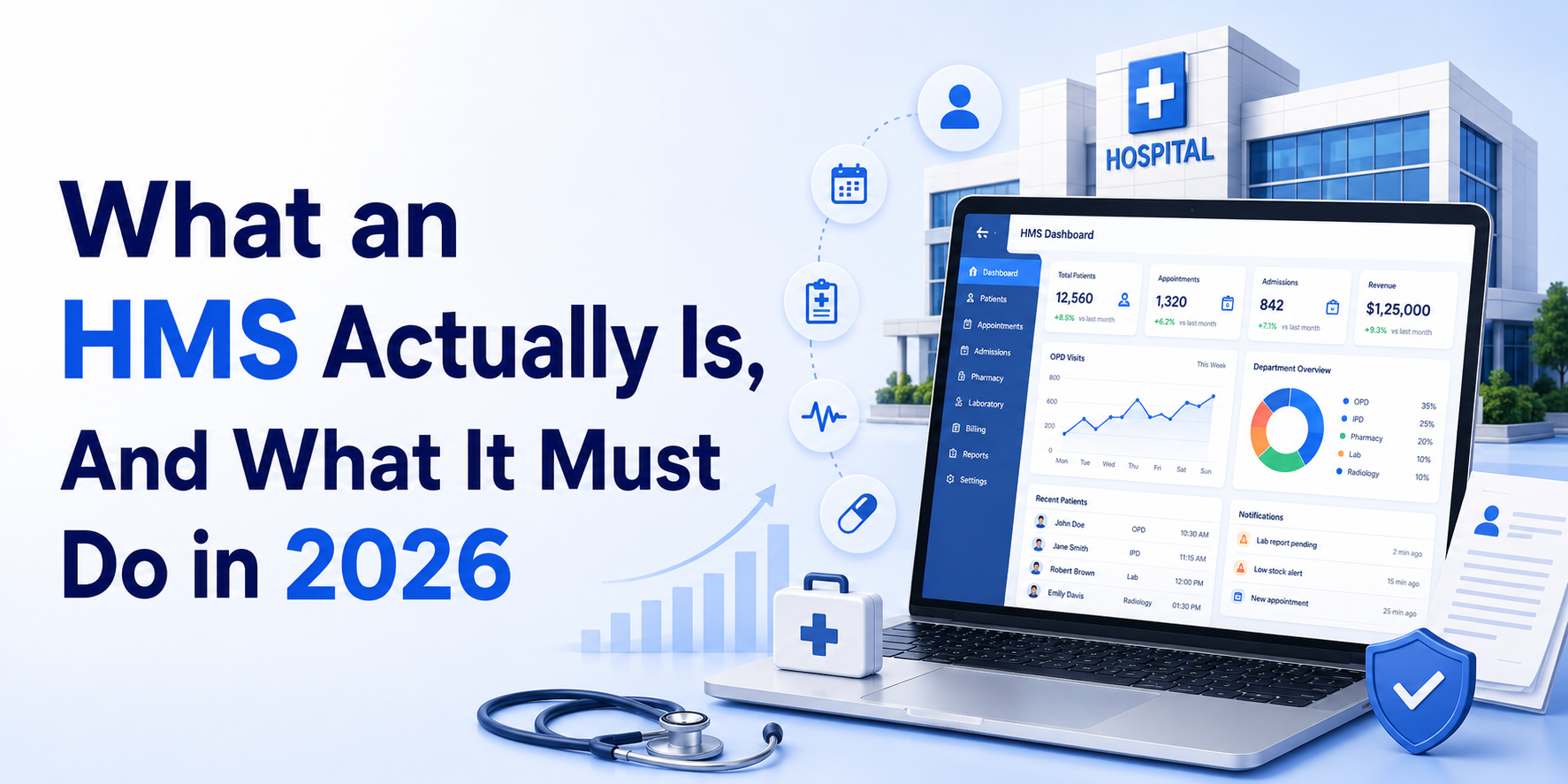
A Hospital Management System is the operational software platform that manages a hospital’s clinical, administrative, and financial workflows. It is the system of record for patient encounters, from the moment a patient registers at the front desk to the moment their insurance claim is adjudicated and their account is closed.
What distinguishes an HMS from an EHR:
The terms HMS, HIS (Hospital Information System), and EHR (Electronic Health Record) are used interchangeably in some contexts and distinctly in others. Here is the precise distinction:
HMS/HIS: The comprehensive operational platform covering administrative, clinical, and financial workflows. Patient registration, bed management, billing, pharmacy, lab, radiology, scheduling, the full operational scope of the hospital. The HMS may or may not include a robust clinical documentation layer.
EHR: The clinical documentation and patient record system, physician notes, nursing assessments, medication administration records, problem lists, medication lists. The EHR is the clinical record layer. In some implementations the EHR is part of the HMS. In others it is a separate system integrated with the HMS.
For the purposes of this guide, we are building an HMS that includes the core clinical documentation layer needed for hospital operations, not a standalone ambulatory EHR, not a standalone practice management system, but the full operational platform a hospital needs to run.
What an HMS must do in 2026:
Patient flow management: Track every patient from registration through discharge, where they are in the facility, what care they have received, what care is planned, and what administrative actions are pending.
Clinical documentation: Capture the clinical record of every encounter, physician orders, nursing assessments, medication administration, vital signs, progress notes, procedure documentation, and discharge summaries.
Billing and revenue cycle: Translate clinical care into billable claims, charge capture, coding support, claim generation, insurance submission, payment posting, and denial management.
Operational management: Run the hospital’s day-to-day operations, bed management, staff scheduling, pharmacy inventory, lab workflow, dietary management, and facilities management.
Regulatory compliance: Support the hospital’s compliance with regulatory requirements, HIPAA, Joint Commission accreditation standards, CMS Conditions of Participation, quality reporting programs.
Analytics and reporting: Provide operational and clinical intelligence, occupancy rates, length of stay, readmission rates, quality metrics, financial performance.
The US hospital market by size:
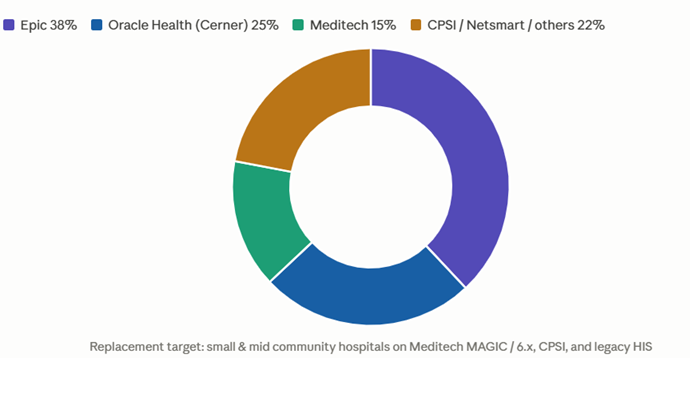
What they are running now:
Epic: Dominant in large health systems and academic medical centers. 38% of US hospital beds. Not the replacement market for new HMS entrants, Epic is deeply embedded and switching costs are prohibitive.
Oracle Health (Cerner): 25% of US hospital beds. VA and DoD contracts. Similar depth of embedding as Epic for large implementations.
Meditech: 15% of US hospital beds. Strong in community hospitals and critical access hospitals. Meditech Expanse (their cloud platform) is a modernization play. Older Meditech versions (MAGIC, 6.x) are the primary replacement target.
CPSI/Evident: Strong in small community hospitals and critical access hospitals. Aging platform with limited cloud and mobile capability.
Netsmart: Behavioral health and long-term care focus. Some general hospital presence.
The replacement opportunity: Small and medium community hospitals on Meditech MAGIC, Meditech 6.x, CPSI, and legacy HIS systems are the replacement market. These hospitals need modern cloud-native, mobile-friendly systems with strong integration capabilities. They cannot afford Epic’s implementation cost ($50M–$200M for a health system) but need significantly more capability than their current systems provide.
Why hospitals switch:
The most common reasons a community hospital initiates an HMS replacement:
Aging infrastructure: the current system is end-of-life, no longer receiving security patches, and increasingly difficult to integrate with modern systems.
Mobile and remote access: the current system requires VPN and desktop access, no mobile app for physicians, no patient portal.
Regulatory compliance gaps: the current system does not support current CMS quality reporting requirements, does not generate Meaningful Use-compliant documentation, or does not support current ICD-10 coding.
Integration limitations: the current system cannot interface with modern lab analyzers, pharmacy robots, or patient monitoring systems using modern HL7 or FHIR standards.
Billing performance: the current system generates high denial rates because it cannot support modern claim scrubbing, real-time eligibility verification, or current coding guidance.
Staff frustration: physician and nursing satisfaction with the current system is low, contributing to staff turnover in an already tight labor market.
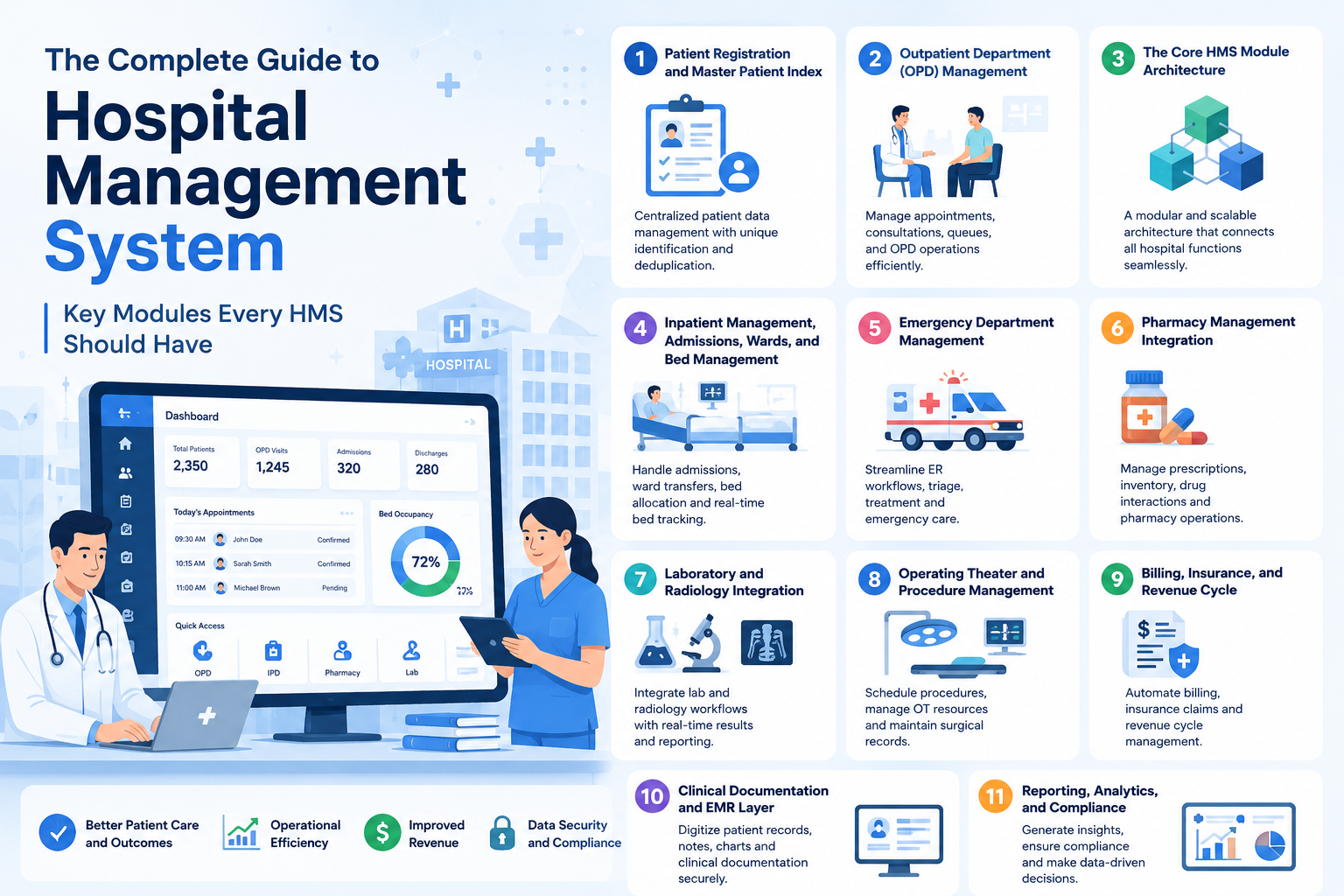
A complete HMS for a US community hospital covers ten functional modules. Each module can be built as a standalone service or as part of a monolithic architecture, the right choice depends on hospital size, IT capability, and future integration requirements.
For a new HMS build in 2026, our recommendation is a modular monolith for hospitals under 200 beds, a single application with clear module boundaries that can be decomposed into microservices when scale requires it. Pure microservices architecture adds operational complexity that a community hospital’s IT team cannot maintain. Pure monolith creates coupling that makes module-specific upgrades expensive. The modular monolith gives the right balance for the mid-market.
The ten modules:
The patient registration module is the foundation of the entire HMS. Every subsequent module depends on the patient identity established here.
Master Patient Index (MPI):
The MPI is the authoritative registry of patient identities in the hospital. Every patient who has ever interacted with the hospital has a unique MPI record. The MPI assigns a unique Medical Record Number (MRN) to each patient and links all encounters, inpatient admissions, outpatient visits, emergency visits, procedures, to the same patient identity.
The MPI challenge: duplicate patient records. When the same patient registers twice, different name spelling, different address, different date of birth entry, the MPI creates two separate identity records for the same person. Duplicate records fragment the patient’s clinical history, create billing errors, and are a patient safety risk (the clinician sees an incomplete medication history because some medications are in the duplicate record).
Duplicate detection: probabilistic matching using the Fellegi-Sunter algorithm or similar, comparing name, date of birth, address, phone, and SSN (or the last four digits) with weighted scoring to identify probable duplicates for review. Every new registration is compared against the existing MPI before a new MRN is assigned.
The registration workflow:
Walk-in registration: receptionist enters patient demographics, insurance information, and reason for visit. The system checks the MPI for existing patient identity. If the patient exists, the registration links to the existing MPI record. If new, a new MRN is assigned.
Pre-registration: scheduled patients pre-register online or by phone before their visit, entering demographics and insurance information through the patient portal. The receptionist verifies at check-in rather than entering data from scratch. Reduces registration time from 8 minutes to 2 minutes.
Identity verification: photo ID scan (driver’s license or passport) with automatic demographic extraction. Insurance card scan with automatic payer and member ID extraction. These reduce manual data entry errors that propagate through billing.
Consent management:
HIPAA Notice of Privacy Practices acknowledgment: every new patient and every patient after a 12-month gap must acknowledge the hospital’s NPP. Acknowledgment is captured electronically, patient signs on a tablet, signature is stored in the registration record with timestamp.
Treatment consent: general consent for treatment captured at registration. Procedure-specific consents captured before procedures in the clinical workflow.
Financial consent: financial responsibility agreement, assignment of benefits, and authorization for release of information captured at registration.
Insurance verification:
Real-time eligibility verification (270/271 HIPAA transaction) at registration: confirm the patient’s insurance is active, what their copay and deductible status is, and whether the specific service requires prior authorization. Integration with the real-time eligibility clearinghouse (Availity, Change Healthcare) or payer FHIR Coverage API for CMS-rule-compliant payers.
The OPD module manages the workflow for outpatient clinic visits, from appointment scheduling through encounter completion and billing.
Appointment scheduling:
Multi-provider, multi-location scheduling with real-time availability. Online patient self-scheduling through the patient portal, patients see available slots for their provider and book directly. Automated appointment reminders (SMS, email, patient portal notification) at 48 hours and 2 hours before the appointment. No-show and cancellation tracking for demand management.
Scheduling rules: appointment type definitions (new patient, follow-up, procedure, urgent), appointment duration by provider and appointment type, block scheduling for specific appointment types, and double-booking rules.
Check-in and patient flow:
Kiosk or tablet self-check-in: patient confirms arrival, updates demographic and insurance information, signs consent forms, pays copay. The check-in event triggers the provider notification, the patient is ready.
Patient flow tracking: the patient’s location in the department, checked in, waiting, in exam room, with provider, waiting for orders, ready for checkout, is tracked in real time on the provider and nursing staff dashboard. Wait time monitoring with escalation alerts when wait time exceeds the defined threshold.
Clinical workflow:
Nursing intake: vital signs, chief complaint, medication reconciliation, allergy review. Entered directly into the HMS clinical documentation layer.
Provider encounter: the provider opens the patient’s chart, reviews the clinical history, documents the encounter (see Module 9 for clinical documentation), places orders (labs, imaging, prescriptions, referrals), and checks out.
Order management:
CPOE (Computerized Physician Order Entry): physician places orders electronically, lab orders, imaging orders, prescription orders, referral orders. Orders are routed to the appropriate department (lab, radiology, pharmacy) through the HMS integration layer.
Order sets: pre-defined sets of orders for common clinical scenarios (annual wellness visit order set, hypertension management order set, diabetes management order set). Reduces ordering time and ensures protocol adherence.
Clinical decision support: drug interaction alerts, allergy alerts, duplicate order alerts, and evidence-based clinical alerts at the point of order entry. Alerts must be tuned, alert fatigue from too many low-value alerts is a documented patient safety problem.
Checkout and billing:
At checkout, the encounter’s diagnoses (ICD-10), procedure codes (CPT/HCPCS), and charges are captured. The billing module receives the encounter data and generates the claim. Patient copay collection at checkout with payment receipt.
The inpatient module manages the patient’s journey from hospital admission through discharge, the most operationally complex workflow in the HMS.
Admission workflow:
Admission source: emergency department admission, direct admission from physician office, transfer from another facility, scheduled surgical admission. Each source has a different admission workflow.
Admission type: inpatient (Medicare Part A, clinical decision requires medically necessary hospital admission), observation (outpatient status, Medicare Part B, clinically indeterminate cases), and outpatient procedure. The inpatient vs. observation status determination has significant Medicare billing implications, hospitals face CMS Recovery Audit Contractor (RAC) audits for inappropriate inpatient admissions.
Admission documentation: admission history and physical (H&P) must be completed by the admitting physician within 24 hours of admission per Joint Commission standards. The HMS must track H&P completion and alert when the deadline approaches.
Bed management:
Bed board: real-time visualization of every bed in the hospital, occupied, available, dirty (needs housekeeping), blocked (maintenance), or held (reserved for a pending admission). The bed board is the operational heart of the inpatient module.
Bed request and assignment: when a patient needs a bed (from the ED, from the OR, from a direct admission), a bed request is entered. The bed management team reviews available beds and assigns based on clinical requirements (isolation room for infection precautions, telemetry bed for cardiac monitoring, ICU bed for critical care).
Housekeeping integration: when a patient is discharged, the bed status changes to “dirty.” A housekeeping task is automatically created. When housekeeping marks the task complete, the bed status changes to “available.” The turnaround time between discharge and bed availability, a key operational metric, is tracked by the system.
Ward management:
Patient assignment: patients are assigned to nurses and physicians. The nurse’s patient assignment is displayed on the nursing dashboard, the nurse sees their full patient list, each patient’s location, current vital signs, pending orders, and outstanding care tasks.
Rounds documentation: the attending physician rounds on each patient daily. The HMS supports rounds with a structured rounding note template, pre-populated with the previous day’s documentation and current vital signs, that the physician completes efficiently during rounds.
Handoff documentation: at shift change, nursing handoff documentation summarizes each patient’s current status, care plan, and outstanding items. The HMS generates a structured handoff report from the current clinical data, reducing the handoff documentation time from 20 minutes to 5 minutes.
Discharge management:
Discharge planning: begins at admission for anticipated complex discharges (patients who will need skilled nursing facility placement, home health services, or complex medication management). The HMS tracks discharge planning activities, social work assessment, case management review, patient education completion, medication reconciliation.
Discharge order: the physician enters the discharge order, which triggers the discharge workflow, nursing discharge assessment, patient discharge instructions, prescription generation, follow-up appointment scheduling, and final billing charge capture.
Discharge summary: the physician completes the discharge summary, diagnosis, hospital course, procedures, discharge medications, follow-up plan. Must be completed within 30 days of discharge per Joint Commission standard (and within 24 hours if the patient is transferred to another facility).
Length of stay management: average length of stay (ALOS) is a key financial and quality metric. The HMS tracks LOS against the expected LOS for each DRG (Diagnosis-Related Group) and alerts when patients are exceeding expected LOS, triggering case management review for discharge barriers.
The ED module is operationally distinct from the general inpatient module, the ED runs at a different pace, with different workflow requirements, and with a different patient population.
ED-specific workflow requirements:
Triage: the first clinical assessment after a patient arrives in the ED. Triage captures chief complaint, vital signs, and assigns an Emergency Severity Index (ESI) triage level (1–5, with 1 being immediately life-threatening). Triage must be completed within 15 minutes of arrival per Joint Commission standard. The HMS tracks triage timing and alerts when the threshold is approaching.
Patient tracking board: the ED tracking board is the operational nerve center, every patient in the ED, their location (waiting room, triage, exam room, imaging, procedure), their triage level, their treating provider, their length of stay, their pending orders, and their disposition status. The board must update in real time.
Fast track vs. main ED: most EDs have a fast track area for low-acuity patients (ESI 4–5) that operates on a different workflow from the main ED (ESI 1–3). The HMS must support separate workflows for each area while maintaining a unified patient record.
ED-specific clinical documentation:
ED physician documentation is different from inpatient documentation, faster, more structured, and more time-pressured. ED documentation templates are organized around chief complaint and ESI level. A chest pain workup template includes cardiac risk stratification (HEART score), EKG interpretation, troponin result tracking, and disposition decision documentation.
Nursing documentation: ED nursing assessments are more frequent than inpatient nursing assessments, vital signs every 30–60 minutes for moderate-acuity patients, continuous monitoring for high-acuity patients. The HMS captures nursing assessments efficiently, tablet-based vital sign entry that auto-populates from bedside monitors where integration is available.
Disposition:
Every ED patient has a disposition, admitted (to inpatient or observation), discharged home, transferred to another facility, left without being seen (LWBS), left against medical advice (AMA). The HMS tracks disposition and initiates the appropriate downstream workflow: bed request for admitted patients, discharge instructions for discharged patients, transfer documentation for transferred patients.
Door-to-disposition time: the total time from ED arrival to disposition decision is the key ED operational metric. The HMS tracks door-to-physician time, physician-to-order time, and order-to-disposition time separately, enabling identification of the specific workflow step causing delays.
The pharmacy module in an HMS is the interface between clinical ordering and medication dispensing. For most hospitals, this means integration with a dedicated pharmacy management system (Pyxis, Omnicell for automated dispensing cabinets, and a pharmacy information system like Meditech Pharmacy or Epic Willow) rather than a standalone pharmacy system built into the HMS.
The pharmacy integration architecture:
CPOE to pharmacy verification: when a physician enters a medication order in the HMS, the order is transmitted to the pharmacy via HL7 v2 RXO (pharmacy order) message. The pharmacist reviews and verifies the order before it is dispensed. The verification status is transmitted back to the HMS via HL7 v2 RXR (pharmacy route) message.
Automated dispensing cabinet (ADC) integration: Pyxis and Omnicell cabinets are stocked with floor stock medications. When a pharmacist verifies a medication order, the order is transmitted to the ADC, the nursing staff can retrieve the medication from the cabinet after verification. The ADC records the withdrawal (quantity, time, nurse identity) and transmits a transaction record to the pharmacy system.
Medication administration record (MAR): the HMS MAR shows every medication ordered for the patient, the scheduled administration time, and the administration record, when each dose was given, by whom, and by what route. The nurse scans the patient’s wristband and the medication barcode at administration, the HMS verifies patient identity, medication, dose, route, and timing (five rights verification). Administration recorded automatically from the barcode scan.
Pharmacy-specific clinical decision support:
Drug-drug interaction alerts: when a new medication order is entered, the HMS checks for interactions with the patient’s current medication list. Alert severity is tiered, critical interactions (contraindicated combinations) are hard stops, moderate interactions are soft stops (provider must document a reason to override), minor interactions are informational.
Allergy alerts: if the ordered medication is in the same drug class as a documented allergy, an alert is generated. Allergy alerts are hard stops for documented allergies and soft stops for potential cross-reactivity.
Renal and hepatic dosing: for medications requiring dose adjustment in renal or hepatic impairment, the HMS checks the patient’s current creatinine clearance and hepatic function and alerts if the ordered dose exceeds the recommended adjusted dose.
Laboratory and radiology are the two departments most dependent on HMS integration. Every lab order placed in the HMS must flow to the lab system; every lab result must flow back. Every radiology order must flow to the RIS; every radiology report must flow back.
Laboratory integration:
Order transmission: lab orders placed in CPOE are transmitted to the Laboratory Information System (LIS) via HL7 v2 ORM (order message). The LIS creates a work order, prints a specimen collection label, and tracks specimen collection and processing.
Result transmission: completed lab results are transmitted from the LIS to the HMS via HL7 v2 ORU (observation result message). Results are displayed in the patient’s chart, the ordering provider is notified of result availability. Critical values (life-threatening abnormal results) trigger immediate notification to the ordering provider with acknowledgment requirement.
Point-of-care testing: glucose meters, I-STAT analyzers, and other bedside testing devices transmit results directly to the HMS via HL7 or proprietary interfaces. POCT results appear in the patient’s chart alongside laboratory results.
Radiology integration:
Order transmission: imaging orders placed in CPOE are transmitted to the Radiology Information System (RIS) via HL7 v2 ORM message. The RIS schedules the study and transmits the order to the PACS (Picture Archiving and Communication System) for image management.
DICOM worklist: the HMS or RIS provides a DICOM Modality Worklist to radiology equipment (CT scanners, MRI machines, X-ray units), the technologist selects the patient order from the worklist rather than manually entering patient demographics, reducing errors.
Report transmission: completed radiology reports are transmitted from the RIS to the HMS via HL7 v2 ORU message or via a FHIR DiagnosticReport resource (for modern FHIR-capable systems). Reports are displayed in the patient’s chart. Critical findings trigger immediate provider notification.
PACS viewer integration: the HMS should provide a link from the radiology report to the DICOM images in the PACS viewer, allowing clinicians to view images directly from the patient’s chart without switching to a separate PACS application.
The OR module manages the surgical workflow, from surgical scheduling through post-procedure documentation and billing.
Surgical scheduling:
OR block scheduling: surgical time is allocated to surgical specialties and surgeons in blocks, Orthopedics has Block A in OR 3 on Monday and Wednesday mornings. Block schedule management tracks utilization: how much of each block is used, which surgeons are consistently using their full block, which blocks are consistently underutilized.
Case scheduling: within allocated blocks, individual surgical cases are scheduled. Scheduling considers: surgeon availability, case duration estimate, required equipment and implants, required anesthesia type, required post-op destination (PACU, ICU, same-day surgery unit).
Prior authorization tracking: surgical procedures frequently require prior authorization. The OR scheduling module integrates with the prior auth workflow, a surgical case cannot be confirmed until prior authorization is obtained.
Surgical checklist and timeout:
Joint Commission’s Universal Protocol requires a pre-procedure verification checklist, a pre-incision timeout, and a post-procedure sign-out for all invasive procedures. The HMS captures these as structured documentation, the circulating nurse enters the timeout confirmation (correct patient, correct procedure, correct site, correct laterality, correct implants) with all required team members electronically attesting.
This is one of the most clinically important features in the OR module, the Universal Protocol timeout is a patient safety requirement, not a documentation exercise. The HMS must make it fast enough that surgical teams complete it rather than routing around it.
Anesthesia integration:
Anesthesia documentation, pre-anesthesia assessment, intraoperative anesthesia record, post-anesthesia care unit (PACU) recovery documentation, may be managed in the HMS or in a dedicated anesthesia information management system (AIMS). Integration between the HMS and AIMS ensures that the surgical and anesthesia records are linked in the patient chart.
Implant and supply management:
Surgeries involving implants (orthopedic, cardiovascular, spine) require device tracking for the FDA’s Unique Device Identifier (UDI) requirements. The HMS captures the implant’s UDI at the time of use, linking it to the patient record and the surgical case. This creates the implant registry required for post-market surveillance.
The billing module is the financial engine of the HMS. For most community hospitals, billing performance, the percentage of charges collected, the denial rate, the days in accounts receivable, is the most visible measure of HMS value.
Charge capture:
Charges are generated by clinical activity, every procedure performed, every medication administered, every supply used, every room day. The HMS must capture these charges accurately and completely.
Charge master (CDM): the hospital’s charge master defines the price for every billable service, every CPT code, every revenue code, every supply item. The CDM has thousands of entries. CDM maintenance, ensuring that prices are set appropriately, that new services are added, and that retired services are removed, is an ongoing operational function.
Automatic charge capture: for high-volume, standardized services (room and board charges, routine lab tests, standard medication administrations), charges are captured automatically from the clinical documentation, the room charge posts automatically each day, the lab test charge posts when the result is resulted, the medication charge posts when the administration is recorded.
Claims generation:
UB-04 (institutional claim): used for inpatient hospitalizations, outpatient hospital services, and emergency department visits. The UB-04 captures revenue codes, HCPCS codes, ICD-10 diagnosis codes, and DRG assignment.
CMS-1500 (professional claim): used for physician professional services. The CMS-1500 captures CPT procedure codes, ICD-10 diagnosis codes, and provider NPI.
Electronic claim submission: claims are submitted electronically via X12 837I (institutional) and 837P (professional) transactions through a clearinghouse (Change Healthcare, Availity, Waystar). The clearinghouse validates the claim format and routes it to the appropriate payer.
Claim scrubbing: before submission, the HMS runs the claim through a claim scrubber, checking for common errors that cause denials (missing required fields, invalid code combinations, incorrect modifier usage, duplicate claims). Correcting errors before submission is less expensive than managing denials after submission.
Insurance verification and prior authorization:
Real-time eligibility verification at registration and at the time of service. Prior authorization status verified before scheduled procedures. Authorization number captured in the claim when required. Failed prior authorization is a leading cause of claim denial, authorization verification before service delivery prevents post-service denials.
Payment posting:
Electronic Remittance Advice (ERA, X12 835): payer payments are received electronically with claim-level payment detail. The HMS posts payments to the corresponding claims, adjusts contractual adjustments, and identifies balances due from secondary insurance or the patient.
Patient statements and collections: after insurance processing, patient balance statements are generated. Patient payment portal for online balance payment. Collections workflow for outstanding balances, automated statements, payment plan management, and escalation to collections agency.
Revenue cycle analytics:
Days in Accounts Receivable (DAR): the average number of days between service delivery and payment receipt. Lower DAR is better. Industry benchmark: 45–55 days for community hospitals.
Net Collection Rate: the percentage of net collectible revenue actually collected. Industry benchmark: 95–97%.
Denial rate: the percentage of submitted claims denied on first submission. Industry benchmark: 5–10%. Denial rate above 15% indicates systematic billing problems.
Charge lag: the average number of days between service delivery and charge posting. Charge lag above 3 days indicates documentation or charge capture process gaps.
The clinical documentation layer is where clinician adoption is won or lost. Every other module can work perfectly, if the documentation layer is difficult, clinicians work around it.
Documentation design principles:
Template-driven with free text available: Most clinical documentation benefits from structured templates, they ensure completeness, enable data extraction for quality reporting, and reduce documentation time. But templates cannot anticipate every clinical situation. Free text must always be available alongside structured templates.
Pre-population from existing datThe documentation system should pre-populate from data already in the HMS, vital signs auto-populate from the monitoring interface, current medications auto-populate from the medication list, active diagnoses auto-populate from the problem list. The clinician reviews and confirms, not re-enters.
Voice recognition integration: Dragon Medical One and Nuance PowerMic are the dominant clinical voice recognition tools. Integration allows physicians to dictate notes and have them transcribed in real time into the documentation template. Voice recognition integration reduces documentation time significantly for complex narrative documentation.
Mobile-first design: Physicians round with mobile devices, tablets and smartphones. The clinical documentation interface must work on mobile with the same functionality as desktop. Responsive design is not sufficient for clinical workflows, a dedicated mobile interface optimized for touch interaction and small screen is required.
Core documentation types:
History and Physical (H&P): the comprehensive clinical assessment completed at admission. The H&P template captures chief complaint, history of present illness (HPI), review of systems (ROS), past medical/surgical/family/social history, physical examination, assessment, and plan.
Progress notes: daily documentation of the patient’s clinical status, response to treatment, and plan. SOAP note format (Subjective, Objective, Assessment, Plan) is standard. The HMS pre-populates the Objective section with current vital signs, lab results, and medication administration records.
Nursing assessments: admission nursing assessment, shift assessment, focused assessments for specific clinical situations. Nursing documentation is structured and template-driven, completing a nursing assessment should take 5–8 minutes, not 20.
Medication Administration Record (MAR): documents every medication administered, drug, dose, route, time, and nurse. Barcode medication administration (BCMA) integration automates MAR documentation from the scan event.
Operative notes: the surgeon’s documentation of the surgical procedure, pre-operative diagnosis, post-operative diagnosis, procedure performed, findings, complications, specimens, implants. Structured template with dictation support.
Discharge summary: the comprehensive summary of the hospital stay, admission diagnosis, hospital course, procedures, complications, discharge condition, discharge medications, follow-up instructions. The HMS generates a draft discharge summary pre-populated from clinical data, the physician edits and finalizes.
Problem list and medication list management:
Problem list: the patient’s active diagnoses, coded in ICD-10. The problem list is maintained across encounters, a chronic condition (diabetes, hypertension) remains on the problem list until explicitly resolved. The problem list is the source for DRG assignment and for quality measure reporting.
Medication list: the patient’s current medications. Reconciled at admission (comparing the patient’s home medications to the admission medication orders), at transitions of care (comparing inpatient medications to discharge medications), and at discharge (the patient’s discharge medication list must match the discharge prescription).
Operational reporting:
Daily census report: current occupancy, beds available, admissions and discharges in the last 24 hours.
Length of stay report: actual LOS versus expected LOS by DRG, by service, by physician.
Throughput metrics: ED door-to-physician time, door-to-disposition time, OR on-time start rate, bed turnaround time.
Financial reports: daily charges, cash collections, aged accounts receivable, denial rate by payer.
Quality and regulatory reporting:
CMS Inpatient Quality Reporting (IQR): 15+ quality measures reported quarterly to CMS. The HMS captures the clinical data elements required for these measures in structured documentation.
Joint Commission ORYX: performance measure data transmitted to The Joint Commission. ORYX uses the same data elements as IQR for most measures.
VBP (Value-Based Purchasing): CMS adjusts Medicare payment based on quality performance. The HMS tracks VBP measure performance in real time, allowing clinical and quality leadership to monitor performance before the measurement period ends.
Readmission tracking: 30-day readmission rates for AMI, heart failure, pneumonia, COPD, hip and knee replacement, and CABG are publicly reported on CMS’s Care Compare. The HMS identifies readmissions in real time, enabling care management intervention before readmissions occur.
Analytics and population health:
ALOS and LOS benchmarking: actual LOS compared to national benchmark by DRG, with drill-down by physician and service to identify outlier patterns.
Case mix index (CMI): the average relative weight of all Medicare discharges, higher CMI indicates higher clinical complexity and supports higher reimbursement. The HMS tracks CMI by service and alerts when CMI is trending down (which may indicate documentation gaps that cause DRG undercoding).
Quality dashboard: a real-time clinical quality dashboard showing performance on key quality metrics, sepsis bundle compliance, VTE prophylaxis, pressure injury rates, hand hygiene compliance, for clinical and executive leadership review.
The data model:
The HMS data model is built around four core entities and their relationships:
Patient: the MPI record, demographics, insurance, contact information, MRN, enterprise identifier.
Encounter: every clinical interaction, inpatient admission, outpatient visit, ED visit, procedure. Every encounter has a type (inpatient, outpatient, emergency), a start date, a status (active, completed, cancelled), a primary diagnosis, and an associated provider and location.
Order: every clinical order, medication order, lab order, imaging order, referral order, procedure order. Every order has an ordering provider, an order time, an order status, and a linked encounter.
Result: the outcome of an order, lab result, radiology report, medication administration, procedure documentation. Every result links to its originating order and to the patient encounter.
Technology stack:
Backend: Python/FastAPI or Node.js/NestJS. Python is preferred for HMS builds with significant analytics and ML components. Node.js is preferred for real-time event-driven workflows (bed board, patient tracking, alert systems).
Database: PostgreSQL as the primary transactional database. TimescaleDB extension for time-series clinical data (vital signs, monitoring data). Redis for session management, real-time bed board state, and caching frequently accessed reference data (drug database, ICD-10/CPT code tables).
Frontend: React with TypeScript for web interfaces. React Native or Flutter for mobile clinical applications. The bed board, patient tracking board, and nursing dashboard benefit from WebSocket-based real-time updates, changes to any patient’s status propagate to all open instances of the board within 2 seconds.
Document storage: AWS S3 for scanned documents, clinical photos, consent forms, and other unstructured content. Documents stored with patient MRN and encounter number in the key structure for retrieval.
Search: Elasticsearch for clinical documentation search, full-text search across progress notes, discharge summaries, and operative notes. Critical for clinical review workflows where the clinician needs to find a specific piece of clinical information quickly.
Multi-tenancy for multi-hospital deployments:
For HMS built for multiple hospitals (a regional health system or a multi-hospital operator), the architecture must support multi-tenancy, each hospital’s data is logically isolated, each hospital can have its own configuration (charge master, clinical templates, user roles), and reporting can be done at the individual hospital level or aggregated across the system.
Row-level security in PostgreSQL is the most common multi-tenancy implementation for HMS, every table has a hospital_id column, and row-level security policies enforce that each hospital’s users can only access rows with their hospital_id.
The interface engine:
The HMS connects to 20–50 external systems. Every connection is a bidirectional interface, orders flow from the HMS to the external system, results flow from the external system back to the HMS. Managing these connections requires an interface engine.
Mirth Connect (now NextGen Connect) is the most widely used open-source interface engine in healthcare. It provides: HL7 v2 message parsing and transformation, message routing, error handling, message logging, and alerting when interfaces fail.
Rhapsody and Iguana are commercial interface engine alternatives with more enterprise features and commercial support, appropriate for larger HMS deployments.
HL7 v2 interface types:
ADT (Admit, Discharge, Transfer): patient registration and location events transmitted from the HMS to external systems. Lab systems, PACS systems, and pharmacy systems all need to know when a patient is admitted, transferred, or discharged, so they can update their own patient records.
ORM (Order Message): clinical orders transmitted from the HMS to receiving departments. Lab orders to the LIS, imaging orders to the RIS, pharmacy orders to the pharmacy system.
ORU (Observation Result): clinical results transmitted from receiving departments back to the HMS. Lab results from the LIS, radiology reports from the RIS, transcription reports from the transcription system.
MDM (Medical Document Management): documents transmitted between systems, discharge summaries, operative notes, consultation reports.
DFT (Detail Financial Transaction): charge transactions transmitted from clinical departments to the billing system. OR charges, pharmacy charges, supply charges.
FHIR R4 APIs:
For modern HMS builds, FHIR R4 APIs provide the interoperability layer for patient access, payer access, and provider-to-provider data exchange required by the CMS interoperability rules. The HMS must expose FHIR R4 APIs for:
Patient Access (21st Century Cures Act): patients access their own clinical data through the patient portal using SMART on FHIR authorization. The HMS exposes Patient, Observation, Condition, MedicationRequest, AllergyIntolerance, Encounter, DiagnosticReport, and DocumentReference resources.
Provider Access: treating providers at other organizations access patient clinical data through the Carequality and CommonWell networks. The HMS participates in these networks through a FHIR-capable HIE connection or directly.
Payer-to-Provider: payers access prior authorization data through the Da Vinci PAS API. The HMS exposes the prior authorization request and response APIs required by the CMS 2026 rule.
Engineering (what you pay us):
HMS MVP, core modules (Patient Registration, OPD, Inpatient/Bed Management, Basic Billing, Clinical Documentation), cloud deployment, 3 HL7 interfaces (lab, pharmacy, ADC): $280K–$420K / 20–28 weeks
Full HMS, all 10 modules, FHIR R4 APIs, 10+ HL7 interfaces, patient portal, mobile app, analytics dashboard, multi-tenant for 3-hospital deployment: $480K–$750K / 32–44 weeks
Enterprise HMS, full above plus AI-assisted documentation, predictive analytics, population health, advanced revenue cycle with denial management: $700K–$1.1M / 40–56 weeks
Dedicated HMS pod post-MVP: $38K–$58K/month
Third-party licensing (annual):
Drug database (First Databank or Wolters Kluwer Medi-Span): $20,000–$60,000/year depending on module scope (drug interactions, dosing, patient education)
ICD-10/CPT code database (AMA, Optum): $15,000–$40,000/year
Clinical decision support rules engine (if third-party): $30,000–$80,000/year
Voice recognition (Nuance Dragon Medical One): $2,400–$3,600/provider/year
Interface engine:
Mirth Connect: open source, free. Infrastructure costs approximately $500–$2,000/month. Rhapsody: $40,000–$120,000/year commercial license.
Compliance and security:
HIPAA BAA execution and legal review: $5,000–$15,000 SOC 2 Type II (required for enterprise hospital procurement): $65,000–$200,000 first year Annual penetration test: $8,000–$22,000 Joint Commission readiness documentation support: $15,000–$40,000
Cloud infrastructure:
AWS for a 200-bed hospital HMS: $8,000–$18,000/month including compute (ECS/EKS), database (RDS PostgreSQL multi-AZ), storage (S3), CDN (CloudFront), and monitoring (CloudWatch). HIPAA-eligible services only.
Implementation services (for hospital deployments):
HMS implementation is not just software delivery, it includes data migration, interface configuration, workflow configuration, staff training, and go-live support. For a 200-bed hospital:
Data migration from legacy system: $80,000–$200,000 Interface engine configuration and testing (per interface): $5,000–$15,000 Clinical workflow configuration and template development: $40,000–$100,000 Staff training (by department): $30,000–$80,000 Go-live support (2 weeks on-site): $25,000–$50,000
Revenue model for HMS vendors:
SaaS subscription (most common for new entrants): $15–$35 per licensed bed per month for small-medium hospitals. A 200-bed hospital at $25/bed/month: $5,000/month, $60,000/year.
Per-module pricing: base HMS at $X/bed/month, additional modules (ED, OR, analytics) at incremental per-bed pricing.
Implementation fee: one-time fee covering data migration, configuration, training, and go-live support, typically $150,000–$500,000 for a 200-bed hospital.
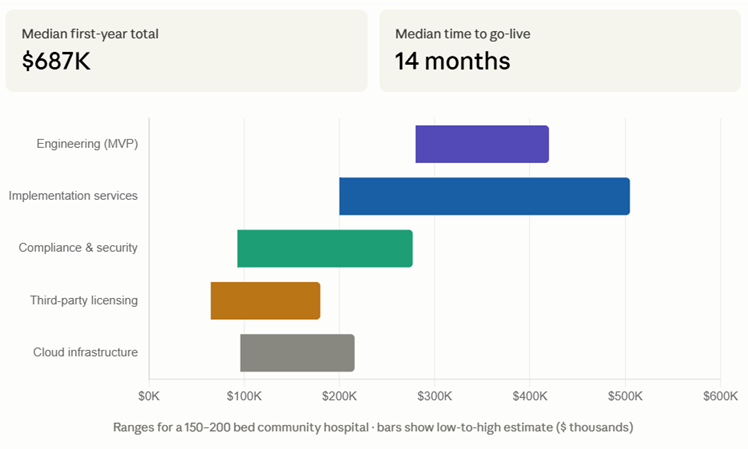
EB Index 2026: The median total first-year cost for a community hospital HMS build, engineering, third-party licensing, implementation services, and compliance, was $687,000 for a 150-bed hospital deployment. The median time from project start to go-live was 14 months. The largest timeline driver was interface testing with legacy lab and pharmacy systems (median 11 weeks for 5 interfaces).
This sprint delivers an HMS MVP covering the five highest-priority modules for a community hospital: Patient Registration/MPI, OPD Management, Inpatient/Bed Management, Billing Foundation, and Clinical Documentation Layer. The ED module, OR module, and advanced analytics are sprint 2.
Week 1: Discovery, Requirements, and Architecture
Hospital requirements session: bed count, departments, specialty services, current system, primary replacement drivers, payer mix, key interfaces required. Data model designed: Patient, Encounter, Order, Result core entities. Module scope confirmed for MVP. Technology stack selected. HIPAA data flow map produced. Interface engine selected (Mirth Connect recommended). Drug database and ICD-10/CPT licensing initiated.
Week 2: Infrastructure and Compliance Foundation
AWS HIPAA-eligible infrastructure provisioned: RDS PostgreSQL Multi-AZ, ECS for application containers, S3 for document storage, CloudWatch for logging and monitoring, CloudTrail for audit trail. Encryption at rest on all databases. TLS 1.2+ enforced. BAA confirmed with AWS. Mirth Connect deployed. CI/CD pipeline with SAST.
Week 3: Master Patient Index and Patient Registration
MPI data model implemented. Duplicate detection algorithm (probabilistic matching). Patient registration workflow: demographics entry, insurance capture, consent collection, MRN assignment. Insurance eligibility verification integration (Availity or Change Healthcare real-time eligibility API). Patient search interface.
Week 4: Appointment Scheduling and OPD Foundation
Provider and location master data. Appointment type configuration. Appointment scheduling with availability management. Online self-scheduling patient portal (basic). Appointment reminder system (SMS integration). OPD patient flow tracking: checked in, waiting, in room, with provider, ready for checkout.
Week 5: CPOE Foundation, Order Entry
Order entry interface: lab orders, imaging orders, medication orders, referral orders. Order routing rules: which orders go to which department. Order status tracking: ordered, acknowledged, in progress, resulted, cancelled. Clinical decision support foundation: allergy check, drug interaction check against drug database.
Week 6: Clinical Documentation Layer, Part 1
Progress note template framework. SOAP note template. Vital signs entry and display. Problem list management: add, modify, resolve diagnoses (ICD-10 coded). Medication list management: add, discontinue, modify medications. Allergy and adverse reaction documentation.
Week 7: Clinical Documentation Layer, Part 2
History and Physical template. Nursing assessment template. Medication Administration Record (MAR) framework. Discharge summary template with auto-population from clinical data. Document storage and retrieval (S3 integration). Voice recognition integration (Dragon Medical One API).
Week 8: Inpatient Admission Workflow
Admission order entry. Inpatient vs. observation status documentation. Admission source documentation. Admission H&P tracking with completion alerts. Attending physician assignment. Primary diagnosis and admitting diagnosis documentation.
Week 9: Bed Management and Ward Operations
Bed board implementation: real-time bed status (occupied, available, dirty, blocked, held). Bed request and assignment workflow. Housekeeping task generation on discharge. Bed turnaround time tracking. Patient location tracking. Ward census by unit and by service.
Week 10: Nursing Workflow and Shift Management
Nurse patient assignment. Nursing dashboard: patient list, vital signs, pending orders, outstanding tasks. Shift handoff documentation: auto-generated handoff report from current clinical data. Nursing alert management: critical lab values, medication due, vital sign thresholds.
Week 11: HL7 Interface, Lab Integration
HL7 v2 ADT outbound to LIS (A01 admit, A02 transfer, A03 discharge, A08 update). HL7 v2 ORM outbound to LIS (O01 order). HL7 v2 ORU inbound from LIS (R01 result). Critical value alert on result receipt. Lab result display in patient chart. Lab result trending view.
Week 12: HL7 Interface, Pharmacy and ADC Integration
HL7 v2 RXO outbound to pharmacy system (medication order transmission). HL7 v2 RXR inbound from pharmacy (verification status). ADC cabinet integration (Pyxis or Omnicell dispense transaction). BCMA barcode medication administration: patient wristband scan, medication barcode scan, five-rights verification. MAR auto-documentation from BCMA scan.
Week 13: Charge Capture and Billing Foundation
Charge master data model and upload. Automatic charge posting from clinical events: room and board daily charge, lab charge on result, procedure charge on documentation. Manual charge entry for complex cases. Charge audit: review and correction of charges before claim generation. UB-04 claim generation for inpatient claims.
Week 14: Insurance and Revenue Cycle
Insurance plan master data. Claim scrubbing rules for common denial reasons. Electronic claim submission to clearinghouse (Change Healthcare or Availity). ERA (835) receipt and payment posting. Patient statement generation. Days in AR calculation and reporting. Denial tracking and work queue.
Week 15: Discharge Workflow
Discharge order workflow. Discharge planning documentation: case management assessment, social work assessment, discharge destination. Medication reconciliation at discharge. Patient discharge instructions generation. Discharge summary completion tracking. Discharge disposition documentation.
Week 16: Patient Portal
Patient registration and login. Appointment scheduling (linked to OPD scheduling module). Clinical record access: visit summaries, lab results, medications, immunizations (FHIR Patient Access API). Secure messaging with provider. Online bill payment. Mobile-optimized responsive design.
Week 17: FHIR R4 APIs
FHIR R4 server configuration. Patient, Encounter, Observation, Condition, MedicationRequest, AllergyIntolerance, DiagnosticReport, DocumentReference resources exposed. SMART on FHIR authorization for patient portal access. US Core profile conformance validation. FHIR conformance statement published.
Week 18: Reporting and Analytics Foundation
Operational dashboard: daily census, admissions and discharges, ED volumes, OR utilization, bed occupancy. Financial dashboard: daily charges, cash collections, aged AR, denial rate. Quality metrics: ALOS by DRG, readmission rate, LOS outliers. Standard report library: census report, LOS report, financial summary, discharge report.
Week 19: QA, Security Review, and HIPAA Compliance Review
Full system Qall user workflows tested across all modules. HIPAA audit trail completeness review. Access control review: role-based access verified for all user types (physician, nurse, billing staff, administrator). Penetration test initiated. HIPAA risk assessment completed. Drug database integration validated. HL7 interface end-to-end testing with lab and pharmacy sandboxes.
Week 20: Pilot Go-Live Preparation and Handover
Pilot hospital data migration: patient master data loaded from legacy system. User accounts created and role assignments configured. Staff training completed by department. Go-live readiness checklist review. Parallel operation plan: legacy system and new HMS running simultaneously for 2 weeks. Go-live support staffing plan. Handover documentation delivered.
HIPAA:
The HMS handles ePHI across every module, patient demographics, clinical documentation, billing information, lab results, imaging reports. Full HIPAA Security Rule compliance is required: encryption at rest and in transit, audit controls, access controls, automatic logoff, backup and disaster recovery. The HMS vendor is a Business Associate of the hospital, BAA required.
Audit trail requirements for HMS: every access to patient records must be logged, who accessed which patient’s record, when, from which workstation, and what action was taken. The audit log must be immutable and retained for 6 years.
Meaningful Use / Promoting Interoperability:
CMS’s Promoting Interoperability program (formerly Meaningful Use) requires hospitals to demonstrate that they are using certified EHR technology to improve healthcare quality and efficiency. The HMS’s clinical documentation layer must be certified under the ONC Health IT Certification Program (21st Century Cures edition) if the hospital intends to receive Promoting Interoperability incentive payments or avoid payment penalties.
ONC certification is a significant undertaking, it requires conformance to the 2015 Edition Cures Update criteria, including FHIR R4 API requirements, patient access provisions, and interoperability standards. Build to the ONC certification criteria from the beginning if hospital certification is in scope.
Joint Commission standards:
The Joint Commission surveys hospitals against their Comprehensive Accreditation Manual for Hospitals (CAMH). HMS-relevant Joint Commission standards:
RC.01.01.01: The hospital maintains complete and accurate medical records for each patient. RC.02.01.01: Entries in the medical record are authenticated. RC.02.03.07: Operative reports are written or dictated immediately after a procedure. UP.01.01.01: Universal Protocol, pre-procedure verification, site marking, and time-out.
The HMS must support compliance with these standards through: documentation completeness tracking, authentication workflows, operative note completion monitoring, and Universal Protocol documentation.
The case for cloud:
Lower upfront capital cost: no server hardware purchase, no data center infrastructure. OpEx model (monthly subscription) rather than CapEx.
Automatic updates: the vendor pushes updates without on-site IT involvement. Security patches are applied centrally.
Disaster recovery: built into the cloud infrastructure, multi-availability zone deployment with automated failover. The hospital does not need to maintain a separate DR site.
Accessibility: physicians and staff can access the system from any location with internet access. Supports telehealth workflows, remote physician access, and multi-site deployments.
The case for on-premises (or private cloud):
Data sovereignty: some hospital boards and legal counsel prefer that patient data remain on the hospital’s own infrastructure. Regulatory requirements in some states or for some federal programs require data residency controls that on-premises deployment satisfies definitively.
Network dependency: rural hospitals with unreliable internet connectivity cannot risk clinical workflow dependency on cloud connectivity. On-premises deployment continues to function during internet outages.
Legacy system integration: some legacy lab analyzers, pharmacy systems, and biomedical equipment interface only through local network connections. On-premises or hybrid deployment enables integration without VPN complexity.
The hybrid recommendation:
For most US community hospitals in 2026, a cloud-hosted HMS with on-premises interface engines for legacy system integration is the right architecture. The HMS application runs in AWS or Azure. The Mirth Connect interface engine runs on a small server in the hospital’s data center, it receives HL7 messages from local lab analyzers and pharmacy systems and forwards them to the cloud HMS over an encrypted VPN. This hybrid model provides the operational and financial benefits of cloud hosting without sacrificing legacy system integration.
The implementation methodology:
HMS implementations follow a predictable methodology regardless of vendor:
Phase 1, Discovery (4–6 weeks): Workflow mapping, current system data export, integration inventory, go-live timeline planning, governance structure establishment.
Phase 2, Configuration (8–12 weeks): Charge master build, clinical template development, user role configuration, interface engine configuration and testing.
Phase 3, Testing (4–6 weeks): End-to-end workflow testing, interface testing, performance testing under simulated load, user acceptance testing.
Phase 4, Training (4–6 weeks): Role-based training, physicians, nurses, registration staff, billing staff, pharmacy, lab, radiology. Training in training mode with synthetic patients.
Phase 5, Go-live (2–4 weeks): Parallel operation (old and new system simultaneously), go-live cutover, hyper-care support (vendor on-site or on-call 24/7 for the first two weeks).
Phase 6, Optimization (ongoing): Post-go-live performance monitoring, user feedback collection, configuration adjustments, additional training.
The physician adoption challenge:
Physician adoption is the make-or-break variable in every HMS implementation. Physicians who refuse to use the system, who continue to dictate notes for transcription, who call the nursing station for lab results rather than using the EMR, who write paper orders, undermine the entire value proposition of the HMS.
The physician adoption playbook:
Physician champion: identify a respected physician leader who is enthusiastic about the new system and willing to advocate publicly for it. The physician champion’s endorsement matters more than any vendor sales pitch.
Physician input in template design: physicians who helped design the documentation templates are more likely to use them. Involve specialty leads in template development before go-live.
Efficiency demonstration: show physicians concretely how the system reduces their documentation burden, not abstract time savings claims, specific workflow comparisons with measured time differences.
At-the-elbow support: during go-live, provide every physician with an at-the-elbow support resource, a super-user or vendor support person who follows them through their first day of rounds and helps them navigate the system in real workflows.
Post-go-live optimization:
The first 90 days post-go-live are the highest-risk period for HMS implementations. Usage patterns are established, workarounds are created (and become entrenched), and early dissatisfaction either gets addressed or becomes permanent.
Build a 90-day optimization plan into every HMS implementation: weekly review of system usage metrics, weekly department-level feedback sessions, rapid response to reported issues (< 48 hours for critical workflow problems), and a transparent roadmap for addressing non-critical feedback.
An Indian engineering partner is the wrong call for your HMS build if: the hospital procurement requires that all development staff be located in the United States, some federal healthcare programs (VA, DoD, federally qualified health centers receiving specific federal grants) have US-person or US-location requirements for technology vendors. If the implementation requires daily on-site presence at the hospital for clinical workflow configuration and go-live support, we staff a US-based implementation lead for every hospital HMS deployment, but if the hospital requires that all implementation staff be physically present and US-located throughout the project, confirm the staffing model before contracting. If the HMS targets a federal healthcare market (VA Community Care, CMS direct programs, Indian Health Service) that has specific FedRAMP security requirements, FedRAMP authorization requires US-person handling of certain data that creates constraints for offshore development teams.
For the vast majority of US community hospital HMS builds, the software engineering, the data model, the HL7 interface development, the FHIR API implementation, the clinical template development, the reporting and analytics, this is engineering work that scales well across time zones. The clinical workflow configuration and go-live support requires US-based resources for the hospital-facing activities. We provide that through our US-based implementation team working alongside the Indore engineering team.
Score each row 0 (absent), 1 (partial), or 2 (fully present). Maximum score: 70.
| # | Criterion | Weight | Your Score |
| 1 | Master Patient Index with probabilistic duplicate detection | 2× | /4 |
| 2 | Real-time insurance eligibility verification at registration | 2× | /4 |
| 3 | Real-time bed board with WebSocket-based updates | 2× | /4 |
| 4 | CPOE with drug interaction and allergy clinical decision support | 2× | /4 |
| 5 | Barcode medication administration (BCMA) with five-rights verification | 2× | /4 |
| 6 | HL7 v2 ADT/ORM/ORU interfaces for lab, pharmacy, and ADC | 2× | /4 |
| 7 | UB-04 and CMS-1500 claim generation with claim scrubbing | 2× | /4 |
| 8 | Electronic claim submission through clearinghouse (837I/837P) | 2× | /4 |
| 9 | FHIR R4 Patient Access API (ONC certification or equivalent) | 2× | /4 |
| 10 | HIPAA audit trail, every patient record access logged immutably | 2× | /4 |
| 11 | Discharge summary auto-population from clinical data | 1× | /2 |
| 12 | Universal Protocol timeout documentation (Joint Commission) | 1× | /2 |
| 13 | Mobile-optimized clinical documentation for physician rounding | 1× | /2 |
| 14 | Voice recognition integration (Dragon Medical or equivalent) | 1× | /2 |
| 15 | Patient portal with SMART on FHIR access | 1× | /2 |
| 16 | Charge master with automatic charge capture from clinical events | 1× | /2 |
| 17 | ERA (835) receipt and automatic payment posting | 1× | /2 |
| 18 | Denial tracking and work queue for revenue cycle management | 1× | /2 |
| 19 | LOS tracking with DRG expected LOS comparison | 1× | /2 |
| 20 | ED tracking board with door-to-physician time measurement | 1× | /2 |
| 21 | Operational analytics dashboard (census, ALOS, occupancy, DAR) | 1× | /2 |
| 22 | SOC 2 Type II in progress or achieved | 1× | /2 |
| 23 | Multi-tenant architecture for multi-hospital deployment | 1× | /2 |
| 24 | Disaster recovery with tested RTO/RPO | 1× | /2 |
| 25 | BAA executed with all sub-processors handling ePHI | 1× | /2 |
Score interpretation:
An HMS (Hospital Management System) is the comprehensive operational platform covering administrative, clinical, and financial workflows, patient registration, bed management, OPD/IPD workflow, billing, pharmacy integration, lab integration, and reporting. An EHR (Electronic Health Record) is the clinical documentation and patient record layer, physician notes, nursing assessments, medication records, and clinical history. In some implementations the EHR is part of the HMS. In others, a standalone EHR (Epic, Cerner) is integrated with a separate HMS for administrative and billing functions.
An HMS MVP covering the five core modules, Patient Registration, OPD, Inpatient/Bed Management, Billing Foundation, and Clinical Documentation, takes 20–28 weeks to build. A full HMS covering all 10 modules with FHIR APIs, patient portal, mobile app, and analytics takes 32–44 weeks. Implementation at a hospital (data migration, interface configuration, staff training, go-live) adds 4–6 months to the timeline beyond software delivery.
HL7 v2 is the dominant message-based protocol for real-time clinical event notifications in US health systems, used for patient admission and discharge events (ADT messages), lab orders and results (ORM/ORU messages), medication orders (RXO messages), and documents (MDM messages). Every lab analyzer, pharmacy system, and automated dispensing cabinet in a hospital communicates through HL7 v2 interfaces. An HMS without HL7 v2 integration capability cannot connect to the hospital’s existing clinical equipment.
An HMS MVP for a 150–200 bed community hospital costs $280,000–$420,000 in engineering over 20–28 weeks. A full 10-module HMS costs $480,000–$750,000 over 32–44 weeks. Total first-year cost including engineering, third-party licensing (drug database, ICD-10/CPT codes), implementation services (data migration, interfaces, training), and compliance averages $687,000 based on the 2026 EngineerBabu Healthcare Build Report.
Barcode Medication Administration (BCMA) is the process of scanning the patient’s wristband barcode and the medication barcode before administration to verify the five rights, right patient, right medication, right dose, right route, right time. BCMA is one of the most effective patient safety technologies in hospital care, it reduces medication administration errors by 41–85% in published studies. The Joint Commission and CMS both include medication safety standards that BCMA supports. Any HMS built for US hospital deployment must include BCMA capability.
Inpatient status means the patient is admitted to the hospital under a physician’s order that the patient requires medically necessary hospital care for a condition expected to require at least 2 midnights of hospital care. Inpatient is billed under Medicare Part A (hospital insurance) using a DRG-based payment. Observation status means the patient is receiving hospital services but does not meet inpatient criteria, they are technically outpatients receiving hospital-level services. Observation is billed under Medicare Part B at a lower reimbursement rate, and patients face higher out-of-pocket costs. The distinction has significant financial implications for both the hospital and the patient, and the HMS must support the documentation and billing workflows for both statuses correctly.
ONC certification is required if the hospital intends to receive CMS Promoting Interoperability incentive payments or avoid payment penalties for not using certified health IT. ONC certification requires conformance to the 2015 Edition Cures Update criteria, including FHIR R4 APIs, patient access provisions, and interoperability standards. ONC certification is a significant undertaking (3–6 months of certification testing and remediation) that adds cost to the HMS build. For hospitals not participating in CMS Promoting Interoperability programs, ONC certification is not legally required, but the FHIR R4 API capabilities required for ONC certification are increasingly expected by hospital procurement teams regardless.
The five most common failure modes in HMS implementations are: (1) physician adoption failure, physicians route around the system rather than using it, often because documentation workflows add time rather than saving it; (2) data migration errors, legacy patient data migrated incorrectly creates duplicate records, missing clinical history, and billing errors; (3) interface failures, HL7 interfaces to lab or pharmacy systems fail to transmit orders or results correctly, disrupting clinical workflows; (4) inadequate training, staff go-live undertrained, creating support burden and workarounds that persist; and (5) scope creep, customization requests during implementation expand scope and timeline without budget adjustment.
The $2.3 million system that could not print a discharge summary is not a cautionary tale about expensive software. It is a cautionary tale about the gap between software capability and workflow fit.
Every hospital management system works in a demo. The question is whether it works when a nurse is managing 8 patients in the last hour of a 12-hour shift, when a physician is completing discharge orders for 6 patients before afternoon clinic, when the billing team is processing 200 claims before the month-end close.
The HMS that survives those moments is the one that was designed for them, where the discharge summary auto-populates instead of requiring 14 mandatory fields, where the bed board updates in real time without a page refresh, where the BCMA scan takes 4 seconds instead of 40.
That is what we build.
Not the most feature-complete HMS. The most workflow-fit HMS for the specific hospital, the specific clinical workflows, the specific staff capabilities, and the specific operational challenges of the community hospital that is replacing something that no longer serves them.
If you want 30 minutes to talk through your HMS build, which modules to prioritize, what the right architecture is, how to sequence the HL7 interfaces, what the implementation approach should look like, book a call with me or Aditi. No slides. No pitch. Just the product conversation.
Book your product audit