How to Build a Construction ERP, Project Costing, Subcontractor Management, Equipment Tracking, and Billing 2026



Create engaging, high-performance mobile applications tailored to your business needs. We craft future-ready apps that offer smooth user experiences on all devices.
Build robust and scalable websites and CMS platforms that help you manage content effortlessly. Our development ensures a seamless digital presence.
Launch secure, feature-rich online stores with intuitive shopping experiences. We build tailored eCommerce platforms designed for growth.
Design captivating games with immersive gameplay and stunning graphics. From concept to launch, we build engaging experiences that players love.
Enhance your customer relationships with customized Salesforce implementations. Drive growth and efficiency with smarter CRM solutions.
Harness artificial intelligence and machine learning to automate workflows and gain actionable insights. Our AI transforms data into smart decisions.
Accelerate your software delivery lifecycle with continuous integration, delivery, and infrastructure automation to boost efficiency.
Hire app developers ready to turn your ideas into sleek, high-performing mobile apps for any platform.
Bring in frontend pros who craft smooth, beautiful, and user-friendly interfaces that your visitors will love.
Get backend developers who build fast, secure, and reliable systems to keep everything running behind the scenes.
Hire eCommerce developers who build secure, scalable online stores designed to offer seamless shopping and grow your sales.
Get dedicated developers committed to your projects, delivering consistent quality and speed as an extension of your team.
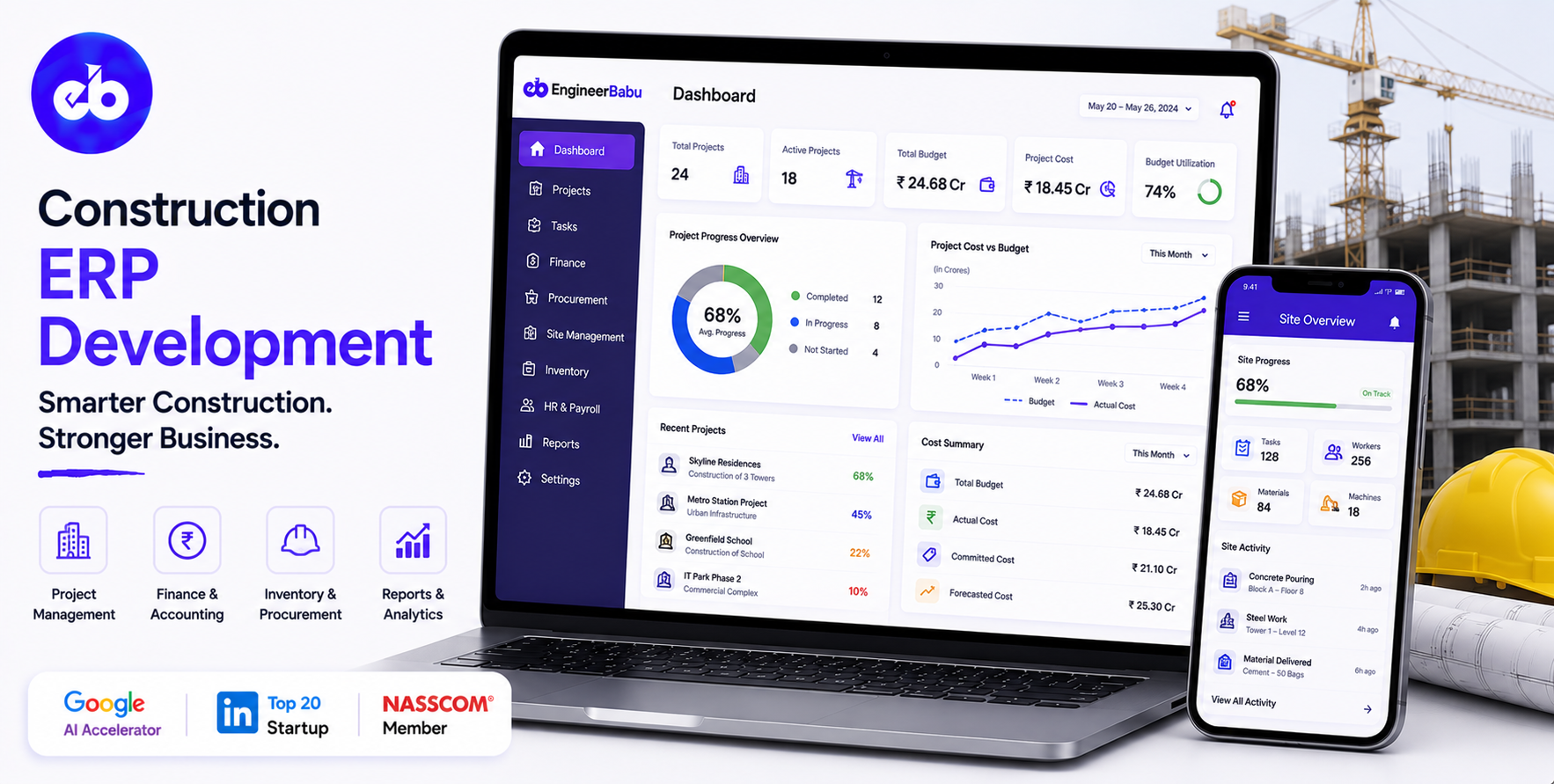
Construction is one of the last major industries where billion-dollar projects are still managed on spreadsheets, WhatsApp groups, and tribal knowledge sitting in a project manager’s head. The consequences are well-documented by Mckinsey: 98% of construction projects over $1 billion experience cost overruns, with an average overrun of 80%.
The primary cause in most post-mortems is not bad engineering. It is bad information management, budgets that do not reflect actuals, subcontractor bills that are not matched to work certified, equipment tracked by phone call, and variations approved verbally with no audit trail.
A construction ERP development does not make construction simpler. It makes information flow correctly so that the people making decisions have the data they need when they need it. That is what brings a project in on budget and on time.
The global construction software market is projected to reach $19 billion by 2030. The buyers are mid-to-large contractors, real estate developers with in-house construction teams, and infrastructure companies managing multiple simultaneous projects.
EngineerBabu built enterprise operations management for Adani Group, one of India’s largest infrastructure and construction conglomerates. CMMI Level 5. Google AI Accelerator 2024 Top 20. Contact: mayank@engineerbabu.com
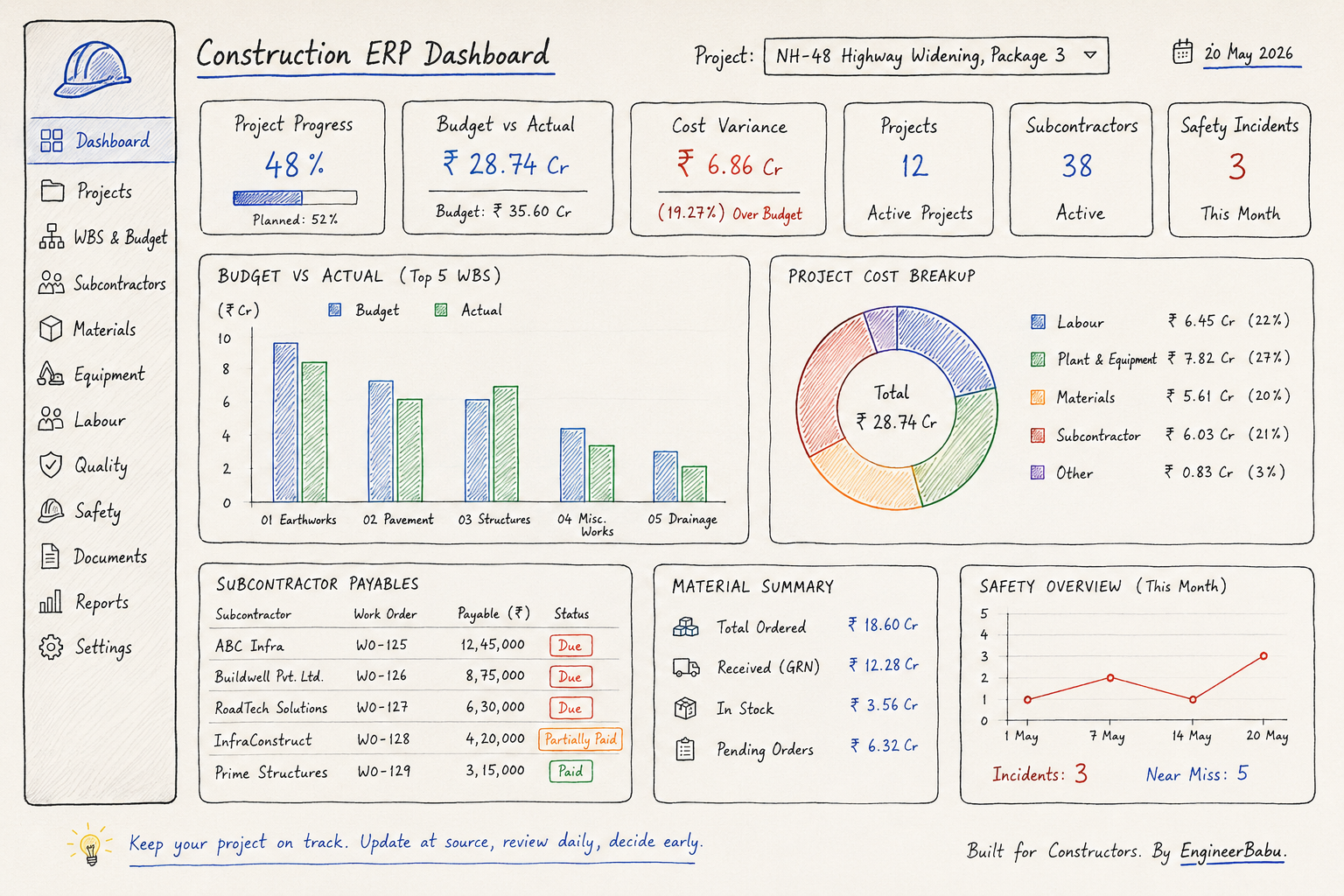
Construction is project-based. Every module in the ERP must understand the project as its primary organising unit, every cost, every contract, every document, every milestone belongs to a project.
| Domain | ERP Function |
| Project setup | WBS creation, budget allocation, schedule baseline |
| Estimation and tendering | BOQ management, rate analysis, tender submission |
| Contracts management | Main contract, subcontracts, supply contracts |
| Subcontractor management | Work orders, progress billing, retention, payments |
| Project costing | Budget vs actual tracking, cost-to-complete forecasting |
| Material management | Procurement, GRN, inventory at site |
| Equipment management | Fleet tracking, utilisation, maintenance, fuel |
| Labour management | Daily muster, attendance, payroll at site |
| Quality management | Inspection test plans, NCRs, defect tracking |
| Safety management | Incident reporting, toolbox talks, permit to work |
| Billing to client | Running account bills, variation orders, retention |
| Document management | Drawings, specifications, RFIs, submittals |
| Financial management | Cost accounting, cash flow, P&L per project |
| Reporting and MIS | Project dashboard, variance reports, management reports |
The WBS (Work Breakdown Structure) is the foundational data structure of construction project management. Every other module, costs, contracts, billings, reports, rolls up to the WBS.
The WBS hierarchy:
Project: NH-48 Highway Widening, Package 3
│
├─ 01, Earthworks
│ ├─ 01.01, Excavation (Cut)
│ ├─ 01.02, Embankment (Fill)
│ └─ 01.03, Compaction
│
├─ 02, Pavement
│ ├─ 02.01, Subgrade preparation
│ ├─ 02.02, Granular sub-base (GSB)
│ ├─ 02.03, Wet Mix Macadam (WMM)
│ └─ 02.04, Bituminous layers
│
├─ 03, Structures (Bridges and Culverts)
│ ├─ 03.01, Foundation
│ ├─ 03.02, Substructure
│ └─ 03.03, Superstructure
│
└─ 04, Miscellaneous Works
Budget allocation per WBS element:
Each WBS element has a budgeted cost, broken down by cost category:
| Cost Category | WBS 01.01 Excavation Budget |
| Labour | ₹12,50,000 |
| Plant and equipment | ₹18,00,000 |
| Materials | ₹3,20,000 |
| Subcontractor | ₹0 |
| Overhead | ₹2,50,000 |
| Total | ₹36,20,000 |
Budget vs actual tracking:
As costs are posted, subcontractor bills approved, material GRNs processed, labour payroll recorded, equipment charges allocated, every transaction is coded to a WBS element and a cost category. The budget vs actual view shows at every level of the WBS how much has been spent against what was budgeted.
Cost-to-complete forecasting:
The ERP forecasts the expected cost at completion by combining actual costs incurred to date with the estimator’s view of what it will cost to complete the remaining work. If the original budget was ₹36.2 lakh for excavation, actual costs so far are ₹22 lakh, but the work is only 40% complete rather than the expected 60%, the ERP flags that this item is trending over budget and the cost at completion will likely exceed the budget by ₹10 to 15 lakh.
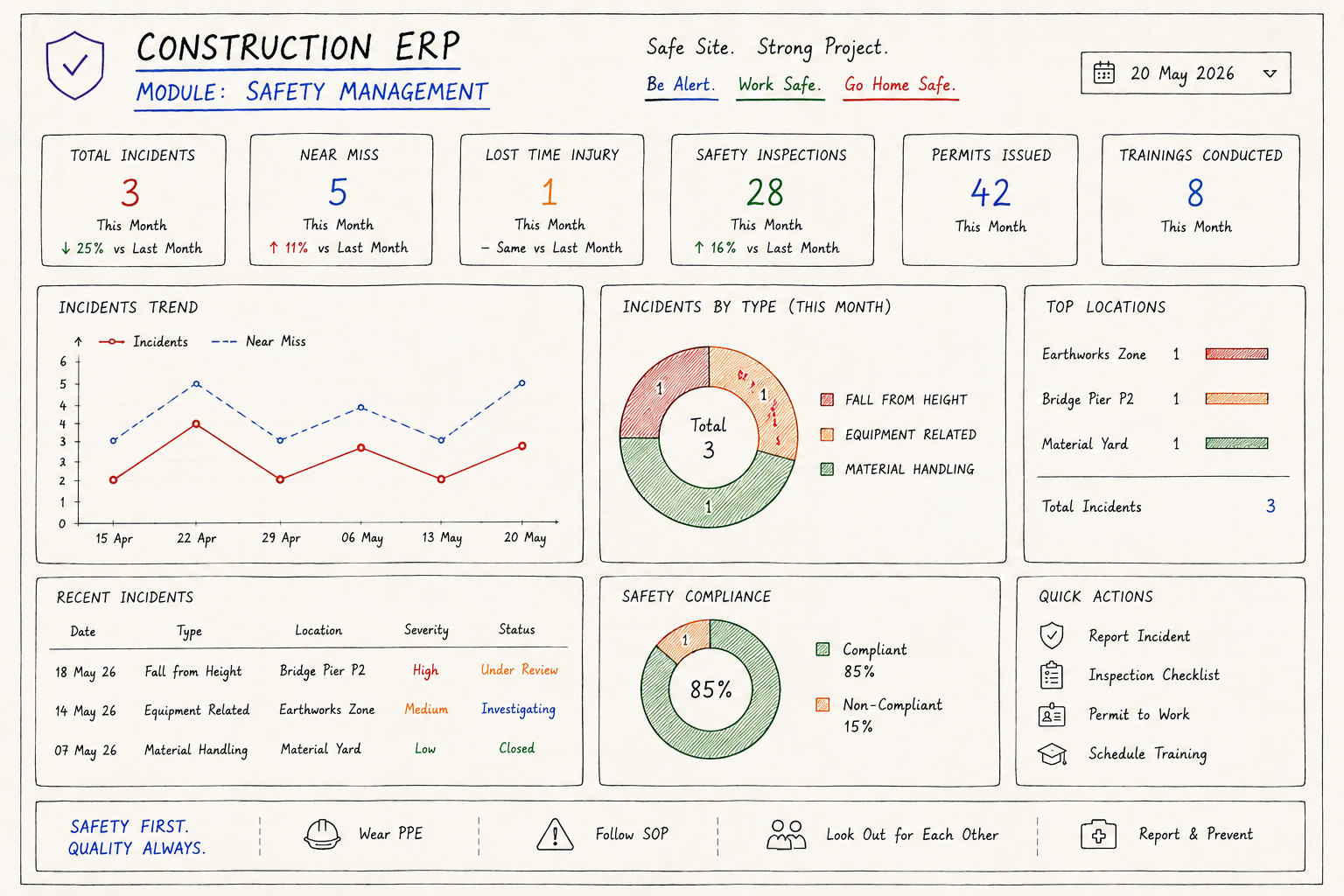
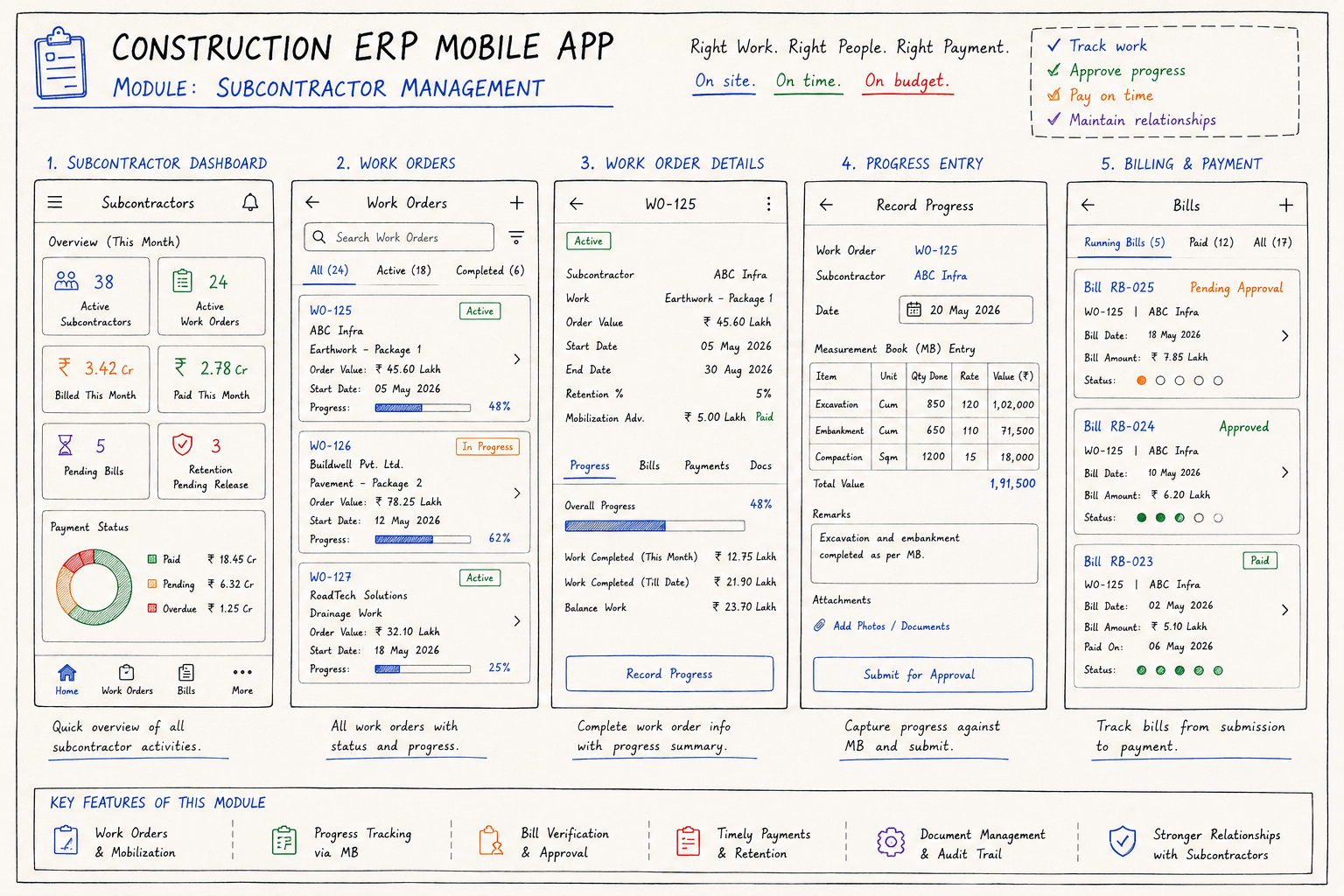
Subcontractors account for 50 to 80% of total project cost on most construction projects. Managing subcontractor work orders, progress measurement, billing, and payment, without a system, is one of the highest sources of cost overruns and project disputes.
The subcontractor lifecycle in the ERP:
| Stage | Action | ERP Function |
| Tendering | Subcontractor quotes received and evaluated | Bid comparison, rate analysis |
| Work order | Subcontract work order issued | Work order generation, digital acceptance |
| Mobilisation | Subcontractor begins work | Mobilisation advance tracked against work order |
| Progress measurement | Quantity of work completed measured | Measurement book (MB) entries |
| Running account bill | Subcontractor submits bill for work done | Bill checking against MB, deductions calculated |
| Bill certification | Site engineer and project manager certify | Approval workflow |
| Payment | Payment released after deductions | Payment voucher, bank transfer |
| Retention | Percentage held until defect liability period | Retention schedule, release on completion |
| Final account | All bills reconciled, final payment | Final account statement |
The measurement book (MB):
In Indian construction contracting, and many international models, every quantity of work is recorded in a Measurement Book before it can be billed. The MB records what work was done, where, by which subcontractor, measured by whom, and on what date.
The ERP digitises the MB, replacing the physical register with a structured digital entry that is linked to the WBS, the subcontract work order, and the payment cycle.
Retention management:
Retention is typically 5 to 10% of every bill amount, held by the main contractor as security against defects during the Defect Liability Period (DLP).
The ERP tracks retention withheld from each bill, the total retention held per subcontractor, the DLP expiry date, and generates the retention release on the correct date, preventing the common situation where subcontractors are not paid their retention because no one tracked the DLP end date.
The project costing module is where all financial threads come together. It gives the project director and management team the real-time picture of where the project stands financially, not where the estimate said it would stand six months ago.
Cost ledger by WBS and cost category:
Every transaction in the ERP, material purchase, subcontractor bill, equipment charge, labour payroll, is coded to a WBS element and a cost category. The cost ledger shows:
| WBS Element | Budget | Committed | Actual | CTC | EAC | Variance |
| 01.01 Excavation | ₹36.2L | ₹28.5L | ₹22.1L | ₹18.4L | ₹40.5L | -₹4.3L |
| 02.03 WMM | ₹45.8L | ₹40.2L | ₹31.5L | ₹12.6L | ₹44.1L | +₹1.7L |
Where:
Earned Value Management (EVM):
For projects with client contractual requirements for EVM reporting, government infrastructure contracts, World Bank funded projects, the ERP calculates:
| EVM Metric | Formula | Meaning |
| Planned Value (PV) | Budgeted cost of work scheduled | What should have been spent |
| Earned Value (EV) | Budgeted cost of work performed | What has been earned |
| Actual Cost (AC) | Actual cost incurred | What has actually been spent |
| CPI (Cost Performance Index) | EV / AC | Are we spending efficiently? CPI < 1 = over budget |
| SPI (Schedule Performance Index) | EV / PV | Are we on schedule? SPI < 1 = behind schedule |
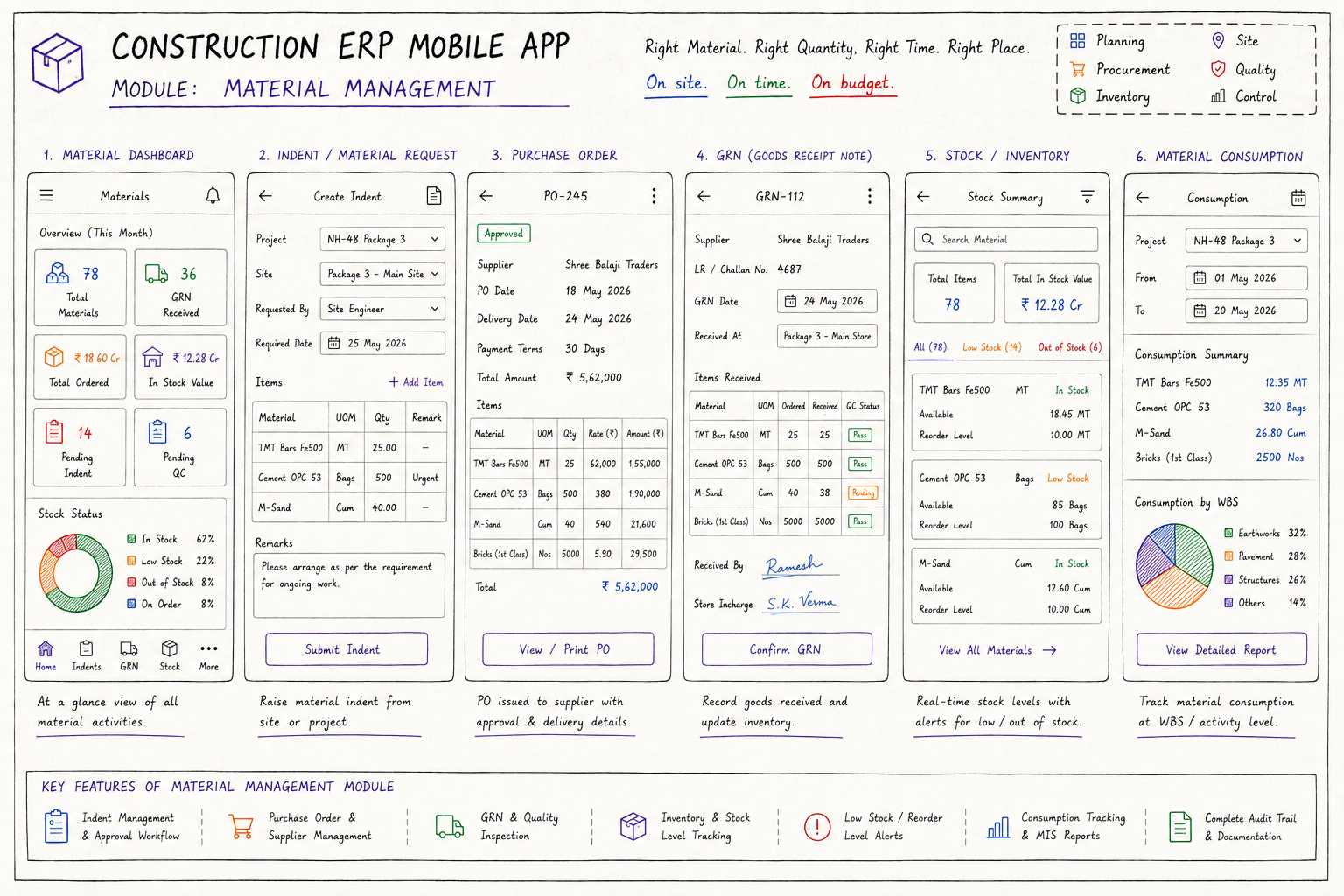
Material waste and theft at construction sites is estimated to add 5 to 15% to project costs in most Indian and Southeast Asian markets.
A material management system that tracks every kg of cement, every tonne of steel, and every litre of fuel from purchase order through GRN through consumption, and compares actual consumption against theoretical consumption from the bill of quantities, eliminates most of this leakage.
The material flow:
| Stage | Action | ERP Function |
| Indent | Site raises material requirement | Material indent, budget check |
| Purchase order | Material ordered from supplier | PO generation, supplier acknowledgement |
| GRN | Material received at site | Weighbridge or count-based receipt, quality check |
| Issue | Material issued to work area | Issue note, WBS code, receiving foreman sign |
| Consumption tracking | Actual vs theoretical consumption | Wastage report, variance flag |
| Return | Unused material returned to store | Return note, inventory update |
| Stock audit | Physical count vs system count | Variance report, investigation |
Theoretical vs actual consumption:
The ERP calculates theoretical material consumption from the bill of quantities and the current work progress. If 500 cubic metres of concrete has been poured, the theoretical cement consumption at 6.5 bags per cubic metre is 3,250 bags.
If the GRN shows 3,600 bags were received and the store shows 150 bags in stock, the actual consumption is 3,450 bags, a wastage of 200 bags (6.1% over theoretical). This variance is flagged for investigation. It might be genuine wastage.
It might be measurement error. It might be pilferage. The system surfaces it; the project manager investigates it.
Construction equipment, excavators, concrete batching plants, piling rigs, transit mixers, represents a massive capital investment.
Managing utilisation, maintenance, fuel consumption, and inter-project transfer without a system means the company never knows whether it owns the right equipment, whether that equipment is being used efficiently, or whether maintenance is being performed on time.
Equipment register per asset:
| Field | Details |
| Asset ID | Unique equipment identifier |
| Description | Make, model, year, registration |
| Current project | Which project is this equipment deployed to |
| Daily hire rate | Internal charge rate per day to the project |
| Operator assigned | Current operator name and licence |
| Odometer/hours | Running meter, for maintenance scheduling |
| Last service date | Preventive maintenance record |
| Next service due | Calculated from service interval + current hours |
| Fuel consumption benchmark | Litres per hour at standard utilisation |
Daily utilisation reporting:
Every equipment unit on site has a daily utilisation log, start time, end time, idle time, breakdown time, and operator reported. This log is submitted by the site supervisor or operator through the mobile app. The ERP calculates:
Utilisation rate, hours worked / total shift hours. If a 10-hour shift shows 4 hours of work and 6 hours of idle time, utilisation is 40%, flag for review. Fuel efficiency, actual fuel consumed / benchmark consumption × hours worked.
A significant deviation (actual > benchmark by more than 10%) suggests engine problems, excessive idling, or fuel pilferage.
Getting paid by the client, on time, for the correct amount, requires a structured billing process that matches the contract terms exactly. A running account bill (RA bill) is the periodic claim the contractor makes to the client for work completed to date.
The RA bill generation:
| Component | Source | Amount |
| Work done this period | Measurement book quantities × contract rates | ₹X |
| Cumulative work done | Sum of all periods to date | ₹Y |
| Less: previous certified | Amount certified in last RA bill | ₹Z |
| Net this period | Current period work done | ₹X |
| Less: advance recovery | Recovery of mobilisation advance | ₹A |
| Less: retention | Retention percentage | ₹R |
| Less: other deductions | Liquidated damages, material recoveries | ₹D |
| Net payable | ₹P |
Variation order management:
When scope changes, the client adds work, designs change, unforeseen conditions require additional work, the variation order process formalises the change and its price. The ERP manages variation orders through their lifecycle: identification, claim submission, client review, negotiation, approval, and incorporation into the next RA bill.
Construction generates enormous volumes of technical documents, drawings, specifications, RFIs, submittals, inspection records, test reports, insurance certificates, and correspondence. A document management system integrated with the ERP links every document to the relevant project, WBS element, subcontract, or payment.
The document register:
| Document Type | Metadata Tracked | Workflow |
| Drawings | Revision number, discipline, issue date, issued by | Drawing issue register, superseded versions archived |
| RFI (Request for Information) | Raised by, raised to, response due date, status | Approval workflow, response time tracking |
| Submittals | Document type, submitted by, review status | Engineer review, approval, return with comments |
| Method statements | Submitted by, reviewed by, approval date | Site activity linked to approved method statement |
| Quality test reports | Test type, date, result, acceptance criteria | Pass/fail flagging, linked to WBS activity |
| Inspection records | ITP checkpoint, inspection date, defects found | NCR generation for defects |
| Module | Cost Range (USD) | Notes |
| WBS management + budget allocation | $8K – $15K | Multi-level WBS, cost category breakdown |
| Subcontractor management + MB | $10K – $20K | Work orders, MB, billing, retention |
| Project costing + EVM | $10K – $18K | Budget vs actual, CTC forecasting |
| Material management at site | $8K – $15K | GRN, issue, theoretical vs actual |
| Equipment management + fleet tracking | $8K – $15K | Utilisation, fuel, maintenance |
| Labour management + site payroll | $6K – $12K | Daily muster, payroll |
| Client billing + variation orders | $8K – $15K | RA bill generation, VO workflow |
| Document management system | $6K – $12K | Drawing register, RFI, submittals |
| Quality and safety management | $5K – $10K | ITP, NCR, incident reporting |
| Mobile app for site teams (Flutter) | $8K – $15K | |
| Analytics and MIS dashboard | $5K – $10K | |
| AWS + VAPT + Year 1 ops | $5K – $10K | |
| Total | $87K – $167K | Full construction ERP |
EngineerBabu built enterprise operations management for Adani Group. CMMI Level 5. Google AI Accelerator 2024 Top 20. Contact: mayank@engineerbabu.com
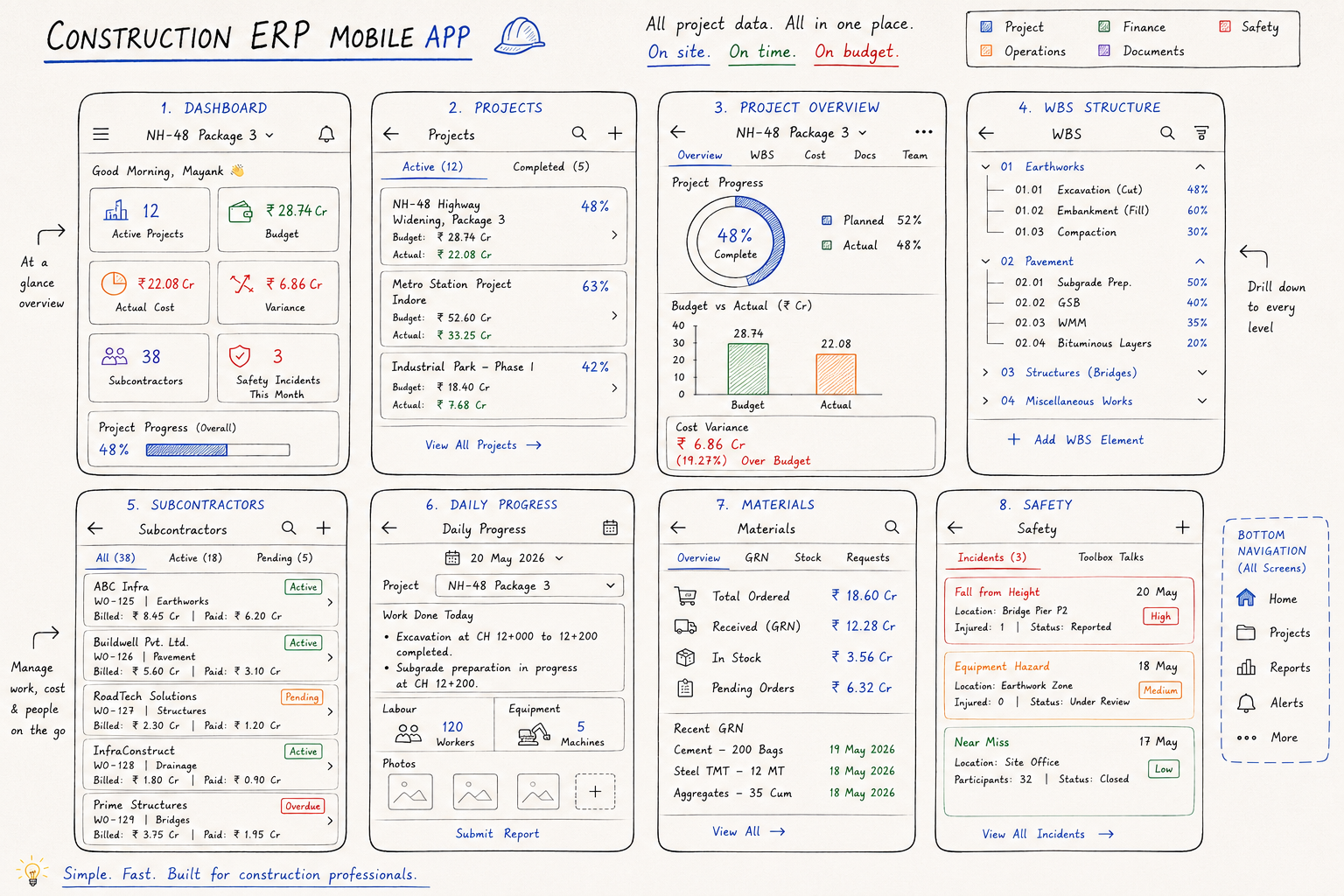
A Work Breakdown Structure (WBS) is a hierarchical decomposition of the total project scope into manageable work packages, each representing a definable deliverable or activity. In construction, the WBS might break a highway project into earthworks, pavement, structures, and utilities at the top level, then into specific activities like excavation, embankment, and compaction within earthworks. The WBS is the foundation of a construction ERP because every other data element, budget, actual cost, subcontract work orders, material issues, equipment charges, and billing to the client, is coded to a WBS element. This coding is what allows the ERP to show, at any level of the WBS, how much has been spent versus budgeted, how much work has been completed, and what the projected cost at completion will be.
A running account bill (RA bill or interim bill) is a periodic payment claim, typically monthly, that a contractor submits to the client for work completed to date. The RA bill starts with quantities of work measured in the measurement book, multiplies by the contract rates, deducts previous payments, and applies deductions like retention, advance recovery, and liquidated damages to arrive at the net payable amount. The construction ERP automates this by pulling the current period measurement book entries, applying the contract rate schedule, calculating all deductions based on contract terms, and generating a formatted RA bill document in the client’s required format. What previously took a billing engineer two to three days to prepare manually takes the ERP under an hour.
A construction ERP prevents material theft and wastage by tracking every material unit from the purchase order through goods receipt at the site gate, through issue from the store to the work area, through consumption in the work. At each transfer point, a document is created and signed by the responsible person, the GRN at receipt, the issue note at issue, the daily consumption report at use. The ERP then compares actual material consumption against theoretical consumption calculated from the bill of quantities and the current progress of work. When actual consumption significantly exceeds theoretical, more cement used than the mix design and quantities justify, more steel issued than the bar bending schedule requires, the variance is flagged for investigation. This systematic comparison catches pilferage, poor material storage practices, and excessive wastage before they compound into large losses.