How to Build a B2B E-commerce Platform, Catalog Management, Bulk Ordering, Credit Management, and ERP Integration 2026



Create engaging, high-performance mobile applications tailored to your business needs. We craft future-ready apps that offer smooth user experiences on all devices.
Build robust and scalable websites and CMS platforms that help you manage content effortlessly. Our development ensures a seamless digital presence.
Launch secure, feature-rich online stores with intuitive shopping experiences. We build tailored eCommerce platforms designed for growth.
Design captivating games with immersive gameplay and stunning graphics. From concept to launch, we build engaging experiences that players love.
Enhance your customer relationships with customized Salesforce implementations. Drive growth and efficiency with smarter CRM solutions.
Harness artificial intelligence and machine learning to automate workflows and gain actionable insights. Our AI transforms data into smart decisions.
Accelerate your software delivery lifecycle with continuous integration, delivery, and infrastructure automation to boost efficiency.
Hire app developers ready to turn your ideas into sleek, high-performing mobile apps for any platform.
Bring in frontend pros who craft smooth, beautiful, and user-friendly interfaces that your visitors will love.
Get backend developers who build fast, secure, and reliable systems to keep everything running behind the scenes.
Hire eCommerce developers who build secure, scalable online stores designed to offer seamless shopping and grow your sales.
Get dedicated developers committed to your projects, delivering consistent quality and speed as an extension of your team.
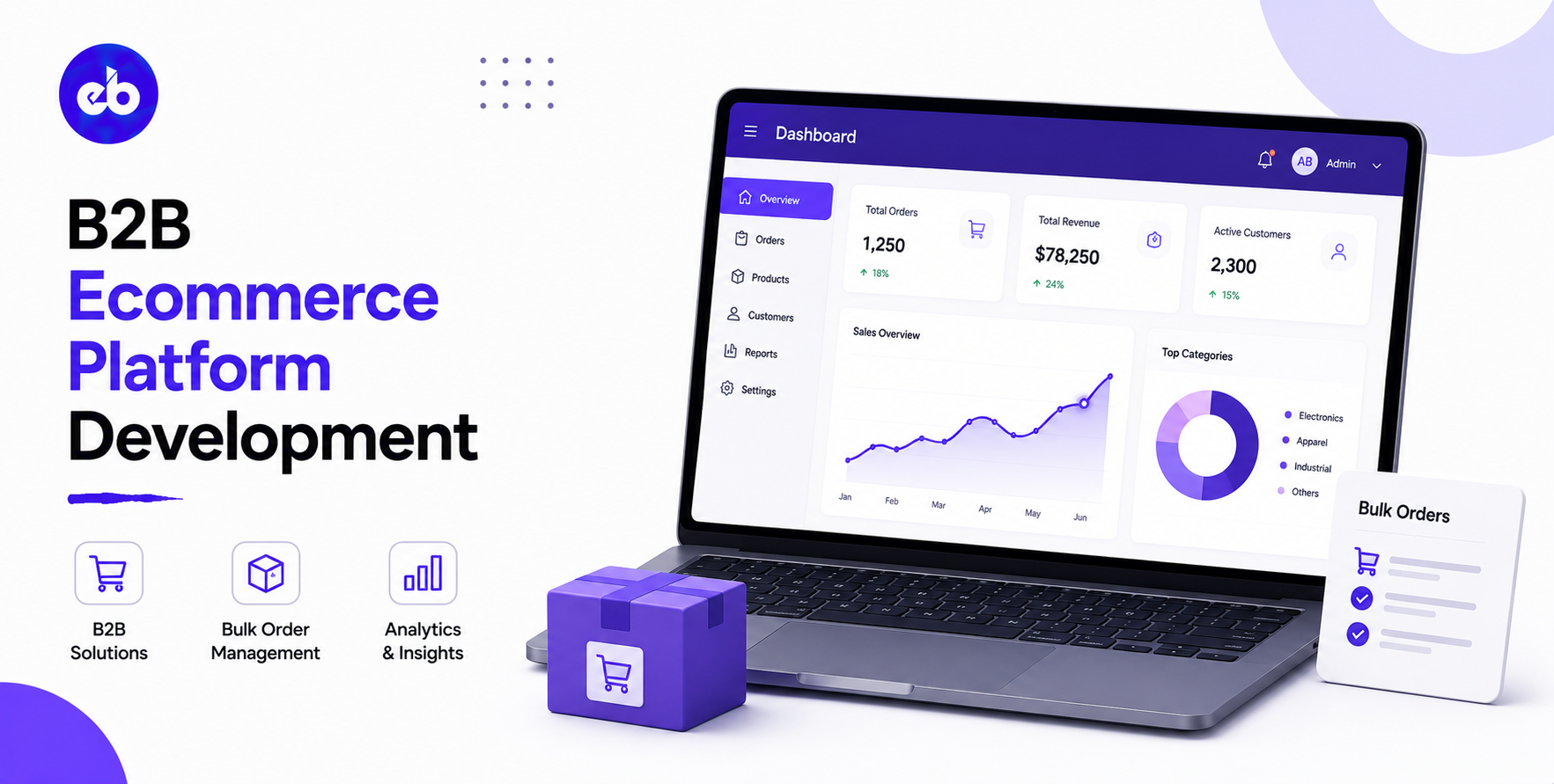
B2B e-commerce is growing 3 times faster than B2C. The global B2B e-commerce market is valued at $36 trillion by 2030, 7 times the size of B2C e-commerce.
The reason is simple: business buyers have become consumer buyers at work.
They expect the same digital convenience for a $50,000 purchase order that they experience buying from Amazon. They do not want to call a sales representative to check stock, wait 3 days for a quote, and email a purchase order that gets manually processed.
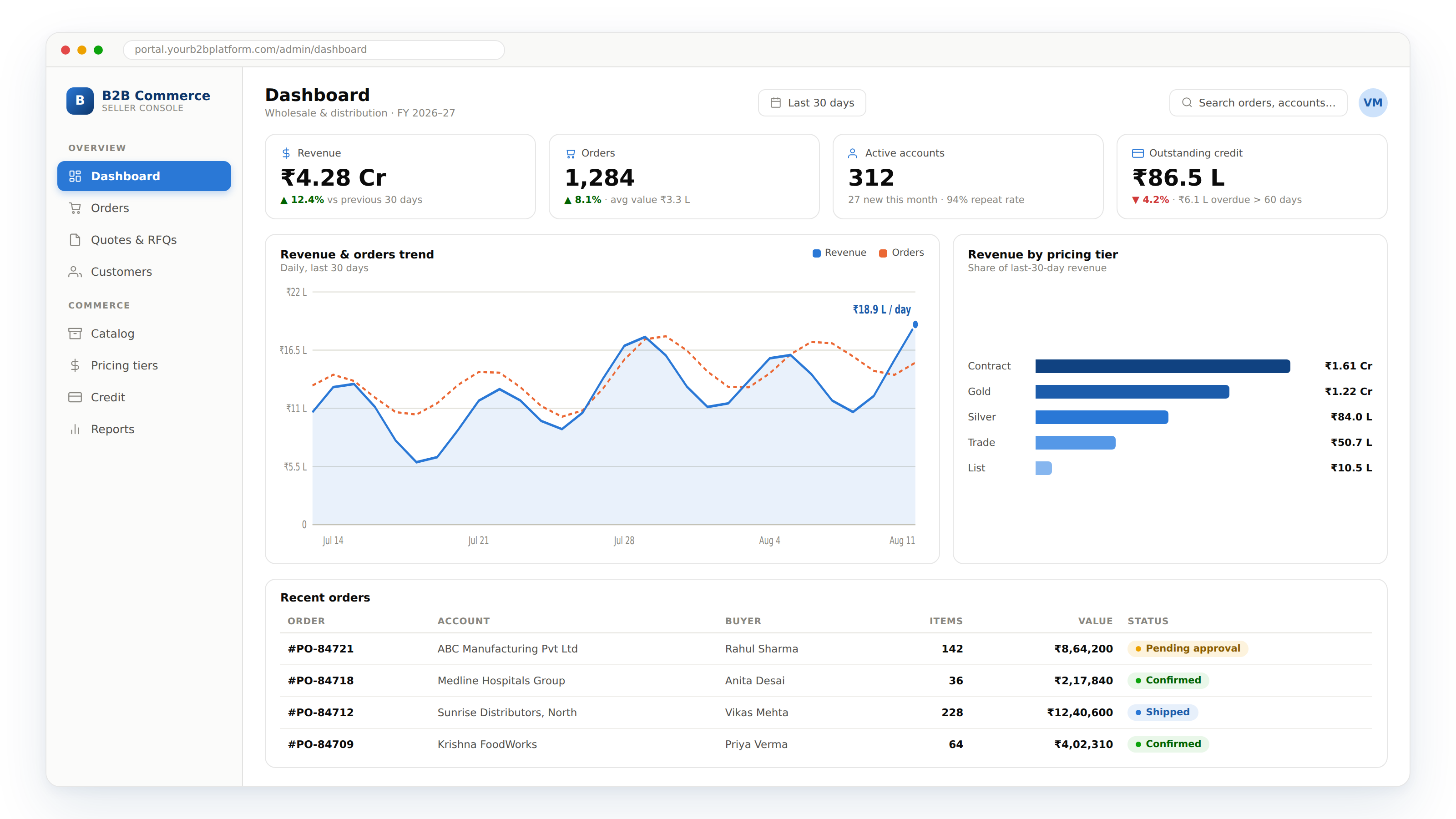
A B2B e-commerce platform built correctly transforms the buying experience, making it as fast and convenient as consumer shopping while handling the commercial complexity that B2B requires: account-specific pricing, credit terms, bulk order minimum quantities, multi-level approval workflows, and ERP integration that keeps inventory and order data current without manual entry.
EngineerBabu built enterprise technology for Adani Group and B2B platforms for 75+ YC-backed companies across manufacturing, distribution, and wholesale verticals. CMMI Level 5. Google AI Accelerator 2024 Top 20. Contact: mayank@engineerbabu.com
| Function | Module |
| Customer account management | Company accounts, multiple buyers per account, credit terms |
| Catalog management | Product catalogue with B2B-specific pricing and MOQ |
| Account-specific pricing | Contract pricing, volume discounts, customer-specific rates |
| Quote management | RFQ to quote to order conversion |
| Bulk and repeat ordering | Order templates, CSV upload, reorder functionality |
| Credit management | Credit limit, payment terms, outstanding balance |
| Approval workflow | Multi-level purchase approval within customer organisation |
| Order management | Order confirmation, fulfillment tracking, invoice |
| ERP integration | Inventory, orders, pricing sync with SAP/Oracle/NetSuite |
| Customer portal | Self-service order history, invoices, tracking |
| Analytics | Customer revenue, product performance, order patterns |
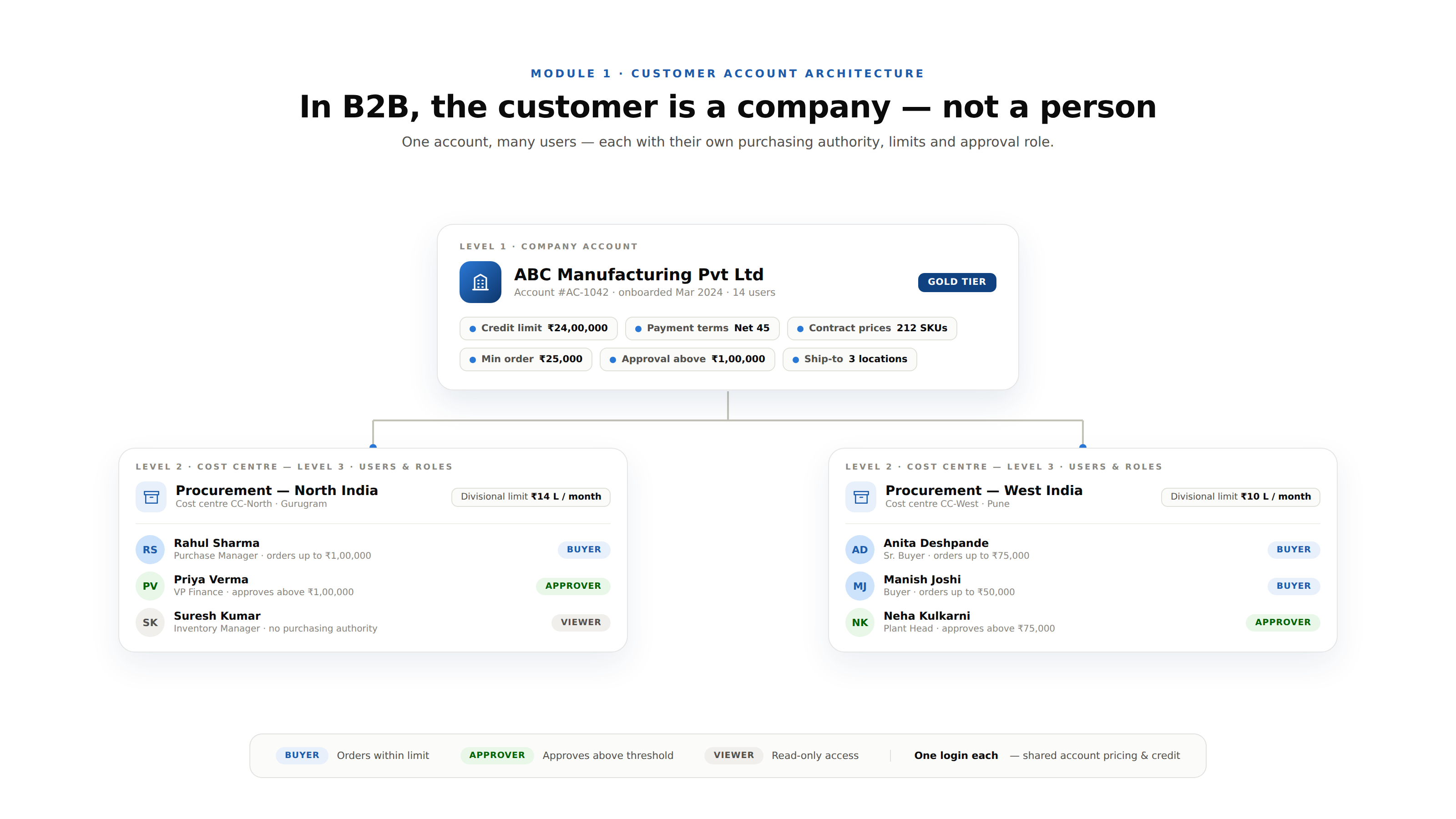
The B2B account hierarchy:
In B2B, the “customer” is not an individual, it is a company with multiple users who have different roles and different purchasing authority.
| Level | Example | Platform Role |
| Company account | ABC Manufacturing Pvt Ltd | Account-level credit, pricing, terms |
| Cost centre / Division | Procurement, North India | Divisional spending limits |
| Buyer | Rahul Sharma, Purchase Manager | Individual ordering authority |
| Approver | Priya Verma, VP Finance | Purchase approval authority |
| Viewer | Suresh Kumar, Inventory Manager | View-only, no purchasing authority |
Account-level configuration:
| Configuration | Details |
| Credit limit | Maximum outstanding permitted |
| Payment terms | Net 30, Net 60, advance payment |
| Pricing tier | Which contract price list applies |
| Approved product list | If the company only buys certain products |
| Minimum order value | Minimum order amount for this account |
| Shipping addresses | All approved delivery locations |
| Approval workflow | Which purchases require approval and at what threshold |
The B2B pricing complexity:
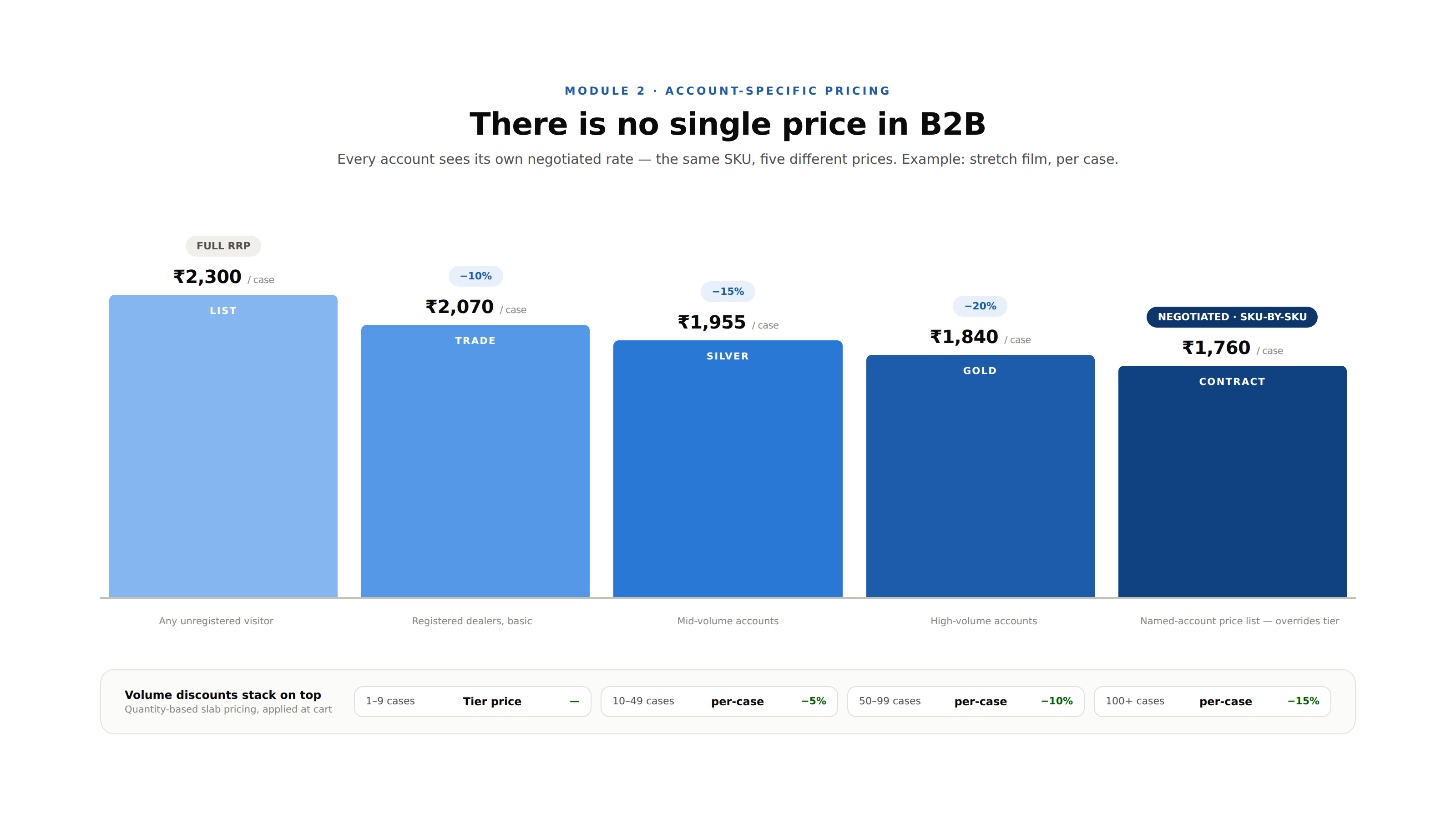
B2B pricing is fundamentally different from B2C, there is no single price for any product. Every customer has a different negotiated price based on their volume, their strategic importance, and their payment terms.
| Pricing Tier | Who It Applies To | Rate |
| List price | Any unregistered visitor | Full RRP |
| Trade price | Registered dealers, basic | 10% below list |
| Silver tier | Mid-volume accounts | 15% below list |
| Gold tier | High-volume accounts | 20% below list |
| Contract price | Named account negotiated price | SKU-by-SKU, may override tier |
| Volume discount | Quantity-based slab pricing | Tiered by order quantity |
The account-specific catalog:
Some manufacturers restrict which products each customer can buy, a regional distributor only gets the product list approved for their territory, a hospital only sees medical-grade products not consumer products.
The platform supports account-specific catalog views, each logged-in buyer sees only the products they are authorised to purchase.
Minimum Order Quantity (MOQ) and pack sizes:
B2B products are typically sold in cases, pallets, or other multi-unit quantities, not individual units. The platform enforces MOQ at the product level and pack size rounding, a product sold in cases of 24 can only be ordered in multiples of 24.
The RFQ workflow:
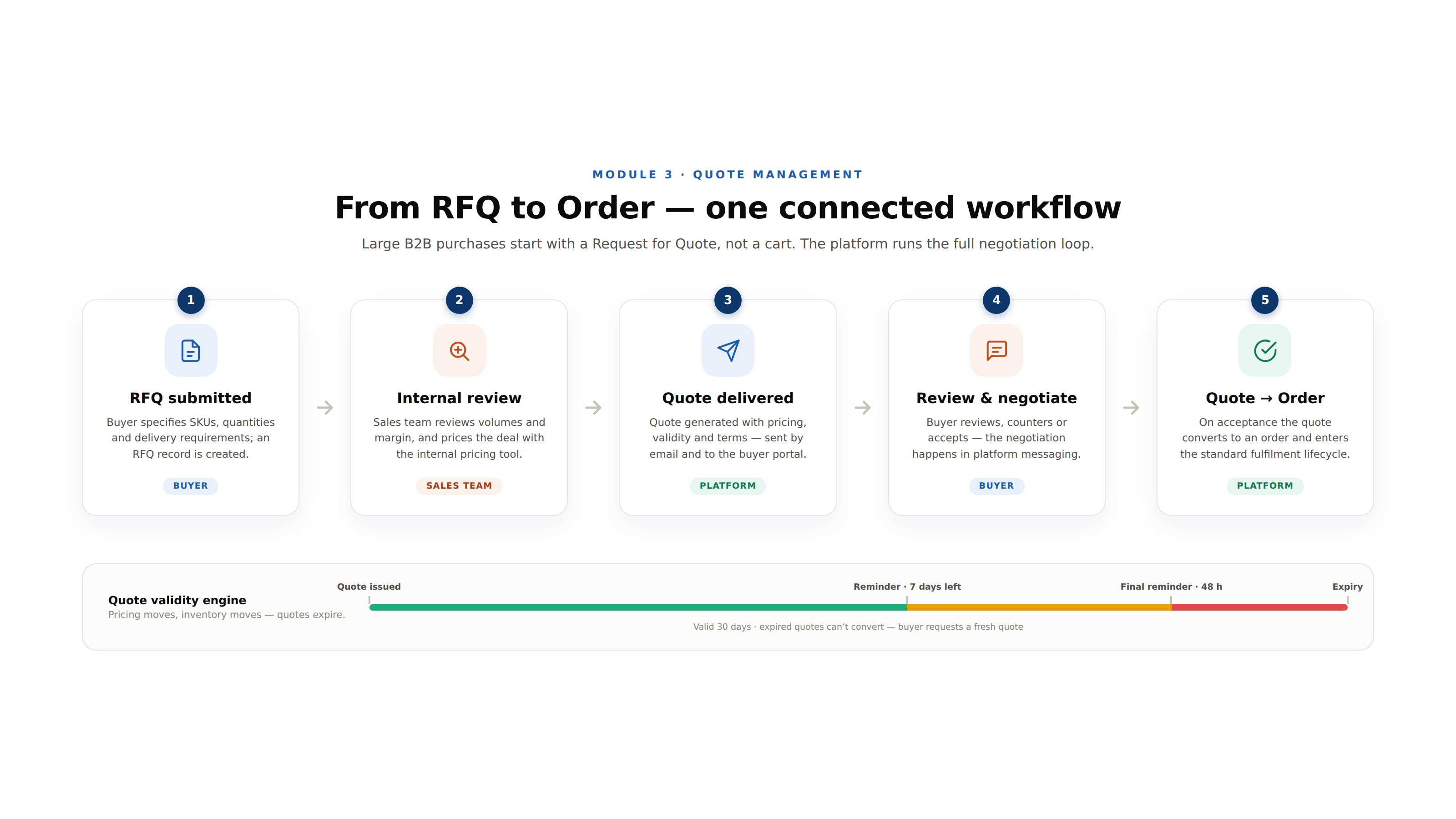
Large B2B purchases often begin with a Request for Quote rather than direct ordering. The platform manages this workflow:
| Step | Action | System |
| RFQ submission | Buyer specifies quantities and delivery requirements | RFQ record created |
| Internal review | Sales team reviews and decides pricing | Internal note + pricing tool |
| Quote generation | Quote prepared with pricing, validity, terms | Quote document generated |
| Quote delivery | Quote sent to buyer via email and portal | Email + portal notification |
| Buyer review | Buyer reviews, negotiates, or accepts | Negotiation via platform messaging |
| Quote acceptance | Buyer accepts, quote converts to order | Order created from quote |
| Order processing | Standard order fulfillment workflow | Normal order lifecycle |
The quote validity engine:
Quotes are valid for a defined period, pricing may change, inventory may move. The platform tracks quote expiry and sends reminders to buyers approaching expiry. Expired quotes cannot be converted to orders, the buyer must request a fresh quote.
CSV order upload:
Large buyers, distributors, institutional purchasers, may have hundreds of line items in a single order. Entering them one by one through the product catalogue is unusable.
The platform supports CSV order upload: the buyer downloads a template, fills in product codes and quantities in Excel, uploads the file, and the platform validates and creates the order in seconds.
Order templates:
A food manufacturer who buys the same set of packaging materials every month does not want to find and add each item individually every time.
Order templates save a specific combination of products and quantities that can be loaded and modified for each order with one click.
Quick reorder:
The platform surfaces the buyer’s last 5 to 10 orders on the homepage, a single “Reorder” button recreates the order with today’s pricing and current inventory availability check. For routine replenishment orders, this eliminates the entire search-and-add workflow.
The credit engine:
| Check | When | Action If Failed |
| Credit limit check | At order placement | Block order, show outstanding balance and credit available |
| Payment terms enforcement | At checkout | Show due invoices, require payment if overdue |
| Order value against available credit | Real-time during order building | Alert when cart value approaches credit limit |
| New invoice posting | On order confirmation | Updates outstanding balance immediately |
The outstanding balance view:
The buyer sees their account’s full financial position, invoices issued, amounts paid, current outstanding, credit limit, and available credit. Invoices can be downloaded directly from the portal. Payment can be made against specific invoices through the payment gateway.
Payment methods for B2B:
| Method | Use Case |
| Net 30/60, invoice | Standard trade credit, most B2B |
| Bank transfer (NEFT/RTGS) | High-value orders |
| UPI | SME buyers in India |
| Cheque | Traditional buyers |
| Letter of credit | International transactions |
| Advance payment | New accounts without established credit |
What the B2B platform must sync with the ERP:
| Data | Direction | Frequency |
| Product catalogue | ERP → Platform | On product master change |
| Pricing and discounts | ERP → Platform | On price change |
| Inventory management | ERP → Platform | Real-time or every 15 minutes |
| Customer account data | ERP → Platform | On customer record change |
| Credit limits and outstanding | ERP → Platform | Real-time |
| Orders | Platform → ERP | On order confirmation |
| Order status | ERP → Platform | On fulfillment milestones |
| Invoices | ERP → Platform | On invoice generation |
| Payments | ERP → Platform | On payment receipt |
The ERP integration architecture:
| ERP | Integration Method |
| SAP | SAP BAPI or REST API via SAP Integration Suite |
| Oracle ERP Cloud | Oracle REST APIs |
| NetSuite | SuiteScript REST API |
| Microsoft Dynamics | Power Automate + Dynamics API |
| Tally | Tally XML API (common for Indian SMEs) |
| Custom ERP | REST API per client specification |
| Module | Cost Range (USD) | Notes |
| Customer account hierarchy + role management | $6K – $12K | |
| Account-specific catalog + pricing engine | $8K – $15K | Tier, contract, volume pricing |
| RFQ to quote workflow | $6K – $12K | |
| Bulk ordering (CSV upload, templates, reorder) | $6K – $12K | |
| Credit management + payment terms | $6K – $12K | Real-time credit check |
| Multi-level approval workflow | $5K – $10K | |
| Payment gateway + B2B payment methods | $5K – $10K | |
| Customer portal (orders, invoices, tracking) | $6K – $12K | |
| ERP integration (SAP/Oracle/NetSuite) | $8K – $15K | Per ERP ~$8K–$15K |
| Analytics (customer revenue, product performance) | $5K – $10K | |
| Mobile app (buyer app) | $6K – $12K | Optional |
| AWS + VAPT + Year 1 ops | $5K – $10K | |
| Total | $72K – $142K | Full B2B ecommerce platform |
Contact: mayank@engineerbabu.com
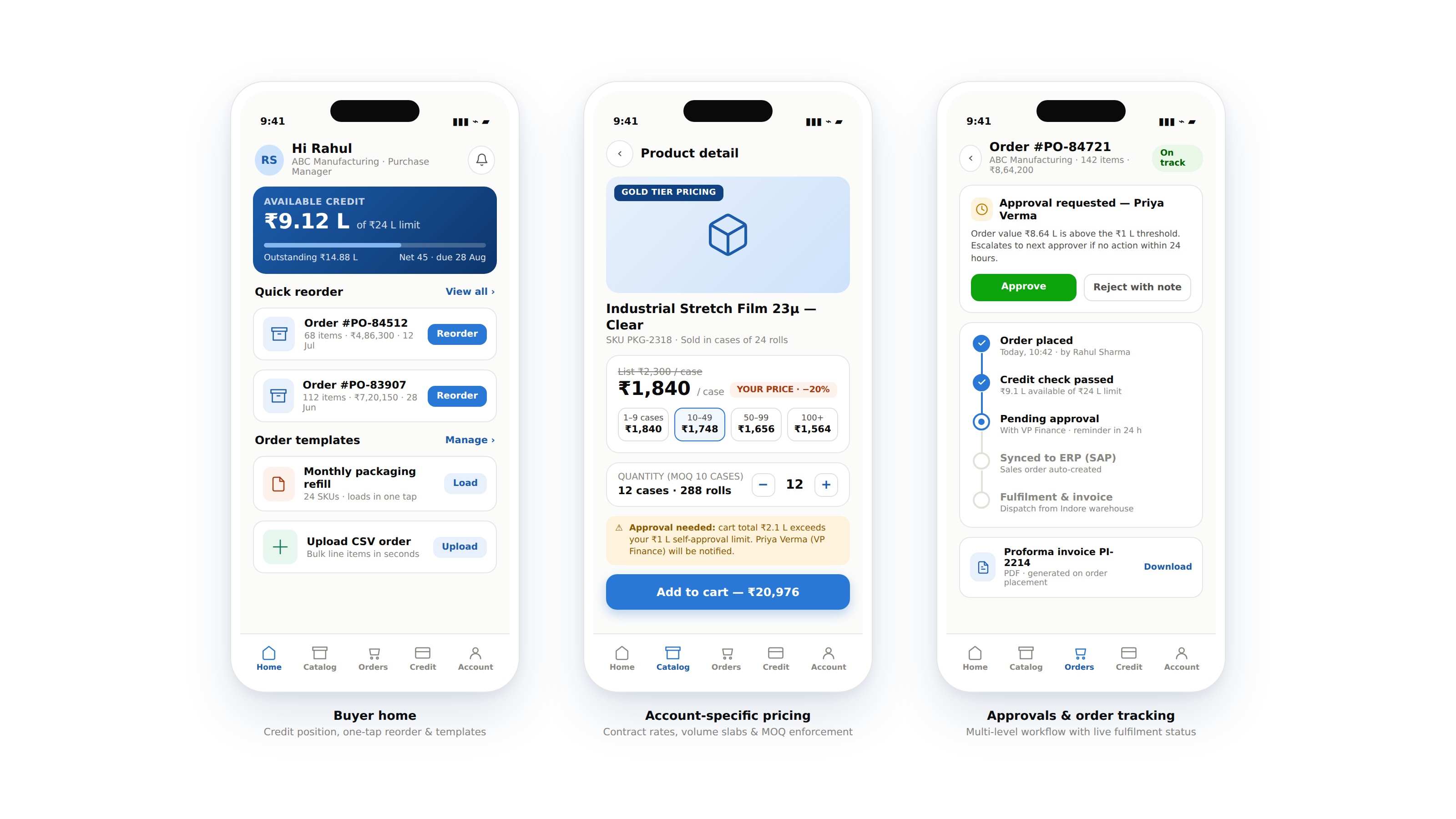
The most important architectural difference is account-based pricing, in B2C every customer sees the same price, in B2B every customer sees a different price negotiated specifically for their account. This means the B2B platform cannot simply display a product price, it must first identify the logged-in user’s account, retrieve that account’s pricing tier and any SKU-specific contract prices, apply volume discount slabs based on the current cart quantity, and display the account-specific price. This account-aware pricing engine touches every part of the platform, the catalog, the cart, the checkout, the invoice, and the ERP sync. Building a B2B platform on top of a B2C architecture without rearchitecting this pricing layer produces a platform that always shows wrong prices to the wrong customers.
A purchase approval workflow enforces a company’s internal procurement governance through the e-commerce platform, requiring designated approvers to authorise purchases above defined thresholds before orders are confirmed. Configuration typically involves: defining approval tiers by value (purchases under ₹10,000 are self-approved, ₹10,000 to ₹1,00,000 require manager approval, above ₹1,00,000 require VP approval), mapping the approval hierarchy to the company’s org chart within the platform, and configuring escalation logic (if the approver does not act within 24 hours, the request escalates to the next level). When a buyer submits an order requiring approval, the order is held in pending status and an approval request is sent to the designated approver via email and platform notification. The approver can approve or reject with comments directly from the notification link without logging into the platform.
Inventory availability management for bulk B2B orders is more complex than B2C because a single order can reserve a significant portion of available stock. The platform implements: real-time inventory check at cart and checkout, the order cannot be placed if insufficient stock is available, with the option to place a partial order or backorder; ATP (Available-to-Promise) calculation, for each product, the platform calculates ATP as current on-hand stock plus incoming purchase orders minus existing reservations, giving buyers an accurate view of what is genuinely available and when; reservation on cart, when a buyer adds items to the cart, a soft reservation holds the inventory for a defined period (typically 30 to 60 minutes) to prevent another buyer from taking the stock while checkout is in progress; and large order approval for quantities above a defined threshold, orders for quantities that would reduce stock below safety stock levels are routed to the sales team for approval before confirmation.