How to Build a Low-Code Platform, Visual Builder, Workflow Engine, API Connectors, and Enterprise Governance 2026


Create engaging, high-performance mobile applications tailored to your business needs. We craft future-ready apps that offer smooth user experiences on all devices.
Build robust and scalable websites and CMS platforms that help you manage content effortlessly. Our development ensures a seamless digital presence.
Launch secure, feature-rich online stores with intuitive shopping experiences. We build tailored eCommerce platforms designed for growth.
Design captivating games with immersive gameplay and stunning graphics. From concept to launch, we build engaging experiences that players love.
Enhance your customer relationships with customized Salesforce implementations. Drive growth and efficiency with smarter CRM solutions.
Harness artificial intelligence and machine learning to automate workflows and gain actionable insights. Our AI transforms data into smart decisions.
Accelerate your software delivery lifecycle with continuous integration, delivery, and infrastructure automation to boost efficiency.

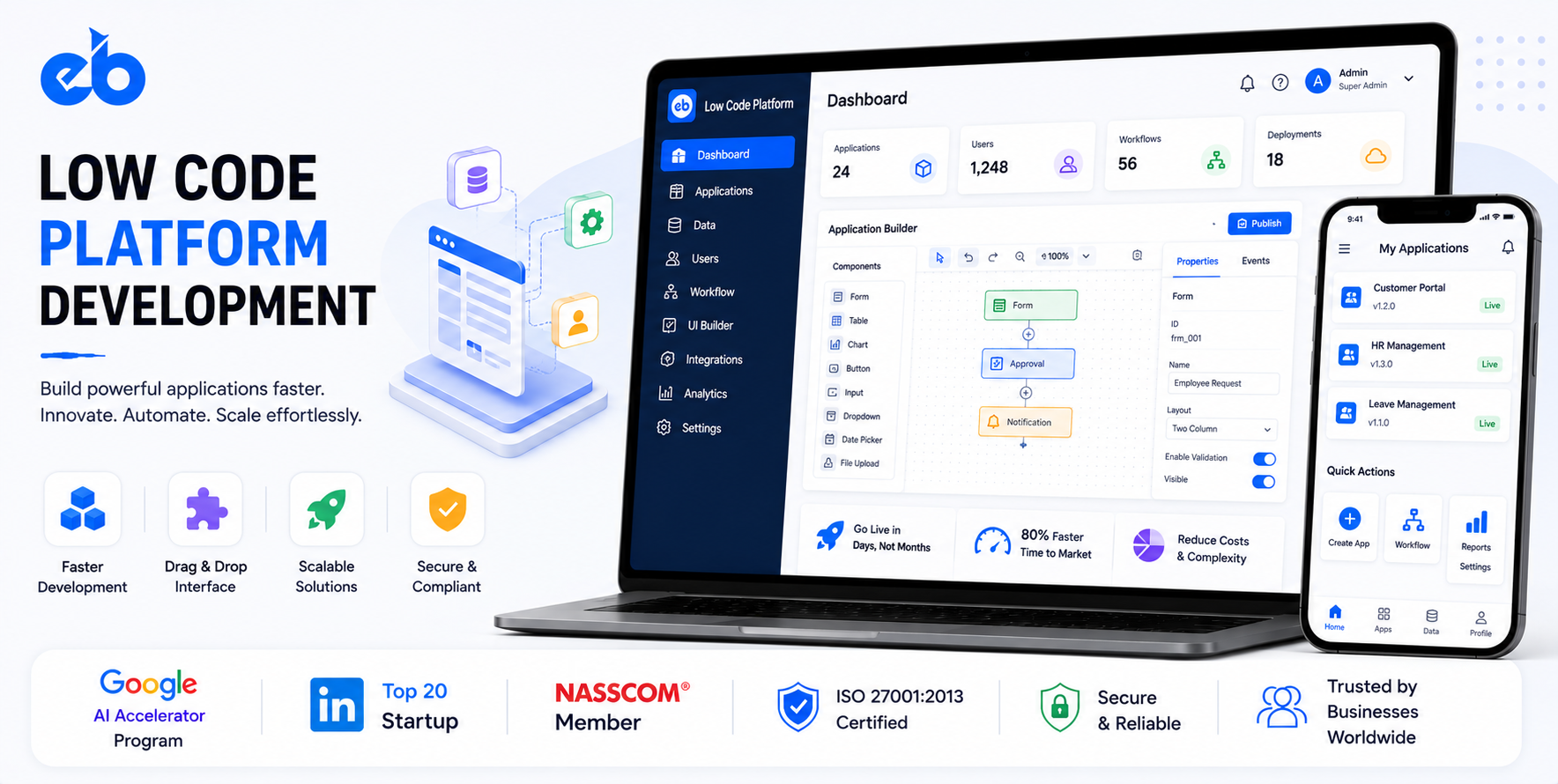
The global low-code development platform market is projected to reach $187 billion by 2030 at a CAGR of 31.1%. Gartner estimates that by 2026, 75% of new applications will be built using low-code or no-code tools.
The pressure driving this is real: enterprise IT backlogs stretch 18 to 24 months.
Business teams with legitimate automation needs cannot wait 2 years for IT to build a form-to-database workflow. Low-code gives non-technical builders the ability to create functional applications, forms, workflows, dashboards, integrations, without writing code.
A Low Code Platform Development is fundamentally different from building a standard SaaS product. The platform must be a meta-application, a system for building systems.
It requires a visual interface builder, a data model designer, a workflow engine, an API development framework, a role-based security model, and a deployment infrastructure that makes all of this production-grade.
EngineerBabu, Google AI Accelerator 2024 Top 20, has built production-grade platforms for 75+ YC-backed companies. We understand what it takes to build systems that developers and non-developers both trust. Contact: mayank@engineerbabu.com
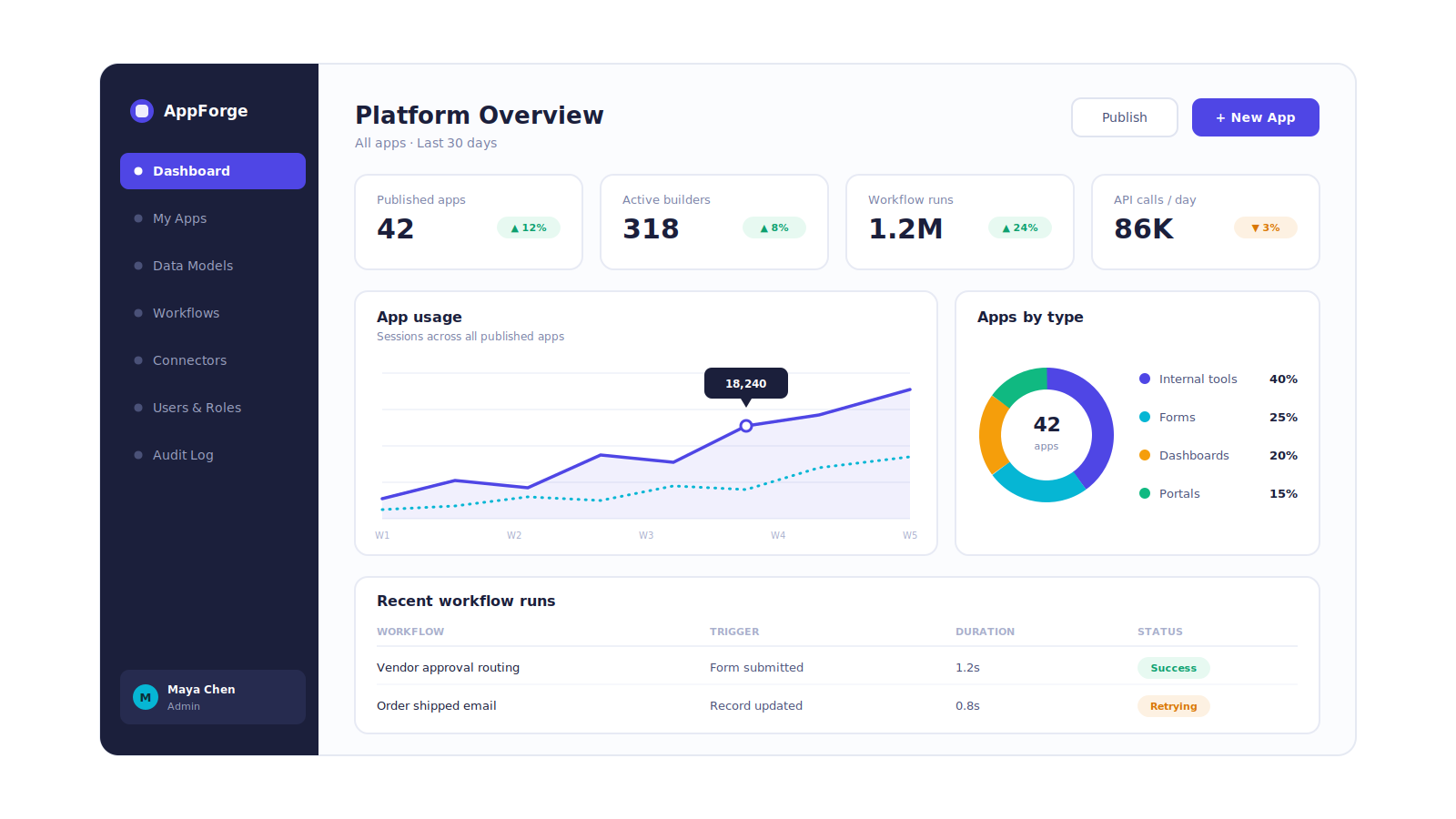
| Function | Module |
| Visual UI builder | Drag-and-drop component library, responsive layouts |
| Data model designer | Tables, fields, relationships, visual schema design |
| Workflow engine | Business logic, conditional flows, automation triggers |
| Formula engine | Excel-like formulas for calculated fields |
| API connector framework | Pre-built connectors + custom API builder |
| Role-based access control | Row-level, column-level, feature-level permissions |
| App publishing | Web app, mobile app, embedded widget deployment |
| Version control | App versioning, rollback, staging environment |
| Enterprise governance | Audit logs, deployment approvals, security policies |
| AI features | AI-assisted app generation, copilot for logic building |
| Analytics | App usage, performance monitoring, error tracking |
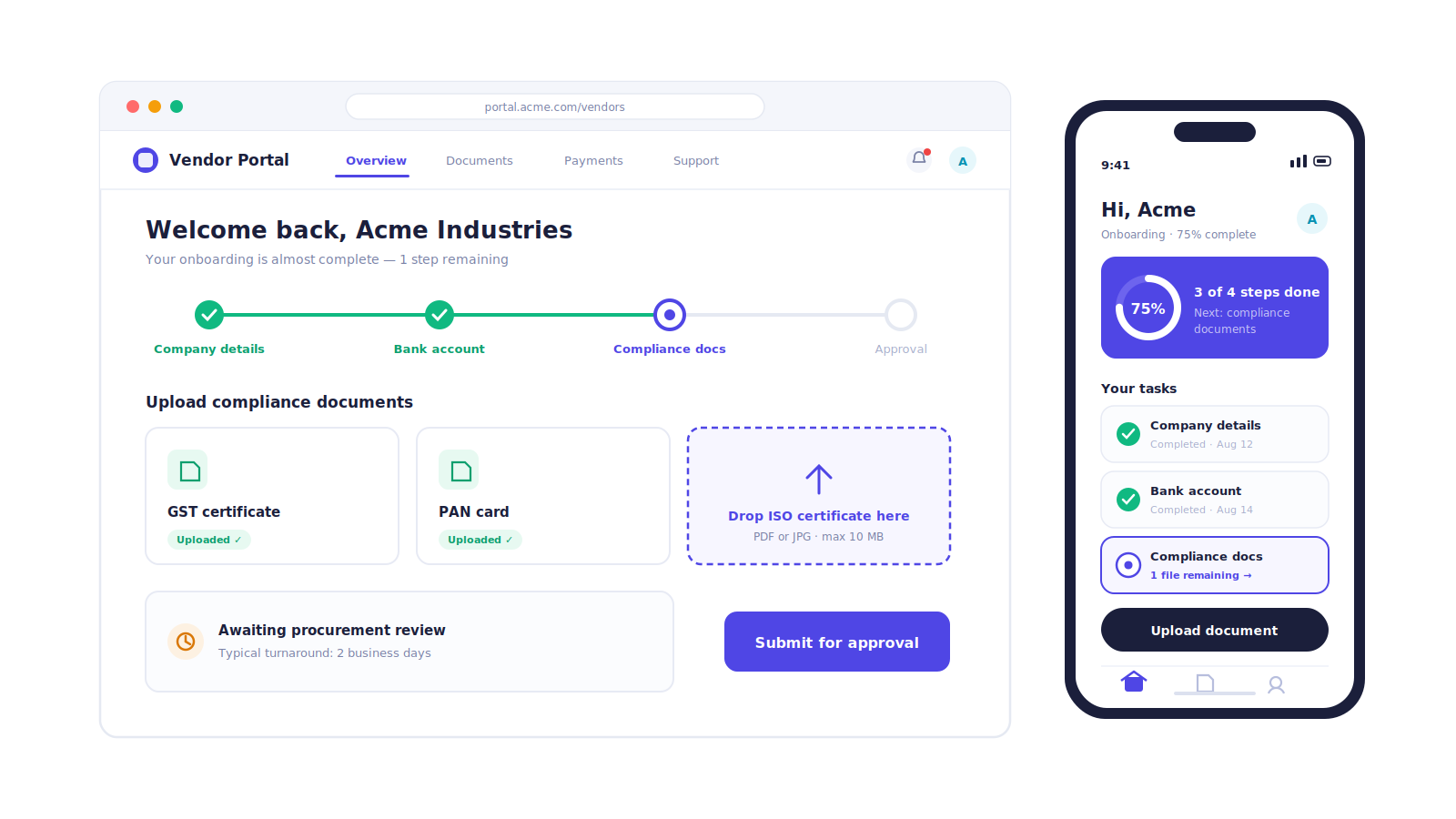
The component library:
The visual builder is built on a component library, every UI element a builder can place on a page. Components fall into four categories:
| Category | Components |
| Layout | Page, container, grid, column, tab, modal, drawer |
| Input | Text input, number input, dropdown, multi-select, date picker, file upload, rich text editor, rating |
| Display | Table, list, card, text, image, badge, icon, chart, map |
| Action | Button, link, form submit, menu |
Each component has a properties panel, configuring what it displays (bound to a data source), how it looks (styling), and what it does (event handlers, “when this button is clicked, run this workflow”).
The canvas architecture:
The canvas is built on a constraint-based layout system, components snap to a grid, resize within their container bounds, and maintain responsive proportions across desktop and mobile viewport sizes.
The technical implementation uses a serialisable JSON representation of the layout:
{
“component”: “Table”,
“id”: “table_customers”,
“props”: {
“dataSource”: “{{queries.getCustomers.data}}”,
“columns”: [
{“field”: “name”, “header”: “Customer Name”},
{“field”: “email”, “header”: “Email”},
{“field”: “created_at”, “header”: “Joined”}
],
“pagination”: true,
“pageSize”: 25
},
“styles”: {
“width”: “100%”,
“borderRadius”: “8px”
}
}
This serialisable representation is what gets stored in the database, versioned in git, and rendered at runtime. The entire application is a JSON tree, enabling version control, diff comparison, and rollback.
The component binding system:
Components are bound to data sources using a template expression syntax, {{queries.getCustomers.data}} in a Table component’s dataSource property binds the table to the result of a query named getCustomers.
This same syntax works for any property of any component, a Text component can display {{currentUser.name}}, a Button can be disabled when {{form.submitButton.disabled === true}}.
The binding system creates a reactive data flow, when the data source updates, all bound components update automatically. This is the foundation of the low-code platform’s interactivity model.
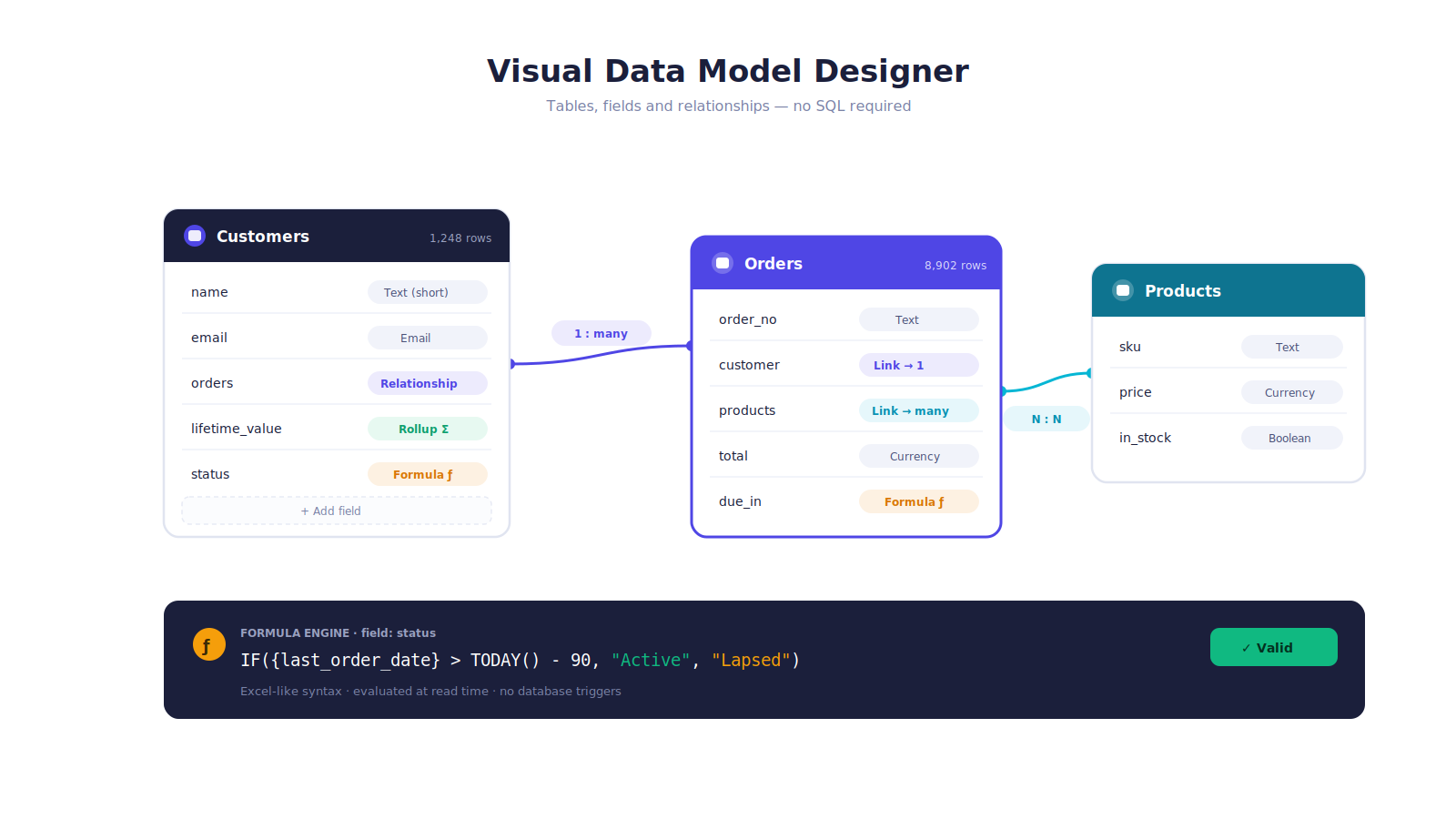
The visual schema designer:
The data model designer allows builders to create database tables, define fields, and set up relationships, without writing SQL.
| Field Type | Use Case |
| Text (short) | Names, titles, short descriptions |
| Text (long) | Notes, descriptions, content |
| Number | Quantities, prices, scores |
| Currency | Monetary values with currency formatting |
| Date | Dates without time |
| Date-time | Timestamps |
| Boolean | Yes/No flags |
| Validated email addresses | |
| Phone | Formatted phone numbers |
| URL | Web links |
| File | Attached files and images |
| Relationship | Link to another table, one-to-many, many-to-many |
| Formula | Calculated from other fields |
| Lookup | Pull field value from related table |
| Rollup | Aggregate from related records (count, sum, average) |
The relationship model:
Relationships between tables are configured visually, the builder selects “Customer” links to “Orders” through a one-to-many relationship. The platform generates the necessary foreign key structure in the underlying database automatically and exposes the relationship in queries, forms, and views without the builder needing to understand SQL joins.
The formula engine:
Formulas work like Excel, IF({status} = “Active”, “Current”, “Lapsed”), DAYS_DIFF({due_date}, TODAY()), CONCATENATE({first_name}, ” “, {last_name}). The formula engine evaluates these expressions at read time, providing computed fields without requiring database triggers or application logic.
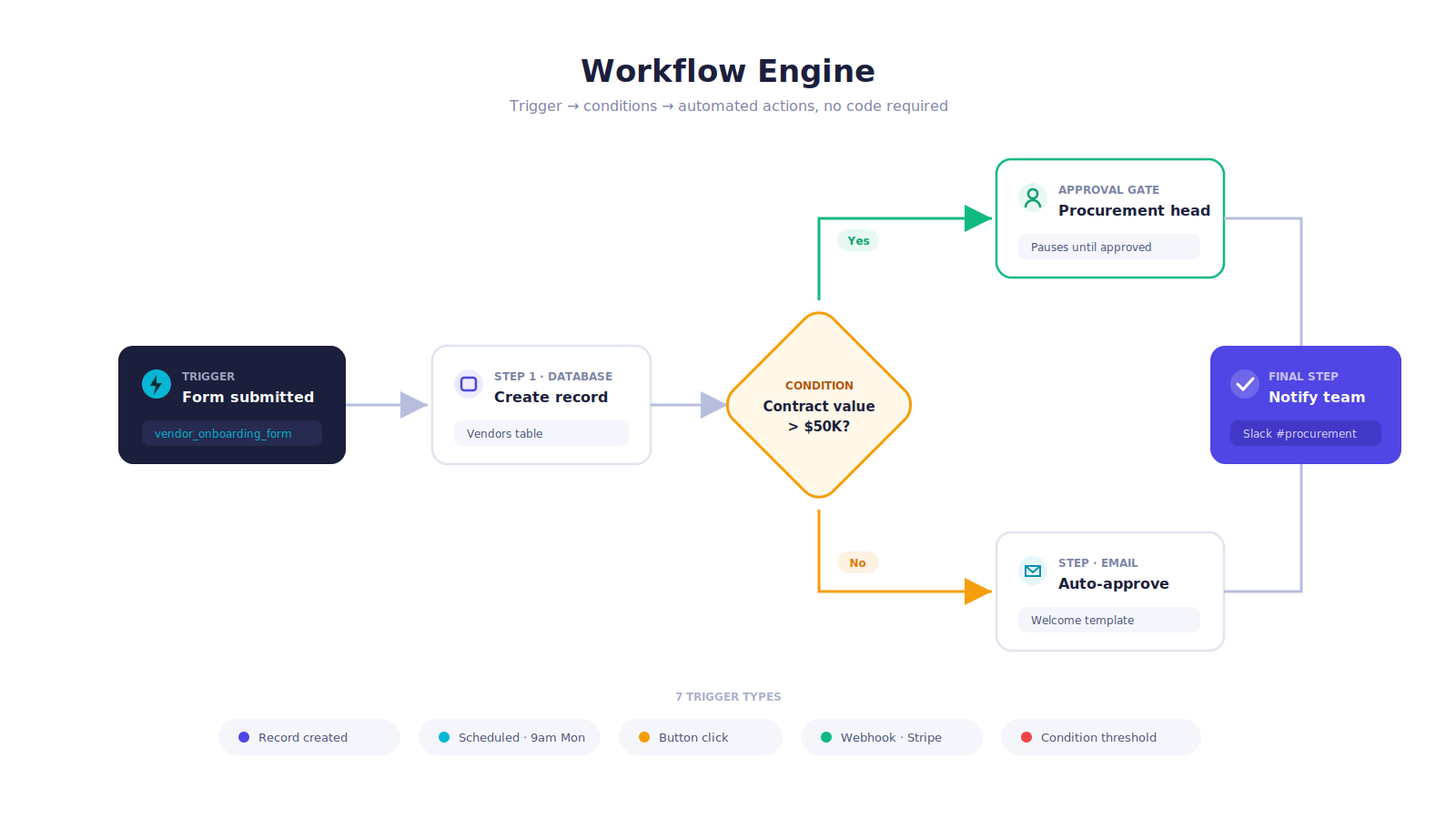
The workflow is the most important module. A low-code platform that can build forms and display data but cannot automate what happens with that data is a glorified spreadsheet.
The workflow trigger types:
| Trigger | Description | Example |
| Record created | When a new record is added to a table | New support ticket created → assign to available agent |
| Record updated | When a specific field changes | Order status changes to “Shipped” → email customer |
| Scheduled | At a defined time | Every Monday 9am → generate weekly report |
| Button click | User action in the UI | “Approve” button clicked → update record + notify team |
| Form submission | Form is submitted | New lead form → create CRM record + send welcome email |
| API call | External system triggers workflow | Webhook from Stripe payment → update subscription status |
| Condition met | Data threshold crossed | Outstanding balance > credit limit → alert sales team |
The workflow step library:
| Step Type | Examples |
| Database | Create record, update record, find records, delete record |
| Communication | Send email, send WhatsApp, send SMS, create calendar event |
| Logic | If/else condition, loop over records, set variable, calculate |
| Integration | Call external API, send to webhook, write to Google Sheets |
| File | Generate PDF, create document from template, upload file |
| User | Assign task to user, request approval, send notification |
| Platform | Trigger another workflow, run a query, navigate to page |
The conditional branching:
Every workflow step can have conditional routing, “If approval is granted, proceed to Step 4. If rejected, proceed to Step 7.” Nested conditions handle complex business logic without code.
The approval workflow:
The built-in approval step pauses workflow execution and presents an approval request to the designated approver, with context (which record, which values, why approval is needed), through the platform notification system or email. The workflow resumes automatically when the approver acts.
The pre-built connector library:
| Category | Connectors |
| Databases | PostgreSQL, MySQL, MongoDB, Supabase, Airtable |
| SaaS applications | Salesforce, HubSpot, Stripe, Twilio, SendGrid, Slack, Notion |
| Communication | WhatsApp Business API, Mailchimp, ActiveCampaign |
| Cloud storage | AWS S3, Google Drive, Dropbox, OneDrive |
| Payment | Razorpay, Stripe, PayU, PayPal |
| AI services | OpenAI, Anthropic, Hugging Face |
| Productivity | Google Sheets, Google Calendar, Microsoft 365 |
The custom API builder:
For connectors not in the library, the custom API builder allows builders to define any REST API call, specifying the URL, method, headers, authentication, and request body with template expressions. The defined connector is then available as a data source or workflow step across all apps built on the platform.
The query editor:
For database connectors, the query editor allows builders to write SQL queries or use a visual query builder. Query results are immediately available to bind to UI components, a table, a chart, a dropdown, without any additional configuration.
The permission model:
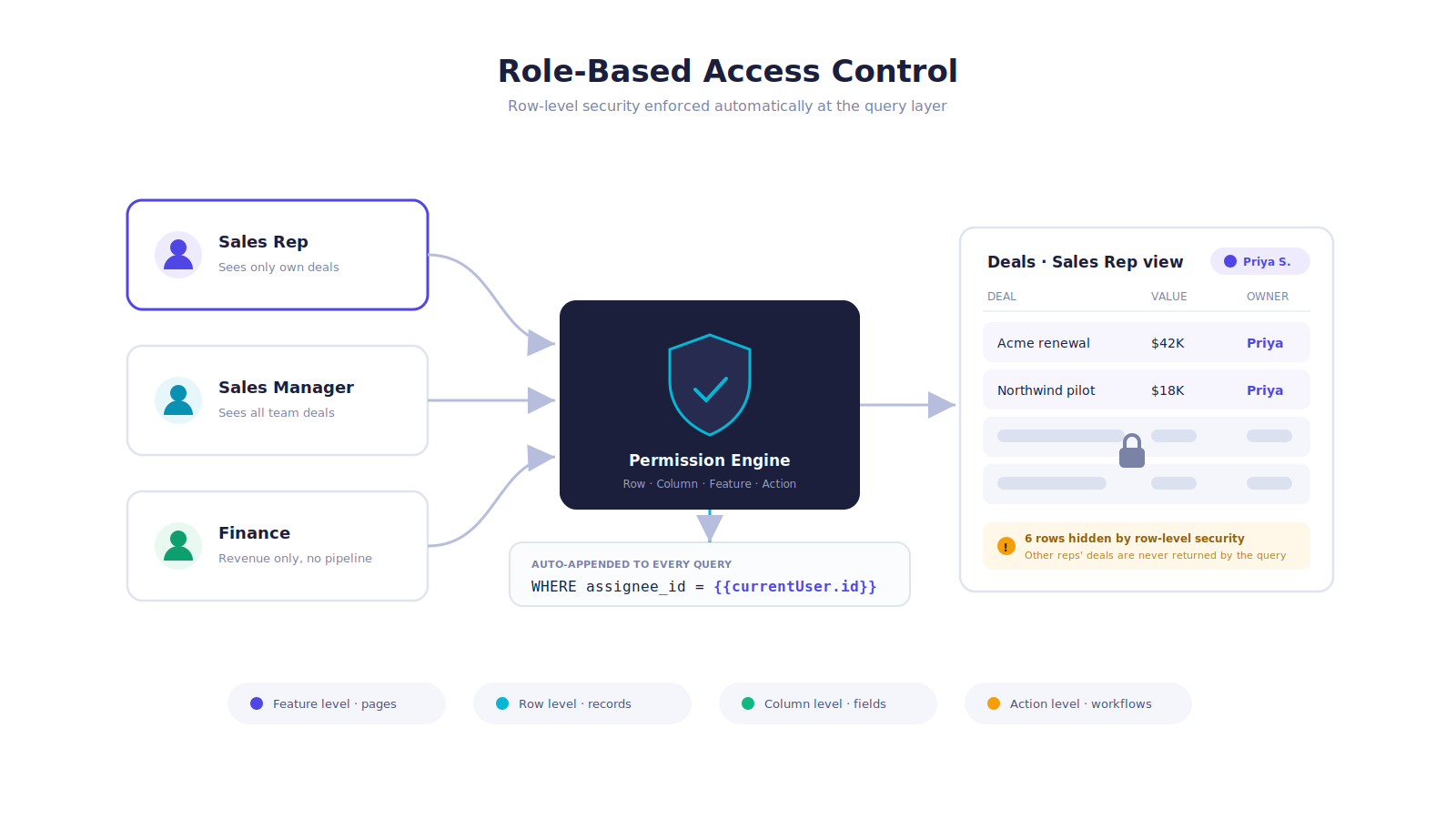
Low-code platforms used by enterprises need fine-grained access control. A CRM built on the platform needs: sales managers to see all deals, sales reps to see only their own deals, finance to see revenue data but not pipeline data, and customers who log in through the portal to see only their own account.
Permission levels:
| Level | Control |
| Feature level | Which pages and components a role can access |
| Row level | Which records a role can see (e.g., only records where assignee = current user) |
| Column level | Which fields a role can view or edit |
| Action level | Which workflow actions a role can trigger |
The row-level security implementation:
Row-level permissions are enforced at the query level, every data query automatically appends a WHERE clause based on the current user’s role and identity.
A sales rep running a query on the Deals table always gets WHERE assignee_id = {{currentUser.id}} appended automatically, they physically cannot retrieve another rep’s deals, regardless of what query they construct.
The staging environment:
Every app built on the platform has three environments, development, staging, and production.
Changes are made in development, tested in staging, and promoted to production through a deployment workflow that requires review and approval for enterprise accounts.
Version control and rollback:
Every change to an app, adding a component, modifying a workflow, changing a query, creates a new version. The version history shows who made what change and when. Any version can be restored with a single click, critical for production incidents caused by a bad deployment.
The audit log:
| Event | Logged |
| App created, modified, published | Who, when, what changed |
| Record created, updated, deleted | Who, when, which record, before and after values |
| Workflow triggered | Who triggered, which workflow, what the outcome was |
| Permission change | Who changed permissions for whom |
| API key created or rotated | Who, when |
Enterprise SSO:
For enterprise customers, the platform integrates with SAML 2.0 and OIDC identity providers, Okta, Azure AD, Google Workspace, allowing employees to authenticate with their company identity without a separate login.
Builder describes what they want, “A vendor onboarding form that collects company details, documents, and routes to procurement for approval”, and the AI generates:
A data model with the appropriate tables and fields. A form UI with all required input components. A workflow that captures the submission, validates documents, and creates an approval task for procurement.
The builder reviews, modifies, and publishes. What would take a non-technical builder 4 to 6 hours to assemble manually takes 20 minutes with AI assistance.
While building a workflow, the builder types “send an email to the customer when their order status changes to shipped” and the AI inserts the correct workflow step, pre-configured with the right trigger, the right action, and template variables already populated from the app’s data model.
| Module | Cost Range (USD) | Notes |
| Visual UI builder (canvas + component library) | $20K – $35K | Most complex UI module |
| Component library (40+ components) | $15K – $25K | Per component ~$400–$600 |
| Data model designer + formula engine | $10K – $18K | |
| Workflow engine (triggers + steps) | $15K – $28K | Approval flow, branching logic |
| Pre-built connector library (20 connectors) | $10K – $20K | Per connector ~$500–$1K |
| Custom API builder | $6K – $12K | |
| Role-based access control (row + column level) | $8K – $15K | |
| Staging + production environments | $5K – $10K | |
| Version control + rollback | $6K – $12K | |
| Enterprise SSO (SAML + OIDC) | $5K – $10K | |
| AI copilot (app generation + logic assistant) | $12K – $20K | LLM integration |
| Audit log + compliance | $5K – $10K | |
| Mobile app publishing | $8K – $15K | React Native wrapper |
| AWS + VAPT + Year 1 ops | $8K – $15K | |
| Total | $133K – $245K | Full low-code platform |
EngineerBabu, Google AI Accelerator 2024 Top 20, builds production-grade platforms for 75+ YC-backed companies. CMMI Level 5. Contact: mayank@engineerbabu.com
A low-code platform is a meta-application, a system for building other systems. Its core technical difference from a standard application is that it does not have a fixed data model or fixed UI, both are defined at runtime by the builders using the platform. The architecture requires: a serialisable JSON-based representation of every app (the entire UI, data model, and workflow logic stored as structured data, not compiled code), a runtime engine that interprets this JSON and renders the application, a reactive binding system that keeps UI components synchronised with data sources, a workflow execution engine that processes triggers and steps as defined by the builder, and a query execution layer that translates the builder’s data operations into actual database queries or API calls. This meta-architecture is what enables non-technical builders to create functional applications, they configure the system rather than programming it.
A workflow engine is the automation backbone of a low-code platform, it executes sequences of steps in response to defined triggers, handling conditional branching, loops, error handling, and integration calls without requiring the builder to write code. Complex business logic is handled through: conditional steps that evaluate expressions and route execution to different paths based on the result; parallel execution branches that run multiple steps simultaneously; loop steps that iterate over a collection of records and apply actions to each; and nested workflows that call other workflows as subroutines. The enterprise-grade workflow engines also support: approval gates (pausing execution pending a human decision), retry logic (automatically retrying failed API calls), transaction management (rolling back database changes if a workflow step fails midway), and audit logging (recording every step execution with timing and outcome for debugging and compliance).
Row-level security is a permission mechanism that restricts which records each user can see or modify based on their identity and role, enforced at the query execution layer rather than the application layer. In a low-code platform without row-level security, a builder creates a data table and a list view, and every user who can access the page sees every record in the table, creating a data privacy violation for any application handling customer, employee, or sensitive business data. Row-level security allows the builder to define a filter rule per role, “a sales representative can only see deals where assignee_id equals their user ID”, which the query engine enforces automatically on every database query, regardless of how the query is constructed. Enterprise deployments universally require row-level security because the same low-code platform may host applications managing customer PII, financial data, HR records, and operational data, each requiring strict data isolation between users and roles.