How to Build a University ERP, Student Lifecycle, Course Registration, Grading, Placement, and Academic Analytics 2026


Create engaging, high-performance mobile applications tailored to your business needs. We craft future-ready apps that offer smooth user experiences on all devices.
Build robust and scalable websites and CMS platforms that help you manage content effortlessly. Our development ensures a seamless digital presence.
Launch secure, feature-rich online stores with intuitive shopping experiences. We build tailored eCommerce platforms designed for growth.
Design captivating games with immersive gameplay and stunning graphics. From concept to launch, we build engaging experiences that players love.
Enhance your customer relationships with customized Salesforce implementations. Drive growth and efficiency with smarter CRM solutions.
Harness artificial intelligence and machine learning to automate workflows and gain actionable insights. Our AI transforms data into smart decisions.
Accelerate your software delivery lifecycle with continuous integration, delivery, and infrastructure automation to boost efficiency.

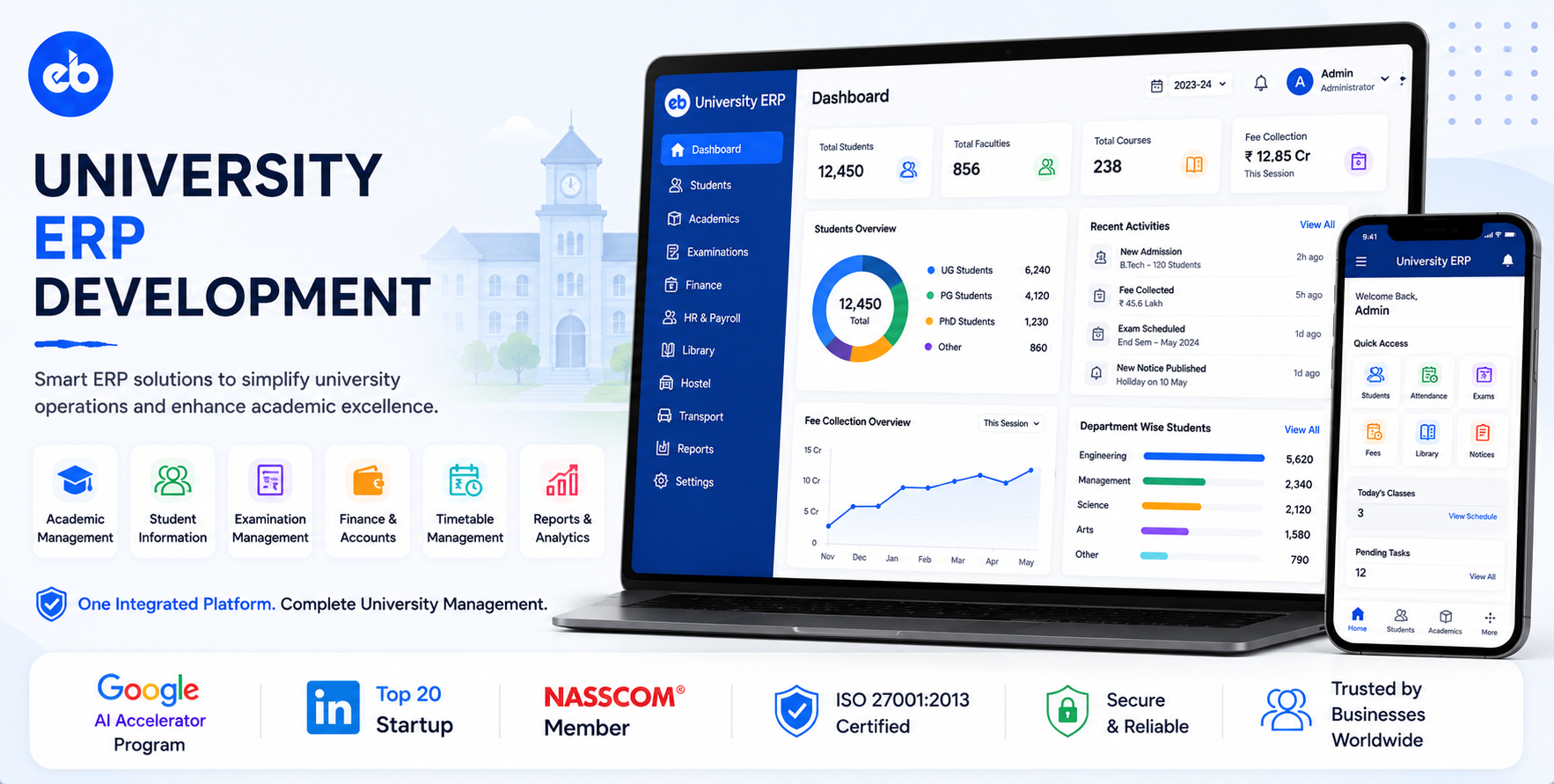
A mid-size university with 15,000 students, 800 faculty, 200 courses, and 50 academic programmes generates more operational complexity than most enterprise businesses.
Admissions cycles, course registration for thousands of students, examination scheduling, grading, transcript issuance, attendance compliance, fee management, placement tracking, alumni management, all requiring coordination across departments that do not naturally communicate.
Most Indian universities run these functions on a combination of legacy software, Excel, and physical registers. The consequences are visible in every academic year: course registration chaos in the first week, examination timetable clashes discovered the night before, marks entry delays holding up convocations, and placement teams with no visibility into which students are actively job-seeking.
The Indian higher education sector has 1,000+ universities and 40,000+ colleges. UGC digitisation mandates and NEP 2020 credit framework requirements are pushing every institution toward comprehensive ERP. The custom ERP market for universities is significant and underpenetrated.
EngineerBabu has shipped 500+ software products across education, fintech, and enterprise verticals. CMMI Level 5. Google AI Accelerator 2024 Top 20. Contact: mayank@engineerbabu.com
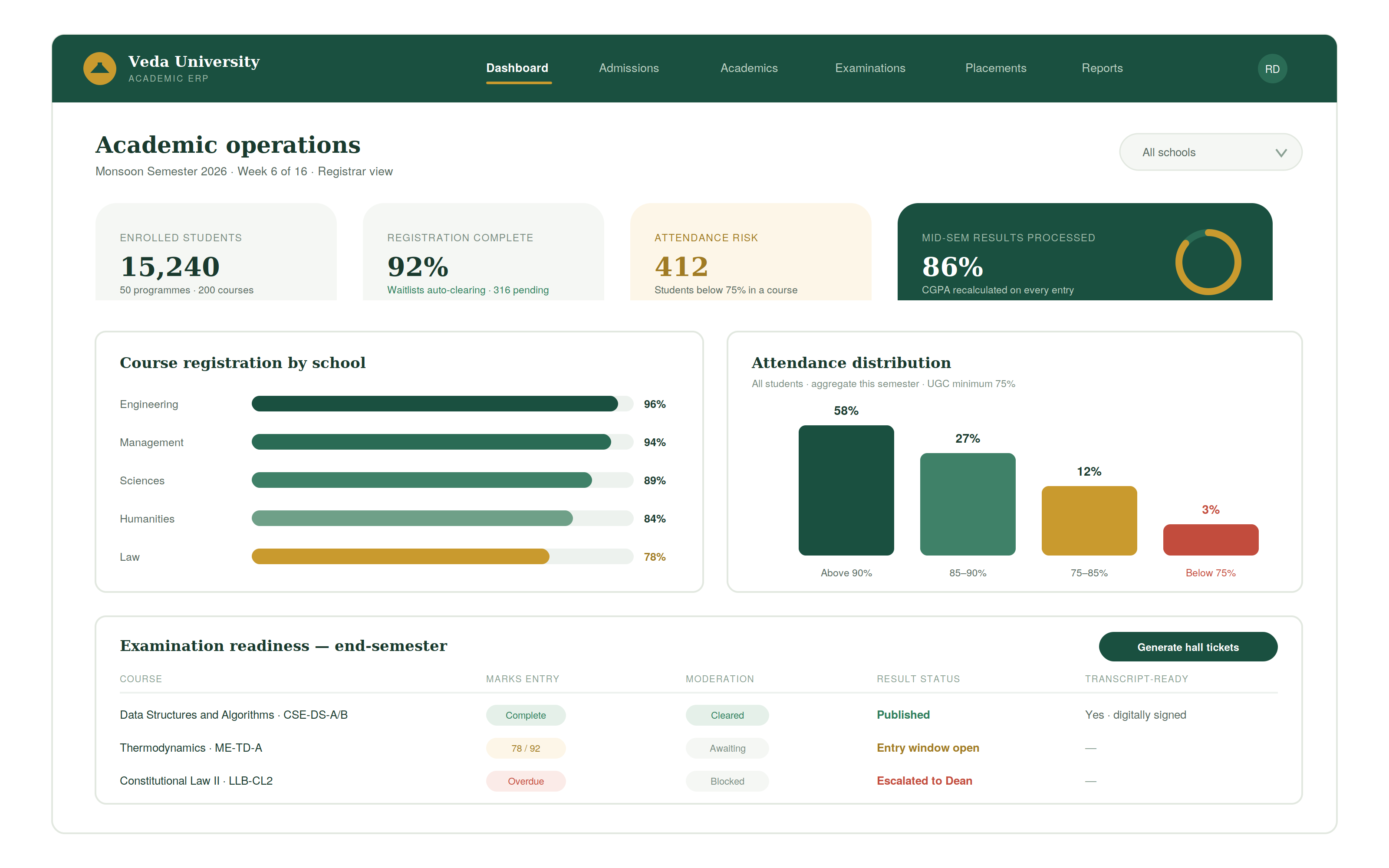
| Function | Module |
| Admissions | Application, entrance, merit list, counselling, enrolment |
| Student information | Complete academic profile, progress tracking |
| Programme and course management | Curriculum, course structure, elective management |
| Academic calendar | Semester planning, holiday calendar, examination dates |
| Course registration | Slot-based or open registration, waitlist management |
| Timetable | Automated or manual timetabling with clash detection |
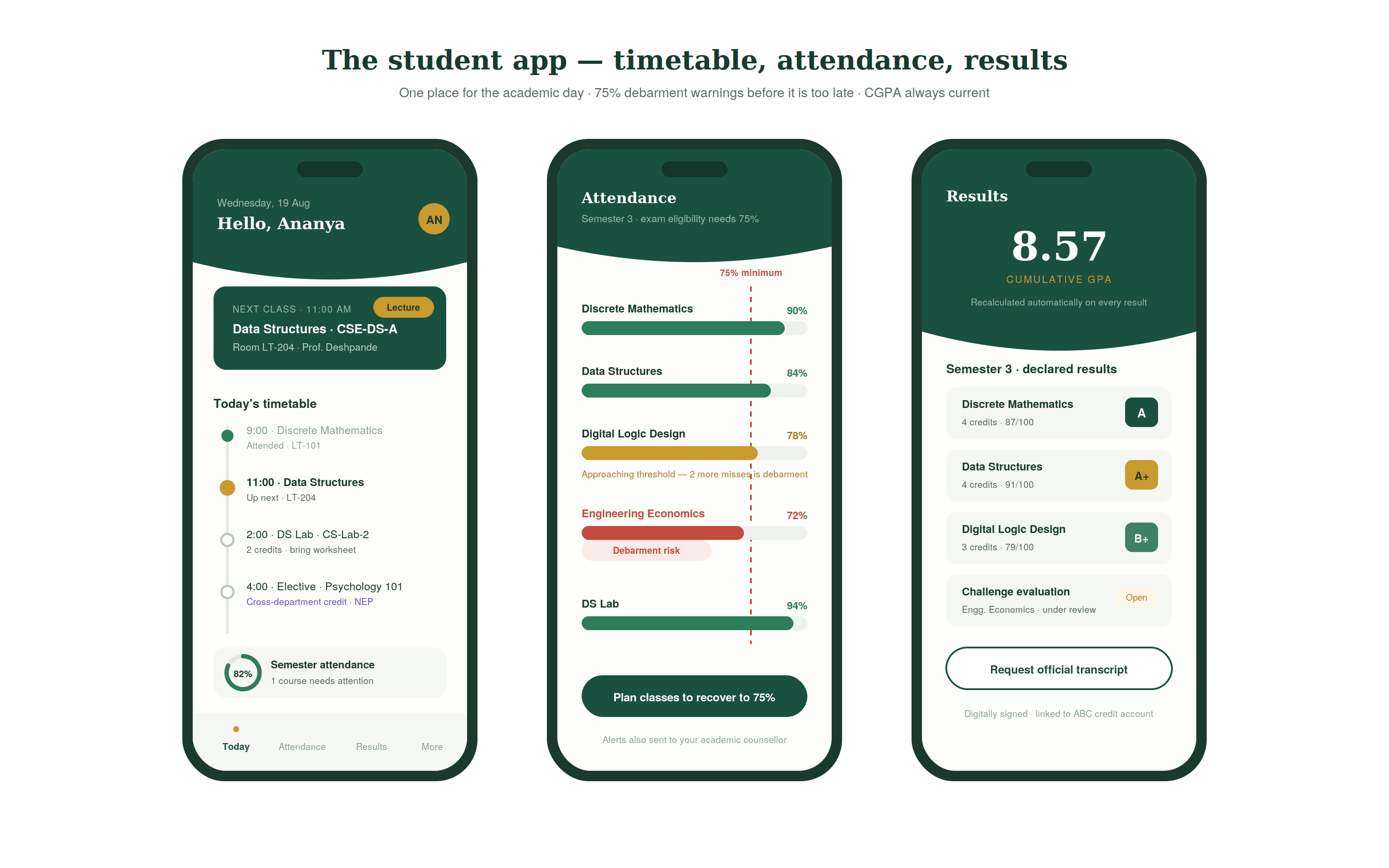
| Attendance | Faculty-marked, biometric, minimum attendance enforcement |
| Assessments and grading | Internal assessments, external examinations, grade calculation |
| Results and transcripts | Result processing, transcript issuance, migration certificates |
| Fee management | Fee structures, collection, scholarship, defaulter management |
| Hostel management | Room allocation, mess management, hostel attendance |
| Placement | Company registration, student profiles, drive management |
| Alumni management | Alumni database, engagement, mentorship |
| HR and payroll | Faculty and staff management |
| Reporting and compliance | NAAC, NIRF, UGC, AICTE regulatory reporting |
The admissions cycle:
| Stage | Action | System |
| Application open | Online application portal opens | Application platform live |
| Application submission | Applicant submits form, documents, fee | Application record created |
| Eligibility screening | Criteria check, minimum qualification, age | Automated eligibility engine |
| Entrance test | If applicable, test conducted and results processed | Exam module |
| Merit list | Rank list generated by programme | Automated merit ranking |
| Counselling / Allotment | Seat allotted based on merit and preference | Seat matrix management |
| Acceptance and fee | Applicant confirms and pays admission fee | Payment gateway |
| Document verification | Original documents verified | Document checklist management |
| Enrolment | Student record created in ERP | Unique enrolment number assigned |
The NEP 2020 multiple entry/exit:
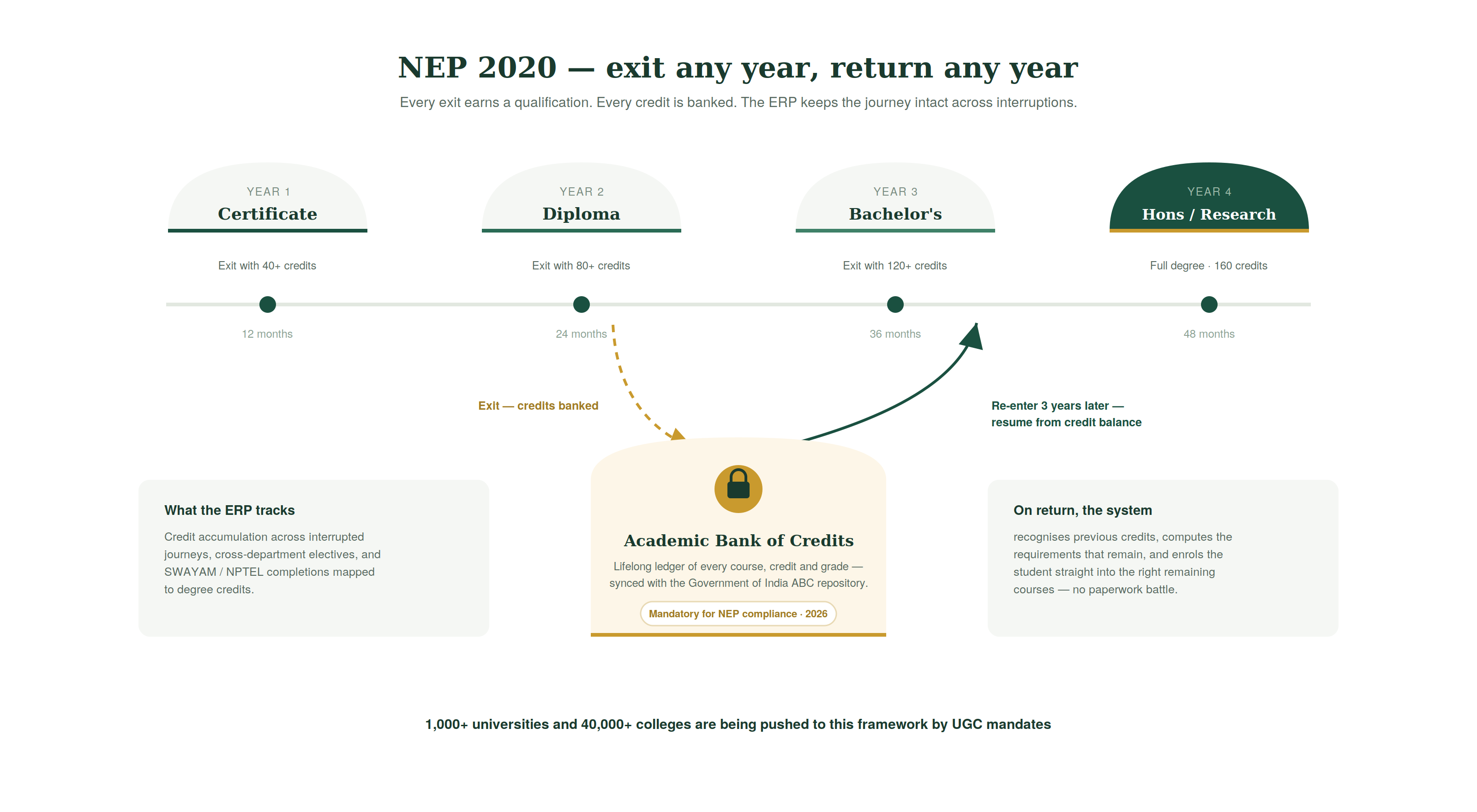
The National Education Policy 2020 requires universities to offer multiple entry and exit points, students can exit with a Certificate (1 year), Diploma (2 years), or Bachelor’s degree (3 or 4 years) and re-enter the credit framework at any point.
The admissions and student profile module must track credit accumulation across interrupted academic journeys, a student who exits after 2 years and re-enters 3 years later should be able to pick up from their existing credit balance.
The academic structure:
| Level | Example | Configuration |
| Institution | XYZ University | Top-level entity |
| School / Faculty | School of Engineering | Groups related departments |
| Department | Computer Science and Engineering | Manages programmes |
| Programme | B.Tech CSE | 4-year degree programme |
| Semester | Semester 3 | Time-bound academic unit |
| Course | Data Structures and Algorithms | Individual subject |
| Course section | CSE-DS-A, CSE-DS-B | Multiple sections of same course |
The credit framework:
Each course has defined credits, typically 3 to 5 credits for a theory course, 1 to 2 for a lab course. A semester has a defined total credit load, typically 24 to 28 credits. The student’s progress toward their degree is measured in accumulated credits.
Elective management:
The NEP framework emphasises elective choice, students should have access to courses from other departments, other programmes, and online platforms (SWAYAM, Coursera, edX). The elective management module:
Manages the elective basket, which courses are available as electives, from which departments, in which semesters. Handles cross-department and cross-university credit transfer. Integrates with SWAYAM to map NPTEL course completions to credits.
The course registration workflow:
| Step | Action | System |
| Registration window opens | Defined period for student course selection | Registration portal activates |
| Course availability check | System shows available sections with seat counts | Real-time seat availability |
| Student selects courses | Chooses core and elective courses | Prerequisites checked automatically |
| Clash detection | System validates no two selected courses overlap in time | Timetable constraint engine |
| Confirmation | Registered course list confirmed | Enrolment records created |
| Waitlist management | Full sections create waitlists, auto-enrol when seat opens | Queue management |
| Add/drop period | Defined window for course changes post-registration | Modification workflow |
The automated timetable generator:
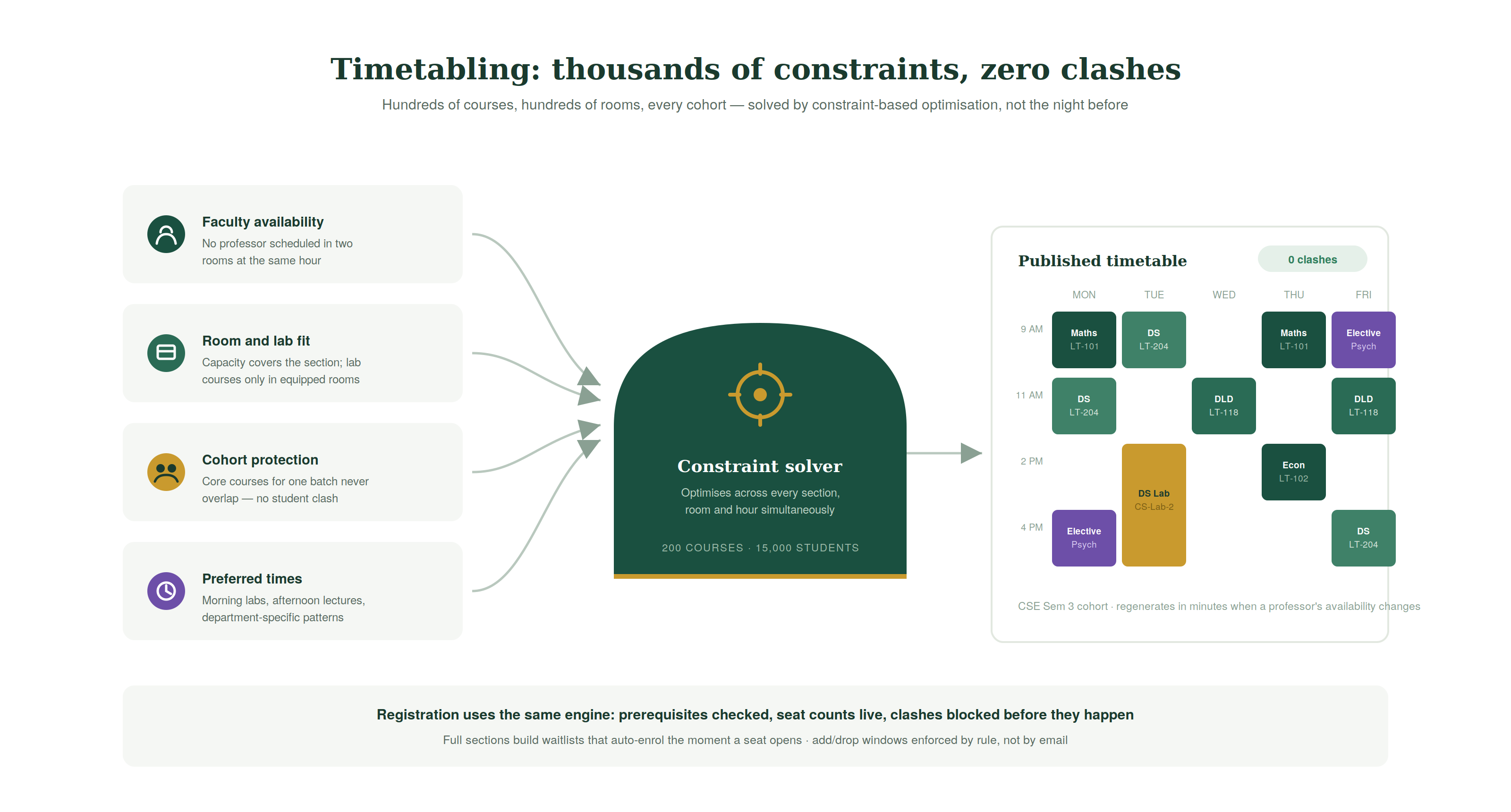
University timetabling is among the hardest scheduling problems, hundreds of courses, hundreds of classrooms, thousands of constraints (faculty availability, room capacity, lab requirements, no clashes for any student in a section).
The timetable engine uses constraint-based optimisation to generate a clash-free timetable that satisfies:
Faculty availability constraints, no faculty scheduled for two courses simultaneously. Room constraints, room capacity ≥ section size, lab courses in equipped rooms. Student group constraints, core courses for the same cohort not scheduled simultaneously. Preferred time constraints, morning labs, afternoon lectures for specific departments.
The attendance compliance requirement:
Most Indian universities require 75% minimum attendance for exam eligibility, a requirement mandated by UGC and enforced by each university’s examination rules. A student falling below 75% in any course is typically debarred from the end-semester examination.
Attendance capture methods at university level:
| Method | Technology | Use Case |
| Faculty-marked (online) | Faculty portal, mark present/absent per student | Most practical for large cohorts |
| Biometric | Fingerprint scanner at classroom entrance | Engineering colleges, management institutes |
| QR code | Student scans QR at start of class | Tech-enabled campuses |
| RFID smart card | Card tap at classroom reader | Premium institutions |
| Face recognition | Camera at entrance | High-end institutions |
The attendance analytics:
| Alert | Trigger | Action |
| Below 75% overall | Student’s aggregate attendance < 75% | Alert to student, academic coordinator |
| Below 75% in specific course | Course-level attendance < 75% | Alert to student, course instructor |
| Approaching debarment | Attendance at 77–80% with weeks remaining | Warning to student, action required |
| Consecutive absences | 5+ consecutive classes missed | Alert to class counsellor |
The examination workflow:
| Step | Action | Timeline |
| Exam schedule | Timetable for end-semester examinations | 4 weeks before |
| Hall ticket | Admit cards issued to eligible students | 2 weeks before |
| Seating arrangement | Room and seat allocation | 1 week before |
| Answer script management | Scripts received, coded, distributed for valuation | During + post exam |
| Marks entry | Faculty enters marks for internal assessments and end-semester | Defined window |
| Grade calculation | Grades computed from total marks using grade table | Automatic |
| Moderation | Borderline cases reviewed | If required |
| Results declared | Results published to student portal | Post moderation |
| Challenge evaluation | Students can challenge specific answers | Defined window |
| Transcripts | Academic transcripts generated | On request |
The grade calculation engine:
| Component | Weightage |
| Internal assessment 1 | 10% |
| Internal assessment 2 | 10% |
| Attendance component | 5% |
| Assignment/project | 10% |
| End-semester examination | 65% |
| Total | 100% |
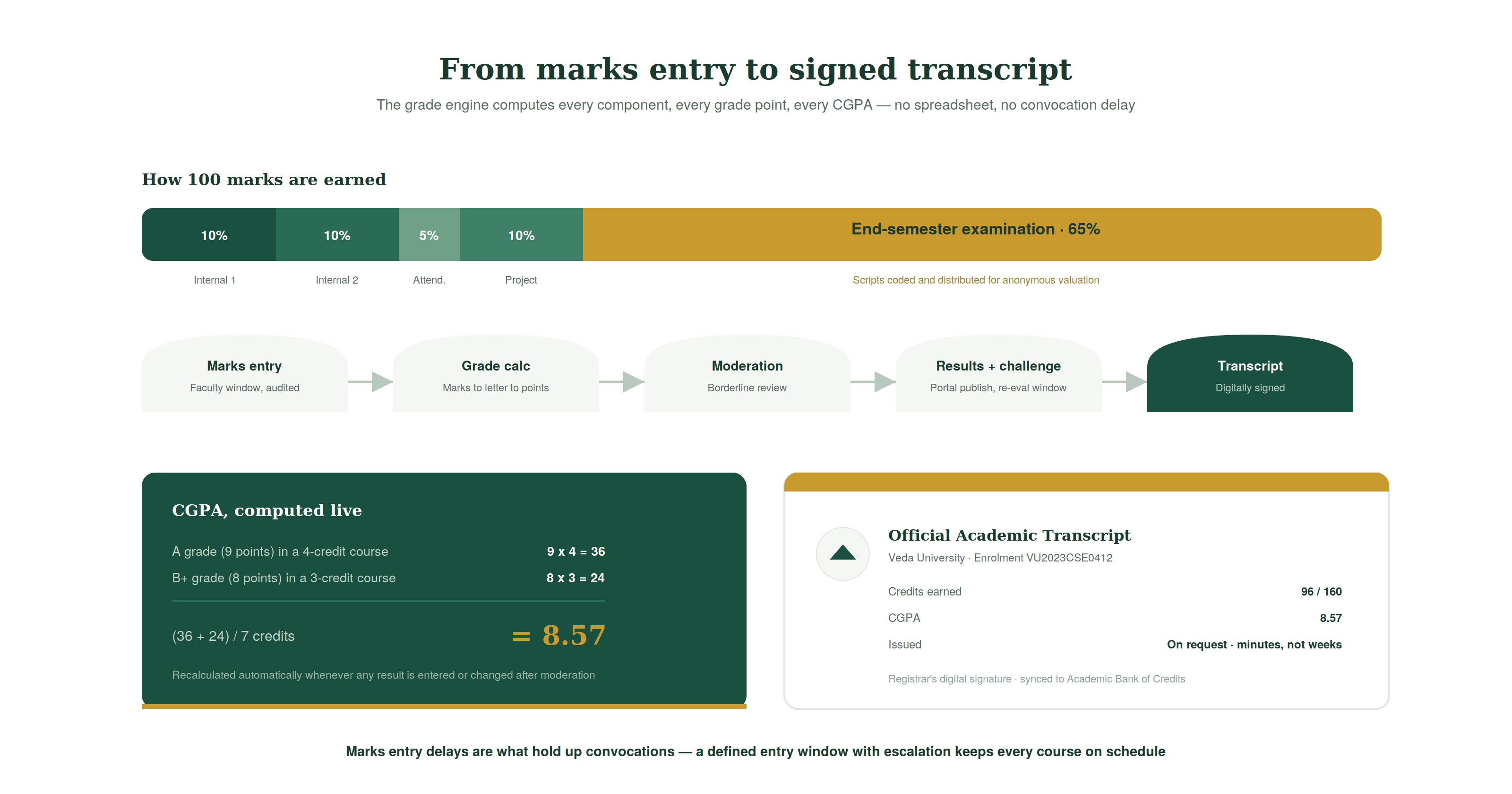
The grade table converts total marks to letter grades (A+, A, B+, B, C+, C, D, F) and grade points. CGPA is calculated as the weighted average of grade points across all courses, credits as weights.
The placement portal:
| Actor | Function |
| Student | Build profile, upload resume, view drives, register for drives |
| Placement team | Register companies, schedule drives, manage process |
| Recruiter | View eligible student profiles, shortlist, schedule interviews |
| Faculty advisor | Track department’s placement status |
The placement drive workflow:
| Stage | Action |
| Company registration | Company profile, job description, eligibility criteria |
| Student registration | Eligible students register for the drive |
| Resume shortlisting | Company reviews registered student profiles |
| Aptitude test | Online test conducted through ERP or external platform |
| Interview scheduling | Shortlisted students scheduled for interviews |
| Offer letters | Selected students receive offers, record in system |
| Placement report | Department-wise, programme-wise, CTC analysis |
The placement analytics:
| Metric | Details |
| Placement rate | % of students placed / eligible students |
| Average CTC | Mean package offered |
| Highest CTC | Best package from a drive |
| Core vs non-core placement | % placed in domain-relevant roles |
| Company diversity | Number of unique companies recruiting |
| Time to first offer | Median days from placement season open to first offer |
| Module | Cost Range (USD) | Notes |
| Admissions + NEP multiple entry/exit | $10K – $18K | Merit list, counselling |
| Student information system + academic profile | $6K – $12K | |
| Programme + course management | $6K – $12K | Credit framework, electives |
| Course registration + clash detection | $8K – $15K | Constraint-based validation |
| Automated timetabling engine | $10K – $18K | Complex constraint solver |
| Attendance management + debarment alerts | $6K – $12K | |
| Examination management + grade calculation | $8K – $15K | CGPA engine |
| Transcript generation + digital signing | $5K – $10K | |
| Fee management + scholarship | $6K – $12K | |
| Placement portal (student + recruiter) | $8K – $15K | |
| Hostel management | $5K – $10K | |
| NAAC/NIRF/UGC regulatory reporting | $6K – $12K | |
| Student portal + mobile app | $8K – $15K | |
| AWS + VAPT + Year 1 ops | $5K – $10K | |
| Total | $97K – $186K | Full university ERP |
Contact: mayank@engineerbabu.com
The National Education Policy 2020 introduced a flexible credit-based framework where students can exit a degree programme at multiple points with recognised qualifications, an exit after 1 year earns a Certificate, after 2 years earns a Diploma, after 3 years earns a Bachelor’s degree, and after 4 years earns a Bachelor’s with Research or Honours. Students who exit can re-enter the credit system later and continue toward the next qualification level from their existing credit balance. A university ERP supports this by maintaining a lifelong Academic Bank of Credits (ABC) account for each student, recording all courses completed, credits earned, and grades obtained. When a student returns after an exit, the system recognises their previous credits, calculates which requirements remain, and enrols them into the appropriate remaining courses. The ABC integration, connecting to the Government of India’s Academic Bank of Credits repository, is a mandatory technical requirement for NEP-compliant universities from 2026.
CGPA (Cumulative Grade Point Average) is the weighted average of grade points earned across all courses in a student’s academic record, with course credits as weights. The calculation: for each course, the grade points earned are multiplied by the course credits; the sum of these products is divided by the total credits attempted. A student who earned an A (9 grade points) in a 4-credit course and a B+ (8 grade points) in a 3-credit course has CGPA = (9×4 + 8×3) / (4+3) = (36+24)/7 = 8.57. The grade calculation engine automates this entirely, converting total marks to letter grades using the university’s grade table, multiplying by credits, summing, and dividing by total credits attempted. The engine recalculates CGPA automatically whenever a new course result is entered or a previous result is modified after moderation, ensuring the student’s academic record is always current.
NAAC (National Assessment and Accreditation Council) accreditation requires self-study reports covering: student admission data by category and programme, faculty qualifications and research output, examination results and pass rates, placement statistics, infrastructure, financial health, and governance. NIRF (National Institutional Ranking Framework) rankings require: faculty data (PhD qualified, publications), student data (enrolment by gender and category), graduation and placement outcomes, research metrics, and perception survey data. UGC compliance requires periodic submission of student enrolment data by programme and category, faculty appointment and qualification data, examination conduct compliance, and fee structure filings. A university ERP with structured data capture across all modules can generate most of these reports automatically, reducing what is typically a months-long manual data collection exercise to a report generated in minutes from operational data.