10 Common Mobile App Development Mistakes Businesses Make in the USA



Create engaging, high-performance mobile applications tailored to your business needs. We craft future-ready apps that offer smooth user experiences on all devices.
Build robust and scalable websites and CMS platforms that help you manage content effortlessly. Our development ensures a seamless digital presence.
Launch secure, feature-rich online stores with intuitive shopping experiences. We build tailored eCommerce platforms designed for growth.
Design captivating games with immersive gameplay and stunning graphics. From concept to launch, we build engaging experiences that players love.
Enhance your customer relationships with customized Salesforce implementations. Drive growth and efficiency with smarter CRM solutions.
Harness artificial intelligence and machine learning to automate workflows and gain actionable insights. Our AI transforms data into smart decisions.
Accelerate your software delivery lifecycle with continuous integration, delivery, and infrastructure automation to boost efficiency.
Hire app developers ready to turn your ideas into sleek, high-performing mobile apps for any platform.
Bring in frontend pros who craft smooth, beautiful, and user-friendly interfaces that your visitors will love.
Get backend developers who build fast, secure, and reliable systems to keep everything running behind the scenes.
Hire eCommerce developers who build secure, scalable online stores designed to offer seamless shopping and grow your sales.
Get dedicated developers committed to your projects, delivering consistent quality and speed as an extension of your team.
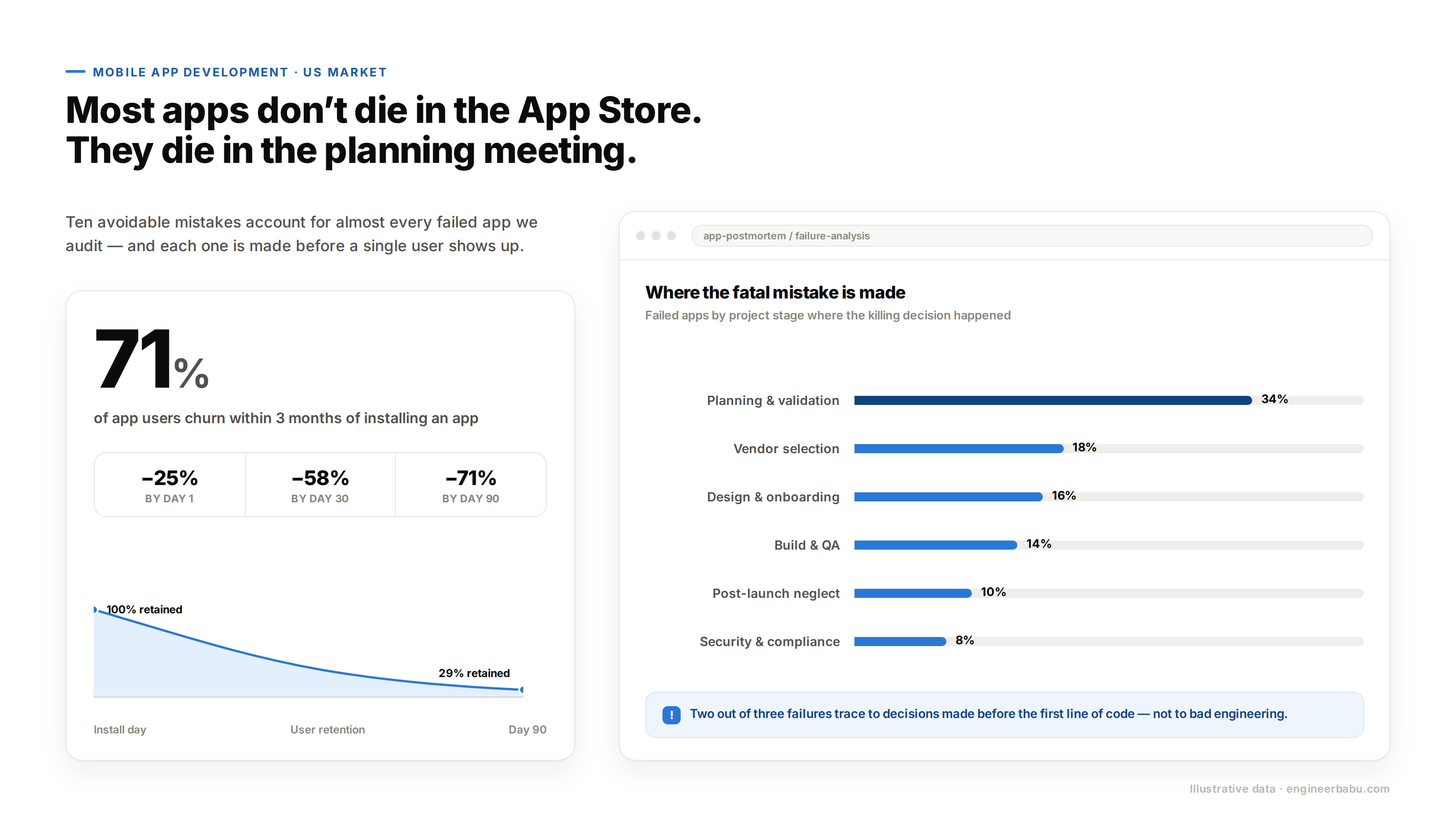
Here is the uncomfortable math of the US app market. Roughly 71% of app users churn within three months of installing an app, according to Zippia. Most of those apps did not fail in the App Store. They failed months earlier, in planning meetings, vendor calls, and rushed sprints.
That is the pattern behind almost every dead app we have audited: the fatal decision was made before a single user showed up.
This post walks through the ten mobile app development mistakes that US businesses repeat most often, why each one quietly kills apps, and what to do instead.
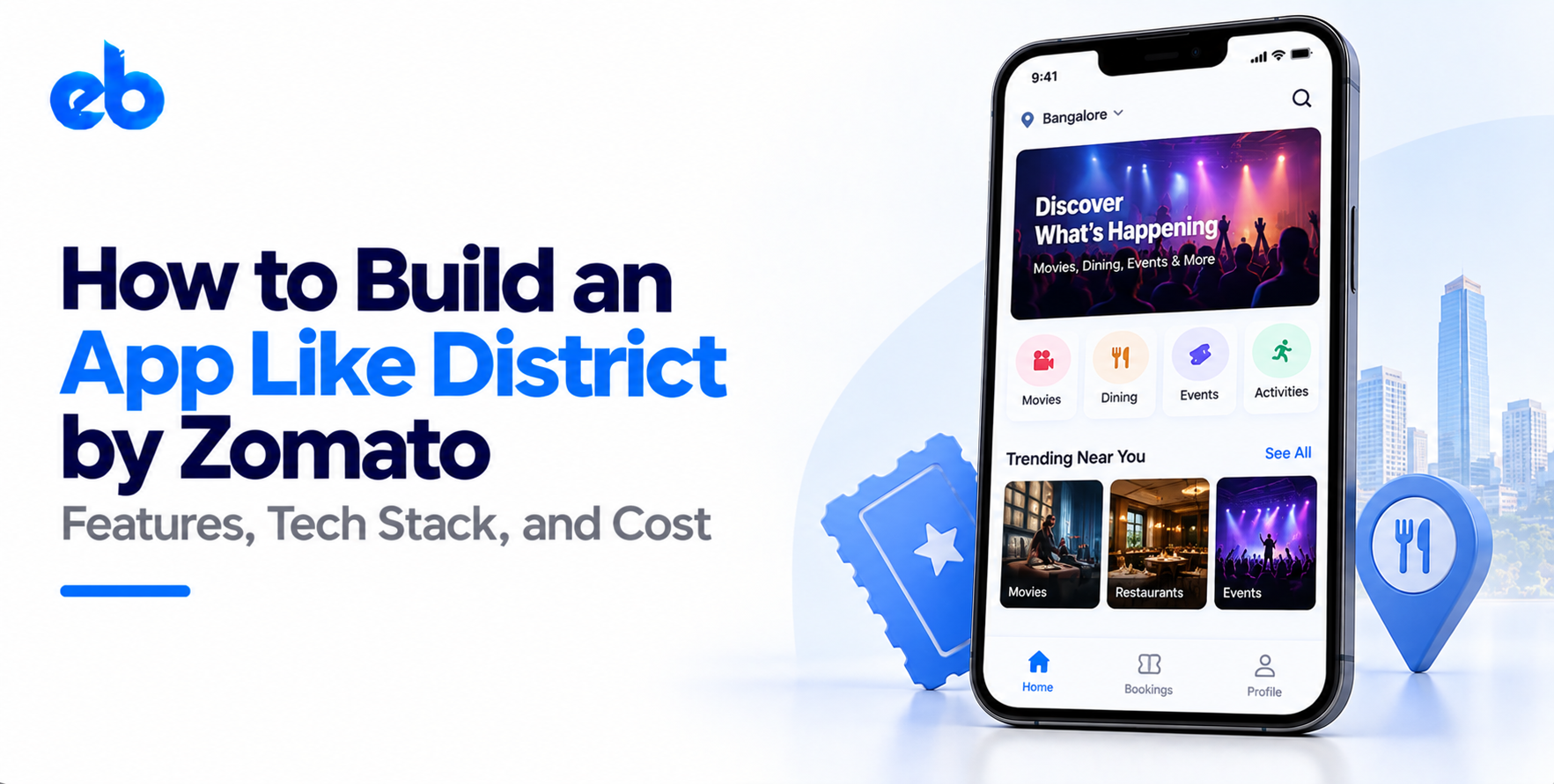
The most common mobile app development mistakes are building without validating demand, hiring on price alone, cramming the first version with features, treating design as decoration, ignoring backend and API planning, skipping security, bolting on AI with no use case, underfunding QA, and launching with no maintenance plan. Each one is avoidable if you catch it at the planning stage, not after launch.
Every one of these shows up constantly in failed projects. Check your current plan against each before you sign anything.
The most expensive of all mobile app development mistakes happens before code exists. A business assumes people want the app, skips validation, and spends six figures finding out they were wrong. The fix is boring and effective: launch a stripped-down version first and let real users vote with their behavior.
A focused MVP Development approach typically costs 40 to 60% less than a full build. More importantly, it turns your riskiest assumption into data. If nobody uses the small version, you just saved yourself the big one.
A $15,000 quote against a $60,000 quote feels like an easy decision. Among all mobile app development mistakes, this one repeats the most. Cheap builds tend to arrive with copied UI kits, no documentation, and code the next team refuses to touch. Then you pay twice: once for the bad build, once for the rebuild.
Compare vendors on shipped apps in your industry, who actually writes the code, and post-launch support terms. If you are still shortlisting, this comparison of mobile app development companies in the USA shows what to evaluate beyond the hourly rate.
Few mobile app development mistakes are as visible to users as this one. A business designs a polished iPhone app, then clones it pixel for pixel onto Android. Android users notice immediately. Navigation patterns, back-button behavior, and system gestures differ between the platforms, and mismatches feel broken even when nothing crashed.
The result shows up as one-star reviews that mention “laggy” or “weird” without saying why. Budget for platform-specific design passes, even on a cross-platform codebase like Flutter or React Native. The shared logic can stay shared. The interface layer should respect each platform’s conventions, because that is what users unconsciously judge.
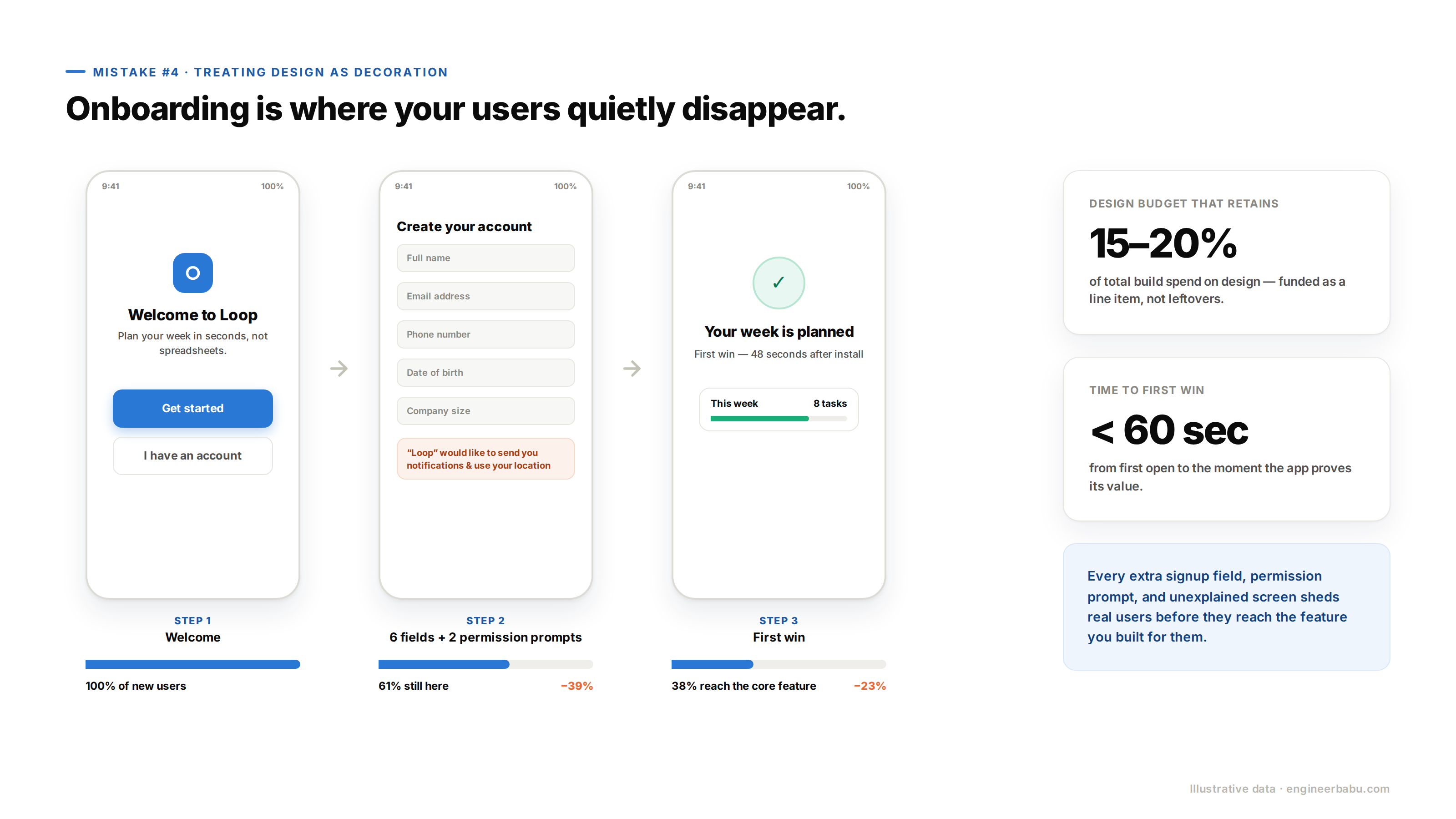
Of all mobile app development mistakes, underinvesting in design is the quietest. Teams spend 80% of the budget on features, squeeze design into the leftovers, then wonder why users open the app once and vanish. Onboarding is where this bites hardest.
Every extra signup field, permission prompt, and unexplained screen sheds real users before they ever reach the core feature. Good design here is not aesthetics. It is the sequence of decisions that gets a first-time user to their first win in under a minute. Put design spend at 15 to 20% of the total budget, and prototype the onboarding flow with real people before development starts.
Feature bloat is one of those mobile app development mistakes that feels like ambition while it is happening. Every stakeholder adds a “must-have,” the scope triples, the timeline slips, and the launch app confuses everyone. Users do not adopt apps because they do a lot.
They adopt apps that do one job noticeably better than the alternative. Write down the single action your app must nail, build the shortest path to it, and park everything else in a version-two backlog. Shipping small and iterating on live user data beats shipping big and guessing.
Founders obsess over screens because screens are visible. Then the app slows to a crawl at 10,000 users because nobody planned the architecture behind those screens. Payment processors, maps, notifications, and third-party data all flow through integrations, and sloppy ones create the crashes users blame on “the app.”
Solid API Development work decides your response times, your uptime, and how painful future integrations will be. Ask any vendor how they handle rate limits, retries, and versioning. Vague answers now become outages later, at the exact moment traffic finally arrives.
Unlike most mobile app development mistakes, this one carries legal consequences, not just churn. A 2023 NowSecure benchmark found that 95% of roughly 6,500 popular mobile apps failed at least one OWASP MASVS mobile security category. In the US, that exposure compounds fast: CCPA, HIPAA for health data, and state privacy laws all carry teeth.
Apps handling money face the strictest bar of all, which is why an experienced fintech app development company builds encryption, consent logging, and audit trails in from day one. Retrofitting security after launch costs multiples of doing it during the build.
In 2026, “add AI” appears in nearly every US app brief. Most of those briefs cannot answer one question: what decision does the AI improve for the user? A chatbot nobody asked for adds API costs, latency, and a new failure surface while moving no metric.
Meaningful AI Development starts from a measurable outcome, like cutting support tickets or predicting churn, and only then picks the model. If your AI feature disappeared tomorrow and no user would notice, it was a press-release feature, not a product feature. Cut it and fund retention instead.
The US market runs on hundreds of device, OS, and network combinations, from new iPhones to five-year-old budget Androids on spotty LTE. Skimping on QA sits high on any honest list of mobile app development mistakes, because teams test on the founder’s phone plus two office devices, then ship bugs to everyone else.
And app store users are unforgiving: a crash in the first session usually means an uninstall and often a public review. Reserve 10 to 15% of the budget for QA across device labs, slow-network conditions, and interrupted sessions like incoming calls. Fixing a defect before launch is dramatically cheaper than fixing it in production with your rating on the line.
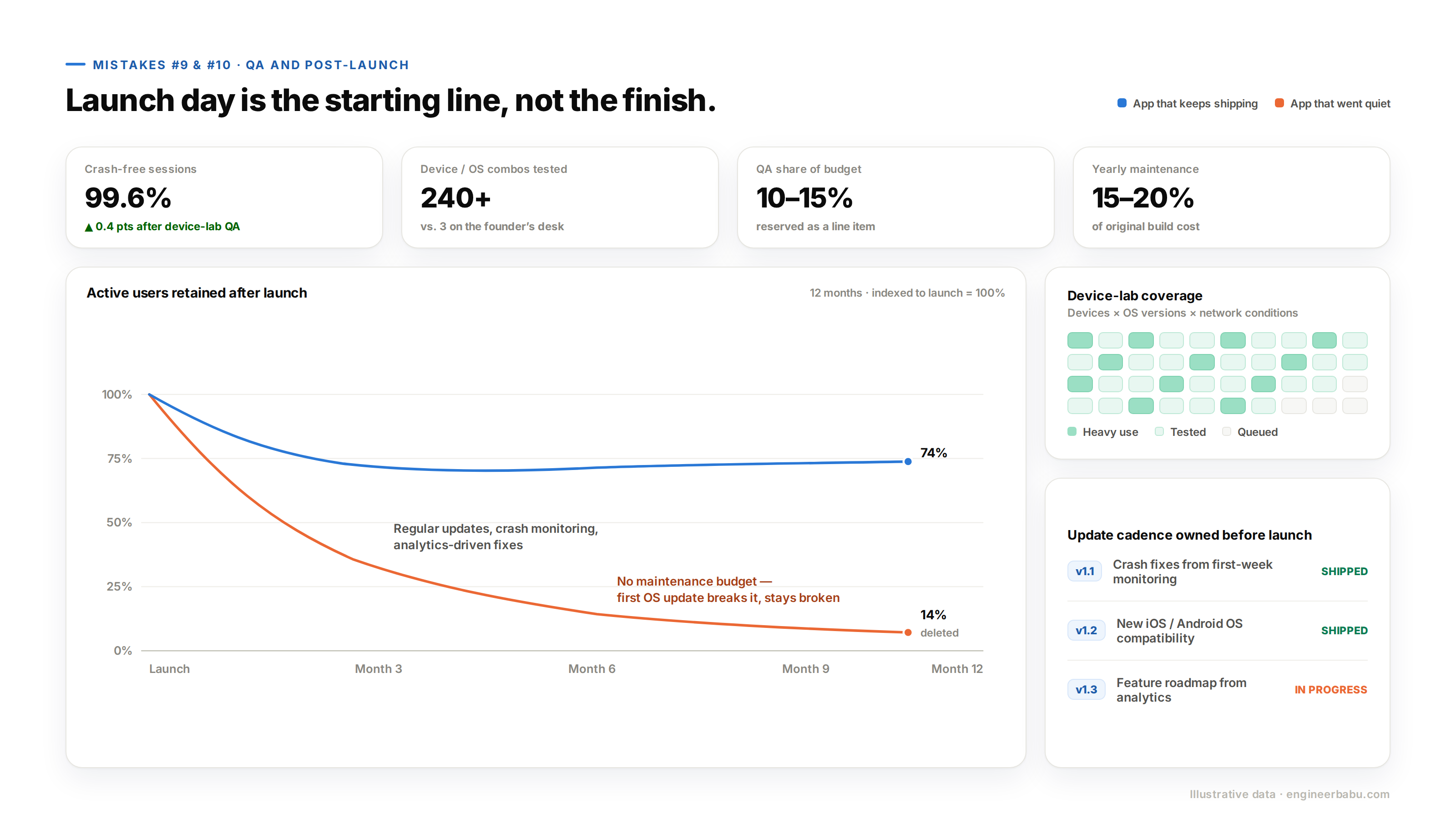
The last of these mobile app development mistakes is treating launch day as the finish line. It is the starting line. Without an analytics setup, you cannot see where users drop off. Without a maintenance budget, the first iOS or Android update breaks something and stays broken. Without an update cadence, the app looks abandoned within months, because it is.
Plan for ongoing costs of roughly 15 to 20% of the original build per year. Decide before launch who owns crash monitoring, store updates, and the feature roadmap. Apps that keep shipping keep users. Apps that go quiet get deleted.
Notice the thread running through all ten: none of them are coding problems. They are decision problems that happen upstream of the code. So the prevention is procedural. Validate demand before you build. Pick a partner on evidence, not price.
Define one core job for version one. Fund design, QA, and security as line items, not leftovers. And write the post-launch plan before launch, not after.
A disciplined mobile app development process, with senior engineers involved from architecture through maintenance, is what turns this checklist from advice into default behavior.
Apps in the USA rarely die from bad code. They die from mobile app development mistakes made in the first month of planning, then discovered in the last month of runway. Every item on this list is cheap to prevent and brutal to repair.
Walk your current project through the ten points above before your next milestone payment. If more than two of them describe your plan, fix the plan first. The build will go better because of it.
Planning an app for the US market? Talk to the EngineerBabu team and pressure-test your build plan before you commit the budget.
The biggest mobile app development mistakes are skipping demand validation, hiring on price alone, overloading version one, neglecting design and onboarding, ignoring backend architecture, treating security as an afterthought, adding AI without a use case, underfunding QA, and launching with no maintenance plan.
Most failures trace back to mobile app development mistakes made before launch. Weak onboarding, untested devices, and missing analytics mean users churn quickly and teams cannot see why. Around 71% of users abandon an app within three months, so retention has to be designed in, not patched in.
Plan roughly 10 to 15% of the total budget for QA and testing across devices and network conditions. After launch, expect ongoing maintenance to run about 15 to 20% of the original development cost each year.
Usually, yes. An MVP costs 40 to 60% less than a full build and tests your riskiest assumption with real users. Skipping it means betting the entire budget on an unvalidated guess about demand.
Ask what measurable outcome the AI improves, such as fewer support tickets or better retention. If the feature could disappear without users noticing, it adds cost and complexity without value. Build it only when it moves a metric you already track.