How to Build a Hospital Management System, OPD, IPD, OT, Pharmacy, Lab, Billing, and ABDM Integration 2026



Create engaging, high-performance mobile applications tailored to your business needs. We craft future-ready apps that offer smooth user experiences on all devices.
Build robust and scalable websites and CMS platforms that help you manage content effortlessly. Our development ensures a seamless digital presence.
Launch secure, feature-rich online stores with intuitive shopping experiences. We build tailored eCommerce platforms designed for growth.
Design captivating games with immersive gameplay and stunning graphics. From concept to launch, we build engaging experiences that players love.
Enhance your customer relationships with customized Salesforce implementations. Drive growth and efficiency with smarter CRM solutions.
Harness artificial intelligence and machine learning to automate workflows and gain actionable insights. Our AI transforms data into smart decisions.
Accelerate your software delivery lifecycle with continuous integration, delivery, and infrastructure automation to boost efficiency.
Hire app developers ready to turn your ideas into sleek, high-performing mobile apps for any platform.
Bring in frontend pros who craft smooth, beautiful, and user-friendly interfaces that your visitors will love.
Get backend developers who build fast, secure, and reliable systems to keep everything running behind the scenes.
Hire eCommerce developers who build secure, scalable online stores designed to offer seamless shopping and grow your sales.
Get dedicated developers committed to your projects, delivering consistent quality and speed as an extension of your team.
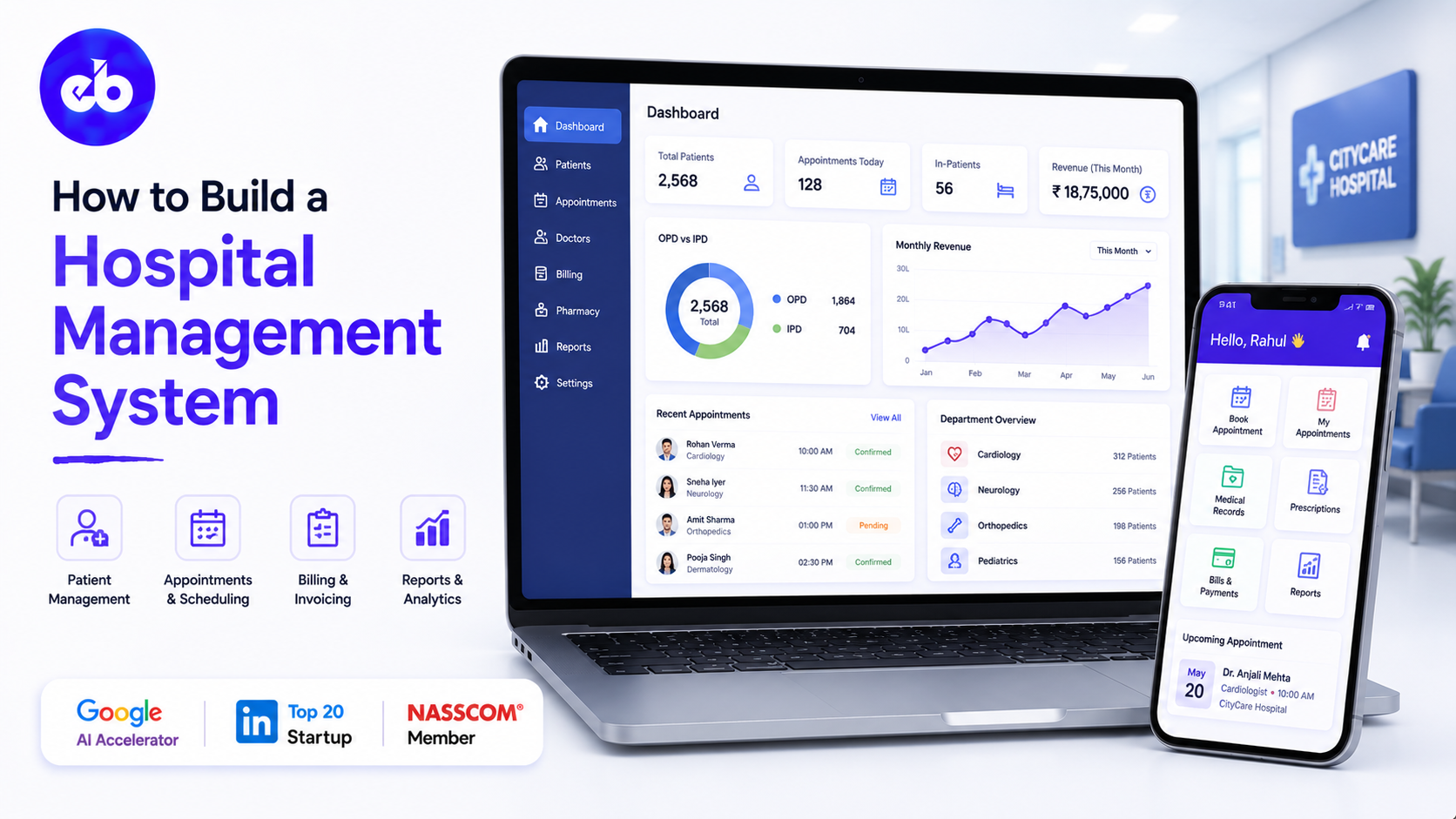
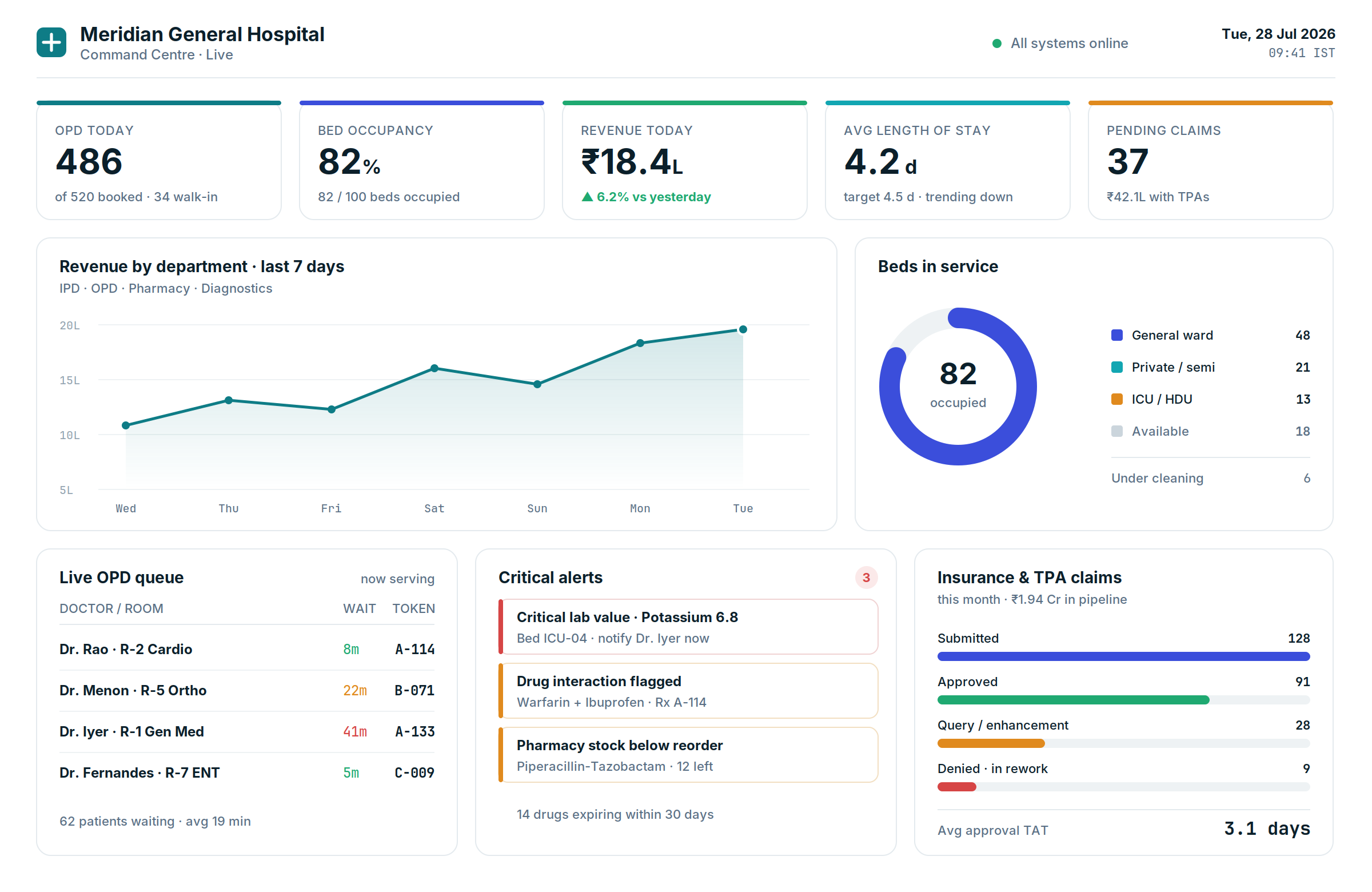
Running a hospital without a Hospital Management System in 2026 is like running a bank without core banking software. Every patient interaction, registration, consultation, investigation, surgery, billing, discharge, generates data that must flow in real time between departments.
When that flow is broken, when the pharmacy does not know the doctor prescribed a new antibiotic, when billing does not know the patient was moved to ICU, when the lab result is not visible to the attending physician before rounds, patient safety and financial performance both suffer.
India has 70,000 hospitals. Most have some form of digitisation. A significant portion still run on disconnected department software or, worse, on manual processes for critical functions. For a hospital treating 500 outpatients and managing 100 inpatient beds, a disconnected or manually operated HMS is not just inefficient. It is a liability.
This guide covers how to build a hospital management system, from the OPD registration workflow through IPD management, OT scheduling, pharmacy, lab, billing, and ABDM integration, with the architecture that keeps every department connected in real time.
EngineerBabu built healthcare platforms for Apollo Hospitals and Somnoware, which was acquired by ResMed. CMMI Level 5. Google AI Accelerator 2024 Top 20. Contact: mayank@engineerbabu.com
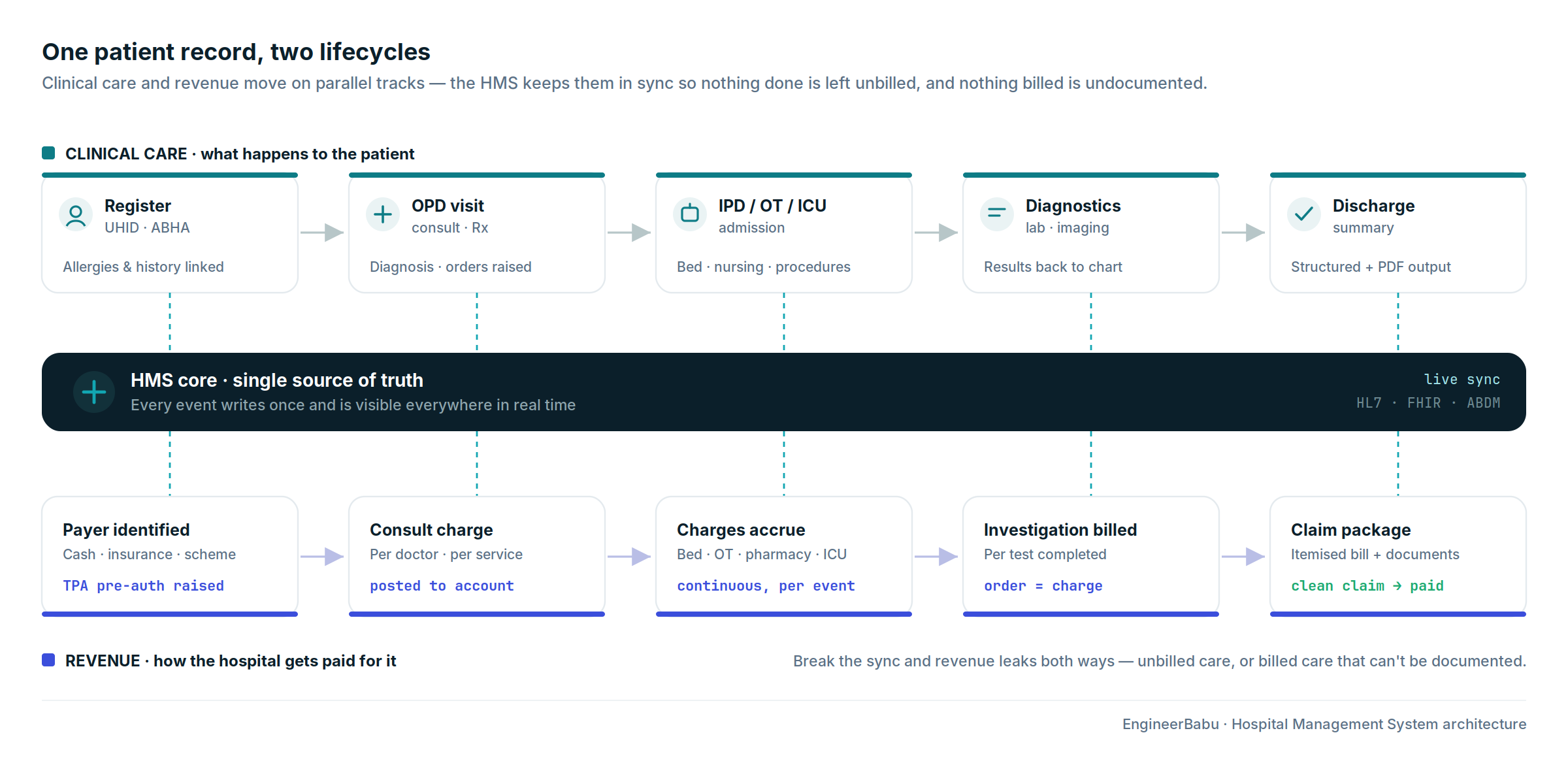
An HMS is not a billing system with some clinical features added. It is the operational backbone that connects clinical care, what happens to the patient, with financial operations, how the hospital gets paid for it.
When these two are disconnected, revenue leaks in both directions: services provided but not billed, and services billed but disputed because the documentation does not support them.
| Department | HMS Function |
| Front desk / Registration | Patient registration, UHID creation, appointment booking |
| OPD | Consultation queue, doctor schedule, e-prescription |
| IPD | Admission, ward management, bed allocation, nursing notes |
| Emergency | Triage, rapid registration, critical care tracking |
| OT (Operation Theatre) | OT scheduling, surgical notes, implant tracking |
| ICU | Intensive monitoring, ventilator records, care protocols |
| Laboratory | Test orders, sample tracking, result entry, report generation |
| Radiology | Imaging orders, DICOM viewer, report delivery |
| Pharmacy | Prescription dispensing, inventory, drug interaction checking |
| Blood bank | Blood group inventory, crossmatch, issue tracking |
| Billing | OPD billing, IPD billing, insurance pre-auth, discharge summary |
| CSSD | Sterilisation tracking, instrument lifecycle |
| HR and payroll | Staff management, duty roster, salary |
| Reporting and MIS | Clinical KPIs, financial dashboards, compliance reports |
The patient journey in a hospital begins at registration. Every subsequent interaction, every consultation, every prescription, every test, every bill, links to the patient’s registration record. Get registration wrong and everything downstream is wrong.
The registration workflow:
A patient arriving at the hospital, for OPD, emergency, or planned admission, is registered at the front desk. The registration desk creates or retrieves the patient’s UHID (Unique Hospital ID). If the patient has visited before, their existing record is retrieved by searching on name, phone number, date of birth, or ABHA ID. If new, a new UHID is generated and the full profile is created.
Patient profile fields:
| Category | Fields |
| Identity | Full name, date of birth, gender, blood group, nationality |
| Contact | Mobile, alternate mobile, email, address, PIN code |
| Emergency contact | Name, relationship, mobile |
| Insurance | TPA name, policy number, corporate ID (if cashless) |
| ABHA ID | Ayushman Bharat Health Account, for ABDM integration |
| Previous visits | Linked to UHID, full visit history accessible |
| Allergies | Drug allergies flagged prominently on every screen |
ABHA (ABDM) integration:
The Ayushman Bharat Digital Mission mandates a unique ABHA ID for every patient in India’s public health ecosystem.
For hospitals participating in ABDM, which is increasingly required for government scheme empanelment, the HMS must create or link the patient’s ABHA ID at registration, generate PHR records for every clinical interaction, and share these records with the ABDM health data fiduciary through the consent-based HIE-CM architecture.
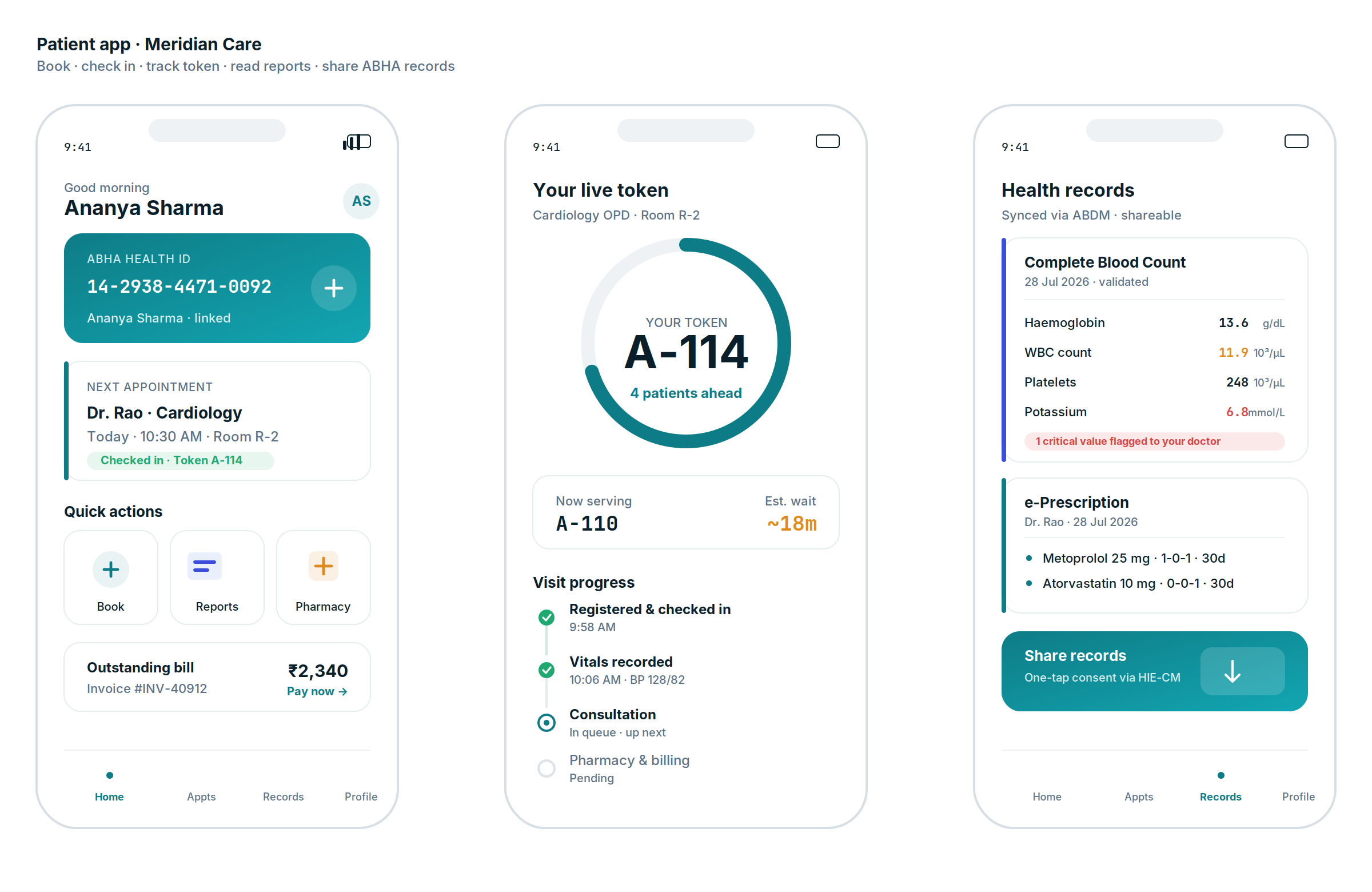
The ABDM integration allows patients to access their health records from any ABDM-connected facility, a patient visiting a hospital in Chennai can share their records from a hospital in Delhi with a single consent action.
The outpatient department is the highest-volume, highest-visibility part of most hospitals. A well-managed OPD with short waiting times and smooth consultation flow is the primary driver of patient satisfaction, and the primary entry point for revenue.
Each doctor in the OPD has a schedule, which days they see patients, in which OPD room, during which time slots, with how many appointments per slot. The HMS manages this schedule and opens appointment slots for booking, online (patient portal or app), through the call centre, or at the front desk.
As patients arrive, they are checked in against their appointment or registered as walk-ins. The queue management system displays on screens at waiting areas, showing the current call number and expected wait time. The doctor’s screen shows the queue for their OPD, and they advance the queue by calling the next patient.
When the patient enters the consultation room, the doctor sees their complete history, previous visits, diagnoses, prescriptions, investigations, allergies, and chronic conditions. The doctor records the current consultation:
| Clinical Data | Input Method |
| Chief complaint | Text with structured categorisation |
| Vital signs | Nurse-entered before consultation |
| Examination findings | Structured templates or free text |
| Diagnosis | ICD-10 coded selection |
| Prescription | Drug, dose, frequency, duration, with interaction checking |
| Investigation orders | Lab or radiology orders generated directly |
| Follow-up | Next appointment booked at consultation close |
| Referral | Internal referral to specialist or external referral with letter |
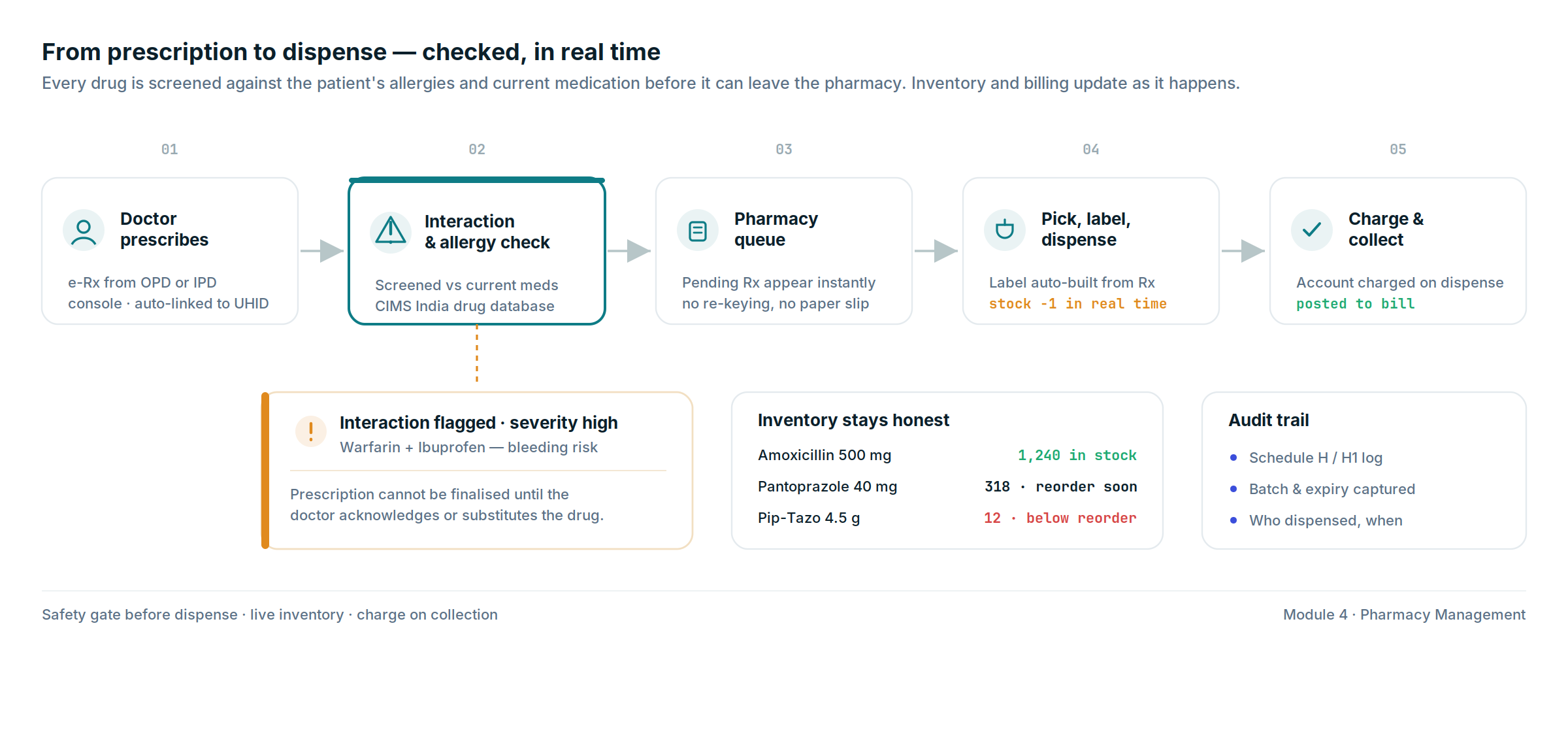
Every drug prescribed is checked against the patient’s documented allergies and their current medication list. Interactions above a defined severity level are flagged to the doctor before the prescription is finalised. The e-prescription is printed and/or sent to the patient’s registered mobile, and simultaneously pushed to the pharmacy for dispensing.
When a patient is admitted, from OPD, from emergency, or as a planned admission, the IPD module takes over. Every inpatient encounter is more complex than an outpatient visit because it spans multiple days, involves multiple departments, accumulates charges continuously, and requires precise documentation for both clinical and billing purposes.
The admission workflow:
| Step | Action | HMS Function |
| Admission decision | Doctor decides admission is required | Admission order created |
| Bed allocation | Available bed identified and assigned | Real-time bed board |
| Insurance pre-authorisation | If insured patient, TPA notified, pre-auth requested | TPA communication module |
| Admission note | Doctor documents reason for admission | Clinical notes |
| Nursing assessment | Initial nursing assessment completed | Nursing documentation |
| Vital signs monitoring | Regular vital signs recorded | Flowsheet with trend alerts |
| Medication administration | Prescriptions administered by nursing | MAR (Medication Administration Record) |
| Investigation orders | Lab and imaging ordered during stay | Order management |
| Consultant visits | Multiple doctors document their visits | Multi-doctor consultation notes |
| Daily progress notes | Attending physician’s daily documentation | Progress note templates |
| Discharge planning | Discharge criteria defined and tracked | Discharge checklist |
| Discharge summary | Complete clinical summary generated | Structured + PDF output |
| Billing | All charges accumulated and finalised | Discharge bill |
Real-time bed board:
The bed board shows every bed in the hospital, ward, ICU, isolation, maternity, with current status: occupied, available, under cleaning, under maintenance. Every bed shows the current patient’s name, admission date, treating doctor, and expected discharge date.
The ward manager uses this view to manage bed allocation, plan discharges, and identify beds that will be available for new admissions.
The hospital pharmacy is one of the highest-risk and highest-revenue departments. Dispensing the wrong drug, the wrong dose, or a drug that interacts with the patient’s current medications is a patient safety event.
Letting pharmacy inventory run to stockout creates operational disruption and patient dissatisfaction.
The pharmacy dispensing workflow:
| Step | Action | System |
| Prescription received | E-prescription from OPD or IPD doctor | Auto-populated from HMS |
| Drug interaction check | New prescription checked against current medications | Drug database (CIMS India or equivalent) |
| Dispensing queue | Pharmacist sees pending prescriptions | Queue management |
| Drug picked | Pharmacist picks drug from inventory | Inventory decremented in real time |
| Label printed | Patient name, drug, dose, instructions | Auto-generated from prescription |
| Dispensing confirmed | Pharmacist confirms dispense | Patient account charged |
| Patient collects | Or nursing staff collects for IPD patient | Collection confirmed |
Pharmacy inventory management:
| Feature | Details |
| Current stock levels | Real-time per drug, per location |
| Reorder alerts | Automatic alert when stock falls below reorder point |
| Expiry tracking | Drugs expiring within 30 days flagged for prioritised use |
| Controlled substance log | Schedule H and H1 drugs, mandatory dispensing log |
| Supplier management | Purchase orders, GRN, supplier performance |
| Returns management | Patient returns, supplier returns, expiry disposal |
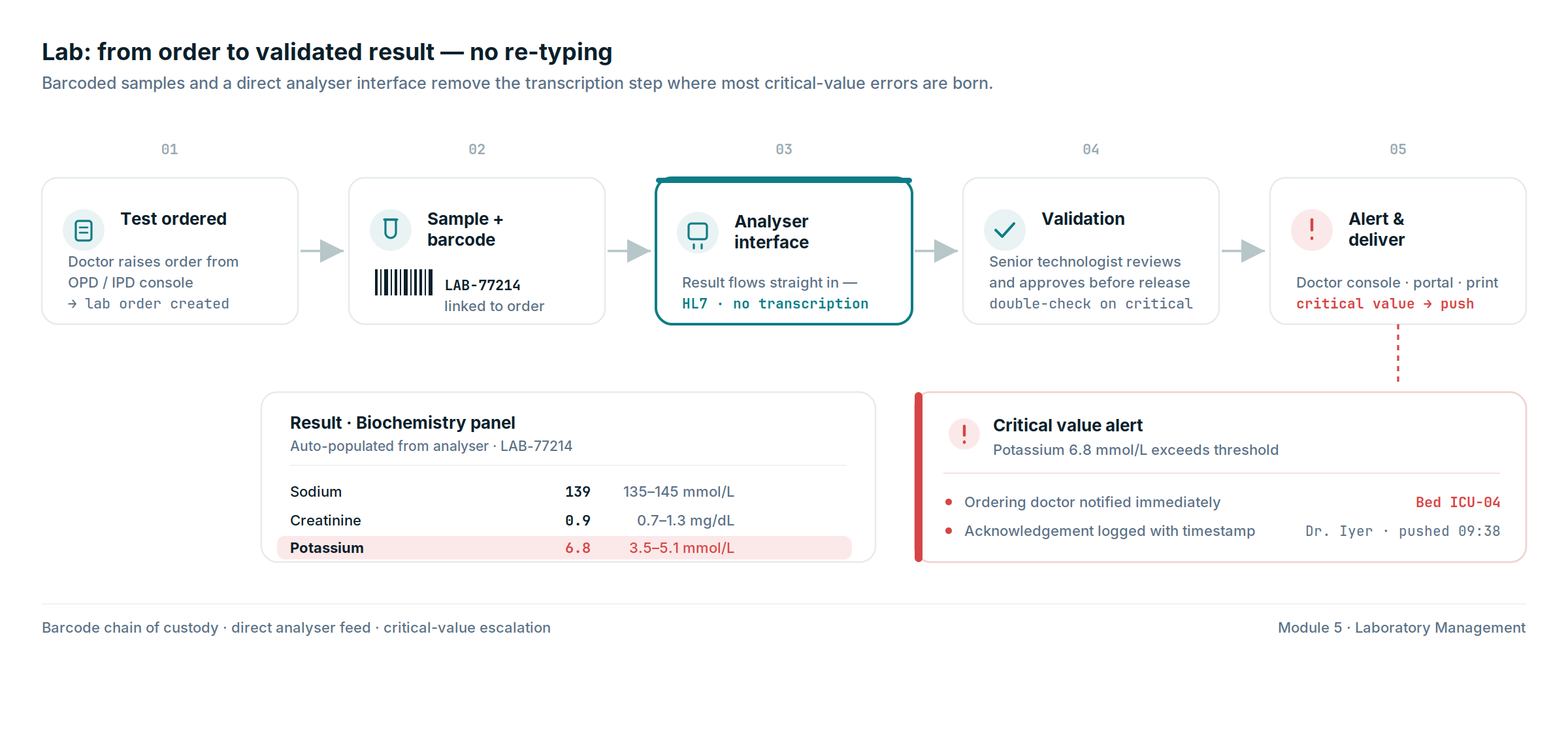
Lab investigations are the highest-volume investigation category in most hospitals. Managing sample collection, processing, result entry, and delivery, for hundreds of tests per day, requires a structured workflow that the HMS’s lab module provides.
The lab order-to-result workflow:
| Step | Action | System |
| Test ordered | Doctor orders test from OPD or IPD console | Lab order created |
| Sample collection | Phlebotomist collects sample, applies barcode | Sample barcode linked to lab order |
| Sample received at lab | Lab receives and acknowledges sample | Sample log updated |
| Sample processing | Analyser processes sample | Manual or auto-interface from analyser |
| Result entry | Technician enters result or analyser pushes result | Result recorded against patient |
| Result validation | Senior technologist reviews and approves | Double-check workflow for critical values |
| Critical value alert | Abnormal value beyond defined threshold | Immediate alert to ordering doctor |
| Result delivery | Result available in doctor’s console, patient portal | Push notification to doctor |
| Report printing | Physical report printed for outpatient | PDF generation |
Analyser integration:
For hospitals with automated haematology, biochemistry, or microbiology analysers, the HMS integrates with the analyser through HL7 or proprietary middleware, the result flows directly from the analyser into the patient’s lab record without manual transcription.
This eliminates transcription errors, the most common source of critical lab value mistakes.
Hospital billing is complex because charges accumulate across multiple departments over multiple days, apply different rates to different patient types (cash, insurance, government scheme), and must be auditable for insurance claim processing.
The billing engine handles:
| Charge Type | Source | Billing Logic |
| OPD consultation | Doctor’s fee schedule | Per visit, per doctor, per service category |
| Bed charges | Ward rate × number of days | Auto-calculated from admission to discharge |
| Procedure charges | OT / procedure charge master | Per procedure, per surgeon, per anaesthetist |
| Lab charges | Lab charge master | Per test ordered and completed |
| Radiology charges | Radiology charge master | Per investigation |
| Pharmacy charges | Drug dispensed × MRP or contracted rate | Real-time as dispensing occurs |
| Nursing charges | Nursing services charge master | Per service, per shift |
| ICU charges | ICU rate × hours | Per hour or per day |
Insurance and TPA billing:
For insured patients, the billing module generates pre-authorisation requests to the TPA (Third Party Administrator) at admission, sends interim enhancement requests if the bill exceeds the initial approved amount, and generates the final claim package at discharge, itemised bill, discharge summary, investigation reports, and supporting documents, in the format required by the specific TPA.
| Module | Cost Range (USD) | Notes |
| Patient registration + UHID + ABHA integration | $8K – $15K | ABDM compliance mandatory |
| OPD management + e-prescription | $10K – $18K | Queue management, drug interaction |
| IPD management + bed board | $10K – $18K | Multi-department, real-time bed tracking |
| OT management + surgical notes | $6K – $12K | Schedule, notes, implant tracking |
| Pharmacy + inventory management | $8K – $15K | Drug database, controlled substance log |
| Laboratory management + analyser integration | $8K – $15K | HL7 interface, critical value alerts |
| Radiology module + DICOM viewer | $6K – $12K | PACS lite integration |
| Hospital billing + TPA billing | $10K – $18K | Insurance pre-auth, claim generation |
| Blood bank management | $4K – $8K | |
| Nursing documentation + MAR | $6K – $12K | Medication administration record |
| HR + duty roster + payroll | $6K – $12K | |
| Patient portal + mobile app | $8K – $15K | |
| Reporting + MIS dashboard | $5K – $10K | Clinical and financial KPIs |
| AWS HIPAA-equivalent + VAPT | $8K – $15K | |
| Total | $103K – $195K | Full hospital HMS |
EngineerBabu built healthcare platforms for Apollo Hospitals and Somnoware (acquired by ResMed). CMMI Level 5. Google AI Accelerator 2024 Top 20. Contact: mayank@engineerbabu.com
ABDM (Ayushman Bharat Digital Mission) is the Government of India’s national digital health infrastructure. It includes the ABHA (Ayushman Bharat Health Account), a unique 14-digit health ID for every citizen, and the Health Information Exchange and Consent Manager (HIE-CM) that allows patients to share their health records across facilities with a single consent action. For hospitals, ABDM integration means: every patient gets an ABHA ID at registration, every clinical interaction generates a linked health record, and the hospital’s HMS must be certified by the National Health Authority as an ABDM-compliant Health Information Provider. In 2026, ABDM integration is increasingly required for government scheme empanelment, hospitals not connected to ABDM cannot process Ayushman Bharat PM-JAY claims. Any HMS built for an Indian hospital in 2026 must have ABDM integration as a core requirement, not an optional add-on.
The OPD (Outpatient Department) module manages patients who come for a consultation and leave the same day, registration, appointment scheduling, consultation queue, e-prescription, investigation orders, billing, and follow-up booking. The IPD (Inpatient Department) module manages patients who are admitted and stay in the hospital, bed allocation, nursing documentation, medication administration records (MAR), daily progress notes, multi-doctor consultations, procedure records, and discharge summaries. The key architectural difference is duration and complexity: an OPD encounter lasts 15 to 30 minutes, an IPD encounter lasts days to weeks and generates dozens of clinical and billing events that must be tracked continuously. A hospital HMS must support both modules with real-time integration, a patient admitted from OPD must have their entire OPD encounter history immediately visible in the IPD module.
For an insured patient, the billing workflow begins at admission rather than discharge. The billing module sends a pre-authorisation request to the TPA (Third Party Administrator) with the patient’s policy details, diagnosis, and estimated treatment plan. The TPA approves an initial credit limit. During the stay, if the actual cost approaches or exceeds the approved limit, the system automatically generates an enhancement request. At discharge, the system generates the complete claim package, itemised bill, discharge summary, investigation reports, and all required supporting documents, in the specific format required by that TPA. The module maintains a library of TPA-specific formats and claim requirements so that every claim goes out correctly the first time. Claims that are rejected are tracked in a denial management queue with the rejection reason and recommended correction.