HIPAA Compliant Cloud Storage for Healthcare Apps in the USA: The Definitive 2026 Guide


Create engaging, high-performance mobile applications tailored to your business needs. We craft future-ready apps that offer smooth user experiences on all devices.
Build robust and scalable websites and CMS platforms that help you manage content effortlessly. Our development ensures a seamless digital presence.
Launch secure, feature-rich online stores with intuitive shopping experiences. We build tailored eCommerce platforms designed for growth.
Design captivating games with immersive gameplay and stunning graphics. From concept to launch, we build engaging experiences that players love.
Enhance your customer relationships with customized Salesforce implementations. Drive growth and efficiency with smarter CRM solutions.
Harness artificial intelligence and machine learning to automate workflows and gain actionable insights. Our AI transforms data into smart decisions.
Accelerate your software delivery lifecycle with continuous integration, delivery, and infrastructure automation to boost efficiency.

This is the question every healthcare app developer Googles, often at 11pm before a demo with a hospital client:
“Is AWS S3 HIPAA compliant?”
The honest answer is: AWS S3 can be HIPAA compliant. Whether your specific S3 bucket is HIPAA compliant depends entirely on how you configured it. An AWS HIPAA BAA does not make your storage compliant, it establishes a legal framework that your configuration must then fulfill.
This guide covers every major cloud storage option, what HIPAA actually requires of cloud storage, and the specific configuration that makes the difference between compliant and non-compliant.
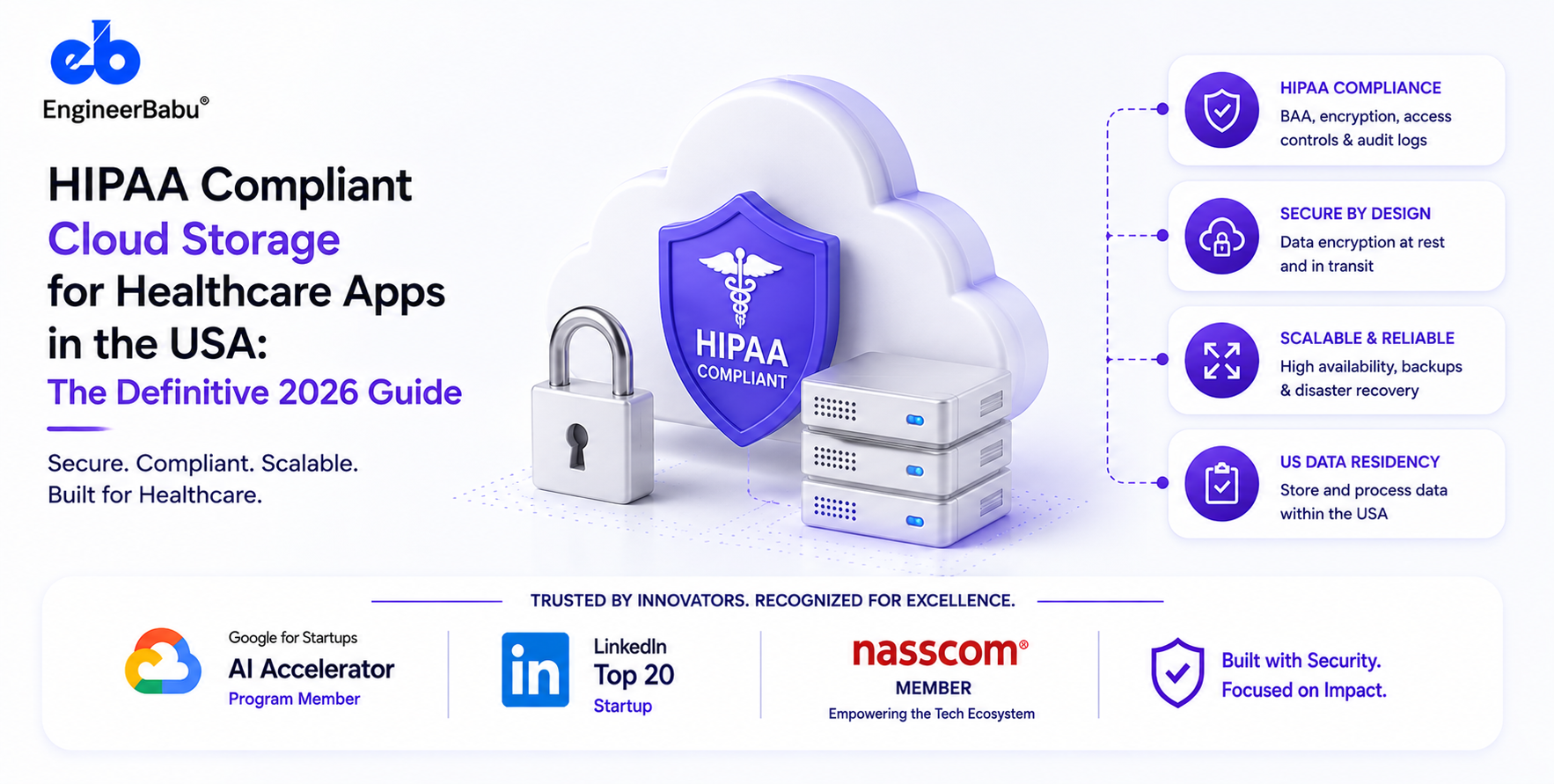
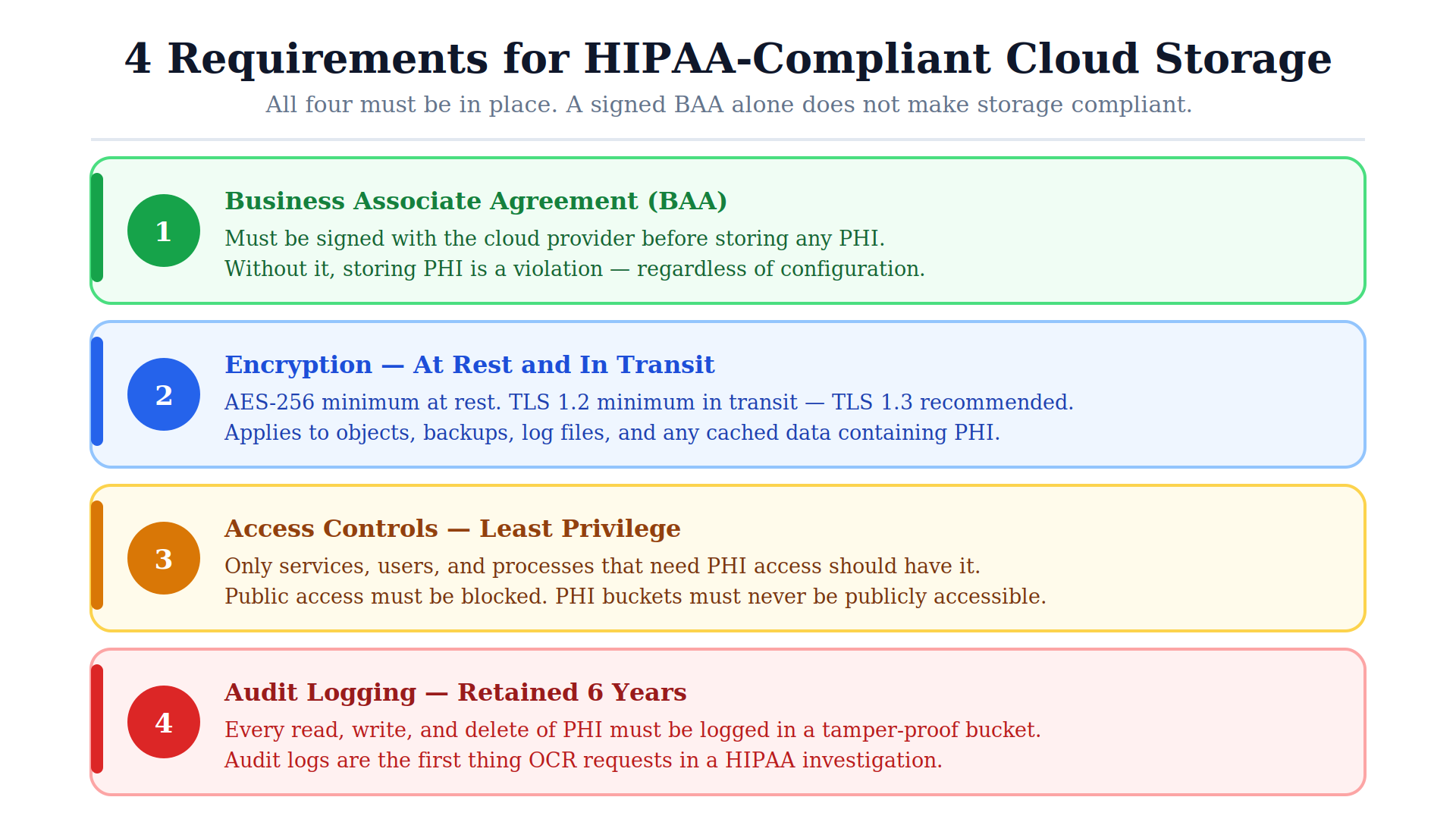
HIPAA compliant cloud storage has four non-negotiable properties: (1) a signed Business Associate Agreement between the healthcare organization and the cloud provider; (2) encryption of all PHI at rest (minimum AES-256) and in transit (TLS 1.3); (3) access controls ensuring only authorized users and processes can access PHI-containing storage; and (4) audit logging of all access to PHI, retained for a minimum of six years.
The cloud provider’s infrastructure being “HIPAA-eligible” is a prerequisite, not a guarantee, the configuration of that infrastructure is the responsibility of the healthcare organization or developer.
The cloud storage provider must sign HIPAA BAA before any PHI is stored. The BAA establishes legal accountability. Without it, storing PHI is a HIPAA violation regardless of how well the storage is configured.
All PHI stored in the cloud must be encrypted. The minimum standard is AES-256 (Advanced Encryption Standard with 256-bit keys). This applies to:
Who holds the encryption keys matters for the BAA: if the cloud provider manages encryption keys (server-side encryption with AWS-managed keys, SSE-S3), the provider is fully a business associate. If you manage your own keys (SSE-C, or AWS KMS with customer-managed keys), the provider has less contact with readable PHI. Either approach is HIPAA compliant; the key management approach affects the BAA scope discussion.
All data movement to and from cloud storage must be encrypted. TLS 1.2 minimum; TLS 1.3 strongly recommended. For S3: enforce aws:SecureTransport condition in bucket policies, buckets that allow HTTP requests are non-compliant.
Least-privilege access: only the specific services, users, and processes that need PHI access should have it. For S3: bucket policies and IAM policies defining precisely who can read, write, and delete objects. Public access must be blocked, S3 buckets containing PHI must never be publicly accessible.
HIPAA Status: HIPAA-eligible with signed BAA
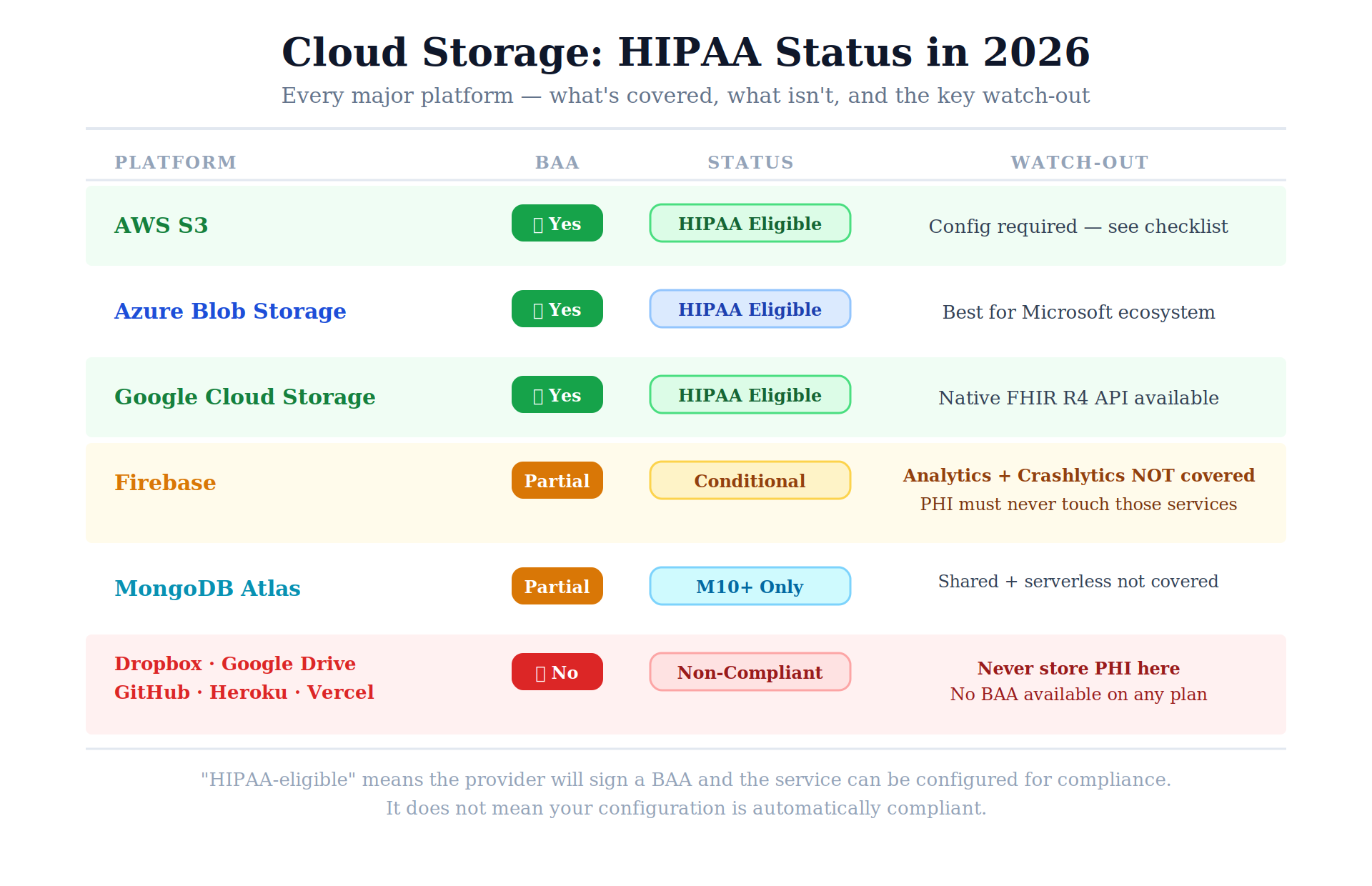
AWS S3 is the most widely used HIPAA-compliant object storage in US healthcare. AWS signs a HIPAA BAA via the AWS Artifact portal in the AWS Management Console. Once the BAA is signed, S3 is covered for PHI storage when configured correctly.
Required configuration for HIPAA compliance:
# HIPAA-compliant S3 bucket configuration
# 1. Block all public access
aws s3api put-public-access-block \
–bucket your-healthcare-bucket \
–public-access-block-configuration \
“BlockPublicAcls=true,IgnorePublicAcls=true,BlockPublicPolicy=true,RestrictPublicBuckets=true”
# 2. Enable default encryption (AES-256)
aws s3api put-bucket-encryption \
–bucket your-healthcare-bucket \
–server-side-encryption-configuration ‘{
“Rules”: [{
“ApplyServerSideEncryptionByDefault”: {
“SSEAlgorithm”: “aws:kms”,
“KMSMasterKeyID”: “arn:aws:kms:us-east-1:ACCOUNT:key/KEY-ID”
}
}]
}’
# 3. Enable access logging
aws s3api put-bucket-logging \
–bucket your-healthcare-bucket \
–bucket-logging-status ‘{
“LoggingEnabled”: {
“TargetBucket”: “your-audit-log-bucket”,
“TargetPrefix”: “s3-access-logs/”
}
}’
# 4. Enforce HTTPS-only access
# Add to bucket policy:
{
“Condition”: {
“Bool”: {
“aws:SecureTransport”: “false”
}
},
“Effect”: “Deny”,
“Principal”: “*”,
“Action”: “s3:*”
}
AWS services covered under the HIPAA BAA (relevant to healthcare apps): EC2, S3, RDS, DynamoDB, Lambda, API Gateway, CloudTrail, CloudWatch, KMS, Cognito, SNS, SQS, ECS, EKS, SageMaker
AWS services NOT covered under the HIPAA BAA (cannot store PHI): Amazon Rekognition (standard), Amazon Transcribe (standard), some analytics services
HIPAA Status: HIPAA-eligible with signed BAA via Microsoft Online Services BAA
Azure Blob Storage with the Microsoft HIPAA BAA is the alternative most commonly chosen for organizations in the Microsoft ecosystem. Configuration requirements parallel AWS: encryption at rest (Azure Storage Service Encryption enabled by default, 256-bit AES), TLS in transit, access logging via Azure Monitor, and Azure Active Directory-based access control.
Azure services covered under the HIPAA BAA: Azure Blob Storage, Azure Files, Azure SQL Database, Azure Active Directory, Azure Key Vault, Azure Monitor, Azure Container Services, Azure Healthcare APIs (FHIR-native storage)
HIPAA Status: HIPAA-eligible with signed BAA via Google Cloud HIPAA BAA
Google Cloud Storage with the Google Cloud HIPAA BAA provides equivalent PHI storage capability. Google Cloud Healthcare API provides FHIR R4-native storage specifically designed for healthcare applications, the most developer-friendly option for teams building FHIR-native systems.
Notable for healthcare app builders: Google Cloud Healthcare API includes native FHIR R4 server capability, you can store and query healthcare data in FHIR format without building a custom FHIR server. Covered under the Google Cloud HIPAA BAA.
HIPAA Status: Conditionally HIPAA-eligible, requires careful configuration
Firebase CAN be HIPAA compliant, but this is one of the most commonly misconfigured options in healthcare app development:
HIPAA-eligible Firebase services (require Google Cloud HIPAA BAA): Cloud Firestore, Cloud Functions, Cloud Storage for Firebase, Firebase Authentication
Not HIPAA-eligible Firebase services (never use with PHI): Firebase Analytics, Firebase Crashlytics, Firebase Remote Config, Firebase Performance Monitoring, Firebase A/B Testing
Many developers build Firebase apps that inadvertently route PHI through Analytics or Crashlytics before realizing these services are not covered. The BAA must be explicitly enabled, and only the covered services can touch PHI.
HIPAA Status: HIPAA-eligible with BAA on M10+ dedicated clusters
MongoDB Atlas offers a HIPAA BAA for M10 and larger dedicated clusters. Shared and serverless clusters are not covered. If you’re using MongoDB as your PHI database: use dedicated M10+ cluster, sign the Atlas BAA, enable encryption at rest (available at M10+), and configure VPC peering to restrict network access.
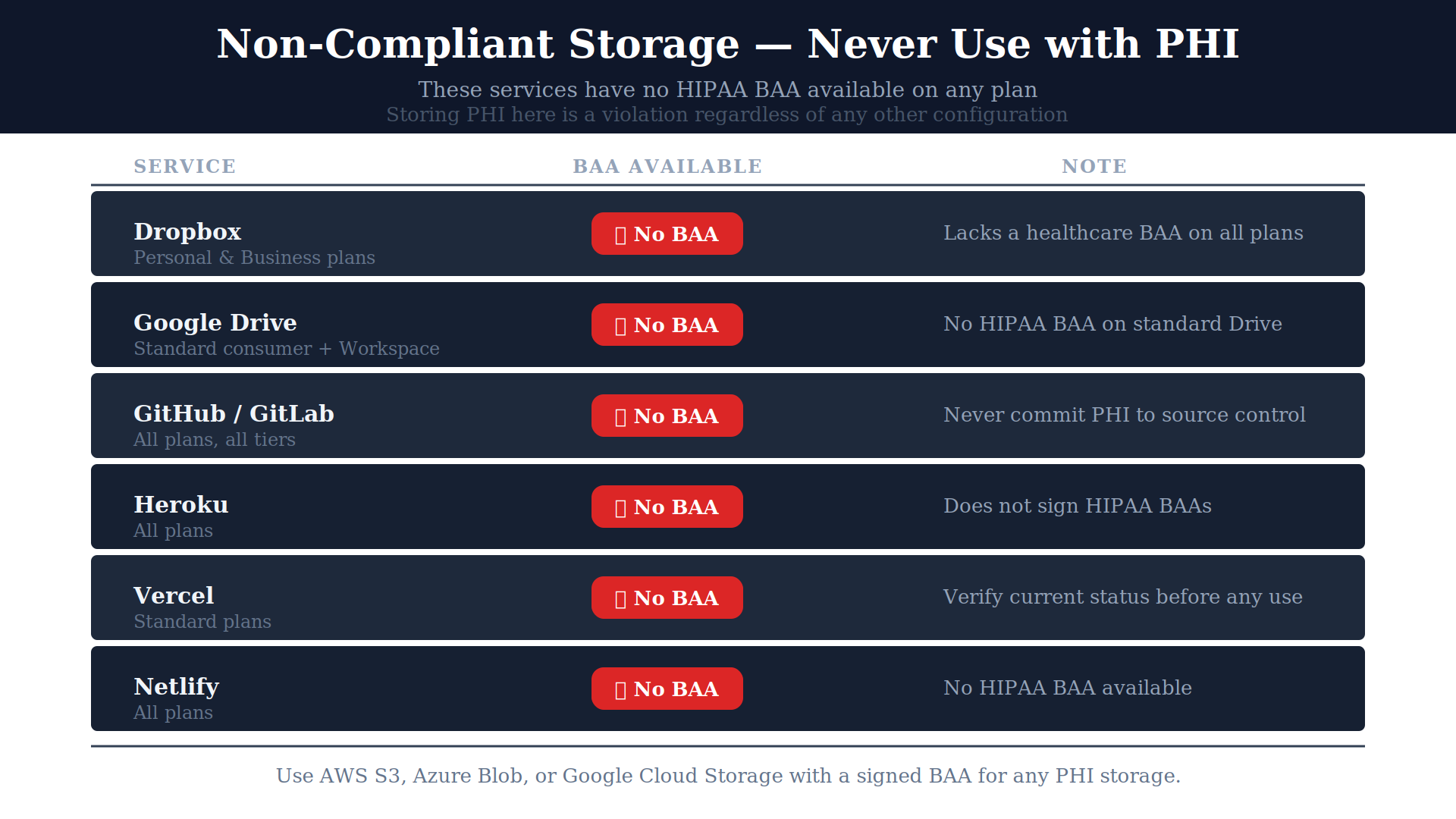
| Service | BAA Available | Notes |
| Dropbox (standard) | No | Personal/business Dropbox lacks healthcare BAA |
| Google Drive (standard) | No | Standard Google Drive has no HIPAA BAA |
| GitHub / GitLab repositories | No | Never commit PHI to source control |
| Heroku | No | Heroku does not sign HIPAA BAAs |
| Vercel (standard) | No | Check current status before use |
| Netlify | No | No HIPAA BAA available |
HIPAA requires organizations to maintain policies for backup, recovery, and business continuity. For cloud storage:
Backup requirements: Regular automated backups of PHI-containing storage. AWS S3 Versioning + lifecycle policies. RDS automated backups with point-in-time recovery. Backup retention matching your data retention policy (minimum 6 years for certain HIPAA records).
Disaster recovery: Geographic redundancy for production PHI storage. AWS S3 Cross-Region Replication with encryption enabled on the destination bucket. RDS Multi-AZ deployment.
Access during outages: HIPAA requires emergency access procedures, the ability to access PHI when primary access controls are unavailable. Document and test these procedures.
HIPAA’s audit control standard (45 CFR §164.312(b)) requires that every access to PHI, read, write, delete is logged and the logs are retained for 6 years.
For S3:
These logs are the first thing OCR requests in a HIPAA audit. If they don’t exist, the absence is itself a violation.
Author: Mayank Pratap | Co-Founder, EngineerBabu | Google AI Accelerator 2024 · CMMI Level 5
AWS S3 is HIPAA-eligible, meaning AWS will sign a BAA and the service can be configured for HIPAA compliance. Whether your specific S3 bucket is compliant depends on your configuration: BAA signed, encryption enabled, public access blocked, access logging enabled, TLS enforced, least-privilege IAM policies applied.
Conditionally. Firebase’s core services (Firestore, Cloud Functions, Cloud Storage, Authentication) are HIPAA-eligible with the Google Cloud BAA properly signed and configured. Firebase Analytics, Crashlytics, Remote Config, and Performance Monitoring are not covered and cannot receive PHI. Many developers inadvertently route PHI through uncovered Firebase services.
Never. No major source code repository (GitHub, GitLab, Bitbucket) signs HIPAA BAAs. Real PHI must never appear in source code, commits, issues, pull requests, or log files committed to repositories. Development must use synthetic data. Production PHI must never touch developer environments without explicit compliance controls.
Minimum 6 years from creation or last effective date. Audit logs must be stored in a tamper-proof system, typically AWS CloudTrail with S3 Object Lock enabled and protected from modification by administrators.
AES-256 at rest, TLS 1.2 minimum (TLS 1.3 recommended) in transit. Key management options: AWS-managed keys (SSE-S3), AWS KMS with AWS-managed keys, or AWS KMS with customer-managed keys. All are HIPAA compliant; customer-managed keys provide the highest control over PHI access.