10 Must Have Features of a Remote Patient Monitoring (RPM) App


Create engaging, high-performance mobile applications tailored to your business needs. We craft future-ready apps that offer smooth user experiences on all devices.
Build robust and scalable websites and CMS platforms that help you manage content effortlessly. Our development ensures a seamless digital presence.
Launch secure, feature-rich online stores with intuitive shopping experiences. We build tailored eCommerce platforms designed for growth.
Design captivating games with immersive gameplay and stunning graphics. From concept to launch, we build engaging experiences that players love.
Enhance your customer relationships with customized Salesforce implementations. Drive growth and efficiency with smarter CRM solutions.
Harness artificial intelligence and machine learning to automate workflows and gain actionable insights. Our AI transforms data into smart decisions.
Accelerate your software delivery lifecycle with continuous integration, delivery, and infrastructure automation to boost efficiency.

TL;DR
A missed high blood pressure alert is not a glitch. It is a design failure, and it is the single clearest way to judge whether an RPM app was built properly.
Remote Patient Monitoring only works when the tech works. And for that, features matter. Brands cannot afford to guess what is essential. One missing feature could mean a compliance issue, a missed diagnosis, or a poor user experience that leads to app abandonment.
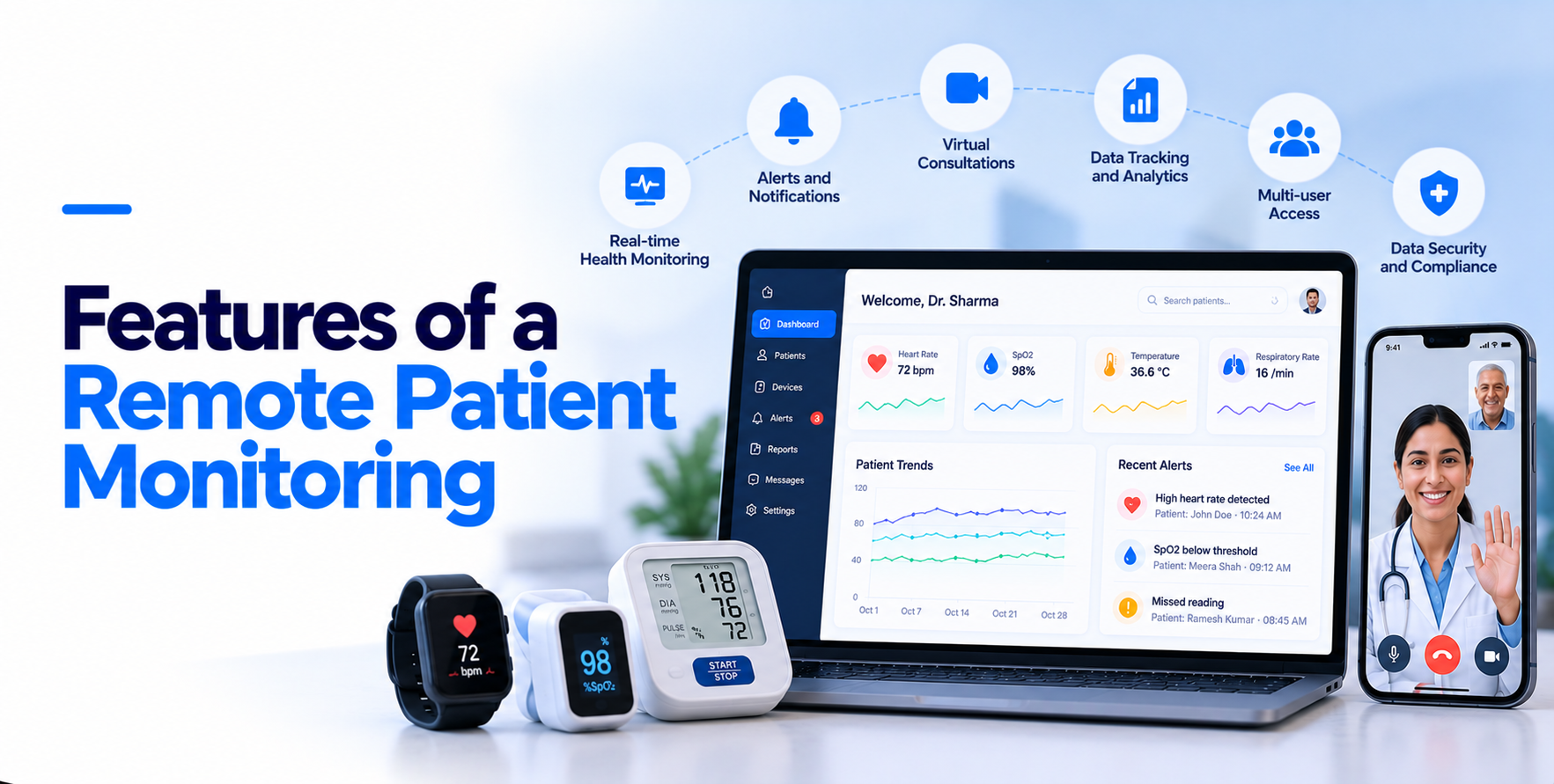
This post covers the 10 features of an rpm every product must have. These are not based on trends. They are based on what actually supports doctors, protects patient data, and keeps users engaged.
A remote patient monitoring app is software that collects physiologic data from connected medical devices in a patient’s home, transmits it securely to their care team, and supports the clinical follow-up that happens as a result.
It has two sides: a patient-facing app that pairs with devices and drives engagement, and a clinician dashboard that surfaces alerts, trends and documentation.
The category is growing steadily. The US remote patient monitoring market reached USD 464.8 million in 2025 and is forecast to hit USD 1,179.4 million by 2034 at a 10.90% CAGR, according to IMARC Group.
Doctors cannot treat what they do not see, which makes real-time tracking the backbone of any remote patient monitoring app. Patients do not always feel symptoms when something is wrong, especially with hypertension, heart failure or diabetes. Their devices catch it anyway. A drop in oxygen levels or a spike in blood sugar means something, and it needs flagging as it happens.
What to build
Apps that sync once or twice a day are not real-time. They are risky. Build for speed and make sure the app works cleanly with Bluetooth-enabled medical devices, since that is where most RPM data originates.
Best for: cardiac, hypertension and post-discharge programs where a delay of hours carries genuine clinical risk.
RPM apps are not standalone tools. They need to talk to Electronic Health Records systems clearly and automatically. When device data lives in a silo, it is just numbers. Synced with the EHR, it sits alongside lab results, medication history and prior diagnoses, which is when it becomes useful.
What to build
Not every EHR vendor plays nice. Your developers need to work with the APIs provided and test thoroughly. Teams targeting large health systems should plan for Epic FHIR integration approval timelines running 8 to 16 weeks, which is usually longer than the engineering itself. The same holds across healthcare API integration work generally.
Best for: practice-based and health system programs, where integration is the adoption driver rather than a nice-to-have.
Skipping compliance is not an option. If your app stores or transmits health data, it falls under HIPAA. If it is classified as a medical device, it may also need FDA clearance.
What to build
For FDA, the app must follow 21 CFR Part 820 guidelines where it qualifies as a medical device, which usually applies when it drives diagnosis or treatment decisions. If your alert logic performs clinical decision support, the software itself may fall under medical device software FDA regulations. Build compliance into the architecture from day one, since patching it in later costs far more.
Best for: any app serving covered entities. There is no tier of RPM product where this is optional.
Doctors juggle dozens of patients a day. Older patients might be using a smartphone for the first time. A clean interface is not a nice touch, it is essential.
What to build
Accessibility belongs here too: voice support for visually impaired users, high-contrast mode for low vision, and tap-friendly targets for users with mobility issues. A good rule of thumb is that an app needing a training session is too complicated. Thoughtful UI/UX design work pays for itself in support ticket volume alone.
Best for: Medicare-age populations and any program where adherence, not capability, is the bottleneck.
Your app should speak up when it matters and stay quiet when it does not. An app sending 50 alerts a day is as dangerous as one sending none. Alert fatigue is real, and clinical staff do start ignoring pings that rarely mean anything.
What to build
Those logs matter beyond clinical review. They are the audit trail that demonstrates your escalation protocol actually ran.
Best for: programs with large caseloads per care manager, where fatigue directly erodes clinical response quality.
Patients will not all use the same device and your app should not expect them to. Some use iPhones, others Android. Some work on tablets, and some own no smartphone at all and rely on caregiver input. On top of that, your app needs to pair with third-party medical devices.
What to build
Cellular-connected devices remove pairing entirely, which raises adherence in elderly populations at roughly $20 to $50 more per unit. Bluetooth costs less but pairing issues generate the highest volume of patient support requests in most programs.
The tradeoffs mirror wearable device integration in healthcare more broadly. Test on older handsets, not just current models.
Best for: mixed-population programs and anything targeting patients over 70, where cellular should be the default.
One of the best features of an RPM is Analytics. Data becomes valuable only when it is understandable. An RPM app collects a massive stream of heart rates, sugar levels, activity and sleep. Raw data overwhelms. What users and providers need are patterns, insights and summaries.
What to build
A patient seeing their blood pressure drop after weeks of effort is more likely to stick with the plan. A doctor spotting consistent night-time heart rate dips might order a sleep study. Both outcomes come from presentation, not collection.
Best for: chronic disease programs where the clinical value sits in the trend rather than any single reading.
An RPM app without communication tools is just a data collector. Healthcare remains relationship-driven. Patients want to ask questions, and providers need to respond quickly when readings go off track.
What to build
All communication must be encrypted and HIPAA-compliant. Calendar integration is a bonus that removes scheduling back-and-forth. Teams extending into full virtual visits often reuse much of this layer when they build a telemedicine app alongside monitoring.
Best for: programs billing for treatment management time, since documented interaction is what the clinical codes actually pay for.
Start small, grow big, and do not break in the process. What works for one practice with 100 patients will not carry a hospital chain with thousands.
What to build
Reading data is time-series data, and generic relational tables degrade badly on exactly the queries RPM needs. Infrastructure choices here also determine whether your HIPAA compliant cloud storage setup stays affordable as retention requirements accumulate.
Best for: multi-site and enterprise deployments, and any product expecting to pass a few thousand active patients.
Engagement is the main threat to every RPM program. Drop-off tends to be steepest in the first three months, and a patient who stops transmitting stops generating both clinical value and revenue.
What to build
The more the app feels like a personal health coach rather than a monitoring tool, the longer people stay with it.
Best for: long-horizon chronic care programs, where 12-month retention matters more than enrollment volume.
Most feature lists stop at the ten above. For any US program billing Medicare, four more are not optional, because they are what makes the service reimbursable.
The 2026 Medicare fee schedule also added codes covering shorter monitoring windows and briefer management intervals, which changes what your thresholds should trigger on.
The full architecture behind this sits in our guide to remote patient monitoring software development.
Not every feature belongs in version one. This is the split that works for most teams validating a program.
|
Feature |
MVP |
Phase 2 |
Scale |
|
Real-time monitoring |
Core |
||
|
HIPAA architecture |
Core |
||
|
Transmission day tracking |
Core |
||
|
One device type |
Core |
||
|
Clinician dashboard |
Core |
||
|
Interaction timer |
Core |
||
|
EHR integration |
Yes |
||
|
Custom alert thresholds |
Yes |
||
|
Secure messaging |
Yes |
||
|
Analytics and reporting |
Yes |
||
|
Additional device types |
Yes |
||
|
Video consultations |
Yes |
||
|
Gamification |
Yes |
||
|
Multilingual support |
Yes |
||
|
Predictive alerting |
Yes |
Ship the core column, enroll real patients, then expand. Teams that build all fifteen before launch usually discover their clinical assumptions were wrong after spending the budget.
Modeling this against expected remote patient monitoring ROI at realistic enrollment keeps the scope honest.
Building an RPM app is more than checking off features. It is about creating something that actually works for doctors, patients and your business. Every one of these remote patient monitoring app features exists because it solves a real problem in clinical care.
If you are outsourcing development, make sure your partner understands these needs inside out. Do not settle for a flashy UI that lacks FDA readiness or proper EHR integration.
The right team ensures compliance, scalability and reliability, which is what makes or breaks a product in the US healthcare system. Our healthcare software development work spans exactly that ground, from device integration through billing compliance.
Get these right and you are not just building an app. You are building trust, outcomes and long-term value.
Choose a partner who has shipped HIPAA products before, confirm they handle encryption, access control, audit trails and secure hosting, and sign a Business Associate Agreement with every vendor touching patient data.
Use real-world testing rather than emulators. Run QA on actual Android and iOS handsets, tablets and wearables, including older models, and test with patients across age groups.
Not easily. Look for vendors supporting HL7 or FHIR APIs. Your team will work closely with their documentation, and sometimes their engineers, to get the sync working reliably.
Start with the most common: blood pressure monitors such as Omron, glucose meters such as Dexcom, pulse oximeters and digital thermometers. Bluetooth support is essential, with manual entry as fallback.
Combine daily check-ins, medication reminders, goal tracking and condition-specific education. The app should feel like a health partner rather than a data collector, which lifts both retention and outcomes.
A focused MVP with one condition and two device types typically runs $110,000 to $175,000. Full platforms with multi-payer billing and fleet management reach $185,000 to $290,000.
A lean MVP reaches live patients in 14 to 18 weeks. Full platforms run 20 to 28 weeks, with EHR vendor approval rather than engineering capacity driving most of the variance.
Telehealth apps deliver live consultations between patient and provider. RPM apps continuously collect device data between visits, with communication as a supporting feature rather than the core function.