How to Build a School ERP, Admissions, Fee Management, Timetable, Attendance, Parent Communication 2026



Create engaging, high-performance mobile applications tailored to your business needs. We craft future-ready apps that offer smooth user experiences on all devices.
Build robust and scalable websites and CMS platforms that help you manage content effortlessly. Our development ensures a seamless digital presence.
Launch secure, feature-rich online stores with intuitive shopping experiences. We build tailored eCommerce platforms designed for growth.
Design captivating games with immersive gameplay and stunning graphics. From concept to launch, we build engaging experiences that players love.
Enhance your customer relationships with customized Salesforce implementations. Drive growth and efficiency with smarter CRM solutions.
Harness artificial intelligence and machine learning to automate workflows and gain actionable insights. Our AI transforms data into smart decisions.
Accelerate your software delivery lifecycle with continuous integration, delivery, and infrastructure automation to boost efficiency.
Hire app developers ready to turn your ideas into sleek, high-performing mobile apps for any platform.
Bring in frontend pros who craft smooth, beautiful, and user-friendly interfaces that your visitors will love.
Get backend developers who build fast, secure, and reliable systems to keep everything running behind the scenes.
Hire eCommerce developers who build secure, scalable online stores designed to offer seamless shopping and grow your sales.
Get dedicated developers committed to your projects, delivering consistent quality and speed as an extension of your team.
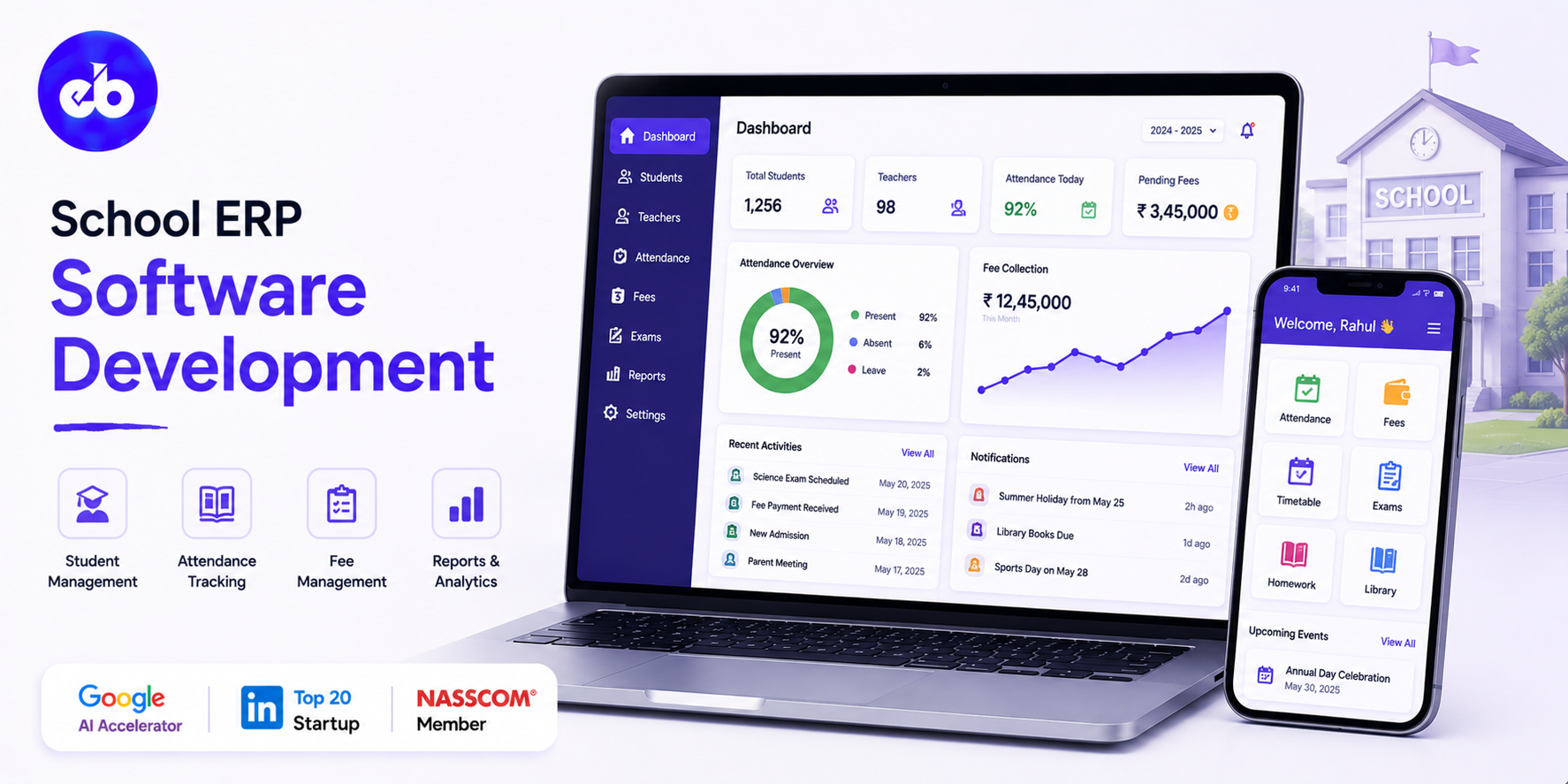
India has 1.5 million schools. The overwhelming majority still manage admissions through paper forms, fees through physical receipt books, attendance through classroom registers, and parent communication through circular notices.
The K-12 digital transformation is happening, but it is happening unevenly, and most available software is either too expensive for mid-market schools or too generic to handle the operational complexity of a 2,000-student institution with 15 sections per grade.
The school that runs on a well-built ERP does not just save administrative time. It gives the principal real-time visibility into which students are academically at risk, which fee accounts are overdue, which teachers are underperforming on attendance, and which parents have not seen a single communication in a month. That visibility is the difference between reactive administration and proactive school management.
This guide covers how to build a school ERP that handles every administrative and academic workflow, from enquiry to alumni.
EngineerBabu has shipped 500+ software products across education, fintech, and enterprise verticals. CMMI Level 5. Google AI Accelerator 2024 Top 20. Contact: mayank@engineerbabu.com
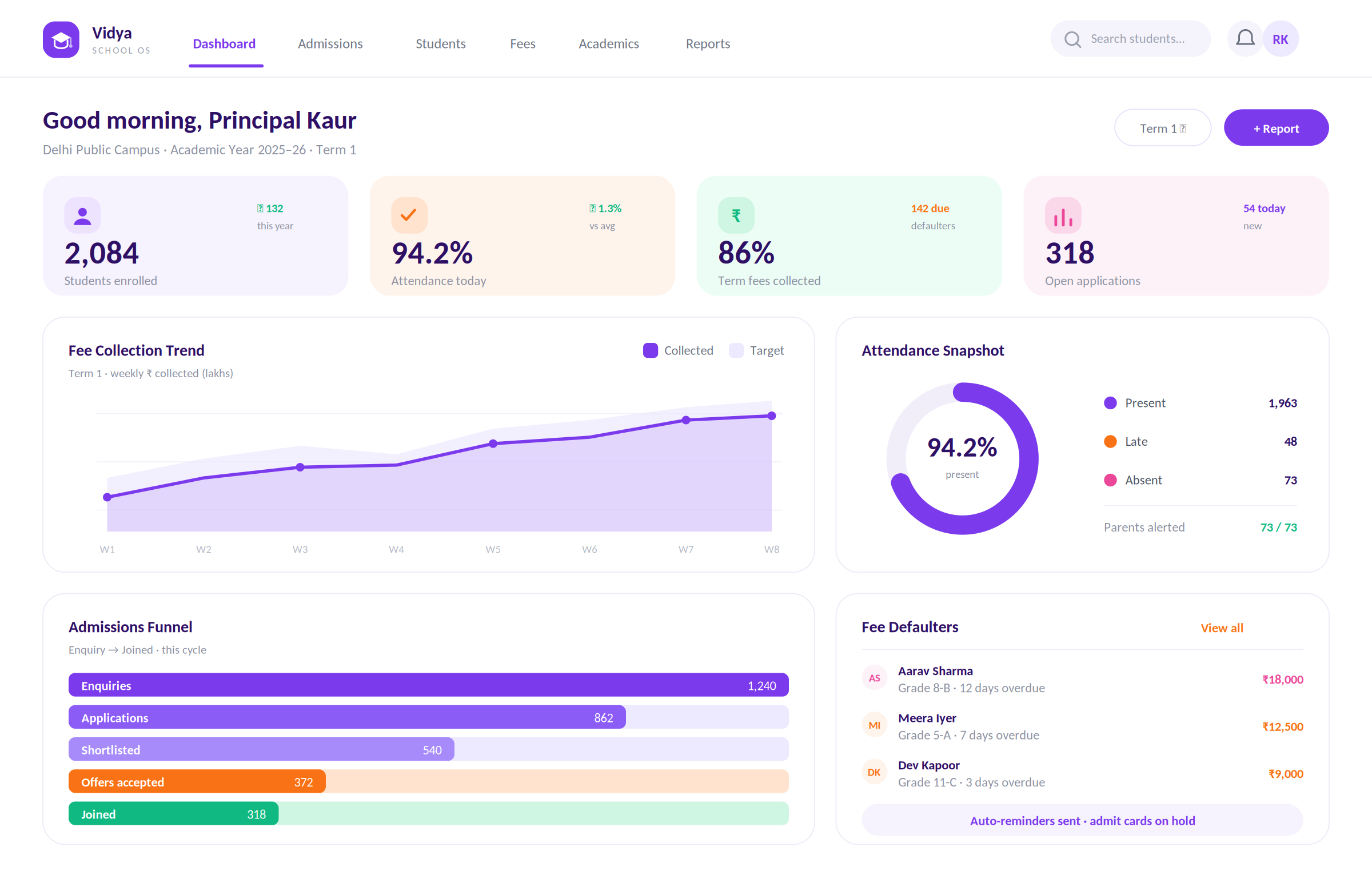
A school ERP is not a school website with a fee payment button. It is the operating system for every administrative and academic process that keeps a school running, and every module must talk to every other module in real time.
| Module | Function |
| Admissions management | Enquiry capture, application, entrance test, admission decision |
| Student information | Complete student profile, academic history, health records |
| Fee management | Fee structure, collection, receipts, defaulter tracking |
| Timetable management | Class scheduling, teacher allocation, room assignment |
| Attendance management | Daily attendance, period-wise attendance, leave management |
| Academic management | Curriculum, lesson planning, assignments, gradebook |
| Examination management | Exam scheduling, mark entry, result processing, report cards |
| Library management | Book catalogue, issue and return, overdue tracking |
| Transport management | Bus routes, student allocation, GPS tracking |
| Hostel management | Room allocation, mess management, attendance |
| HR and payroll | Staff records, attendance, leave, salary processing |
| Parent communication | Notifications, circular distribution, parent portal, fee alerts |
| Analytics and reporting | Academic performance, financial MIS, compliance reports |
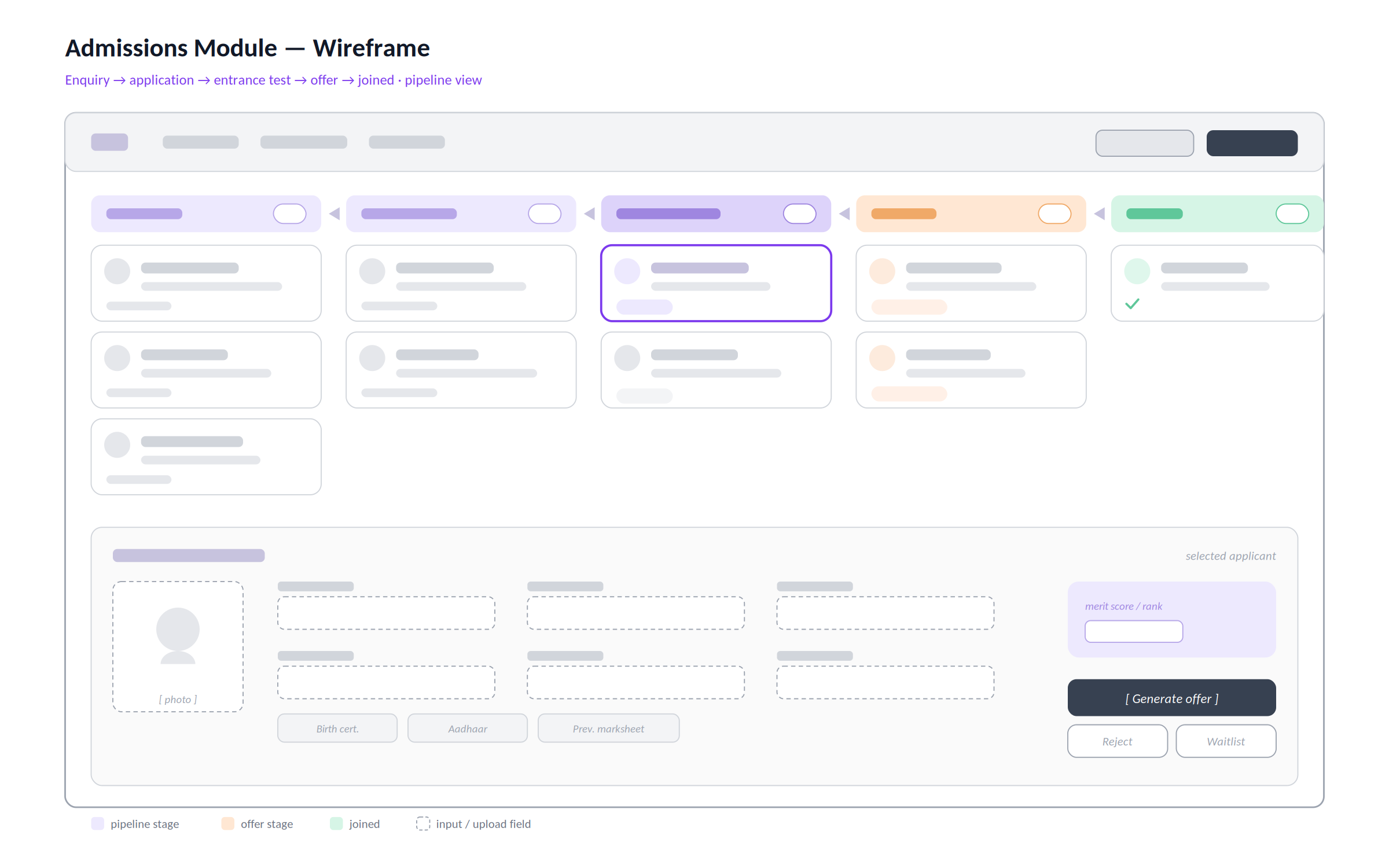
The admissions cycle is the first point where a school’s digital presence matters. Parents shortlist schools online, fill forms online, and expect communication within hours, not days. A paper-based admissions process loses enquiries to competitors who respond faster.
The admissions workflow:
| Step | Action | System Function |
| Enquiry | Parent submits interest online or at reception | Lead capture, instant acknowledgement |
| Application form | Parent completes full application | Online form, document upload |
| Application fee | Payment collected | Payment gateway integration |
| Entrance test scheduling | Test date assigned and communicated | Scheduling, admit card generation |
| Test result | Marks entered, merit list generated | Automated ranking and shortlisting |
| Admission offer | Offer letter issued to shortlisted students | Document generation, email + WhatsApp delivery |
| Acceptance and fee payment | Parents pay first-term fees | Payment gateway, receipt generation |
| Admission confirmation | Student record created in the ERP | Full profile initialised |
| Class and section allocation | Student assigned to class and section | Automated or manual allocation |
The enquiry-to-admission funnel:
The admissions module tracks conversion at every step, how many enquiries became applications, how many applications were shortlisted, how many offers were accepted, how many accepted students actually joined.
This funnel visibility tells the principal and management exactly where the admissions process is losing candidates and what needs attention.
The merit list engine:
For schools with entrance-based admissions, the merit list engine processes exam marks, applies category-wise quotas (if applicable), handles tie-breaking rules, and generates the final merit list with category-wise rankings. The result is published to parent-accessible portals simultaneously, no manual calculation, no printing delays.
Every student in the school has a single, comprehensive profile in the ERP. This profile is the source of truth for every downstream module, attendance, marks, fees, transport, hostel, and parent communication all read from and write to the same student record.
The student profile structure:
| Category | Fields |
| Identity | Full name, date of birth, gender, nationality, religion, mother tongue |
| Contact | Home address, parent phone numbers, emergency contact |
| Academic history | Previous school, Class X/XII marks (for secondary), transfer certificate |
| Health | Blood group, known allergies, medical conditions, vaccination record |
| Admission details | Admission number, admission date, class, section, house |
| Family details | Father name, mother name, guardian name, parent occupation |
| Documents | Birth certificate, Aadhaar card, caste certificate, previous mark sheets |
| Bank details | For scholarship disbursement or fee refund |
The student ID card generation:
Once the student profile is complete, the ERP generates a student ID card, school logo, student photo, student name, class, section, admission number, and QR code linking to the student’s profile.
The QR code is used for library card access, attendance check-in (in schools with biometric or QR-based attendance), and transport check-in.
Fee management is where most school administrators spend the most time and make the most errors. A well-built fee module eliminates manual calculations, reduces defaulters, and gives the finance team real-time visibility into fee collection performance.
The fee structure engine:
Different students have different fee structures, day scholars vs boarders, different classes have different fee levels, sibling discounts apply, scholarship deductions reduce certain components. The fee engine handles all of this:
| Fee Component | Example | Applicability |
| Tuition fee | ₹12,000/term | All students |
| Development fee | ₹3,000/year | All students |
| Transport fee | ₹2,000/month | Transport-enrolled students only |
| Hostel fee | ₹25,000/term | Hostel students only |
| Lab fee | ₹1,500/year | Grade 6 and above |
| Sibling discount | -10% on tuition | Students with a sibling enrolled |
| Scholarship | -₹5,000/term | Scholarship awardees |
The fee collection workflow:
Parent receives a fee demand on the first day of the payment window, via email, WhatsApp, and parent portal notification. Payment is made online (payment gateway) or at school reception (cash or cheque). Receipt is auto-generated and delivered via WhatsApp and email. The ERP updates the student’s fee account instantly.
Defaulter management:
On the payment due date, the ERP automatically identifies students with outstanding fees and sends reminders, day 1, day 3, day 7 after due date. The class teacher sees a daily report of fee defaulters in their section. A fine is applied automatically if the school’s policy includes a late payment penalty, calculated per day on the outstanding amount, without manual intervention.
Fee defaulter escalation:
Students with fees outstanding beyond a defined threshold are flagged for the principal’s attention. The ERP can be configured to restrict access to certain services, exam admit cards, library borrowing, report card download, until the outstanding fee is cleared. This reduces defaulters without the administrative overhead of manual follow-up.
Timetable creation is one of the most complex combinatorial problems in school administration. A 2,000-student school with 80 teachers, 15 subjects per grade, 8 periods per day, and constraints like no teacher teaching more than 3 consecutive periods or the same class appearing twice before lunch, this is an NP-hard scheduling problem.
The ERP’s timetable engine solves it automatically.
Timetable generation inputs:
| Input | Details |
| Classes and sections | Grade 1 to Grade 12, sections A through G per grade |
| Subjects per class | Which subjects are taught in each class, weekly periods required |
| Teacher-subject allocation | Which teacher teaches which subject in which classes |
| Teacher constraints | Maximum periods per day, no consecutive periods, leave days |
| Room constraints | Lab, computer room, art room, special rooms for certain subjects |
| School constraints | Assembly periods, PT periods, library periods |
The generated timetable:
The engine produces a complete timetable, one per class showing which subject is taught in which period by which teacher, and one per teacher showing which classes they teach in which periods. Clashes, the same teacher assigned to two classes simultaneously, or a room double-booked, are detected and flagged automatically.
Substitution management:
When a teacher is absent, the substitution module identifies available teachers (those with a free period at that time) and suggests substitution assignments. The substitute teacher receives a notification with the class details. The substitution is recorded, and the class teacher receives confirmation that their students are covered.
Daily attendance tracking sounds simple. At scale, 2,000 students, 80 teachers, 8 periods per day, it is an operational challenge that consumes significant administrative time if handled manually.
Attendance capture methods:
| Method | Technology | Best For |
| Teacher-marked attendance | Teacher app, class-wise, period-wise | Standard classroom |
| Biometric attendance | Fingerprint scanner integration | Secondary school, staff |
| QR code scan | Student QR code + fixed scanner at gate | Large school daily attendance |
| RFID card | RFID reader at school gate + bus | Schools with smart card programmes |
| Face recognition | Camera at gate + face matching | Premium schools with automation budget |
The attendance data model:
For each student, for each day, for each period, present, absent, late, or on-leave. This granularity enables analysis that period-level aggregation cannot: which periods have the highest absence rate (first period on Monday is a common pattern), which subjects correlate with highest absenteeism, and which students have a pattern of selective absence.
Automated parent alerts:
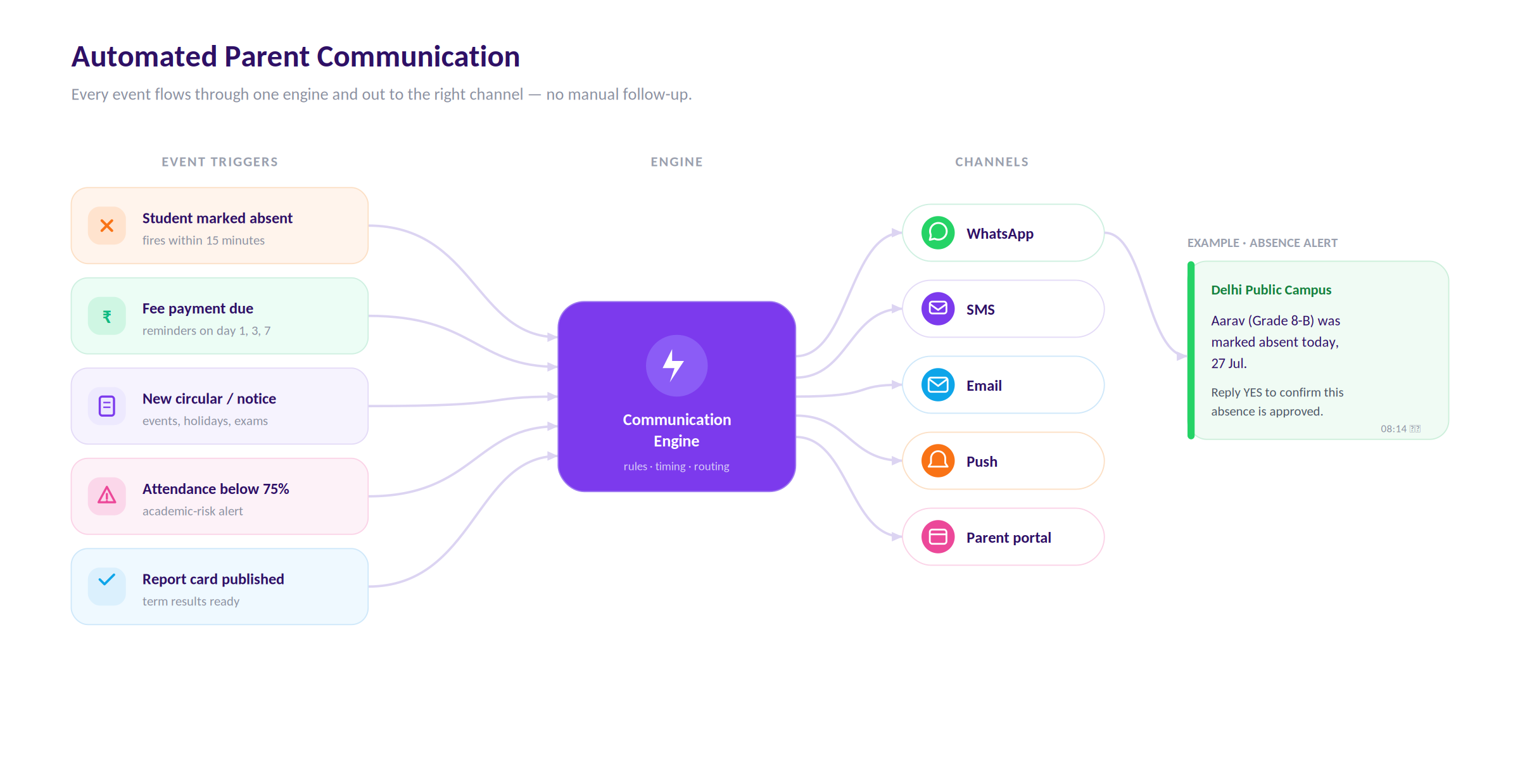
When a student is marked absent for the day, the parent receives an SMS and WhatsApp alert within 15 minutes of the attendance being marked. This prevents students from leaving home in the morning and not reaching school without the parent knowing.
The alert includes the student’s name, class, section, and date, and a reply option to confirm the absence is known and approved.
Attendance analytics for management:
| Report | Audience | Frequency |
| Class-wise attendance summary | Class teacher | Daily |
| Grade-wise attendance percentage | Academic coordinator | Weekly |
| Chronic absentee list (< 75% attendance) | Principal | Monthly |
| Teacher attendance summary | HR / Principal | Monthly |
| Student attendance trend (academic risk) | Counsellor + class teacher | Weekly |
The academic module covers curriculum delivery, lesson planning, assignment management, and the gradebook that tracks every student’s performance across every subject throughout the year.
Teachers create weekly lesson plans, specifying which topics will be covered, which textbook chapters, which learning objectives, and which assessments are planned. The academic coordinator reviews and approves lesson plans. At the end of the week, teachers mark actual coverage against planned coverage, creating a delivery log that the academic coordinator uses to monitor curriculum progress.
Teachers create assignments through the ERP, specifying the subject, grade, section, instructions, and submission deadline. Students access assignments through the student portal or parent app. Submissions are uploaded digitally. Teachers mark and return with feedback through the same interface. Parents can see assignment grades without waiting for physical notebooks to come home.
Every marks entry, unit test, half-yearly exam, project, practical, assignment, goes into the gradebook against the student’s profile. The gradebook calculates cumulative performance, applies school-defined weightages (unit test 20%, half-yearly 30%, annual 50%), and maintains a running grade for each subject in real time. Teachers, academic coordinators, and parents all see the same number from the same source, no discrepancy between the teacher’s register and the report card.
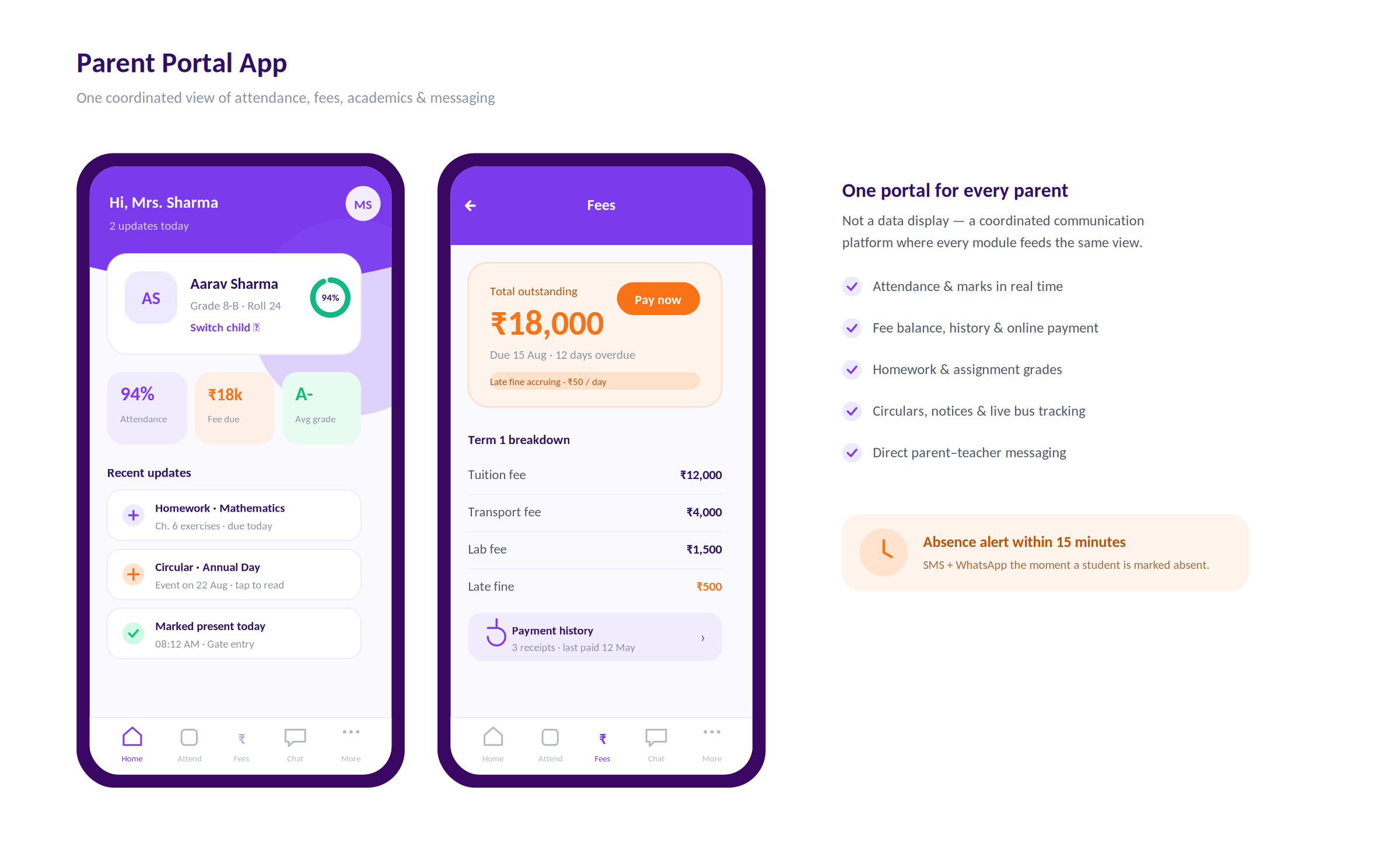
Parents are the school’s most important stakeholders and the most underserved by most school ERP systems. A parent portal that shows only the fee balance and yesterday’s attendance is not a parent communication platform, it is a data display.
Parent portal features:
| Feature | Details |
| Attendance view | Daily and period-wise attendance with trend |
| Academic performance | Subject-wise marks, gradebook, assignment grades |
| Fee account | Outstanding fees, payment history, receipts |
| Timetable | Current week’s class schedule |
| Circular and notices | School announcements, event notifications |
| Leave application | Parent submits leave request for approval |
| Homework view | Current assignments and submission status |
| Bus tracking | If GPS tracking is active, real-time bus location |
| Direct messaging | Parent-teacher messaging on specific academic concerns |
Automated communication workflows:
| Trigger | Message | Channel |
| Student absent | “Your child [Name] was marked absent in [Class] today” | SMS + WhatsApp |
| Fee due | “Fee payment of ₹X is due on [Date]” | WhatsApp + email |
| New circular | “[School Name]: New circular, [Title]” | Push notification + email |
| Exam schedule | “Half-yearly examinations begin on [Date]. Timetable attached.” | WhatsApp + email |
| Report card | “Your child’s report card for Term 1 is available” | Push + email + portal |
| Birthday | “[Name]’s birthday message from [School Name]” | |
| Low attendance | “Attendance alert: [Name] has attended only 68% of classes this month” | SMS + WhatsApp |
| Module | Cost Range (USD) | Notes |
| Admissions management + merit list engine | $8K – $15K | Online form, payment, ranking |
| Student information system | $5K – $10K | Complete profile, document management |
| Fee management + defaulter automation | $8K – $15K | Structure engine, payment gateway, alerts |
| Timetable generation engine | $8K – $15K | Constraint-based automatic generation |
| Attendance management + parent alerts | $6K – $12K | Multi-method capture, automated notifications |
| Academic management + gradebook | $8K – $15K | Lesson plans, assignments, marks |
| Examination management + report cards | $6K – $12K | Schedule, mark entry, PDF generation |
| Parent portal (web + mobile) | $8K – $15K | Full feature parent app |
| Library management | $4K – $8K | Catalogue, issue, return, overdue |
| HR and payroll | $6K – $12K | Staff records, leave, salary |
| Analytics and MIS dashboard | $5K – $10K | Academic, financial, compliance reports |
| AWS + VAPT + Year 1 ops | $5K – $10K | |
| Total | $77K – $149K | Full school ERP |
Contact: mayank@engineerbabu.com
A school ERP (Enterprise Resource Planning) is a fully integrated platform that connects every administrative and academic function of a school, admissions, student records, fee management, timetable, attendance, academics, examinations, library, transport, HR, and parent communication, in a single system where every module shares the same underlying data. A school management app typically handles one or two of these functions, often fee payment and attendance, without the integrations that make the data meaningful. The distinction is integration: in a true school ERP, a fee defaulter is automatically flagged when their attendance crosses a threshold, their report card download is blocked until fees are cleared, and the parent receives a coordinated alert, all from the same system. An app cannot do this because it does not know about the other functions.
A custom school ERP makes sense for schools with more than 800 students, or school chains managing three or more campuses. Below 800 students, a commercial product like Fedena, MyClassCampus, or SchoolTime typically covers requirements at affordable subscription cost. Above 800 students, schools frequently find that commercial products hit configuration limits, they cannot handle the specific fee structure, the specific timetable constraints, or the specific reporting format required by their management or their board. School chains with three or more campuses almost universally benefit from a custom platform because multi-campus management, cross-campus reporting, and shared teacher resources require custom workflows that commercial products cannot support without expensive customisation.
The fee defaulter management system works through a series of automated triggers. On the payment due date, the system identifies all students with outstanding fees and sends the first reminder, via WhatsApp and SMS, automatically. On day 3 after the due date, a second reminder goes with the late payment fine calculation shown. On day 7, a third reminder with escalation language. Beyond day 10, the account is flagged as a defaulter and the class teacher receives a daily report of defaulters in their section. Specific services, exam admit card generation, report card download, library borrowing, can be restricted automatically for defaulters above a configured threshold. The school never needs to ask a staff member to manually call a defaulter list because the system handles every step until the payment is received.