How to Build a 3PL Platform, Multi-Client Inventory, Billing, Customer Portal, and Operations Management 2026



Create engaging, high-performance mobile applications tailored to your business needs. We craft future-ready apps that offer smooth user experiences on all devices.
Build robust and scalable websites and CMS platforms that help you manage content effortlessly. Our development ensures a seamless digital presence.
Launch secure, feature-rich online stores with intuitive shopping experiences. We build tailored eCommerce platforms designed for growth.
Design captivating games with immersive gameplay and stunning graphics. From concept to launch, we build engaging experiences that players love.
Enhance your customer relationships with customized Salesforce implementations. Drive growth and efficiency with smarter CRM solutions.
Harness artificial intelligence and machine learning to automate workflows and gain actionable insights. Our AI transforms data into smart decisions.
Accelerate your software delivery lifecycle with continuous integration, delivery, and infrastructure automation to boost efficiency.
Hire app developers ready to turn your ideas into sleek, high-performing mobile apps for any platform.
Bring in frontend pros who craft smooth, beautiful, and user-friendly interfaces that your visitors will love.
Get backend developers who build fast, secure, and reliable systems to keep everything running behind the scenes.
Hire eCommerce developers who build secure, scalable online stores designed to offer seamless shopping and grow your sales.
Get dedicated developers committed to your projects, delivering consistent quality and speed as an extension of your team.
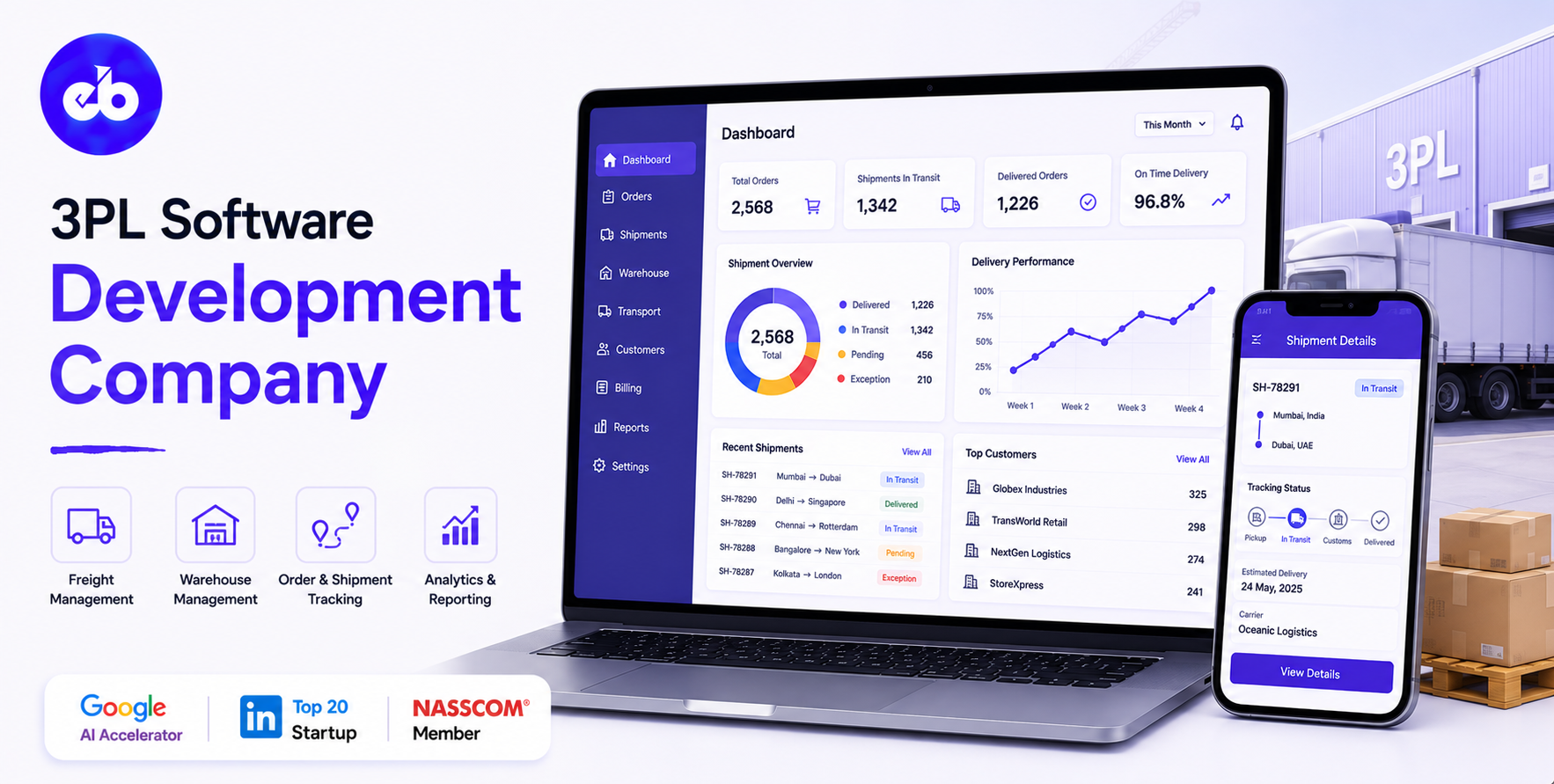
The US third-party logistics market was valued at $240 billion in 2024 and expected to cross $500 billion by 2033. Every 3PL in it is solving the same fundamental problem: running one warehouse for multiple clients whose inventory must be perfectly segregated, whose billing must be perfectly accurate, and who each demand complete real-time visibility into their own stock, without ever seeing anyone else’s.
A 3PL operation that manages ten clients through ten separate spreadsheets is not a scalable business. It is a headcount problem that grows linearly with every client added.
The 3PL that builds the right technology platform can double client count without doubling operations staff. That is the economics that separates the 3PL businesses that grow profitably from the ones that grow themselves out of margin.
This guide covers how to build a 3PL-specific platform, covering everything from multi-client inventory segregation through value-added services billing, client portal, and the operational intelligence that makes a 3PL genuinely competitive.
EngineerBabu built logistics technology for Serman Logistics and enterprise operations for Adani Group. CMMI Level 5. Google AI Accelerator 2024 Top 20. Contact: mayank@engineerbabu.com
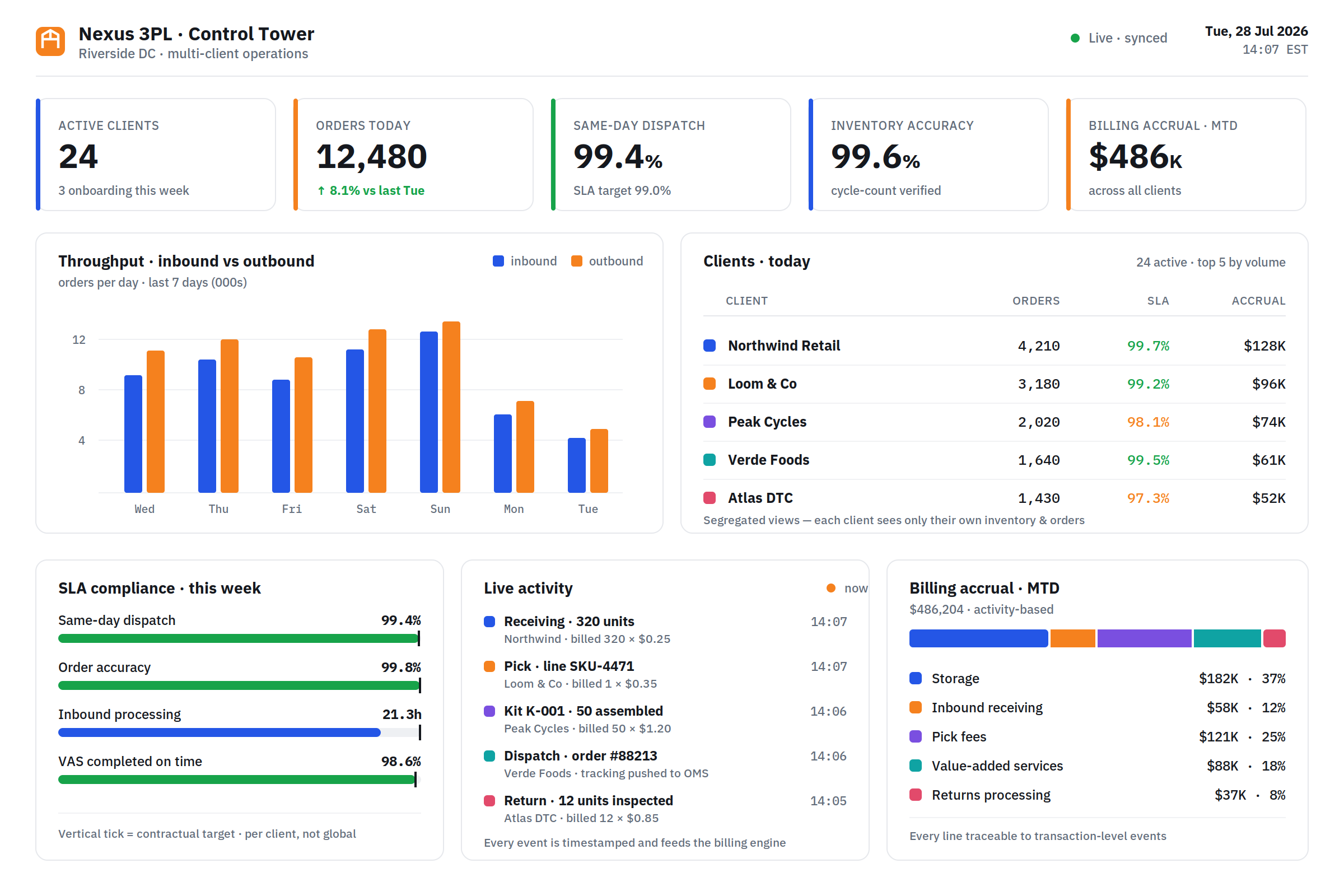
A standard WMS manages inventory for one owner. A 3PL platform manages inventory for multiple clients, simultaneously, in the same physical space, with complete segregation of data and operations.
This distinction drives most of the architectural differences:
| Feature | Standard WMS | 3PL Platform |
| Client data model | Single owner | Multi-tenant, each client sees only their inventory |
| Billing | Internal cost tracking | Client-specific billing, per pallet, per pick, per order |
| Reporting | Internal operations | Client-facing portal with real-time visibility |
| SLA management | Internal KPIs | Per-client SLA with contractual commitment tracking |
| Rate cards | N/A | Per-client pricing for every service type |
| Onboarding | One-time setup | Repeatable client onboarding workflow |
| Integrations | ERP and TMS | Client-specific integrations, each client’s OMS, ERP, or marketplace |
The 3PL platform must do everything a WMS does, receiving, putaway, picking, packing, dispatch, returns, cycle counting, labour management, and add a client management layer on top that makes all of it multi-tenant, billable, and visible to the right client.
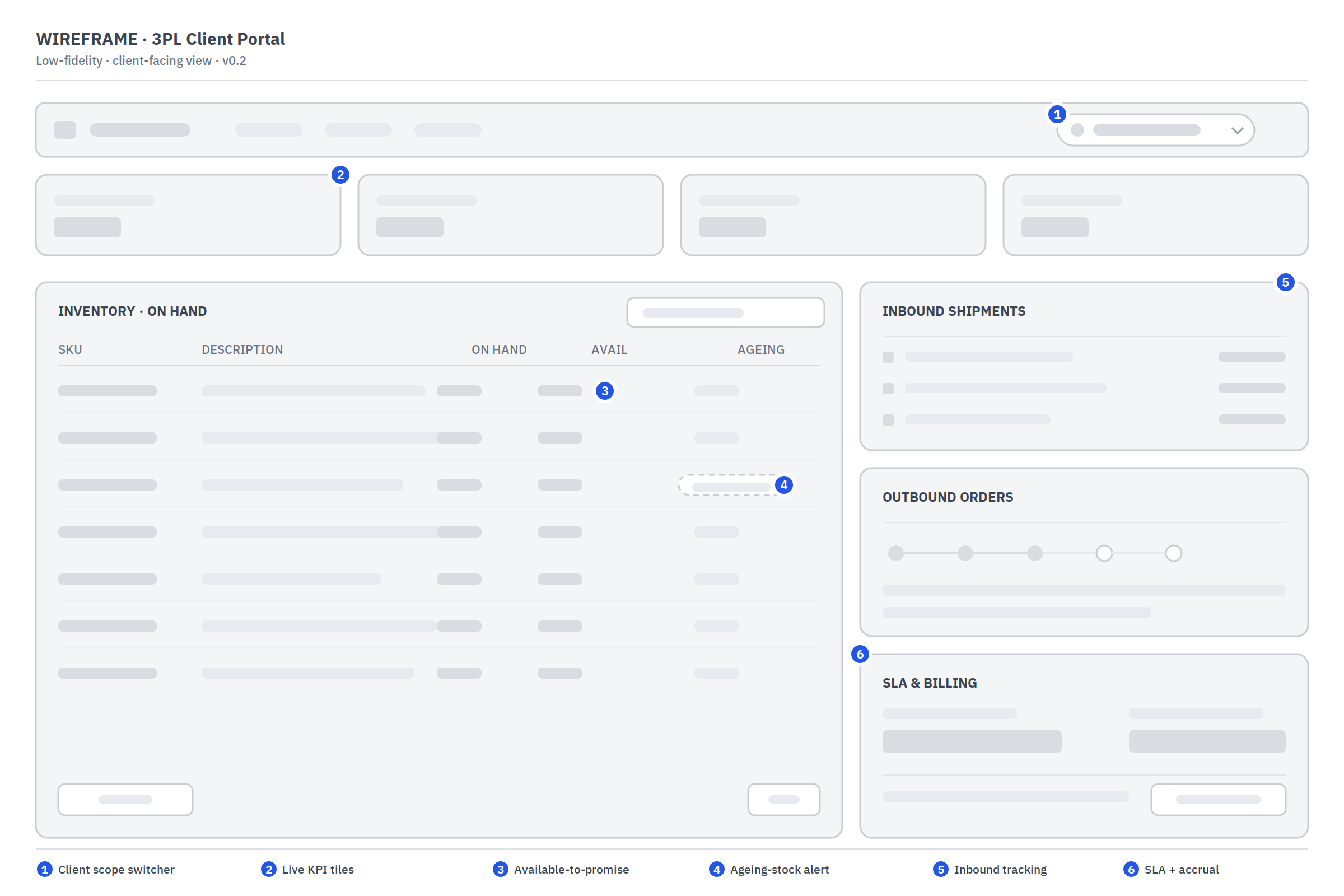
The foundation of the platform is the multi-tenant data model. Every inventory record, every transaction, every document belongs to one client.
The system enforces this at the database level, a query for Client A’s inventory cannot return Client B’s data regardless of what the application layer does.
The client data model:
| Entity | Client-Specific? | Notes |
| Item/SKU master | Yes, per client | Same SKU code can exist for multiple clients |
| Inventory locations | Shared physical space, segregated data | Location belongs to one client at a time |
| Orders | Yes, per client | Complete order history per client |
| Billing | Yes, per client | Rate card, invoices, statements per client |
| SLA configuration | Yes, per client | Different clients have different committed service levels |
| Reports and dashboards | Yes, per client | Client portal shows only their data |
The client onboarding workflow:
| Step | Action | Time Required |
| Client contract setup | Rate card configured, SLAs defined, billing model selected | 1–2 hours |
| Item master import | Client uploads SKU list with dimensions and weights | 2–4 hours |
| Location allocation | Physical warehouse space assigned to client | 1–2 hours |
| Integration setup | Client’s OMS or ERP connected to platform API | 1–5 days |
| Test run | First inbound shipment processed in test mode | 1 day |
| Go-live | Client’s inventory begins flowing through the platform | Live |
A repeatable onboarding workflow, where every step is templated and the only variable is the client-specific data, allows the 3PL to onboard a new client in 3 to 7 days rather than 3 to 7 weeks.
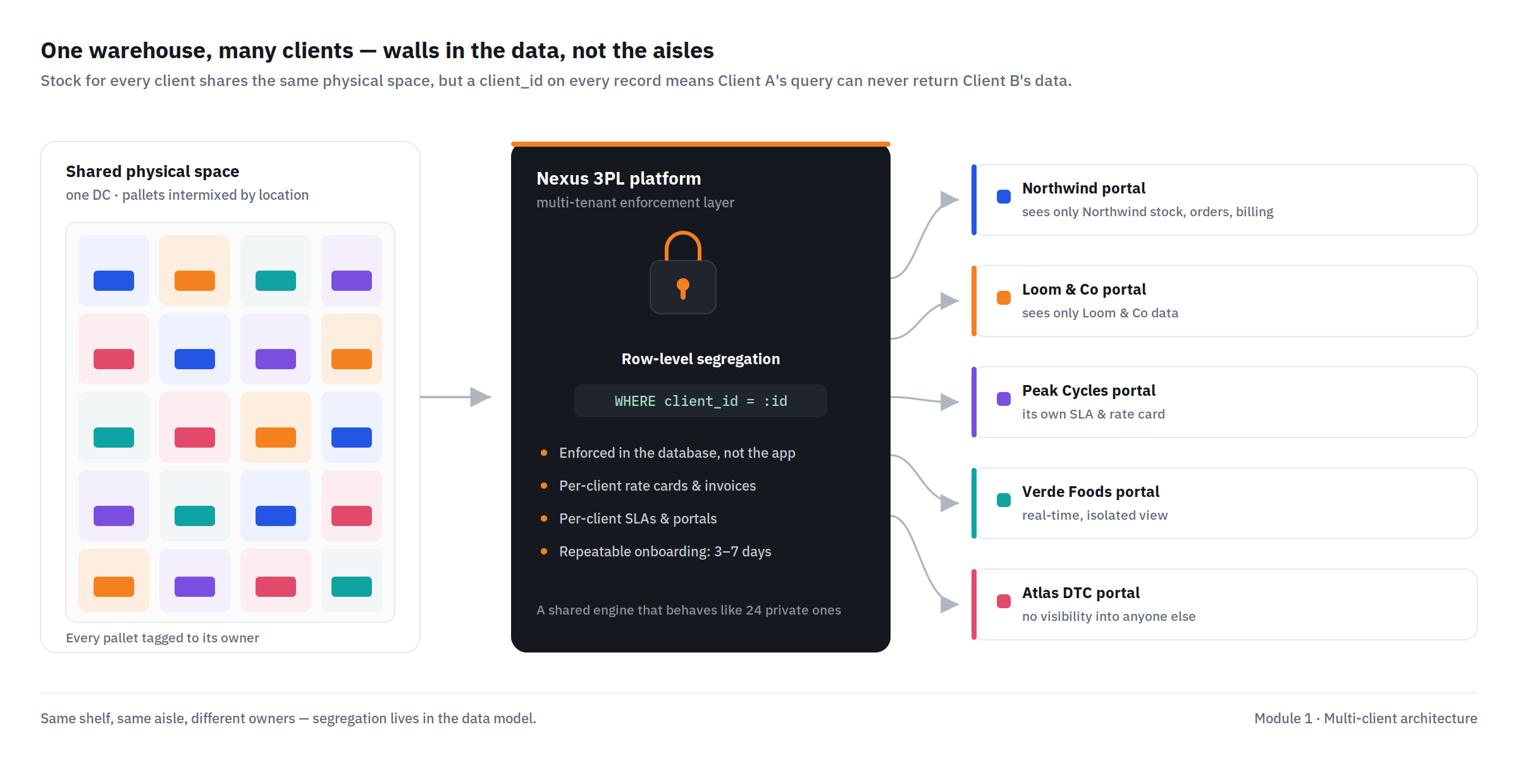
Most 3PL revenue does not come from storage alone. Value-added services, kitting, labelling, quality inspection, repackaging, returns processing, carry higher margins and create stickier client relationships.
The platform must manage VAS operations as precisely as it manages standard warehouse operations.
Common VAS offerings:
| Service | Operation | Billing Model |
| Kitting | Combining multiple items into a single kit | Per kit assembled |
| Labelling | Applying client-specific or retailer-specific labels | Per unit labelled |
| Quality inspection | Inspecting inbound or outbound items | Per unit inspected, per hour |
| Repackaging | Changing packaging type or configuration | Per unit repackaged |
| Gift wrapping | Adding gift packaging per customer instruction | Per unit gift-wrapped |
| Returns inspection | Inspecting returned items and categorising | Per unit inspected + per disposition decision |
| Garment processing | Steaming, hanging, tagging for apparel | Per unit processed |
| Photogrpahy | Product photography for e-commerce | Per SKU, per image |
VAS work order management:
When a client requests a VAS, “We need 500 units of SKU-1234 and 500 units of SKU-5678 kitted together into kit K-001, completed by Thursday”, the platform creates a work order. The work order assigns:
Required input inventory (reserved from available stock), required output inventory (the kit’s item record created in advance), the work centre or zone where the VAS will be performed, the operator team assigned, the quality check requirements, and the completion deadline.
As operators complete the VAS, they confirm completion in the platform, scanning input items consumed and output units created. The inventory records update automatically: input items decremented, output kits incremented, and the billing engine records the completed units for invoicing.
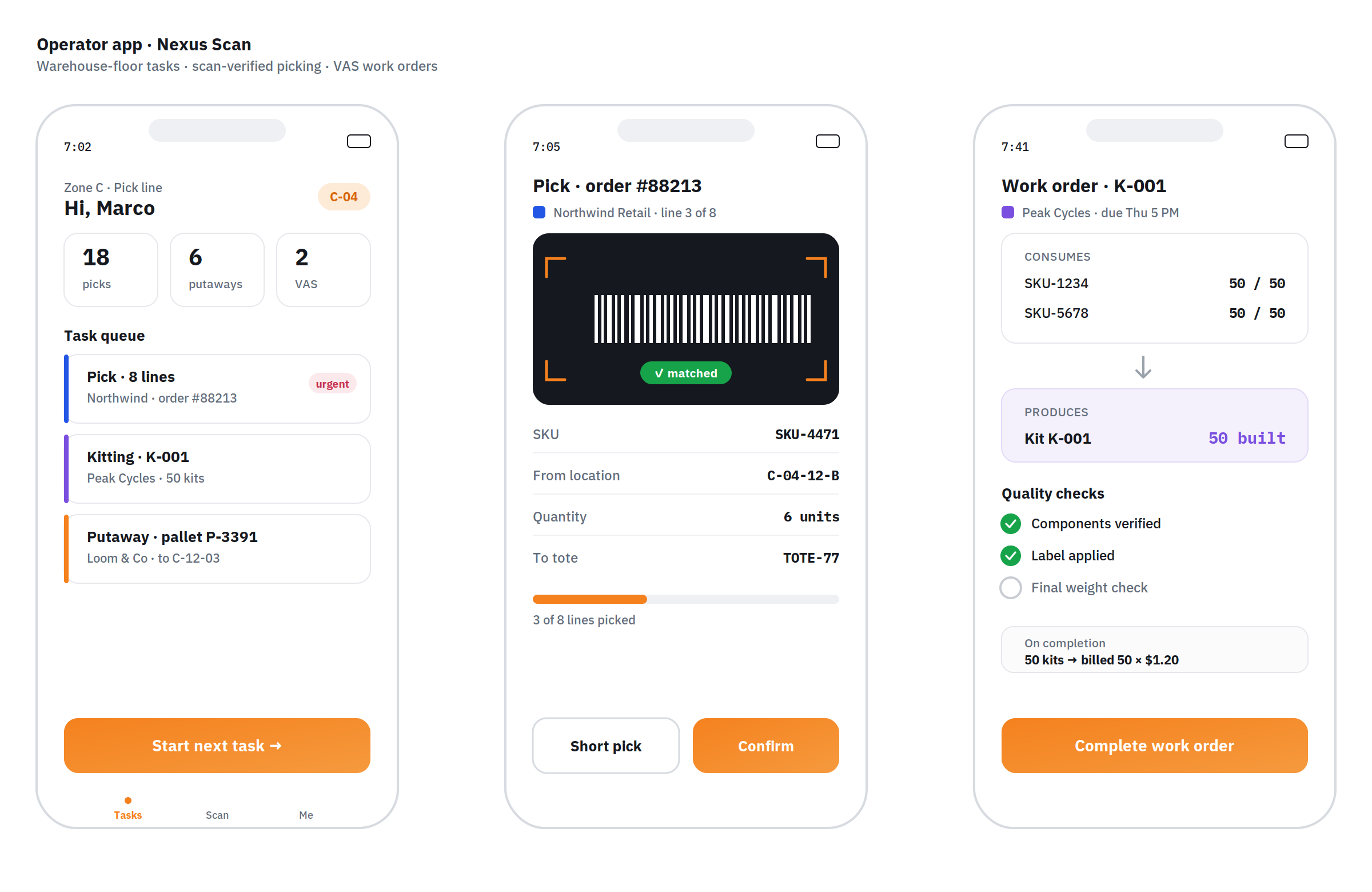
The billing engine is the most commercially critical module in a 3PL platform. It is also the one most commonly built poorly, resulting in billing disputes, revenue leakage, and client relationship damage.
3PL billing model types:
| Billing Model | How Charged | Common For |
| Per pallet stored | Weekly or monthly × pallet count | General warehousing |
| Per cubic metre stored | Volume × rate | Varying size inventory |
| Per inbound unit | Units received × rate | High-volume e-commerce |
| Per outbound unit/order | Units or orders dispatched × rate | Fulfillment operations |
| Per pick | Individual picks × rate | Piece-pick operations |
| Per labour hour | Hours worked × rate | VAS and project work |
| Minimum monthly charge | Floor charge regardless of activity | Capacity reservation |
| Handling fee per SKU | One-time setup per new SKU introduced | SKU management |
The activity-based billing calculation:
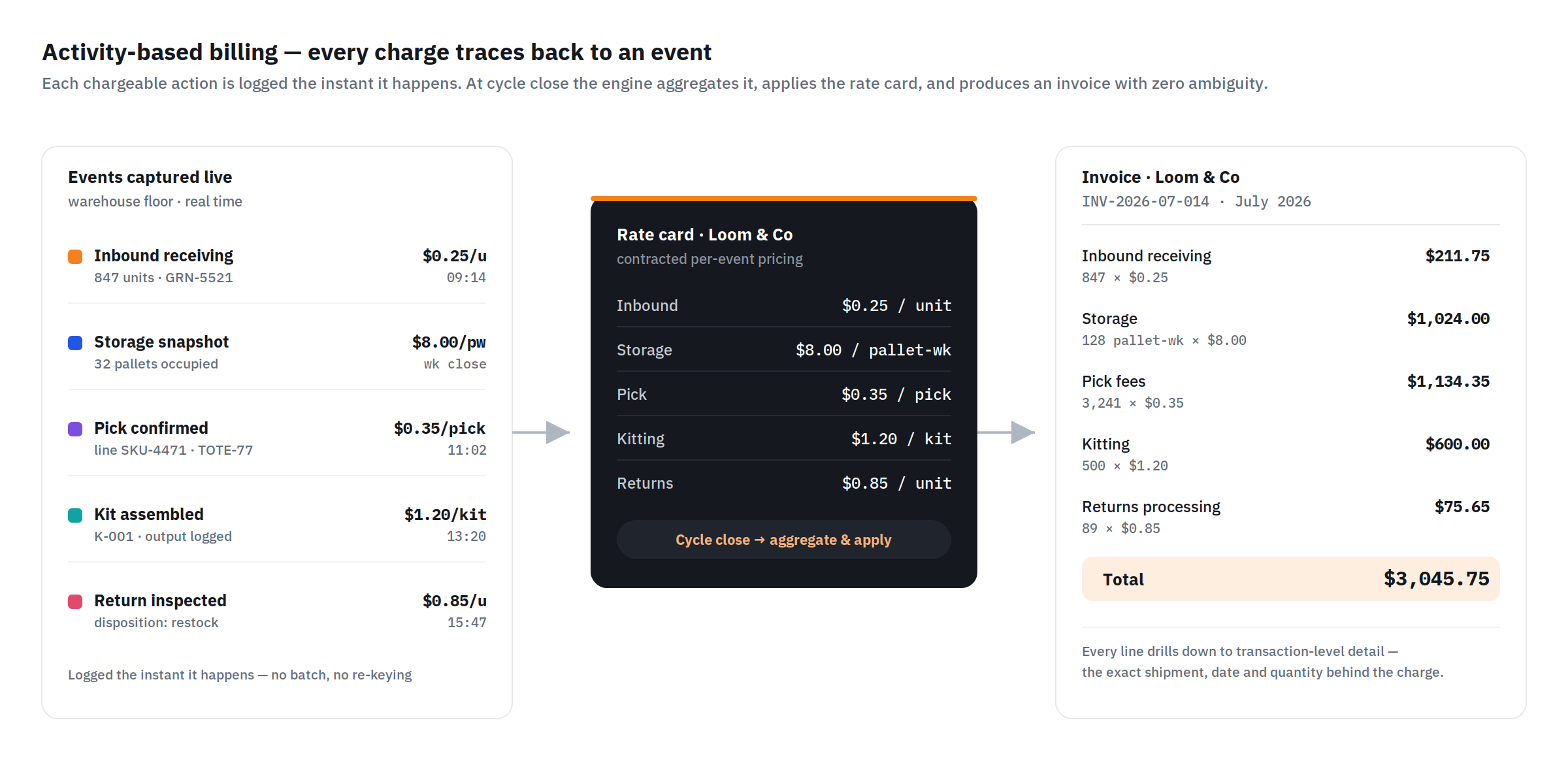
The billing engine captures every chargeable event in real time as warehouse operations occur. When a pallet is received, the system logs one inbound pallet event at the client’s inbound rate.
When a line is picked, it logs one pick event at the client’s pick rate. When storage is calculated at week-end, the system counts every pallet or cubic metre occupied and multiplies by the storage rate.
At billing cycle end, weekly, bi-weekly, or monthly depending on the contract, the engine aggregates all activity records for the client, applies the rate card, applies any minimum charges or volume discounts, and generates a detailed invoice showing every chargeable event.
The invoice format:
| Line Item | Detail | Amount |
| Inbound receiving, 847 units | 847 × $0.25 | $211.75 |
| Storage, 32 pallets × 4 weeks | 128 pallet-weeks × $8.00 | $1,024.00 |
| Pick fees, 3,241 picks | 3,241 × $0.35 | $1,134.35 |
| Kitting, 500 kits assembled | 500 × $1.20 | $600.00 |
| Returns processing, 89 units | 89 × $0.85 | $75.65 |
| Total | $3,045.75 |
Every line is supported by a transaction-level detail report, the client can see every individual receiving event, every pick, every kit assembled. Zero ambiguity. Zero disputes.
The client portal is what makes or breaks a 3PL’s service proposition in 2026. Clients do not want to email their account manager for a stock report. They want to log in and see everything in real time.
Client portal features:
| Feature | Details |
| Real-time inventory management | Current stock levels per SKU, per location, per status |
| Inbound shipment tracking | Expected receipts, received, pending putaway |
| Outbound order tracking | Order status, received, picking, packed, dispatched, delivered |
| Inventory ageing | How long each SKU has been in storage, ageing cost alert |
| Billing and invoices | Current accrual, invoice history, download statements |
| SLA performance | On-time dispatch rate, accuracy rate vs contractual commitment |
| Returns management | Returned orders, inspection results, disposition decisions |
| Reporting and analytics | Custom date-range reports on any metric |
| Integration status | Are orders flowing in correctly? Any errors? |
| Document management | GRNs, dispatch notes, VAS completion certificates |
Real-time inventory accuracy:
The client portal pulls inventory data directly from the WMS database, not a nightly batch. When an operator confirms a pick at 2:14pm, the client’s inventory view shows the updated quantity at 2:14pm.
This real-time accuracy is what enterprise e-commerce clients demand, they need to know exactly what stock is available to promise to their own customers.
Every 3PL client has a different order management system. Some use Shopify. Some use Magento. Some use SAP. Some have their own custom platform.
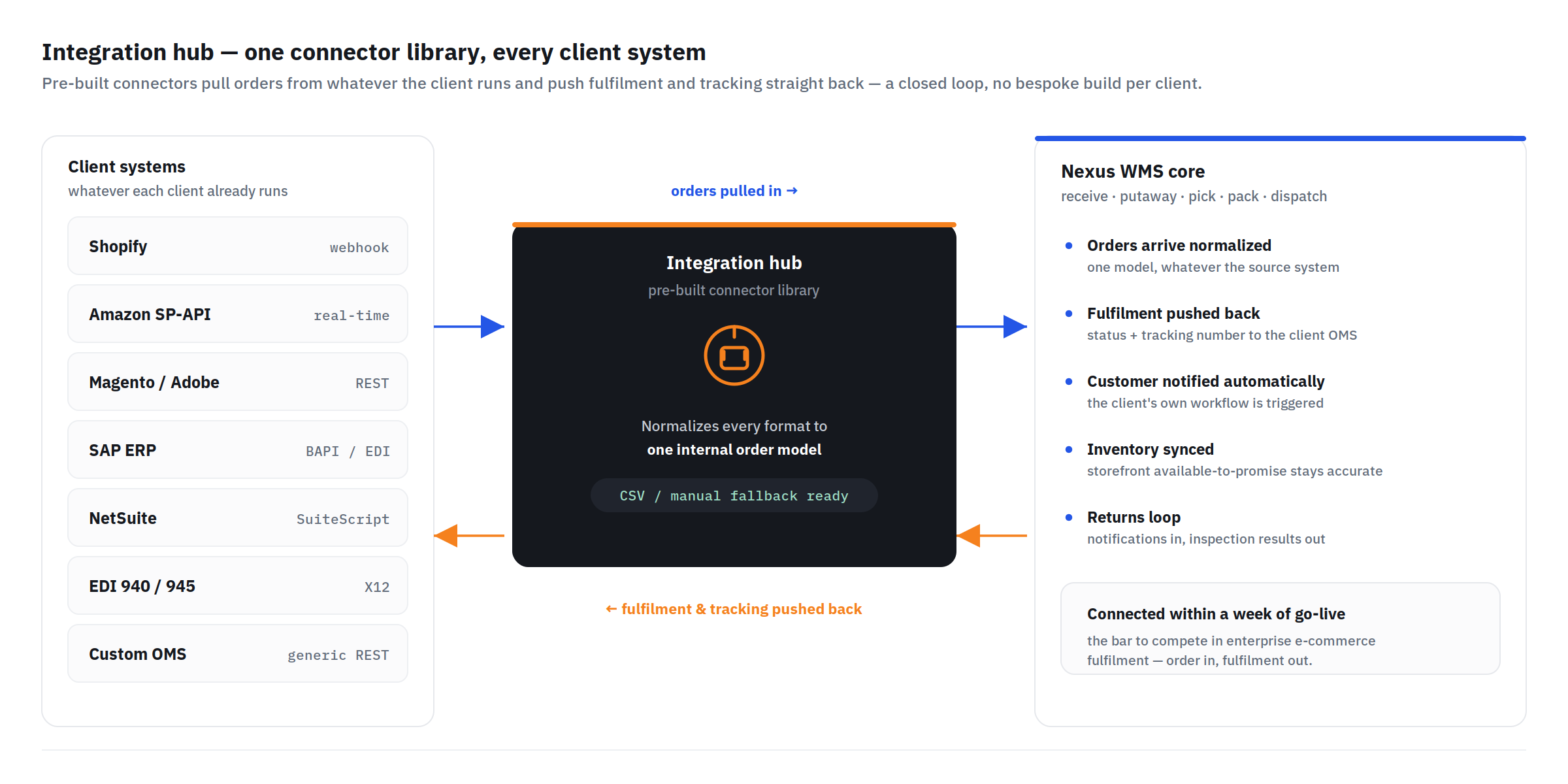
The 3PL platform must connect to all of them, pulling orders in and pushing fulfilment confirmations out, without building a custom integration for each client from scratch.
The integration hub architecture:
The platform maintains a library of pre-built connectors for the most common client systems:
| System | Connector Type | Order Flow |
| Shopify | Shopify API | Orders pulled on webhook trigger |
| WooCommerce | WooCommerce REST API | Orders pulled on schedule |
| Amazon Seller Central | Amazon SP-API (MWS replacement) | FBM orders pulled in real time |
| Magento / Adobe Commerce | REST API | Orders pulled on schedule or webhook |
| SAP ERP | BAPI or REST | EDI or API depending on client SAP version |
| NetSuite | SuiteScript REST API | Orders pulled and fulfilment pushed |
| Custom OMS | Generic REST API connector | Configured per client’s API spec |
| EDI 940/945 | EDI X12 | Traditional EDI clients |
For clients without a standard system, the platform provides a manual order upload interface, CSV template for batch orders, or a web UI for individual order entry.
The fulfilment confirmation push:
When an order is dispatched, the platform immediately pushes the fulfilment confirmation back to the client’s system, updating the order status, recording the tracking number, and triggering the client’s customer notification workflow. This closed loop, order in, fulfilment out, is what allows a 3PL’s client to promise their customers accurate delivery information.
A 3PL’s competitive differentiation is not just operational efficiency, it is the ability to prove that operational efficiency to clients with transparent, auditable data.
SLA metrics tracked per client:
| SLA Metric | Definition | Typical Commitment |
| Same-day dispatch rate | Orders received by cutoff dispatched same day | > 99% |
| Order accuracy | Correct items and quantities shipped / total orders | > 99.8% |
| Inbound processing time | Hours from truck arrival to stock available to pick | < 24 hours |
| Returns processing time | Hours from return receipt to disposition decision | < 48 hours |
| Inventory accuracy | System stock count vs physical count | > 99.5% |
| VAS completion on time | VAS work orders completed by committed date | > 98% |
The SLA dashboard:
Each client sees their own SLA performance, not global warehouse performance. A client whose own orders have a 99.7% same-day dispatch rate sees that number in their portal.
A client whose orders have been affected by a specific operational issue sees that too, with a root cause note from the operations team.
This transparency builds trust. Clients who can see their SLA performance, including the occasional miss and the explanation, are more loyal than clients who receive monthly performance reports they have no way to verify.
| Module | Cost Range (USD) | Notes |
| Multi-tenant architecture + client onboarding | $8K – $15K | Core data segregation |
| WMS core (receiving, putaway, picking, packing, dispatch) | $25K – $45K | Full WMS functionality for 3PL context |
| VAS work order management | $6K – $12K | |
| 3PL billing engine + invoice generation | $10K – $18K | Activity-based billing, rate card management |
| Client portal (web, real-time) | $10K – $18K | All visibility features |
| Integration hub (5 pre-built connectors) | $10K – $20K | Per connector ~$2K–$4K |
| SLA management + performance reporting | $5K – $10K | |
| Returns management | $5K – $10K | |
| Labour management + productivity | $5K – $10K | |
| AWS + VAPT + Year 1 ops | $6K – $12K | |
| Total | $90K – $170K | Full 3PL platform |
Contact: mayank@engineerbabu.com
The most important technical difference is multi-tenancy, the ability to manage inventory, operations, and data for multiple clients simultaneously in complete segregation. In a standard WMS, all inventory belongs to one owner and there is no concept of client-level data access control. In a 3PL platform, every inventory record, transaction, document, and report belongs to a specific client, and the system must enforce at the database level that Client A cannot see Client B’s data under any circumstance. This multi-tenancy extends to billing, each client has their own rate card, their own invoice cycle, and their own billing logic, and to the client portal, which shows each client only their own operations in real time. Building multi-tenancy correctly from the start is architecturally critical, retrofitting it into a system designed for single-tenant operation is one of the most expensive and risky technology projects a 3PL can undertake.
Activity-based billing records every chargeable warehouse event in real time as operations occur, every inbound unit received, every storage pallet-week, every pick, every VAS unit processed. When the billing cycle closes, the billing engine aggregates all recorded events, applies the client’s contracted rate for each event type, and generates an invoice supported by a transaction-level detail report. The client can see every individual event that generated a charge, the specific inbound shipment, the specific date, the specific quantity. When a client questions a charge, the operations team shares the event log showing exactly what happened and when. This level of detail eliminates the most common source of billing disputes, the client believes they were charged for something that did not happen or was charged at the wrong rate.
For e-commerce clients, the three critical integrations are: order management system integration (pulling new orders from Shopify, WooCommerce, Amazon, or the client’s custom OMS), carrier integration (booking shipments and printing labels for FedEx, UPS, USPS, DHL, or regional carriers), and fulfilment confirmation push (sending tracking numbers and dispatch confirmations back to the client’s OMS to trigger customer notifications). Secondary integrations include inventory sync, pushing current stock levels to the client’s OMS so the e-commerce storefront shows accurate available-to-promise quantities, and returns integration, receiving return notifications from the client’s OMS and pushing inspection results back. A 3PL that cannot connect to a client’s existing systems within a week of go-live is not competitive in the enterprise e-commerce fulfillment market.