How to Build an AI Knowledge Management Platform - Enterprise Search, LLM Q&A, Knowledge Graph 2026


Create engaging, high-performance mobile applications tailored to your business needs. We craft future-ready apps that offer smooth user experiences on all devices.
Build robust and scalable websites and CMS platforms that help you manage content effortlessly. Our development ensures a seamless digital presence.
Launch secure, feature-rich online stores with intuitive shopping experiences. We build tailored eCommerce platforms designed for growth.
Design captivating games with immersive gameplay and stunning graphics. From concept to launch, we build engaging experiences that players love.
Enhance your customer relationships with customized Salesforce implementations. Drive growth and efficiency with smarter CRM solutions.
Harness artificial intelligence and machine learning to automate workflows and gain actionable insights. Our AI transforms data into smart decisions.
Accelerate your software delivery lifecycle with continuous integration, delivery, and infrastructure automation to boost efficiency.
Enterprise knowledge is scattered across Confluence, SharePoint, Notion, Google Drive, Slack channels, email threads, and the heads of senior employees. When someone needs an answer, how does the sales team handle this objection, what is the process for Y, what did we decide about Z in the Q3 meeting, finding it takes 30 to 60 minutes.
An AI knowledge platform makes it findable in 10 seconds.
Every enterprise generates thousands of documents every month. Policies live in Confluence, contracts in SharePoint, product documentation in Notion, conversations in Slack, project updates in Jira, and critical decisions often remain buried inside email threads or in the minds of experienced employees.
The result is a familiar problem:
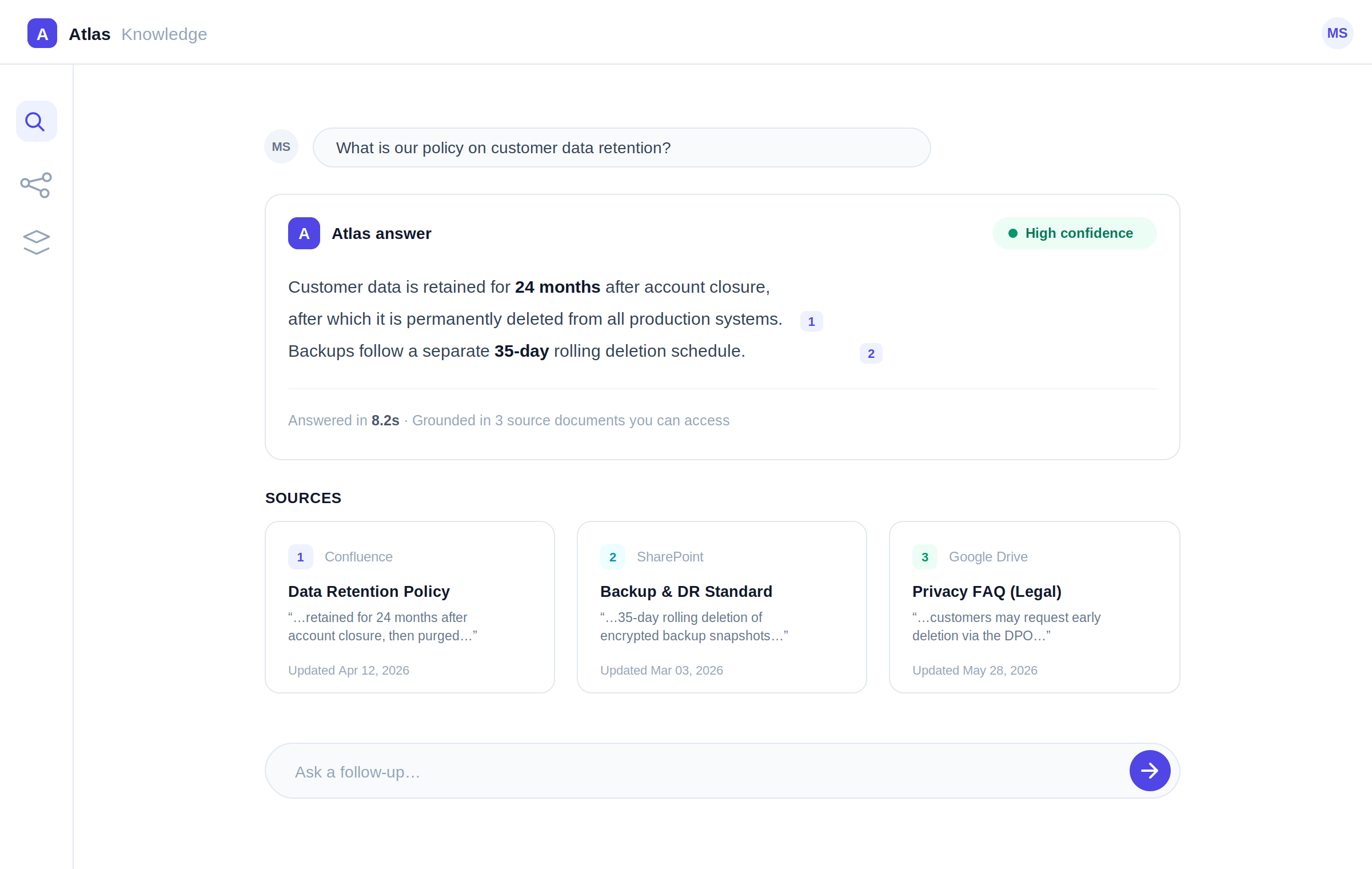
An AI-powered knowledge management platform solves this by connecting all enterprise knowledge sources into a single intelligent search experience. Instead of manually opening multiple tools, employees ask a question in natural language and receive a cited answer within seconds.
According to McKinsey, employees spend nearly 20% of their workweek searching for internal information or tracking down colleagues who can help with specific tasks. AI-powered enterprise search dramatically reduces this lost productivity by making organizational knowledge instantly discoverable.
Whether you’re building an internal knowledge assistant, enterprise search platform, or Retrieval-Augmented Generation (RAG) system, the architecture below represents a production-ready implementation.
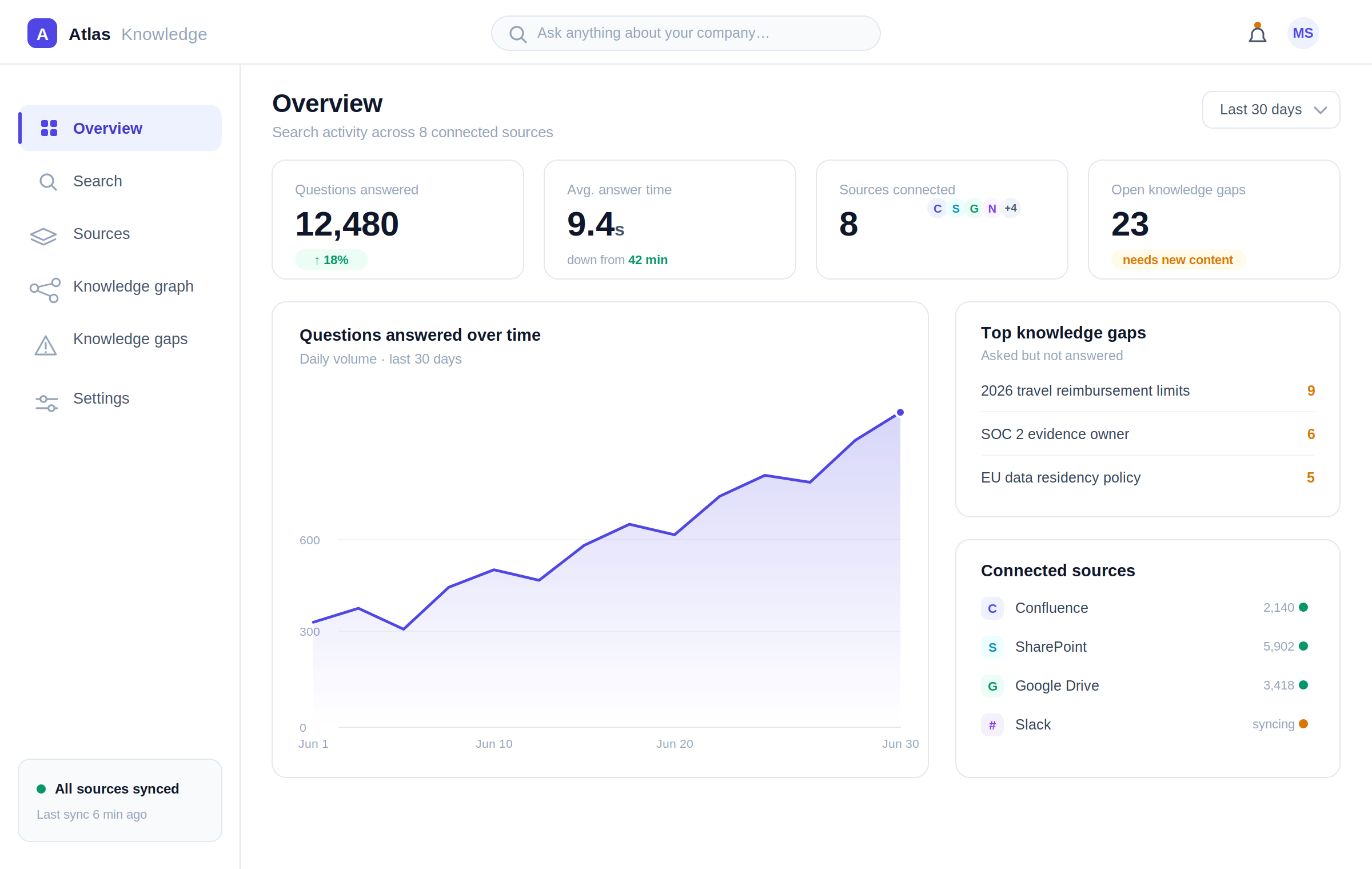
Modern enterprises need more than keyword search. They need systems that understand context, respect access permissions, cite their sources, and continuously improve as organizational knowledge grows.
A robust AI platform development enables organizations to:
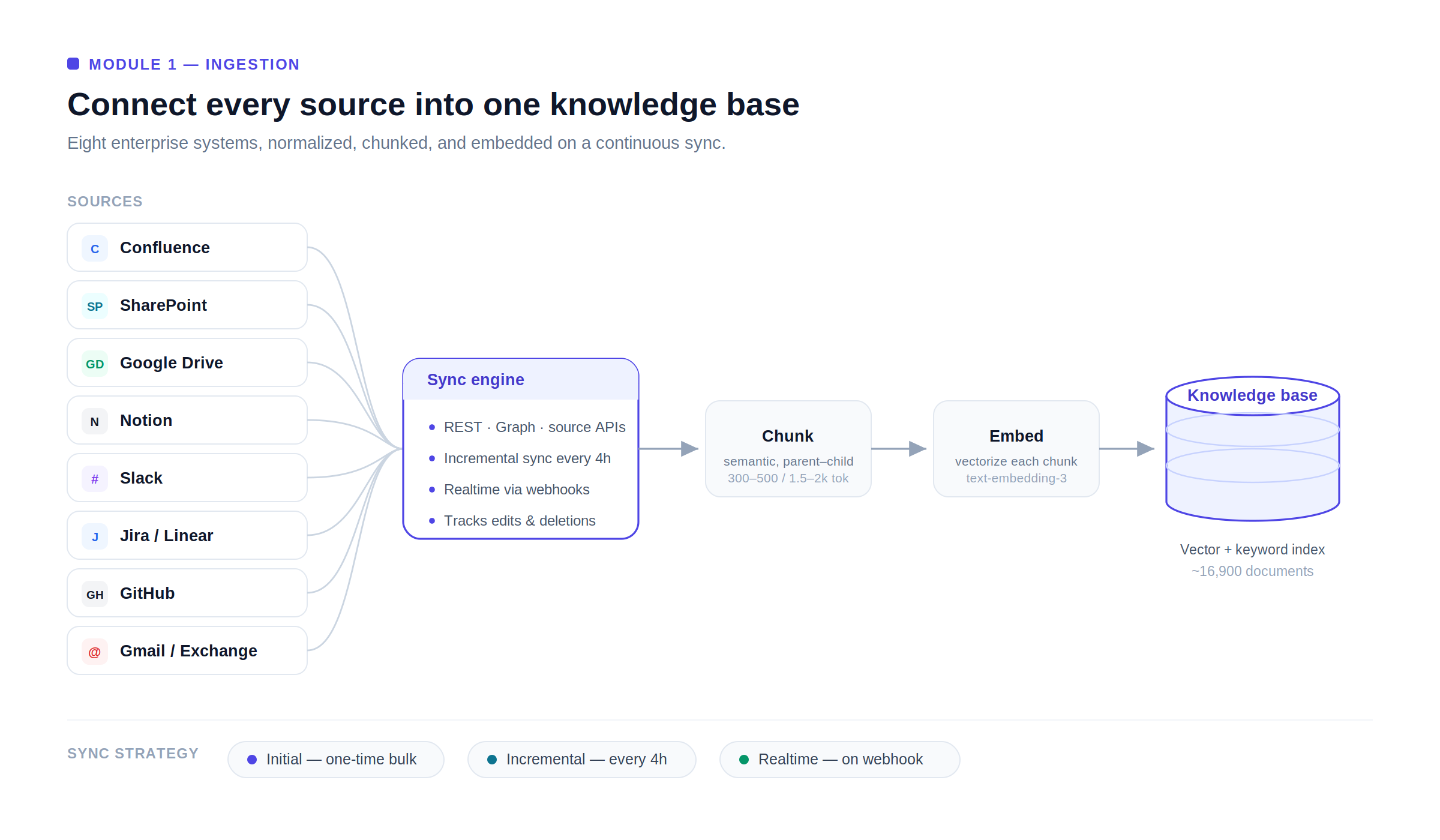
Enterprise knowledge sources:
| Source | Integration | Document Types |
| Confluence | REST API | Wiki pages, spaces, templates |
| SharePoint | Microsoft Graph API | Documents, lists, pages |
| Google Drive | Google Drive API | Docs, Sheets, Slides, PDFs |
| Notion | Notion API | Pages, databases, wikis |
| Slack | Slack API | Channel messages, threads, files |
| Gmail/Exchange | API | Important threads (user-configured) |
| JIRA/Linear | REST API | Tickets, epics, comments |
| GitHub | GitHub API | READMEs, wikis, documentation |
Sync strategy:
| Type | Frequency | Trigger |
| Initial ingestion | One-time bulk | Platform setup |
| Incremental sync | Every 4 hours | All sources |
| Real-time sync | On webhook | Sources supporting webhooks |
Chunking strategies:
| Strategy | Best For |
| Fixed-size | Simple, consistent – baseline approach |
| Semantic | Better context preservation – split at paragraphs |
| Hierarchical | Long documents – small chunks for retrieval, large parent for context |
| Document-type-aware | Code chunked by function, prose by paragraph |
Platform defaults to semantic chunking with parent-child structure: child chunks (300–500 tokens) for retrieval, parent chunks (1,500–2,000 tokens) for context.
Embedding model selection:
| Use Case | Model |
| General enterprise | OpenAI text-embedding-3-large |
| Multilingual knowledge base | multilingual-e5-large |
| On-premise (data residency) | nomic-embed-text (open-source) |
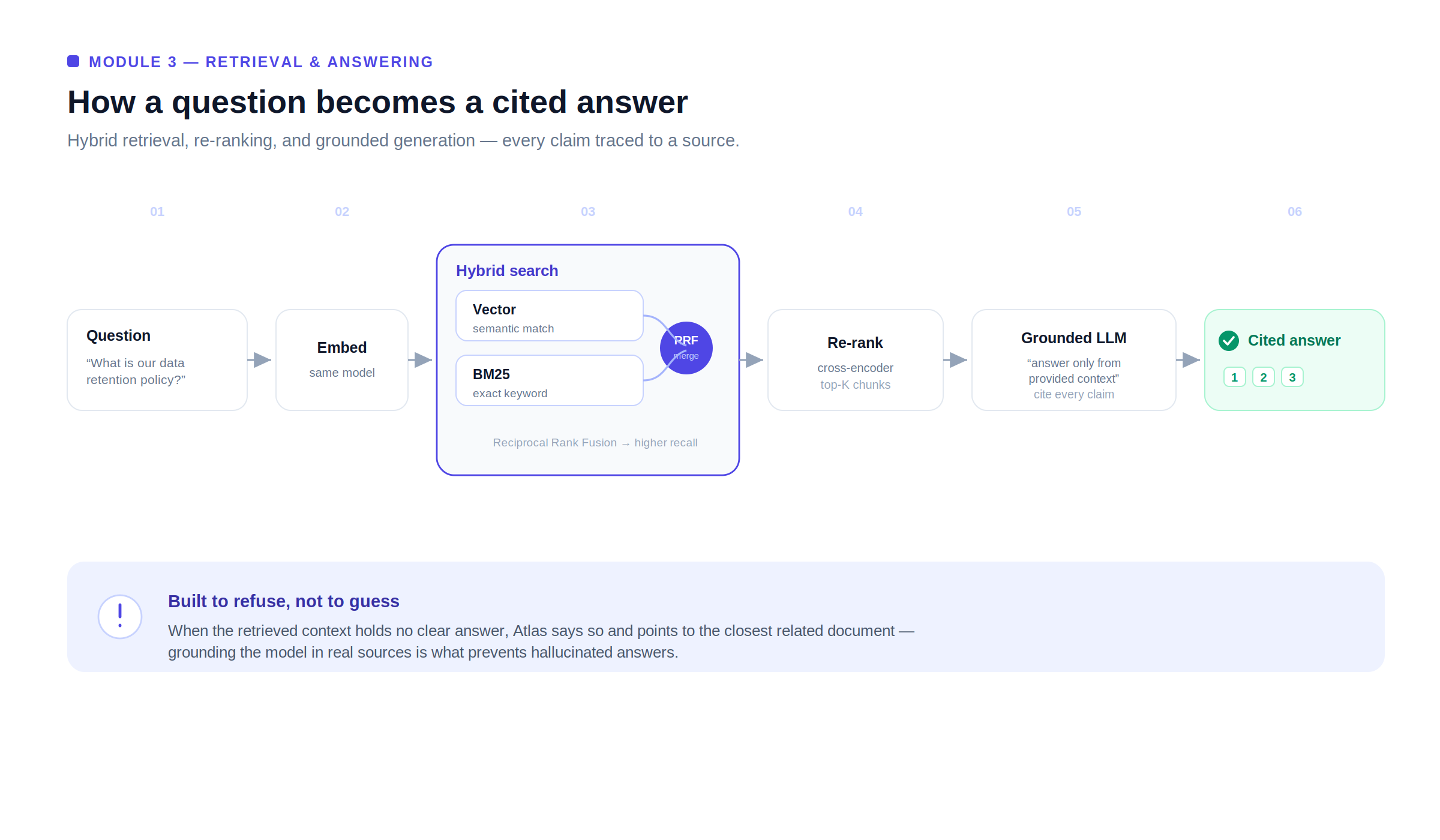
The query flow:
Confidence indicator:
When retrieved context does not contain a clear answer, the LLM responds: “I could not find a clear answer in the company knowledge base. The most relevant document I found is [X], it may contain related information.” This prevents hallucination while directing to potentially helpful content.
Query-time permission filtering:
The platform maintains a permission mirror, synced from each source system (Confluence space permissions, SharePoint document library permissions, Google Drive sharing settings). When a user queries, results are filtered to only include documents the user has permission to access in the source system.
A contractor who cannot access the M&A deal room in SharePoint will not receive answers derived from documents in that folder.
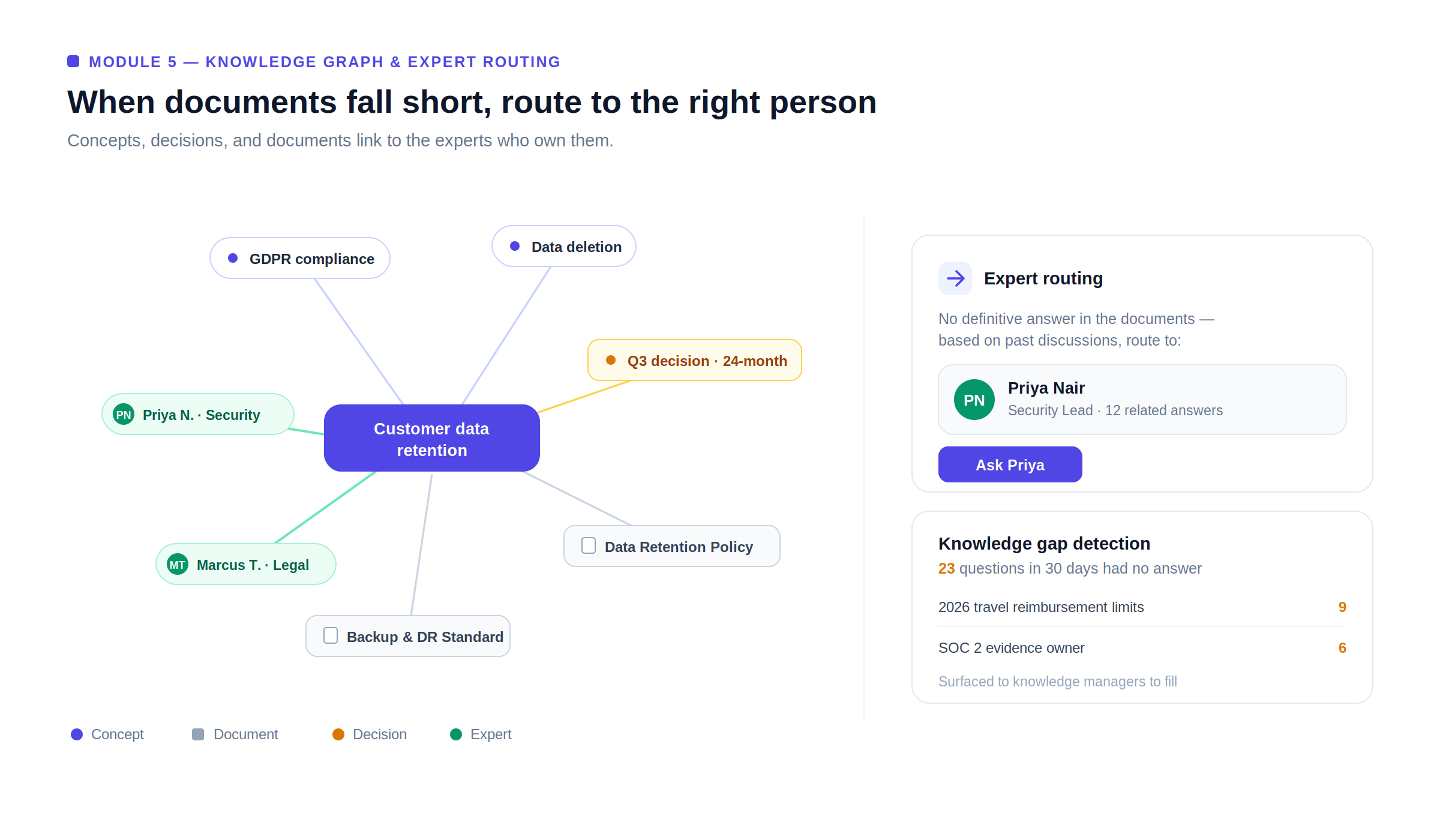
Knowledge graph nodes:
| Node Type | Examples |
| Concepts | “Customer data retention”, “GDPR compliance” |
| People | Employee names with expertise areas |
| Projects | Project names with related documents |
| Decisions | Key decisions with rationale, date, stakeholders |
Expert routing:
When a query cannot be answered from documents, the platform routes to the most relevant human expert: “I couldn’t find a definitive answer. Based on past discussions, [Name] has the most relevant expertise on this topic.”
Knowledge gap detection:
Unanswered queries aggregated and surfaced to knowledge managers: “These 23 questions were asked in the last 30 days and could not be answered from existing content.”
| Module | Cost Range (USD) | Notes |
| Multi-source ingestion pipeline (10 connectors) | $10K – $20K | Per connector $1K–$2K |
| Chunking engine + embedding pipeline | $6K – $12K | |
| Vector database infrastructure | $5K – $10K | Pinecone / pgvector |
| Hybrid search (vector + BM25) | $5K – $10K | |
| LLM Q&A with citations | $8K – $15K | GPT-4o + RAG |
| Permission mirroring + query-time filtering | $8K – $15K | Per source system |
| Knowledge graph construction | $8K – $15K | |
| Expert routing engine | $5K – $10K | |
| Knowledge gap detection | $4K – $8K | |
| Web + Slack + Teams interface | $6K – $12K | |
| AWS + SOC 2 + VAPT | $5K – $10K | |
| Total | $70K – $137K | Full KM platform |
Contact: mayank@engineerbabu.com
Enterprise knowledge platforms transform scattered documents into a secure, searchable source of truth, enabling employees to find accurate, cited answers in seconds instead of spending valuable time searching across multiple systems.
By combining enterprise integrations, hybrid search, Retrieval-Augmented Generation (RAG), permission-aware access, and knowledge graphs, organizations improve productivity, preserve institutional knowledge, and make faster, more informed decisions.
Looking to build a custom AI knowledge management platform? EngineerBabu develops secure, enterprise-grade AI solutions with RAG, vector search, and seamless integrations tailored to your business needs. Contact us at mayank@engineerbabu.com to get started.
The platform implements query-time permission filtering before returning any retrieved chunk, the platform checks whether the requesting user has access to the source document in the original system. The permission mirror is synced from each source system on a regular schedule. A query that would surface content from a restricted document returns no result for that document, the user experiences the same access restriction they would encounter going directly to the source system.
Hybrid search combines vector similarity search (semantic matching) with BM25 keyword search (finds documents containing exact terms in the query). Vector search misses documents using specific technical terminology or product names that appear literally in the query. Keyword search misses conceptual variants. Combining both using Reciprocal Rank Fusion achieves higher recall than either method alone, consistently outperforming pure vector retrieval for enterprise queries that mix conceptual questions with specific terminology lookups.
Yes. Instead of relying on a single document, the platform retrieves relevant information from multiple sources, ranks the results, and generates a consolidated answer with citations for every factual statement. This enables employees to receive complete responses even when information is distributed across different systems.
The platform continuously synchronizes connected systems using scheduled incremental updates and real-time webhooks where available. New documents, edits, permission changes, and deleted content are reflected in the knowledge base automatically, ensuring employees always receive answers based on the latest available information.
Yes. The retrieval layer is model-agnostic and can work with OpenAI, Anthropic, Google Gemini, Azure OpenAI, Meta Llama, Mistral, or self-hosted open-source models deployed on private infrastructure. This allows organizations to meet data residency, compliance, performance, and cost requirements without changing the overall architecture.