Cloud Kitchen App Development: Everything You Need to Know


Create engaging, high-performance mobile applications tailored to your business needs. We craft future-ready apps that offer smooth user experiences on all devices.
Build robust and scalable websites and CMS platforms that help you manage content effortlessly. Our development ensures a seamless digital presence.
Launch secure, feature-rich online stores with intuitive shopping experiences. We build tailored eCommerce platforms designed for growth.
Design captivating games with immersive gameplay and stunning graphics. From concept to launch, we build engaging experiences that players love.
Enhance your customer relationships with customized Salesforce implementations. Drive growth and efficiency with smarter CRM solutions.
Harness artificial intelligence and machine learning to automate workflows and gain actionable insights. Our AI transforms data into smart decisions.
Accelerate your software delivery lifecycle with continuous integration, delivery, and infrastructure automation to boost efficiency.
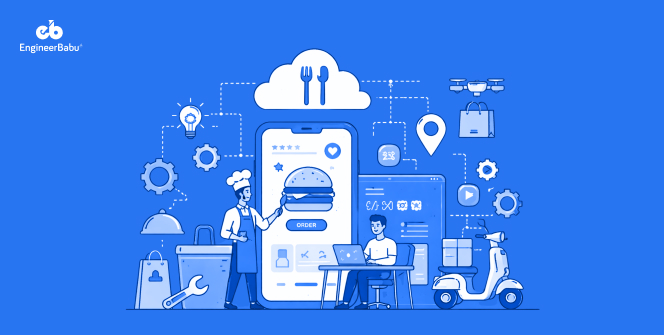
Ghost kitchens generated over $56 billion in global revenue in 2023, and that number is projected to cross $112 billion by 2027 (Statista). The model works. A brand cooks food, a delivery app moves it, and nobody needs a dining room.
But there’s a quiet piece of infrastructure behind every successful cloud kitchen operation that rarely gets the credit it deserves: the app.
Whether you’re running a single ghost kitchen brand or managing a multi-brand virtual food hall, the software you build determines how fast orders flow. It also decides how well kitchens communicate and whether customers come back.
This guide walks you through cloud kitchen app development from the ground up. We’ll cover what to build, how to build it, and what to watch out for along the way.
A cloud kitchen app is not just a food ordering app with a different name. It’s a purpose-built platform that manages the complete lifecycle of a delivery-only food business.
That includes order intake, kitchen workflow, delivery coordination, inventory management, and customer engagement. Some apps serve customers directly. Others are internal tools that kitchen staff use to manage prep queues.
The best platforms do both, connecting every part of the operation into one coherent system.
Before writing a single line of code, you need to decide which type of app you’re actually building. These are not interchangeable.
This is what most people picture first. It’s a branded mobile app where customers browse menus, place orders, and track deliveries. It lives on the customer’s phone and competes directly with third-party platforms like DoorDash or Swiggy.
An internal dashboard for kitchen staff. It receives orders, displays preparation instructions, tracks cook times, and coordinates between stations. A well-designed KMS is the difference between a smooth dinner rush and total chaos.
If you operate multiple virtual brands out of the same kitchen, you need a system that routes each incoming order to the right brand workflow without confusion. This type is increasingly common. Many cloud kitchen operators now run five to ten distinct brands from one physical space.
Built for operators who license their kitchen model to others. The platform needs to support multiple franchisees, each with their own menu, pricing, and reporting. It also needs to maintain centralized oversight at the same time.
Cloud kitchen app development starts before any wireframe is drawn. You need to be specific about who uses this app and what they need to accomplish. A kitchen manager pulling up a prep queue has nothing in common with a customer tracking their biryani.
Each user role requires a different interface, different permissions, and different data.
Common roles in a cloud kitchen platform include customers, kitchen staff, order dispatchers, delivery partners, brand managers, and operations administrators. Define each one clearly before touching design.
Decide early whether you’re building a standalone branded app, integrating with existing third-party platforms through aggregator APIs, or creating an API on your own.
Many operators start by integrating with Zomato, Swiggy, or DoorDash and later add a direct-order channel to reduce commission fees.
Your cloud kitchen app development plan needs to account for this from day one. The architecture is very different depending on which direction you go.
Don’t lump every feature into a single list. Organize them by who uses them. Customer-facing features include menu browsing with real-time availability, order customization, payment processing, live order tracking, and a reorder function.
Kitchen-side features include a live order queue with priority tagging, preparation timers, station-by-station instructions, and order completion confirmation.
Management-side features include sales dashboards, inventory alerts, staff performance tracking, and multi-brand reporting.
The tech stack is where decisions get consequential. For a cloud kitchen app, you need a stack that handles high-concurrency order spikes.
It also needs to sync data between customer and kitchen in real time and integrate cleanly with payment gateways and mapping APIs.
The kitchen display interface deserves as much design attention as the customer app. Kitchen staff work under pressure, often in low lighting, with wet or gloved hands. Text needs to be large and legible.
Critical actions need to require minimal taps. Color coding for order priority, dietary restrictions, and station assignments can dramatically reduce errors during peak hours.
For the customer side, the menu structure matters enormously. Customers who can’t find what they want in under thirty seconds tend to abandon. Group items logically, show accurate preparation times, and make dietary filters prominent.
The development phase should be structured around modules rather than features. That way, each piece can be tested and deployed independently.
The four non-negotiable modules are the order management engine, the payment processing system, the real-time notification layer, and the kitchen display system.
Build the order management engine first. It is the backbone of every other function. Orders flow in, get routed to the right kitchen or station, trigger preparation workflows, and eventually update delivery status. Every other module depends on it working correctly.
Cloud kitchen app development relies on external APIs more heavily than most other app categories. You’ll typically need integrations with payment gateways like Stripe or Razorpay.
Mapping APIs such as Google Maps handle delivery tracking. SMS or push notification services like Twilio or Firebase Cloud Messaging manage alerts. POS systems matter if you also operate physical pickup counters. Food aggregator APIs pull orders from Zomato, Swiggy, or similar platforms.
Each integration adds complexity and a potential failure point. Plan for graceful fallbacks when external services go down.
Payment card data handling requires PCI DSS compliance. If you operate in markets like India, you’ll need to account for RBI guidelines on payment processing. Customer food preference and personal data falls under GDPR in Europe and applicable data protection laws elsewhere.
At the infrastructure level, implement end-to-end encryption for all transactions. Use token-based authentication with short expiry windows. Enforce role-based access control so kitchen staff can only see what they need. Run regular penetration testing as part of your quarterly release cycle, not as an afterthought.
A cloud kitchen app has to work flawlessly under conditions that are inherently stressful. Your QA process needs to simulate peak-hour load, network drops mid-transaction, simultaneous orders from multiple channels, and device failures in the kitchen.
Test payment flows with real sandbox environments, not mocked responses. Test the kitchen display system with actual kitchen staff if possible, not developers who know how the app is supposed to behave. The most valuable bugs come from users who don’t know how it was intended to work.
A staged rollout reduces risk significantly. Start with a closed beta at one kitchen location and gather real operational data. Fix the issues that only surface in production, then expand. Monitor server response times, order completion rates, and payment failure rates obsessively in the first weeks after launch.
Customers in 2026 expect to see their order move from placed to prepared to dispatched. A static “order received” confirmation is no longer acceptable. Real-time tracking with accurate ETAs reduces support contacts and increases customer satisfaction scores measurably.
If your kitchen runs more than one brand, the menu management system needs to support brand-level customization of items, pricing, and availability. It should do this without requiring a separate app or admin panel for each brand. Changes to a menu item should propagate to all connected ordering channels in real time.
Orders come from multiple channels: a branded app, Zomato, a WhatsApp ordering link. They need to arrive at the kitchen in a unified format with clear routing. The system should automatically assign orders to available stations based on capacity, not force dispatchers to manually manage queue depth.
A customer ordering a dish that ran out twenty minutes ago is a frustrating experience that damages trust. Inventory thresholds should automatically remove items from the menu when stock drops below a defined level. They should restore them when stock is replenished.
Development cost varies considerably based on scope, team location, and the number of integrations you require.
Development time follows a similar range: five to seven months for an MVP, eight to twelve months for a comprehensive platform.
Building for a single channel and then retrofitting third-party integrations later is one of the most expensive mistakes in cloud kitchen app development. Design for multi-channel from the beginning.
Similarly, treating the kitchen display system as a secondary concern almost always leads to operational problems. It’s not a nice-to-have. It’s the heart of the kitchen workflow.
Underestimating real-time infrastructure is another frequent issue. Many development teams design an app that performs well under controlled testing and then struggles when 200 concurrent orders arrive during a Friday dinner rush.
Load tests aggressively and over-provision infrastructure early.
Cloud kitchen app development is as much an operational problem as a technical one. The best apps in this space were built by teams who spent serious time understanding kitchen workflows and delivery logistics.
They also studied the specific failure modes of food businesses before writing any code. If you’re building one, start with those workflows, not with the feature list.
The market is growing fast and the technology is mature. The operational complexity is high enough that a well-built platform creates a durable competitive advantage. Get the fundamentals right and everything else follows.
If you’re ready to build, EngineerBabu has helped fintech and food-tech startups turn complex product ideas into production-ready platforms. Their team can take your cloud kitchen app from concept to launch, with the technical depth and domain experience to get it right the first time.
A basic MVP typically takes five to seven months. A full-featured platform with multi-brand support, real-time tracking, and third-party integrations can take eight to twelve months depending on team size and scope.
No. A well-built multi-brand platform lets you manage all your virtual brands from a single system. Each brand gets its own menu, pricing, and storefront while orders route through one unified kitchen workflow.
Most operators start with third-party platform integrations to reach existing customers quickly. Once order volume grows, adding a direct ordering channel reduces commission fees significantly. The best approach is to plan for both from the beginning so the architecture supports it.
Real-time order synchronization is where most platforms run into trouble. When orders are coming in from multiple channels simultaneously during peak hours, keeping the kitchen display, inventory, and delivery status all in sync without delays requires solid infrastructure and careful backend design.
Ongoing maintenance typically runs between 15% and 20% of the original development cost annually. That covers bug fixes, security updates, server costs, and incremental feature additions based on operational feedback.