How to Build a Warehouse Management System - Receiving, Putaway, Picking, Packing, Dispatch, and Real-Time Inventory 2026


Create engaging, high-performance mobile applications tailored to your business needs. We craft future-ready apps that offer smooth user experiences on all devices.
Build robust and scalable websites and CMS platforms that help you manage content effortlessly. Our development ensures a seamless digital presence.
Launch secure, feature-rich online stores with intuitive shopping experiences. We build tailored eCommerce platforms designed for growth.
Design captivating games with immersive gameplay and stunning graphics. From concept to launch, we build engaging experiences that players love.
Enhance your customer relationships with customized Salesforce implementations. Drive growth and efficiency with smarter CRM solutions.
Harness artificial intelligence and machine learning to automate workflows and gain actionable insights. Our AI transforms data into smart decisions.
Accelerate your software delivery lifecycle with continuous integration, delivery, and infrastructure automation to boost efficiency.

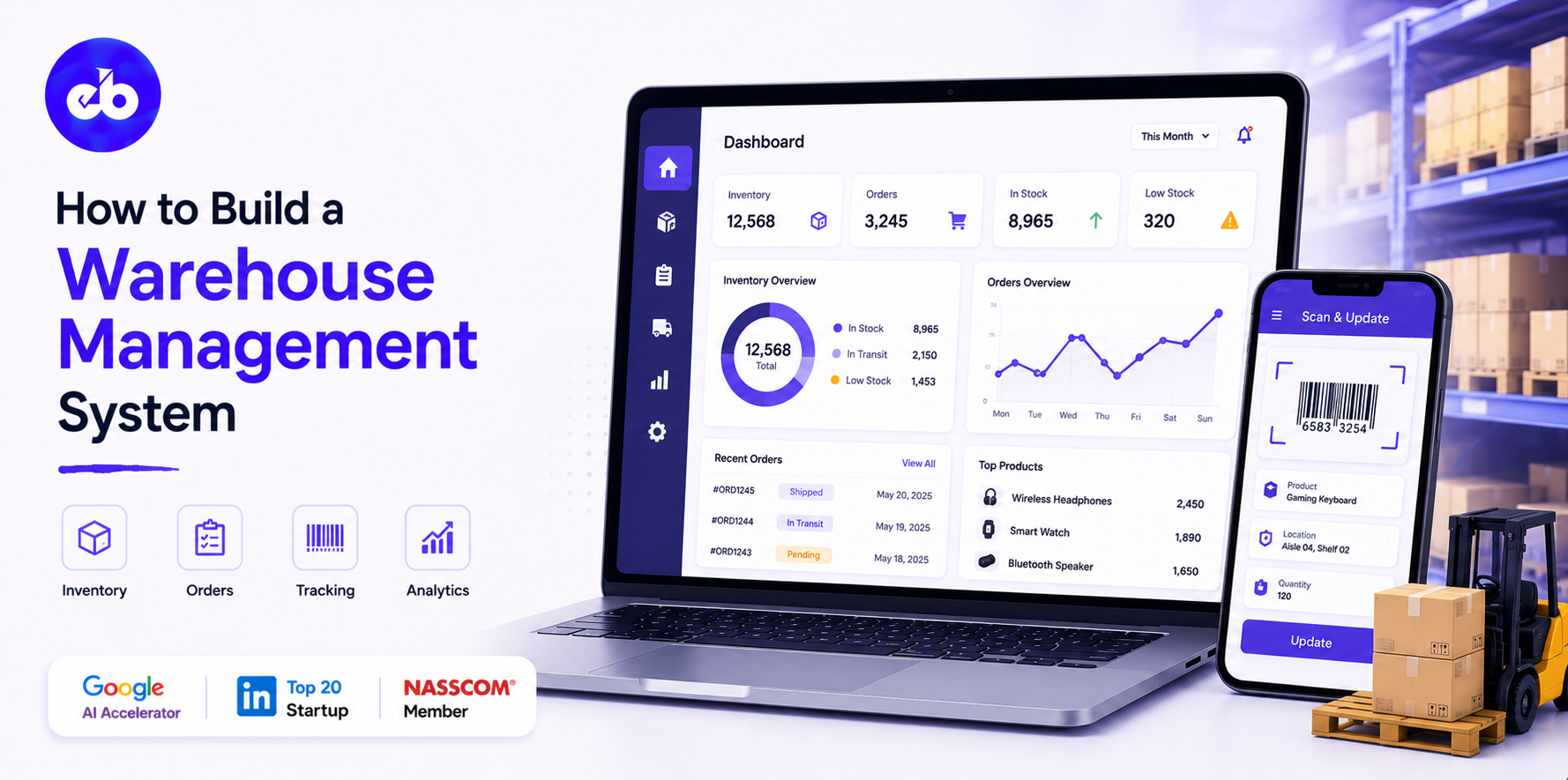
Every fulfillment failure, the wrong item shipped, the delayed order, the inventory count that does not match the system, traces back to a warehouse management problem. Not a people problem. A system problem.
The global warehouse management system market is projected to reach $10.4 billion by 2030 at a CAGR of 15.3%. The growth is driven by one thing: e-commerce volumes that have made manual warehouse operations structurally impossible.
A warehouse processing 500 orders per day can run on clipboards and Excel. The same warehouse at 5,000 orders per day cannot. At that scale, every minute of mislocation, mis-pick, or inventory discrepancy compounds into customer complaints, return costs, and carrier penalties.
This guide covers how to build a warehouse management system from the ground up, every operational module, every integration, every architectural decision that separates a platform that scales from one that breaks.
EngineerBabu built enterprise operations management for Adani Group and logistics technology for Serman Logistics. CMMI Level 5. Google AI Accelerator 2024 Top 20. Contact: mayank@engineerbabu.com
A WMS is not an inventory tracker. Inventory tracking is one output. The WMS is the system that directs every physical movement inside the warehouse, who picks up what, from where, in what sequence, and delivers it where with the goal of maximising throughput, minimising travel time, and maintaining inventory accuracy at all times.
| Warehouse Process | What Happens | WMS Function |
| Receiving | Inbound shipments arrive | ASN matching, GRN creation, discrepancy flagging |
| Putaway | Received goods stored in locations | Location assignment, directed putaway, slotting rules |
| Inventory management | Stock tracked in real time | Location-level inventory, lot tracking, expiry management |
| Replenishment | Pick locations restocked from reserve | Demand-triggered replenishment, wave planning |
| Order release | Orders selected for fulfillment | Wave management, batch processing, priority rules |
| Picking | Items collected from storage | Directed picking, pick path optimisation, confirmation |
| Packing | Items packed for shipment | Pack verification, carton selection, label printing |
| Dispatch | Packed shipments sent to carriers | Manifest, carrier booking, trailer loading |
| Returns | Inbound returns processed | Inspection, disposition, restocking or quarantine |
| Yard management | Trucks and trailers at dock | Dock scheduling, trailer tracking (if included) |
| Reporting | Performance visibility | Productivity, accuracy, throughput, SLA compliance |
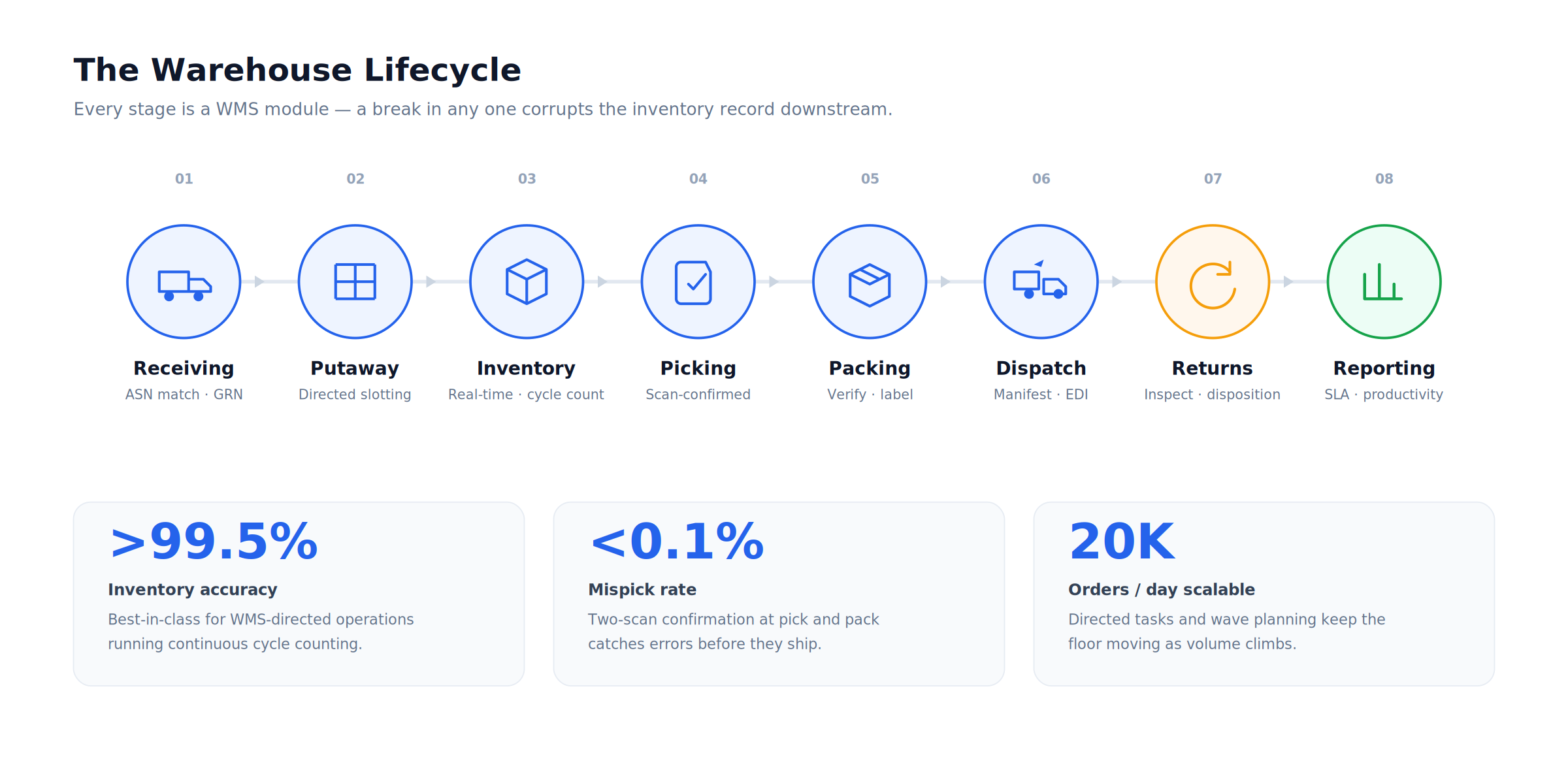
Every process on this list is a module. Every module requires precise data flow to the next. A break in any one, a receiving error, a mis-putaway, a pick confirmation without scan, corrupts the inventory record and everything downstream.
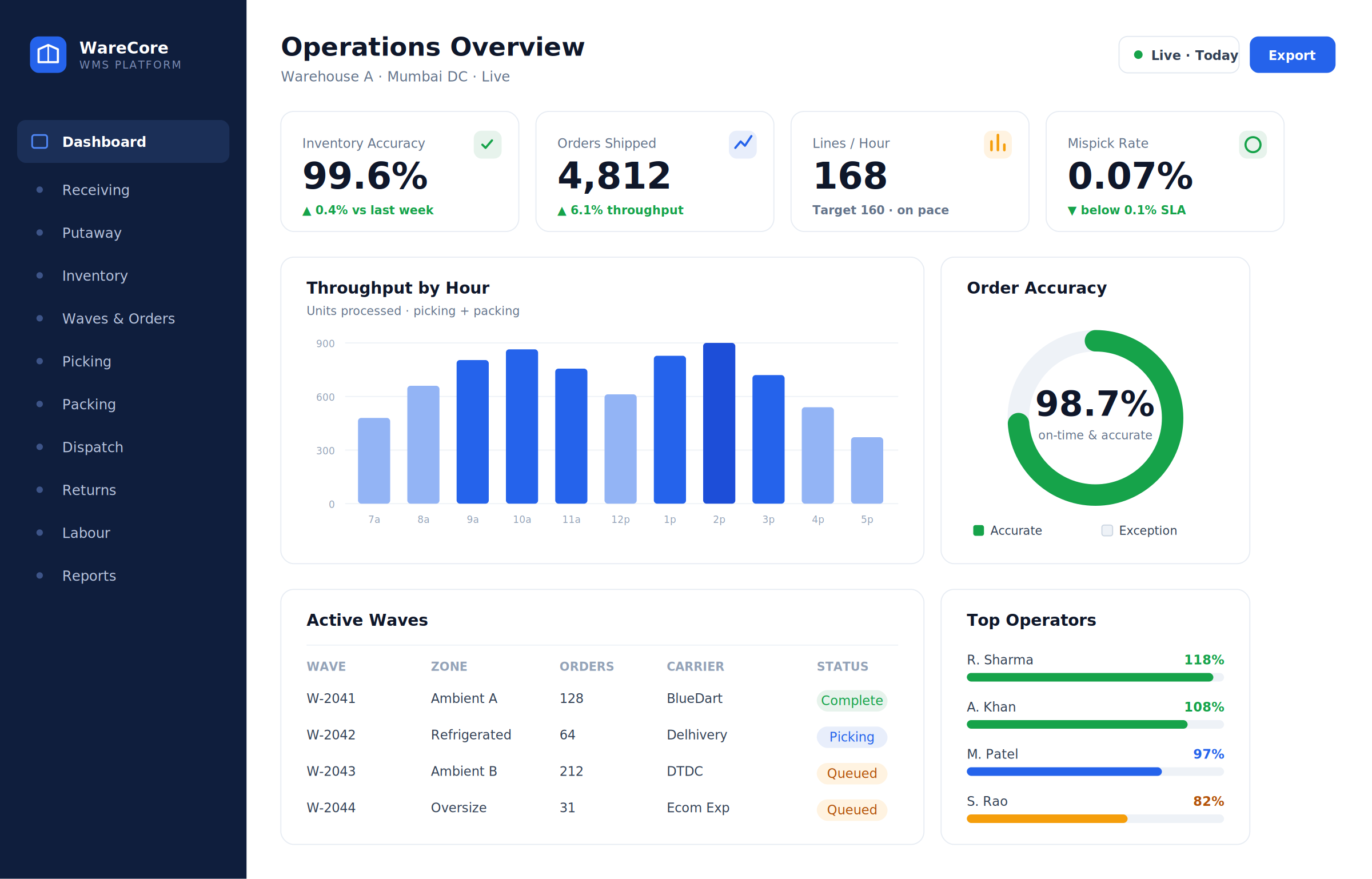
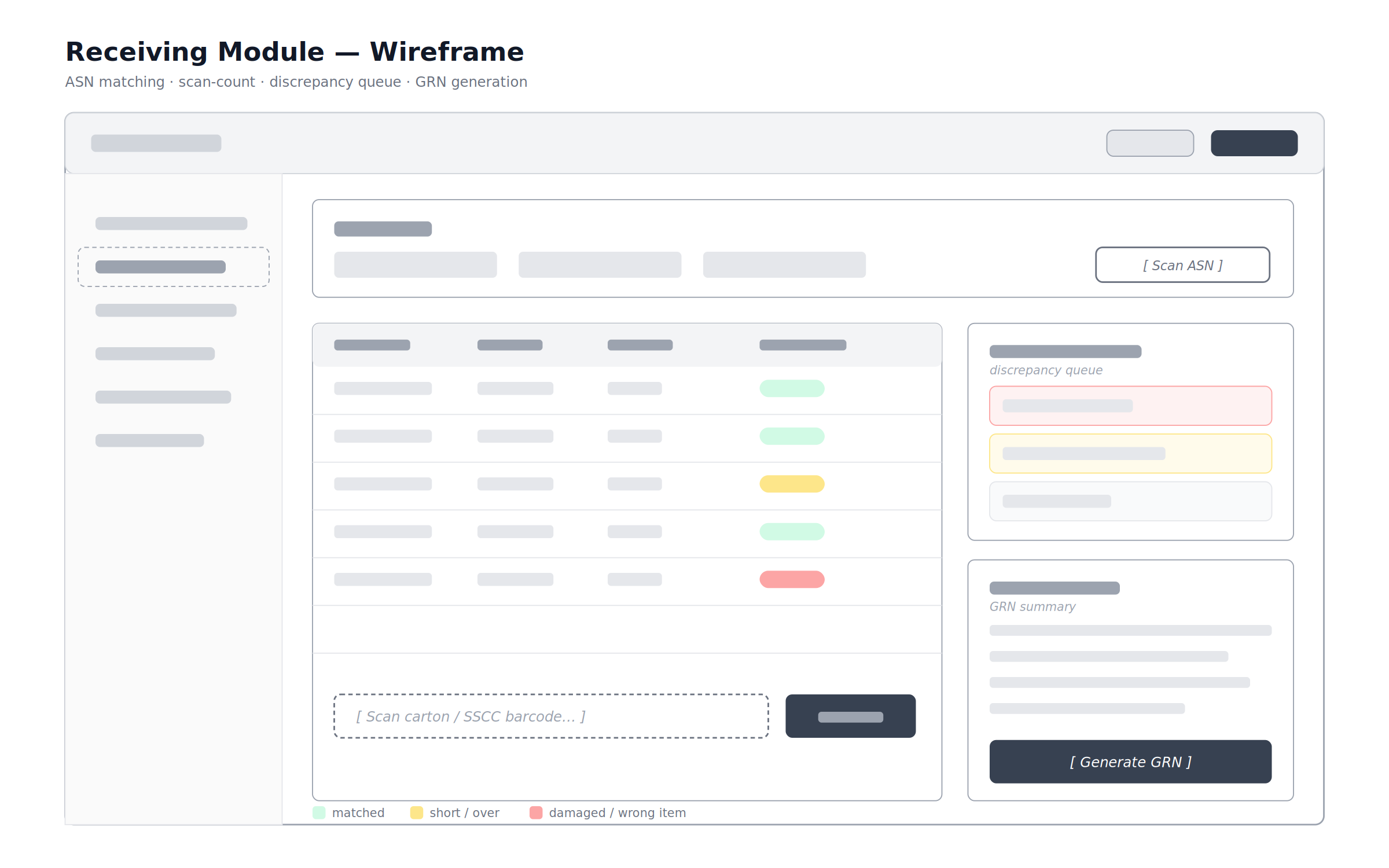
Receiving is where inventory accuracy is won or lost. An error at receiving, wrong quantity confirmed, wrong lot number recorded, damaged goods accepted without flagging, propagates through every downstream process. The WMS must make receiving both fast and accurate.
An ASN (Advance Shipment Notice) arrives from the supplier or the TMS before the physical truck arrives. The WMS pre-creates the expected receipt record, supplier, PO number, expected items, expected quantities, expected lot numbers if applicable.
When the truck arrives and goods are unloaded, the receiving operator scans barcodes or QR codes on each pallet or carton. The WMS compares each scan against the expected ASN. Matches are confirmed. Discrepancies, over-shipments, short-shipments, wrong items, damaged goods are flagged immediately and routed to a discrepancy queue.
| Data Field | Input Method | Validation |
| PO or ASN reference | Scan or manual entry | Matched against open POs in the system |
| Item/SKU | Barcode scan | Validated against item master |
| Quantity received | Scan count or manual entry | Compared to expected quantity |
| Lot number | Barcode scan | Validated against supplier lot data if provided |
| Expiry date | Scan or manual entry | Flagged if below minimum shelf life threshold |
| Condition | Structured selection – Good / Damaged / Suspect | Routes to QC hold if not Good |
| License plate / SSCC | Pallet barcode scan | Assigns a unique pallet identity in the WMS |
Quality control integration:
For items requiring inspection before putaway, food, pharma, high-value goods, the WMS routes received stock to a QC hold location. The QC team performs inspection and records the result. The WMS only releases the stock for putaway after QC approval. Items that fail QC are routed to a quarantine location pending supplier return or disposal.
The GRN (Goods Receipt Note):
Once receiving is complete, the WMS generates a GRN, the formal record of what was received, in what condition, against which PO. The GRN triggers downstream processes: inventory is added to the system, the supplier’s delivery is acknowledged, and the ERP (if integrated) is updated to trigger the accounts payable process.
A warehouse without a location management system is a warehouse where inventory gets lost. Not theoretically lost, physically lost. Items putaway in ad-hoc locations by different operators, without a system record, become inventory that exists in the count but cannot be found when needed.
The WMS owns every square metre of the warehouse. Every storage location, every bin, shelf, rack position, floor slot, and bulk area, is registered in the system with its physical coordinates, capacity (weight and cube), temperature zone, and allowed item types.
The location hierarchy:
| Level | Example | Purpose |
| Warehouse | Warehouse A | Top-level facility identifier |
| Zone | Ambient, Refrigerated, Hazmat, Oversize | Temperature or handling zone |
| Aisle | A, B, C… | Navigation reference |
| Bay | A-01, A-02… | Rack position along the aisle |
| Level | L1, L2, L3… | Height within the rack |
| Position | Left, Centre, Right | Bin within the level |
| Full location code | A-01-L2-C | Complete address of every storage position |
Directed putaway:
When a pallet is received and ready for putaway, the WMS assigns a specific location, not a zone, a specific bin. The assignment follows configurable rules:
FEFO (First Expiry, First Out), the system assigns locations that ensure older stock is accessible before newer stock. FIFO (First In, First Out), new stock goes behind existing stock so older stock is picked first. Product affinity, items frequently picked together are stored close to each other to reduce travel time.
Weight and cube, heavy items go to lower levels, light items to upper levels. Velocity, fast-moving items go to primary pick locations near the dispatch area, slow-movers to reserve storage.
The operator receives a directed putaway task on their handheld device or forklift terminal, “Take pallet LP-00482 to location A-04-L1-C.” They confirm the putaway by scanning both the pallet barcode and the location barcode. The inventory is now in a known, confirmed location.
Real-time, location-level inventory accuracy is the core value proposition of a WMS. Everything the WMS does is in service of maintaining a precise, current record of exactly how much of every item is in exactly which location.
What the inventory record tracks per item per location:
| Field | Details |
| Item/SKU | Product identifier |
| Location | Specific bin address |
| Quantity on hand | Current available quantity |
| Quantity reserved | Reserved for open pick tasks not yet completed |
| Quantity available | On hand minus reserved |
| Lot number | Batch identifier (if lot-tracked) |
| Expiry date | Best-before or use-by date (if date-tracked) |
| Serial number | Individual item identifier (if serial-tracked) |
| Owner | In a 3PL, which client owns this inventory |
| Status | Available / QC Hold / Quarantine / Damaged |
Cycle counting:
Physical inventory counts interrupt operations. A WMS replaces scheduled full physical counts with continuous cycle counting, a process where a small number of locations are counted every day, rotating through the entire warehouse over a defined period.
The system selects which locations to count based on: ABC classification (A-items counted more frequently), recent discrepancy history (locations with past errors counted more often), last count date (locations not counted recently prioritised), and transaction activity (locations with high movement volume counted more frequently).
Operators scan the location, count the items, and confirm the count in the WMS. If the count does not match the system record, the discrepancy is investigated and resolved before the system record is adjusted.
Inventory accuracy benchmark:
| Accuracy Level | Operational Impact |
| < 95% | Frequent stockouts, mispicks, and customer complaints |
| 95–98% | Acceptable for most operations but improvement needed |
| 98–99.5% | Good, typical for well-managed manual operations |
| > 99.5% | Best-in-class, typical for WMS-directed operations with cycle counting |
A well-implemented WMS consistently drives inventory accuracy above 99.5%.
Not every order is released to the pick floor the moment it arrives. Wave management is the process of grouping orders into release batches, waves, that optimise pick floor efficiency.
Why waves matter:
Releasing all orders at once creates a chaotic pick floor where operators are constantly crossing paths and competing for the same locations. Releasing orders in structured waves allows the system to plan pick paths that minimise congestion, group orders going to the same carriers, and balance operator workload across the shift.
Wave planning inputs:
| Input | How It Shapes the Wave |
| Carrier cutoff times | Orders for carriers with earlier cutoffs go into earlier waves |
| Order priority | VIP, same-day, and SLA-critical orders jump queue |
| Pick zone concentration | Orders concentrated in the same zone are batched together |
| Operator capacity | Wave size set to match available operator headcount |
| Equipment availability | If forklifts are limited, bulk-pick waves are smaller |
| Shipping dock assignment | Orders consolidated by dock door to reduce dispatch travel |
Wave types:
Single-order waves release one order per operator, every pick from that operator’s device belongs to the same customer order. Simple, accurate, but slow for high-volume operations. Batch waves group multiple orders together on one pick run, the operator collects items for several orders simultaneously, then sorts them at a packing station.
Faster but requires a tote or cart system and a sorting step. Cluster picking assigns a small group of orders (typically 4–8) to one operator who carries all of them simultaneously using a multi-tote cart, the most efficient method for e-commerce fulfillment operations.
Picking is the most labour-intensive warehouse operation, typically 50 to 60% of total warehouse labour cost. The WMS’s pick path optimisation directly impacts the productivity of every hour worked on the pick floor.
How directed picking works:
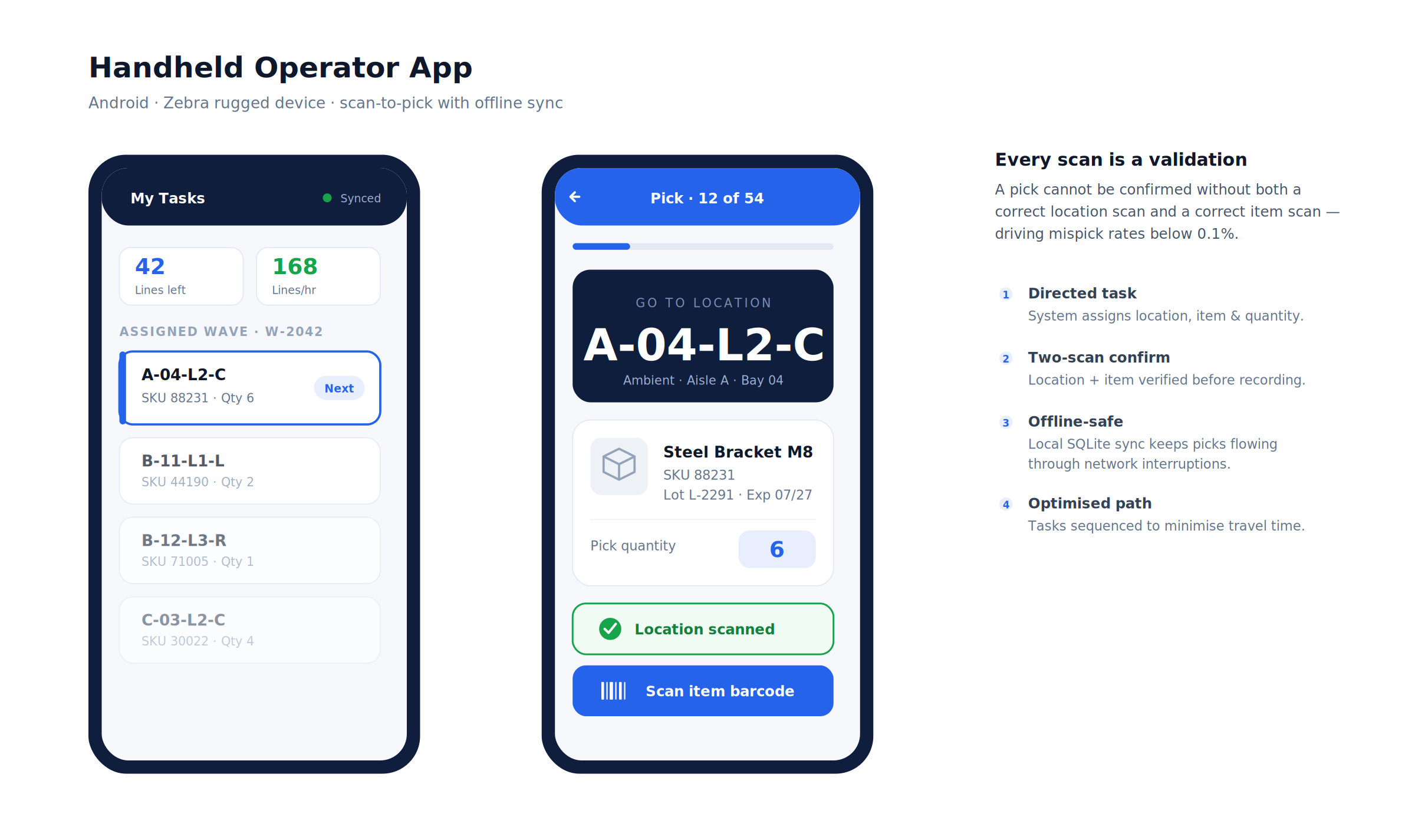
The WMS generates a pick task for each operator. The task specifies exactly which location to go to, what to pick, and in what quantity. The operator navigates to the location, scans the location barcode to confirm they are in the right place, scans the item barcode to confirm they picked the right item, and enters the quantity if it differs from the task or confirms if it matches.
Every scan is a validation. A pick cannot be confirmed without both the correct location scan and the correct item scan. This is what drives mispick rates below 0.1%.
Pick path optimisation:
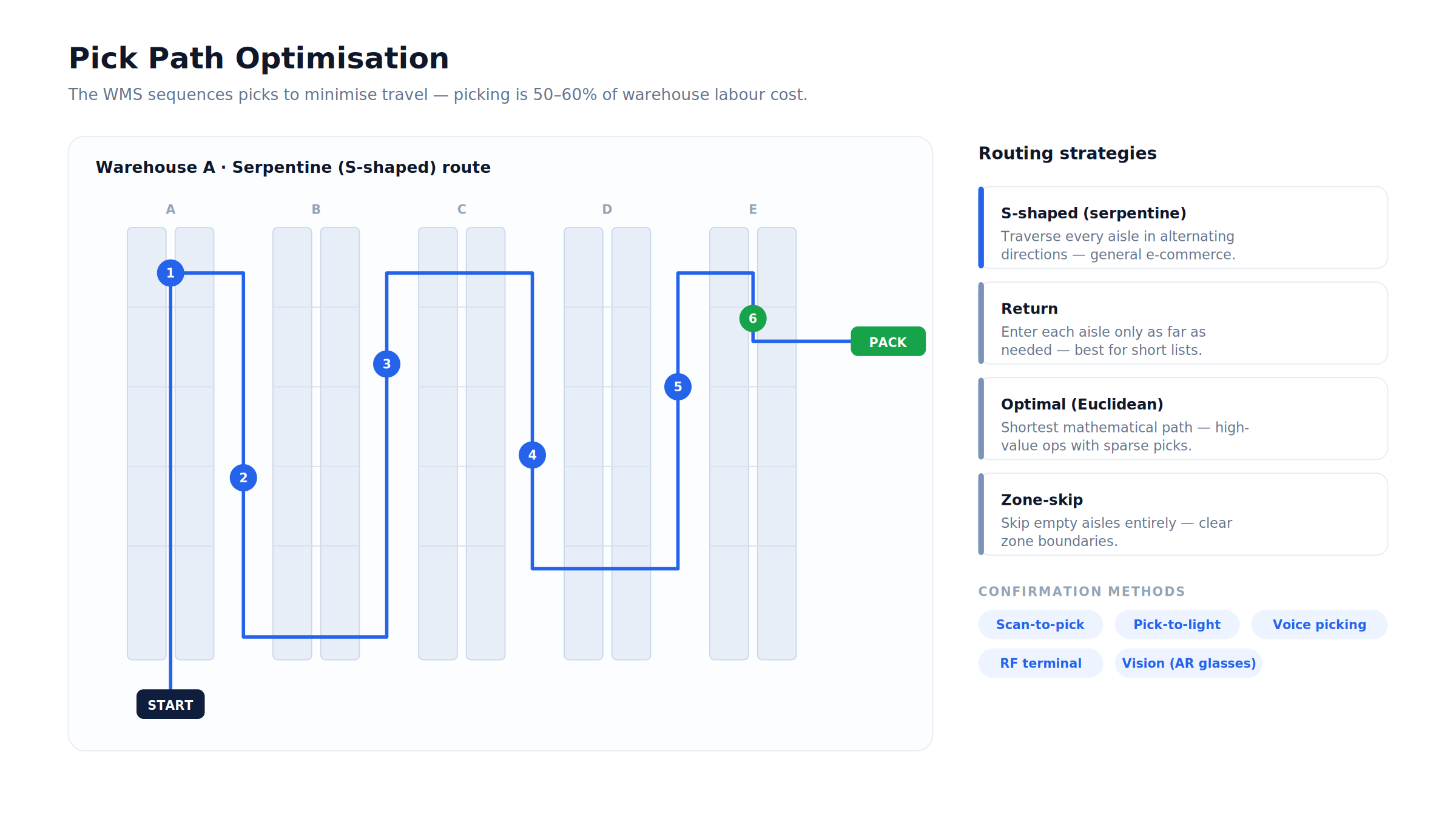
The sequence in which the WMS directs picks through the warehouse has a significant impact on the distance travelled per pick. The WMS calculates pick paths using one of several optimisation strategies:
| Strategy | How It Works | Best For |
| S-shaped (serpentine) | Operator traverses every aisle in alternating directions | General e-commerce fulfillment |
| Return | Operator goes into each aisle only as far as needed, then returns | Short pick lists |
| Combined | Mix of S-shaped and return based on pick density | Medium complexity operations |
| Optimal (Euclidean) | Shortest mathematical path calculated per pick list | High-value operations with sparse picks |
| Zone-skip | Operator skips empty aisles entirely | Operations with clear zone boundaries |
Pick confirmation methods:
| Method | Technology | Accuracy | Speed |
| Scan-to-pick | Barcode scanner on handheld | Very high | Medium |
| Pick-to-light | Light indicator at pick location | Very high | Fast |
| Voice picking | Headset voice commands + confirmation | High | Fast (hands-free) |
| RF terminal | Ruggedised handheld with scanner | Very high | Medium |
| Vision picking | Smart glasses with AR overlay | High | Fast |
Packing is the last physical step before a shipment leaves the warehouse. A mispick that makes it through packing becomes a customer complaint, a return, and a replacement shipment. The packing station is the final verification checkpoint.
The operator at the pack station receives the tote or cluster cart from picking. They scan each item as they pack it into the shipping carton. The WMS verifies that every scanned item matches the order. If an item is missing or wrong, the WMS alerts immediately and prevents the carton from being sealed.
For operations packing variable-size orders, the WMS recommends the optimal carton size based on the items’ dimensions and quantities, minimising void fill, reducing dimensional weight charges, and ensuring items fit without damage.
Once the carton is packed and verified, the WMS generates and prints the shipping label, carrier barcode, tracking number, shipper address, consignee address, service type, and hazmat markings if applicable. The label prints directly to the pack station label printer without operator input.
Every carton that leaves the pack station has a complete digital record: which items were packed, by which operator, at which station, at what time, with which carrier tracking number. This record is the audit trail for any customer dispute about what was shipped.
Dispatch is where the warehouse hands off to the carrier. The WMS manages the final steps, manifest generation, carrier booking confirmation, trailer loading, and departure recording.
The dispatch workflow:
| Step | Action | System |
| Outbound shipments staged | Packed cartons moved to outbound staging area | WMS updates location to staging zone |
| Load plan generated | Cartons assigned to trailers by carrier and departure time | WMS load plan or TMS integration |
| Trailer loading | Operator scans each carton as it is loaded into the trailer | WMS confirms carton on correct trailer |
| Manifest generated | Complete load manifest showing all cartons on trailer | WMS + carrier EDI 204 |
| Carrier departure confirmed | Trailer departs, WMS marks shipments as dispatched | Inventory decremented, orders closed |
| Carrier booking confirmed | Tracking numbers activated in carrier system | Customer receives shipment notification |
Integration with TMS:
In a fully integrated stack, the WMS and TMS share data bidirectionally. The WMS tells the TMS when shipments are ready for carrier collection. The TMS tells the WMS which carrier is coming, at what time, and to which dock door. The WMS pre-assigns staging locations by carrier and departure to minimise congestion at dispatch.
Returns are the least glamorous part of warehouse operations and the most poorly managed. A well-built WMS treats returns as a first-class operational process, not an afterthought.
The returns workflow:
| Step | Action |
| Return authorisation | RMA created, customer receives return label |
| Inbound scanning | Returned item scanned on arrival, matched to original order |
| Inspection | Condition assessed, resaleable, refurbishable, damaged, counterfeit |
| Disposition | Based on inspection: restock / quarantine / refurbish / dispose |
| Inventory update | Restocked items added back to available inventory |
| Credit processing | Customer credit or replacement triggered in OMS |
For 3PLs, returns management is a billable service. The WMS tracks every touch on every returned item, receipt, inspection time, disposition decision, and generates a billing record per return processed for the client.
Labour is the largest cost in a warehouse. The WMS already knows everything about what every operator did every minute, which tasks they were assigned, how long each task took, how many picks they completed per hour. Labour management converts this data into productivity intelligence.
Labour management metrics:
| Metric | Calculation | Benchmark |
| Lines picked per hour | Lines completed / hours worked | Varies by operation, 80–200 lines/hour |
| Units per man-hour | Units processed / hours worked | Varies by product type |
| Accuracy rate per operator | Correct picks / total picks | > 99.5% |
| Task completion rate | Tasks completed on time / tasks assigned | > 95% |
| Idle time percentage | Time with no active task / total shift time | < 10% |
| Travel time percentage | Time travelling / total working time | < 30% |
Engineered labour standards:
Advanced labour management defines engineered time standards for every task type, how long it should take to travel from Point A to Point B, how long to pick one unit of item type X, how long to pack a standard carton.
The WMS compares each operator’s actual performance against these engineered standards and produces a performance percentage. Operators consistently above 100% are top performers. Operators consistently below 85% need coaching or task reassignment.
| Layer | Technology | Reason |
| Backend | Java Spring Boot or Python FastAPI | Java for high-concurrency warehouse operations; Python for analytics |
| Database | PostgreSQL + TimescaleDB | Relational for inventory; time-series for event logging |
| Real-time events | Apache Kafka | High-throughput task assignment and confirmation events |
| Mobile (handheld/forklift terminal) | Android (Zebra SDK) | Industry-standard warehouse handheld devices run Android |
| Barcode scanning | Zebra or Honeywell SDK | Hardware-grade scanning performance |
| Pick-to-light | Custom hardware integration | Vendor-specific APIs per pick-to-light system |
| Label printing | ZPL (Zebra Programming Language) | Industry standard for warehouse label printers |
| ERP integration | REST API or SAP BAPI | Bidirectional inventory and order data |
| TMS integration | REST API + EDI | Shipment handoff and carrier communication |
| Maps/slotting visualisation | Custom SVG or D3.js floor plan | Warehouse layout visualisation |
| Cloud | AWS (Mumbai for India, us-east-1 for US) | Low-latency, high-availability |
| Offline capability | Local SQLite sync | Handheld devices must work during network interruptions |
| Security | Role-based access, TLS 1.3, AES-256 | Inventory data is operationally sensitive |
| Module | Cost Range (USD) | Notes |
| Location management + warehouse setup | $5K – $10K | Location master, zone configuration, capacity rules |
| Receiving + ASN matching + GRN | $8K – $15K | Barcode scan, discrepancy handling, QC routing |
| Directed putaway engine | $6K – $12K | FEFO/FIFO rules, slotting logic, location assignment |
| Inventory management + cycle counting | $8K – $15K | Location-level tracking, lot/serial/expiry, cycle count workflow |
| Wave management + order release | $6K – $12K | Wave planning, priority rules, batch/cluster logic |
| Directed picking + path optimisation | $10K – $20K | Most operationally complex module |
| Pack station verification + carton selection | $6K – $12K | Scan-to-pack, label printing, carton recommendation |
| Dispatch + carrier integration | $6K – $12K | Manifest, trailer loading, EDI integration |
| Returns management | $5K – $10K | RMA, inspection, disposition workflow |
| Labour management + productivity | $6K – $12K | Task timing, engineered standards, operator scorecards |
| Handheld device app (Android/Zebra) | $8K – $15K | Offline capability, barcode scanning |
| ERP integration (SAP/Oracle/NetSuite) | $6K – $12K | Bidirectional inventory and order sync |
| Analytics dashboard | $5K – $10K | Throughput, accuracy, labour productivity |
| AWS + VAPT + Year 1 operations | $6K – $12K | Production-grade deployment |
| Total | $91K – $179K | Full production WMS |
EngineerBabu built enterprise operations management for Adani Group and logistics technology for Serman Logistics. CMMI Level 5. Google AI Accelerator 2024 Top 20. Contact: mayank@engineerbabu.com
Most WMS implementations fail not because the software is wrong. They fail because of three execution errors that are entirely preventable.
The first is launching without a clean location master. If the physical warehouse is not mapped accurately in the system, every location labelled, every barcode installed and scanned to confirm it reads correctly, the WMS cannot direct accurately.
The directed putaway task says “go to A-04-L2-C” but the barcode at that location is missing, so the operator cannot confirm. The task sits unresolved. A day of this creates chaos. Warehouse setup and physical labelling must be 100% complete before go-live.
The second is going live with too many active operators on day one. Every new WMS implementation has a learning curve. Operators who are experienced in the warehouse’s physical layout need 3 to 5 days to get comfortable with scan-to-pick.
If 50 operators switch from paper pick lists to handheld devices simultaneously, productivity drops 40 to 60% in the first week and leadership panics. The right approach is a pilot with 5 to 10 operators, fix every friction point, and then roll out in waves.
The third is not training supervisors on exception management. Operators adapt quickly. Supervisors take longer to understand that the WMS is now the source of truth, not their visual observation of the pick floor. The supervisor who overrides the WMS’s task assignments because it does not match their intuition is the supervisor who breaks the system’s optimisation logic. Supervisor training on exception handling, task management, and when not to override is as important as operator training on scanning.
Build the system right. Train for the failure modes. Go live in phases. It works.
A Warehouse Management System (WMS) manages every physical movement inside a warehouse, receiving, putaway, picking, packing, and dispatch, using directed tasks, barcode scanning, and real-time inventory tracking at the specific storage location level. Inventory management software typically tracks quantities at the SKU or category level without directing physical operations. The distinction is operational control: a WMS tells operators exactly where to go, what to pick, and confirms each action with a scan, driving inventory accuracy above 99.5%. Basic inventory software tracks what should be where based on transactions but cannot direct operations or catch errors in real time. A WMS is required when a warehouse processes more than 200 to 500 orders per day and manual tracking of location-level inventory becomes operationally impossible.
Directed picking is a WMS feature where the system tells each operator exactly where to go, what item to pick, and how many to collect, rather than the operator navigating from a paper or screen-displayed pick list. Confirmation requires scanning both the storage location barcode and the item barcode before the pick is recorded. This two-scan confirmation catches three types of errors: going to the wrong location, picking the wrong item, and picking the wrong quantity. Operations using paper pick lists typically see mispick rates of 1 to 3%, meaning 1 to 3 wrong items per 100 picks. Operations using WMS-directed picking with scan confirmation consistently achieve mispick rates below 0.1%, which at 10,000 picks per day is the difference between 100 to 300 customer complaints and fewer than 10.
FEFO (First Expiry, First Out) is a putaway and picking logic that ensures items with earlier expiry dates are stored in accessible locations and picked before items with later expiry dates. It is mandatory in food, pharmaceutical, and cosmetics warehousing, any category where selling or shipping an expired product creates a safety risk, regulatory penalty, or customer complaint. The WMS implements FEFO by recording expiry dates at receiving, assigning putaway locations that keep older stock in primary pick positions, and sequencing pick tasks so the earliest-expiring stock is always picked first. Without WMS-enforced FEFO, operators inevitably pick from the most accessible stock regardless of expiry, which in practice means new stock gets picked before old stock, creating expiry write-offs that are entirely avoidable.
A WMS integrates with an ERP system through bidirectional real-time API calls or EDI transactions covering four key data flows. First, order flow: the ERP sends sales orders or transfer orders to the WMS for fulfillment, the WMS receives these orders, plans waves, directs picking, and sends confirmed shipments back to the ERP to update order status and trigger invoicing. Second, inventory flow: the WMS sends real-time inventory movements to the ERP, goods receipts, stock adjustments, and cycle count results update the ERP’s inventory module without manual entry. Third, purchase order flow: the ERP sends POs to the WMS as expected receipts, the WMS uses these to create ASNs and validate incoming shipments. Fourth, return flow: the WMS sends return dispositions back to the ERP to trigger credit notes or replacement orders. A clean WMS-ERP integration eliminates the manual data entry that causes the most inventory reconciliation errors in hybrid operations.
A commercial WMS (Manhattan Associates, Blue Yonder, Körber) is the right choice when the warehouse operation is standard, conventional racking, standard pick methods, off-the-shelf carrier integrations, and the company has the budget for six-figure licensing plus multi-year implementation. A custom WMS is the right choice when the operation has specific constraints that commercial systems handle poorly: a 3PL with a unique multi-client billing model, a warehouse with non-standard storage media (automated carousels, goods-to-person robots, very narrow aisle), a company whose competitive differentiation depends on operational processes that cannot be configured in a generic system, or a company that needs WMS functionality without paying $200,000 to $500,000 in commercial licensing and implementation fees. EngineerBabu builds custom WMS platforms in the $91,000 to $179,000 range that deliver 90% of what commercial platforms offer for operations processing up to 20,000 orders per day.
A WMS is the most operationally consequential piece of software a warehouse-dependent business runs. Getting it right means every order ships accurately and on time. Getting it wrong means customer complaints compound daily until the business either fixes the system or loses the customers.
EngineerBabu built enterprise operations management for Adani Group across multi-site, high-volume distribution environments and logistics technology for Serman Logistics. CMMI Level 5. Google AI Accelerator 2024 Top 20. 500+ products shipped across 20+ countries.
If you are building a WMS, whether greenfield for a new operation or replacing a legacy system that no longer scales, write to mayank@engineerbabu.com
Tell us the operation size, the current pain points, and what commercial systems you have already evaluated. We will give you a straight answer on what to build and what it will cost.