9 Features of a Successful Mobile App That Keep Users Coming Back


Create engaging, high-performance mobile applications tailored to your business needs. We craft future-ready apps that offer smooth user experiences on all devices.
Build robust and scalable websites and CMS platforms that help you manage content effortlessly. Our development ensures a seamless digital presence.
Launch secure, feature-rich online stores with intuitive shopping experiences. We build tailored eCommerce platforms designed for growth.
Design captivating games with immersive gameplay and stunning graphics. From concept to launch, we build engaging experiences that players love.
Enhance your customer relationships with customized Salesforce implementations. Drive growth and efficiency with smarter CRM solutions.
Harness artificial intelligence and machine learning to automate workflows and gain actionable insights. Our AI transforms data into smart decisions.
Accelerate your software delivery lifecycle with continuous integration, delivery, and infrastructure automation to boost efficiency.

Unlock your phone and count the apps you actually opened this week. Most people land somewhere between eight and twelve. Everything else is furniture.
The data agrees. iOS apps hold onto roughly 5.3% of their users by day 30, and Android apps keep 3.8%. Those are AppsFlyer figures compiled by Business of Apps. Nineteen of every twenty installs vanish inside a month.
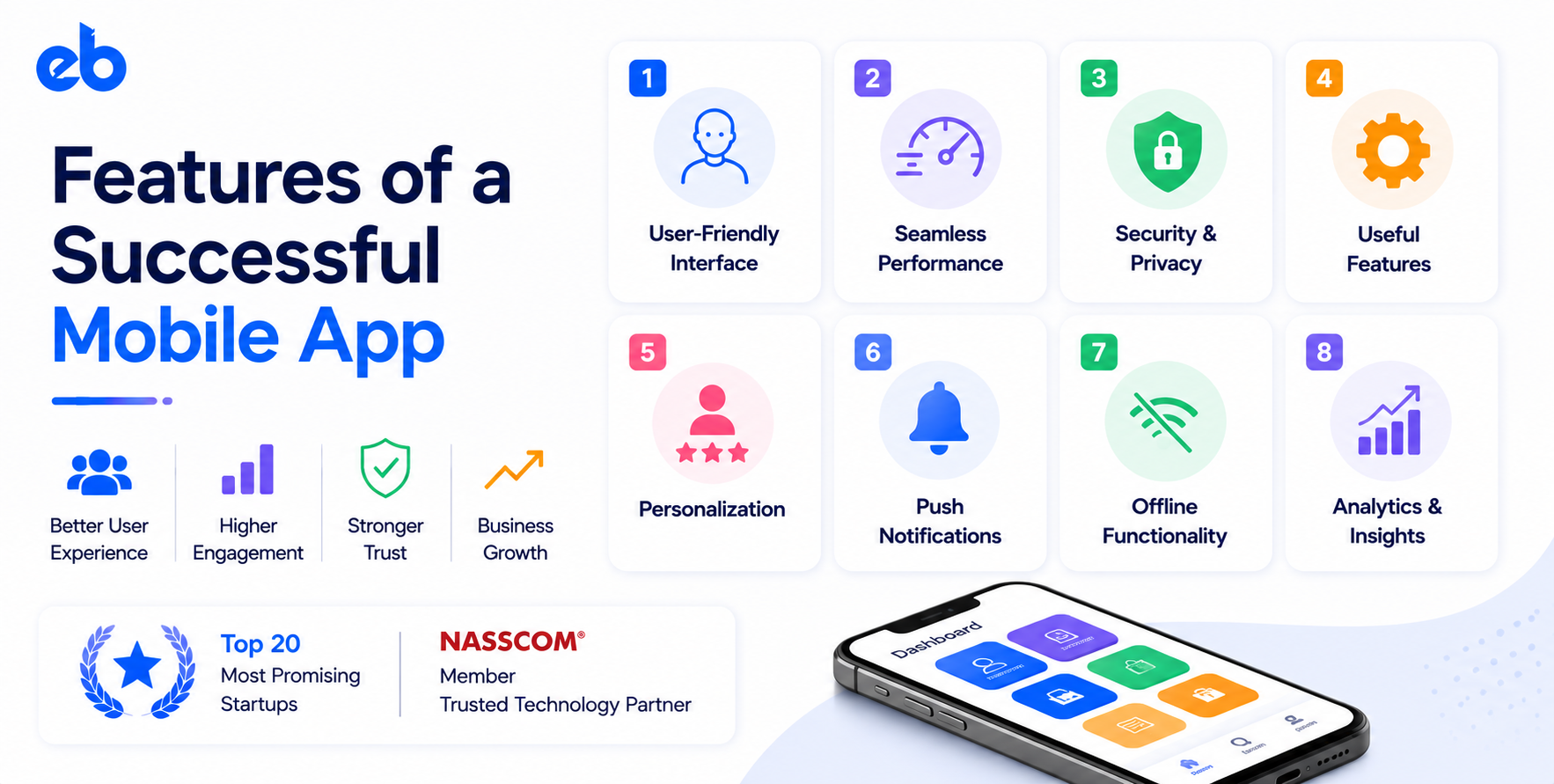
That drop-off is almost never caused by a missing feature. It is caused by the wrong ones getting built first. The features of a successful mobile app are the ones that shorten the distance between opening the app and finishing a task.
Here are the features of a successful mobile app that earn a permanent home screen spot, and how to sequence them.
Every feature you ship becomes permanent overhead. It needs regression testing on each OS release, support documentation, analytics events, and a slice of the interface.
Apps that win pick one job and do it faster than the alternative. Apps that stall do nine jobs adequately. The features of a successful mobile app all share that narrow focus.
So run one filter before any mobile app development sprint begins. Name the single action that makes your app worth keeping. Anything that speeds up that action is a candidate, and everything else waits.
First-time users decide fast. Apps whose users complete one meaningful action in session one retain far better than apps opening with a signup wall.
Ask for the account after the value, not before it. Let people search, browse, or track something first, then cut every signup field you do not need on day one. A five-screen product tour is not onboarding, and this remains the highest-leverage of the features of a successful mobile app.
Speed sits underneath every other feature on this list, and users grade it harshly. Cold start under two seconds, skeleton screens instead of spinners, and right-sized images beat any animation you could ship.
Crashes are worse than slowness. One freeze during checkout costs you the user and the review, which is why performance heads most rankings of the features of a successful mobile app. Test on a mid-range Android phone with throttled bandwidth, because office WiFi hides almost every problem you need to find.
Good navigation is invisible. Users should reach the main action in two taps from any screen, without building a mental map first.
Keep the tab bar to five items and label them with plain nouns. Accessibility belongs here too. Tap targets of at least 44 points, readable contrast, and support for larger system fonts widen your audience immediately.
Elevators, basements, and flights break the assumption of constant connectivity. An app that shows a blank screen during those moments teaches users to stop trying.
Cache the last known state, queue writes locally, and sync when the connection returns. Error messages should say what happened and what to do next. “Something went wrong” sends people straight to the app store to complain.
Push is the most abused item on this list. Batch-and-blast messaging gets you muted, and a muted app is a deleted app with extra steps.
Tie every notification to something the user did or asked for. A price drop on a saved item, a delivery update, a payment due Friday. Ask permission after the value is visible, then offer per-category controls.
Every extra field in a payment flow costs conversions. Support platform wallets, store cards securely, and never make a returning user retype an address.
Handle failures as carefully as successes, with clear retries and saved cart state. Most of this rests on clean API development, since gateways, tax logic, and fulfillment systems must agree before a confirmation appears.
Personalization built only on signup questions goes stale within a week. Behavior is the better signal: what users open, skip, repeat, and abandon.
Smart defaults, reordered home screens, and predictive search all deepen sessions. This is where AI development earns its budget, and where custom ML development models beat generic tools once you have enough usage data.
Trust is one of the features of a successful mobile app that shows up directly in the interface. Biometric login, session timeouts, and visible data-sharing controls reduce hesitation at the moments that matter.
Request permissions in context. Asking for location during signup feels invasive, while asking when someone taps “find stores near me” feels obvious. Encrypt data in transit and at rest, and keep secrets off the client.
You cannot improve what you never measured. Funnels, event tracking, and crash reporting belong in the first release, not in a later cleanup sprint.
Instrumentation is the least visible of the features of a successful mobile app, so protect it in scope. Instrument four drop-off points: signup, first action, checkout, and repeat visit. Pair those numbers with a short in-app feedback prompt. Analytics shows you where users quit, and two lines of comment often explain why.
Knowing the features of a successful mobile app is the easy part. Sequencing them against a real deadline and budget is where teams struggle.
List each proposed feature and score it on one question. Does this make the primary user action faster, cheaper, or more likely to happen? Anything scoring zero moves to the backlog, regardless of who requested it.
Run this with your engineering lead present, because effort estimates change priorities fast. A three-day feature with modest impact usually beats a six-week feature with theoretical impact. Write down the reasoning so the same debate does not return every sprint. This exercise alone removes 30% to 40% of a typical first-release scope.
A first version should carry a narrow feature set built to production standards. That includes analytics, crash reporting, and payments if money moves. Cutting scope is smart, while cutting quality is not.
Teams that treat MVP development as a learning exercise get real retention data in eight to twelve weeks. Teams that keep adding screens before launch collect opinions instead of evidence.
Pick three metrics before release: day 7 retention, completion rate on the core action, and crash-free sessions.
Once you are live, read behavior instead of requests. Abandoned screens, searches returning nothing, and steps where sessions end become your roadmap for the next quarter.
Then interview ten users who churned and ten who stayed. The contrast between those groups usually points at one fixable gap rather than a long wish list.
Release on a predictable cycle after that. Regular updates signal an active product to users and to app store ranking systems, and they keep changes small enough to debug.
Category shifts the priority order of the features of a successful mobile app more than most teams expect.
Fintech products live on trust and fast verification. KYC flows, transaction clarity, and fraud alerts outrank visual polish. A specialized fintech app development company usually leads with compliance architecture, not screens.
Education apps depend on progress mechanics instead. Streaks, offline lesson downloads, and resumable video matter more than social feeds, a pattern visible across the leading edtech app development companies.
Retail apps compete on search quality and checkout speed. Healthcare apps compete on privacy and appointment reliability. The hardest part of your user’s job always decides which features earn budget.
A few additions consume weeks and return almost nothing.
None of these belong on a list of the features of a successful mobile app until the basics are solid.
The features of a successful mobile app are unglamorous. Fast launches, short onboarding, honest error states, clean payments, and notifications people keep switched on.
Nothing there wins a design award. All of it wins the day 30 retention number that decides whether the product survives.
If you are scoping a build, compare specialist mobile app development companies on problems they have solved in your category. Then ask them to defend a feature list instead of accepting yours.
Want a second opinion on your scope before development starts? Talk to the team at EngineerBabu.
Fast onboarding, reliable performance, simple navigation, secure payments, behavior-based notifications, and analytics from day one. Each one shortens the path to value, which is the strongest predictor of whether a user comes back in week two.
Enough to complete one core action end to end, usually five to eight screens. Everything else should wait for real usage data, since most first-release scope gets cut or rebuilt after launch anyway.
The feature set stays the same, but the implementation does not. Payment sheets, permission prompts, back navigation, and notification behavior follow different platform conventions. Ignoring them produces poor reviews on whichever platform you treated as secondary.
Recommendation engines, predictive search, and in-app assistants typically add 20% to 40% over base development, plus ongoing inference costs. Start with rule-based logic, then upgrade to models once you have data worth training on.
Onboarding that delivers a real result in the first session. Users who finish one meaningful action on day one retain at several times the rate of users who only browse. Fix that before any other feature.