How to Build a Citizen Services Portal, e-Governance, Document Management, Grievance Redressal, and Service Delivery 2026


Create engaging, high-performance mobile applications tailored to your business needs. We craft future-ready apps that offer smooth user experiences on all devices.
Build robust and scalable websites and CMS platforms that help you manage content effortlessly. Our development ensures a seamless digital presence.
Launch secure, feature-rich online stores with intuitive shopping experiences. We build tailored eCommerce platforms designed for growth.
Design captivating games with immersive gameplay and stunning graphics. From concept to launch, we build engaging experiences that players love.
Enhance your customer relationships with customized Salesforce implementations. Drive growth and efficiency with smarter CRM solutions.
Harness artificial intelligence and machine learning to automate workflows and gain actionable insights. Our AI transforms data into smart decisions.
Accelerate your software delivery lifecycle with continuous integration, delivery, and infrastructure automation to boost efficiency.

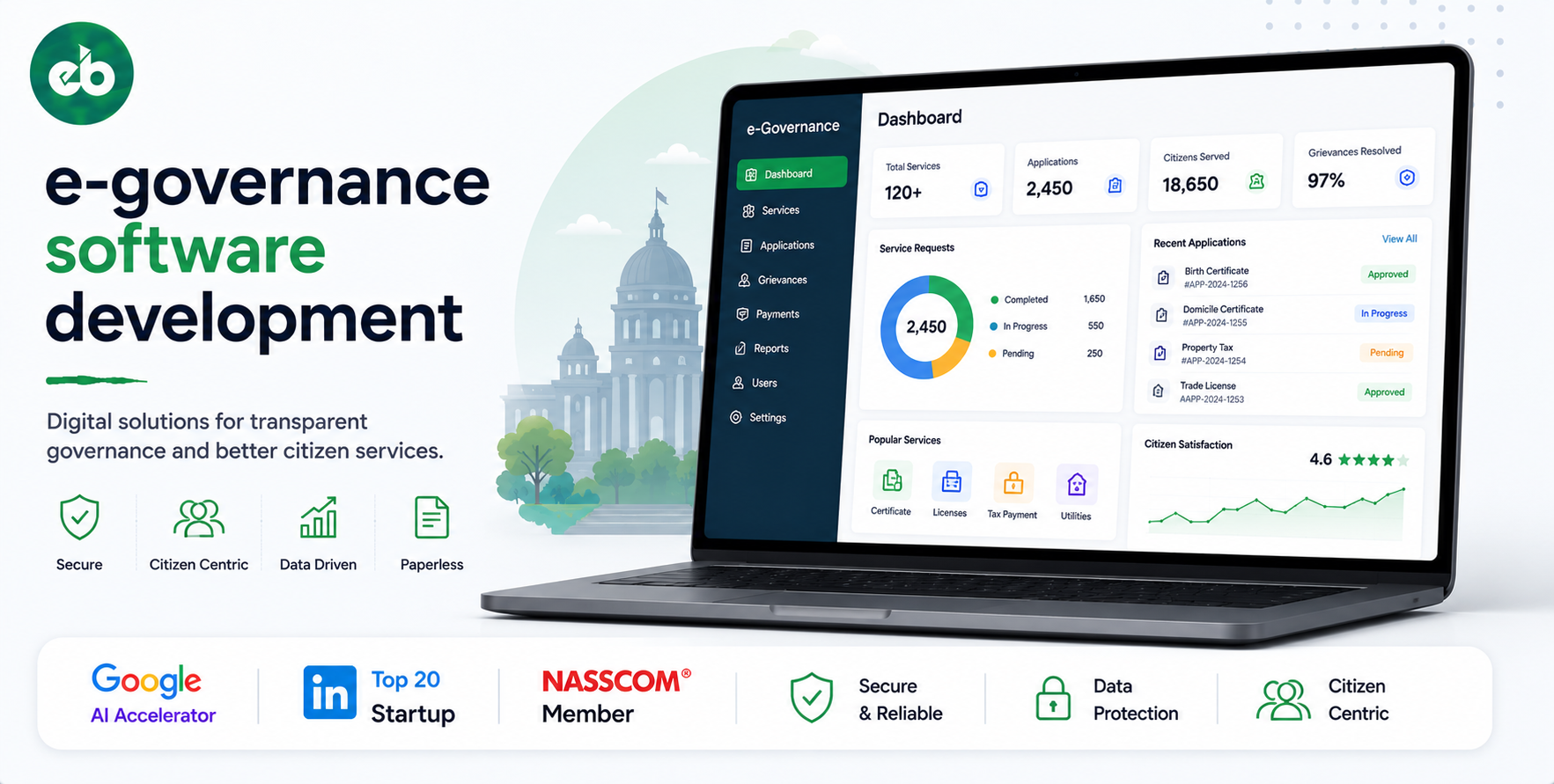
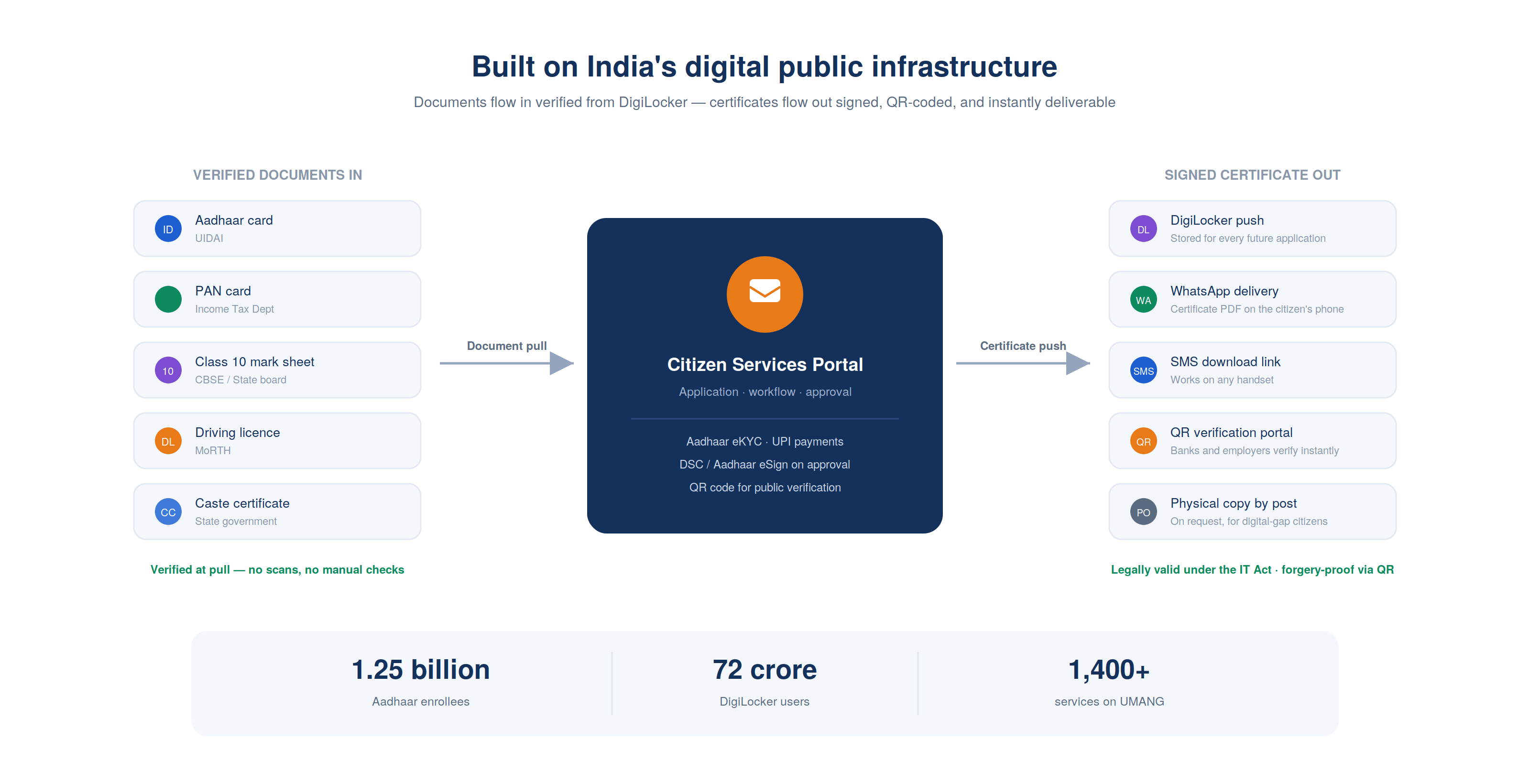
India’s Digital India programme has set a global benchmark. Aadhaar with 1.25 billion enrollees, DigiLocker with 72 crore users, UMANG app serving 1,400 government services, the country has built the identity and document infrastructure.
What most state governments still lack is the application layer that uses this infrastructure to deliver specific services, birth certificates, caste certificates, income certificates, property records, construction permits, and grievance redressal, in days rather than months.
An E-Governance software development on the right architecture, DigiLocker integration, Aadhaar eKYC, digital payments, workflow management, and real-time status tracking, can reduce the time to deliver a service from 45 days to 5 days.
It can reduce corruption by removing the human touchpoints where discretion and delay are used as leverage. And it can give government leadership the data to measure whether their departments are performing.
EngineerBabu built enterprise operations management for Adani Group, which has extensive experience in infrastructure operations with regulatory interfaces, and healthcare platforms for Apollo Hospitals. CMMI Level 5. Google AI Accelerator 2024 Top 20. Contact: mayank@engineerbabu.com
| Function | Module |
| Citizen registration and authentication | Aadhaar-based identity, DigiLocker integration |
| Service catalogue | All government services with eligibility criteria |
| Application submission | Guided forms, document upload, payment |
| Workflow management | Application routing, officer processing, approval |
| Status tracking | Real-time application status for citizens |
| Document management | DigiLocker pull, document verification, certificate issuance |
| Payment integration | Fees via UPI, net banking, payment gateways |
| Grievance redressal | Complaint submission, escalation, resolution tracking |
| SMS and WhatsApp notifications | Status updates at every milestone |
| Reporting and analytics | Application volumes, processing times, pendency |
| Officer portal | Case management interface for government officials |
| Integration | Aadhaar, DigiLocker, UMANG, NIC infrastructure |
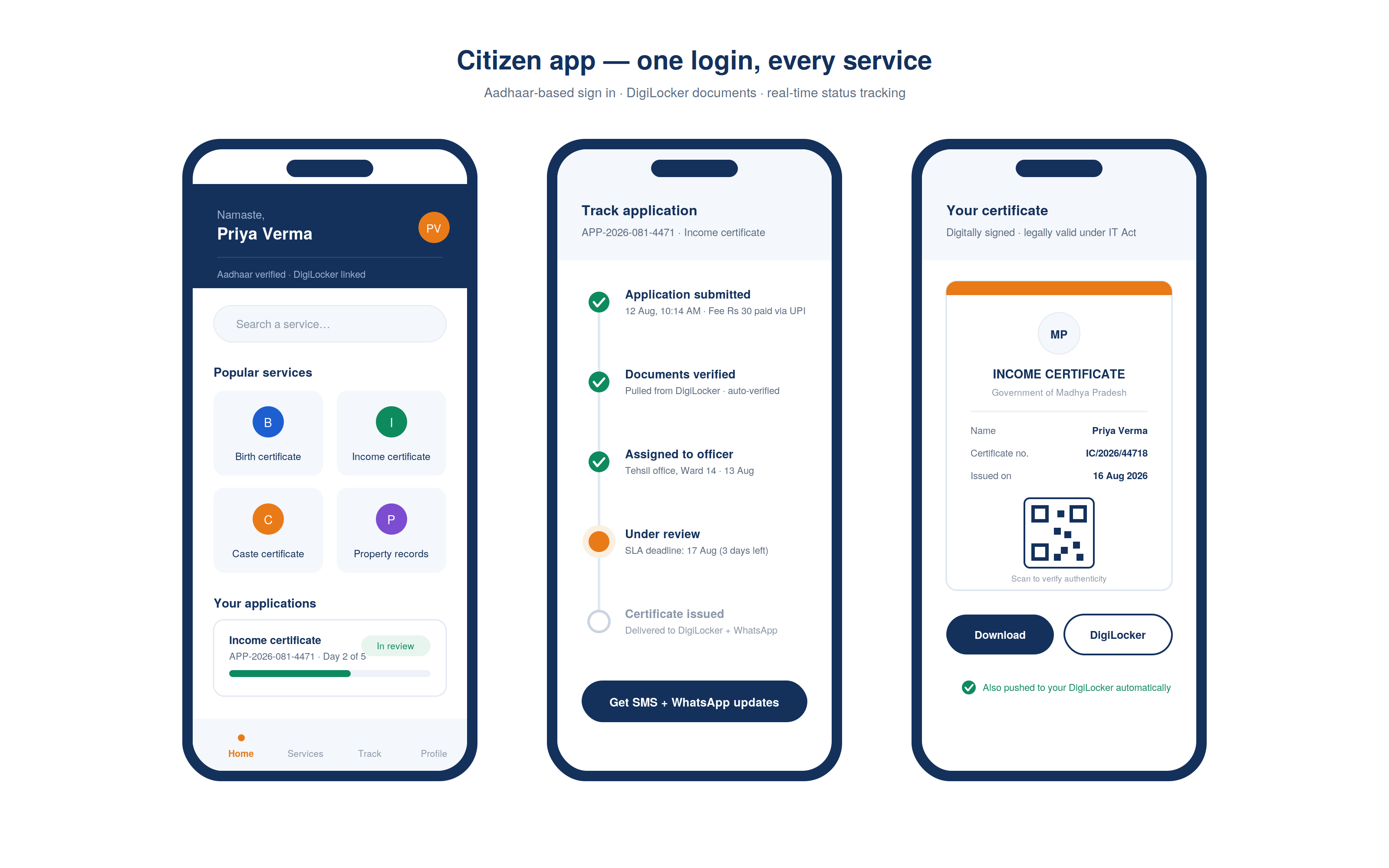
The identity infrastructure:
India’s e-governance stack provides world-class identity infrastructure. The platform uses these as the authentication layer, citizens do not create new usernames and passwords:
| Authentication Method | Technology | Use Case |
| Aadhaar OTP | UIDAI OTP API | Most services, phone-based verification |
| Aadhaar biometric | UIDAI biometric API (via authorised AUA) | High-value services, land records, pension |
| Mobile OTP | Telecom operator OTP | Fallback, where Aadhaar is not mandatory |
| DigiLocker login | DigiLocker OAuth | Documents-intensive services |
| Jan Parichay | State digital identity | State-specific services |
The citizen profile:
After authentication, the platform creates a citizen profile linked to the Aadhaar number. The profile automatically pre-fills from Aadhaar demographic data, name, date of birth, address, gender.
DigiLocker integration pulls already-issued documents, PAN card, mark sheets, caste certificate if already issued, into the citizen’s profile, so they do not upload the same documents repeatedly for different services.
The family member management:
Many services are applied for on behalf of family members, a parent applying for a birth certificate for a child, a son applying for pension for an elderly parent. The platform supports family member profiles, each linked to the primary citizen’s profile and accessible after authentication.
The service catalogue:
Every government service available on the platform is listed in the service catalogue with:
| Field | Details |
| Service name | Birth certificate, Income certificate, Building permit, etc. |
| Issuing department | Revenue, Municipal Corporation, DCRB |
| Eligibility criteria | Who can apply |
| Required documents | What to submit |
| Applicable fees | Fee amount, exemptions |
| Processing time | Committed turnaround |
| Service level | Standard / Express |
| Form preview | Sample of the application form |
| Status definitions | What each status means |
The eligibility engine:
For some services, eligibility must be verified before an application is accepted. The eligibility engine queries relevant databases, BPL list for subsidised services, land records for land-related applications, and either confirms eligibility or explains why the citizen does not qualify and what they need to do to become eligible.
The guided application form:
Government application forms are notoriously complex. The platform replaces physical forms with guided digital wizards, each question presented one at a time, with explanations for every field, validation that catches errors before submission, and auto-population from the citizen’s profile wherever possible.
DigiLocker document pull:
Rather than uploading document scans, citizens authorise the platform to pull verified digital documents directly from their DigiLocker account.
A document pulled from DigiLocker is already verified, it was issued by a government authority and the citizen does not need to upload a scan that an officer then manually verifies.
| Document | DigiLocker Source | Verification |
| Aadhaar card | UIDAI via DigiLocker | Verified at pull |
| PAN card | Income Tax Dept via DigiLocker | Verified at pull |
| Class 10 mark sheet | CBSE/Board via DigiLocker | Verified at pull |
| Driving licence | MoRTH via DigiLocker | Verified at pull |
| Caste certificate | State govt via DigiLocker (if already issued) | Verified at pull |
The application fee payment:
Fees are collected through the payment layer at application submission:
| Payment Method | Integration |
| UPI | BHIM UPI + all UPI apps |
| Net banking | HDFC, SBI, ICICI, Axis via payment gateway |
| Debit card | Rupay, Visa, Mastercard |
| CSC (Common Service Centre) | Cash payment at CSC operator for digital-gap citizens |
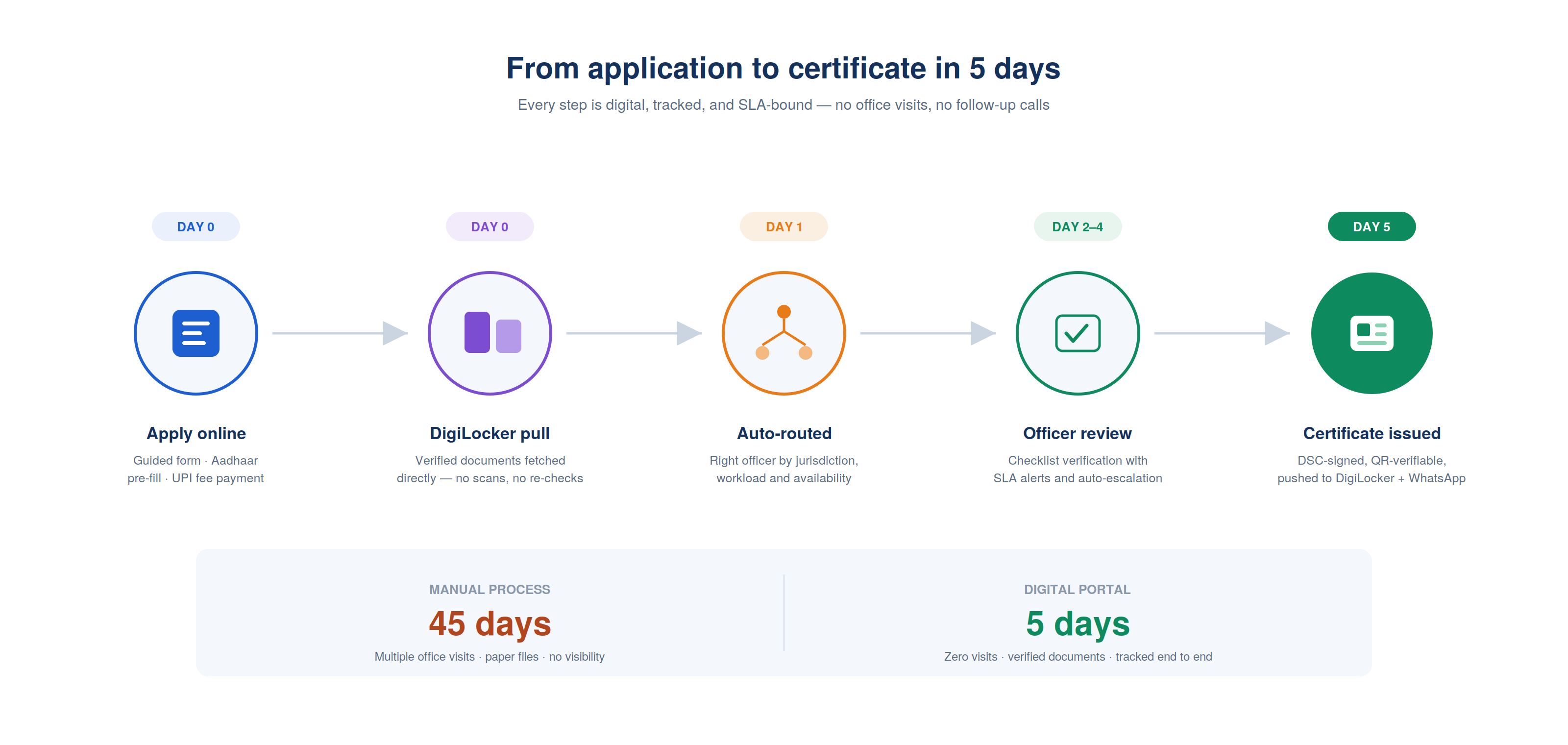
The application routing engine:
When an application is submitted, the routing engine assigns it to the appropriate officer based on:
| Routing Factor | Logic |
| Service type | Each service routes to the designated department and officer role |
| Geographic jurisdiction | Applications from a specific village or ward go to the responsible officer |
| Current workload | Load balancing, applications distributed across officers within a jurisdiction |
| Officer availability | Absent officers’ applications reassigned to available coverage |
The officer processing interface:
The officer sees a prioritised queue of pending applications, oldest first, with escalation alerts for applications approaching their processing deadline.
For each application, the officer sees:
| View | Details |
| Application details | All form fields submitted by the citizen |
| Submitted documents | Preview of all uploaded or DigiLocker-pulled documents |
| Verification checklist | Required verifications with tick-box confirmation |
| Field verification (if required) | Assign field team for physical verification |
| Action buttons | Approve / Reject / Return for correction / Escalate |
| Reason entry | Mandatory reason for rejection or return |
| Certificate preview | Preview of the certificate that will be issued |
The SLA management engine:
Every application has a committed processing time, typically defined in state government service delivery acts. The platform tracks elapsed time from application submission and alerts:
Day-of-deadline: Officer and supervisor alerted that this application must be processed today. Overdue: Application automatically escalated to the district-level officer with delay reason request. Persistently overdue: Escalated to the commissioner with individual officer performance flag.
The certificate generation engine:
When an application is approved, the platform generates the digital certificate automatically, pulling the approved application data into a predefined certificate template, applying the issuing officer’s digital signature, and adding a QR code that links to the government’s certificate verification system.
The digital signature:
Officers sign certificates with their DSC (Digital Signature Certificate), issued by a licensed Certifying Authority. The platform integrates with the officer’s DSC token (USB hardware key) or supports Aadhaar eSign for officers who use it. The digital signature on the certificate is legally equivalent to a physical stamp and signature under the IT Act.
Certificate delivery:
| Delivery Channel | Details |
| DigiLocker push | Certificate stored in citizen’s DigiLocker, accessible from any device |
| SMS with download link | Link to download PDF certificate |
| Certificate PDF sent to WhatsApp | |
| Portal download | Available in citizen’s profile on the portal |
| Physical copy | For citizens who requested, printed and dispatched by post |
The QR verification system:
Every certificate has a QR code. When a third party, a bank, an employer, another government department, scans the QR code, they are taken to the government’s verification portal which confirms whether the certificate is genuine and shows its key details. This eliminates certificate forgery, which is a significant problem in manual systems.
The grievance lifecycle:
| Stage | Action | Timeline |
| Submission | Citizen submits complaint, description, category, evidence photos | Instant |
| Acknowledgement | System generates complaint reference number | Instant |
| Assignment | Complaint routed to responsible department and officer | Within 2 hours |
| Investigation | Officer investigates and records findings | Within defined SLA |
| Resolution | Complaint resolved, citizen notified | Per service SLA |
| Escalation | Unresolved complaints auto-escalate up the hierarchy | Per escalation rules |
| Closure | Citizen confirms resolution or dispute triggers review | Mandatory |
| Appeal | Citizen can appeal closure if unsatisfied | Second-level review |
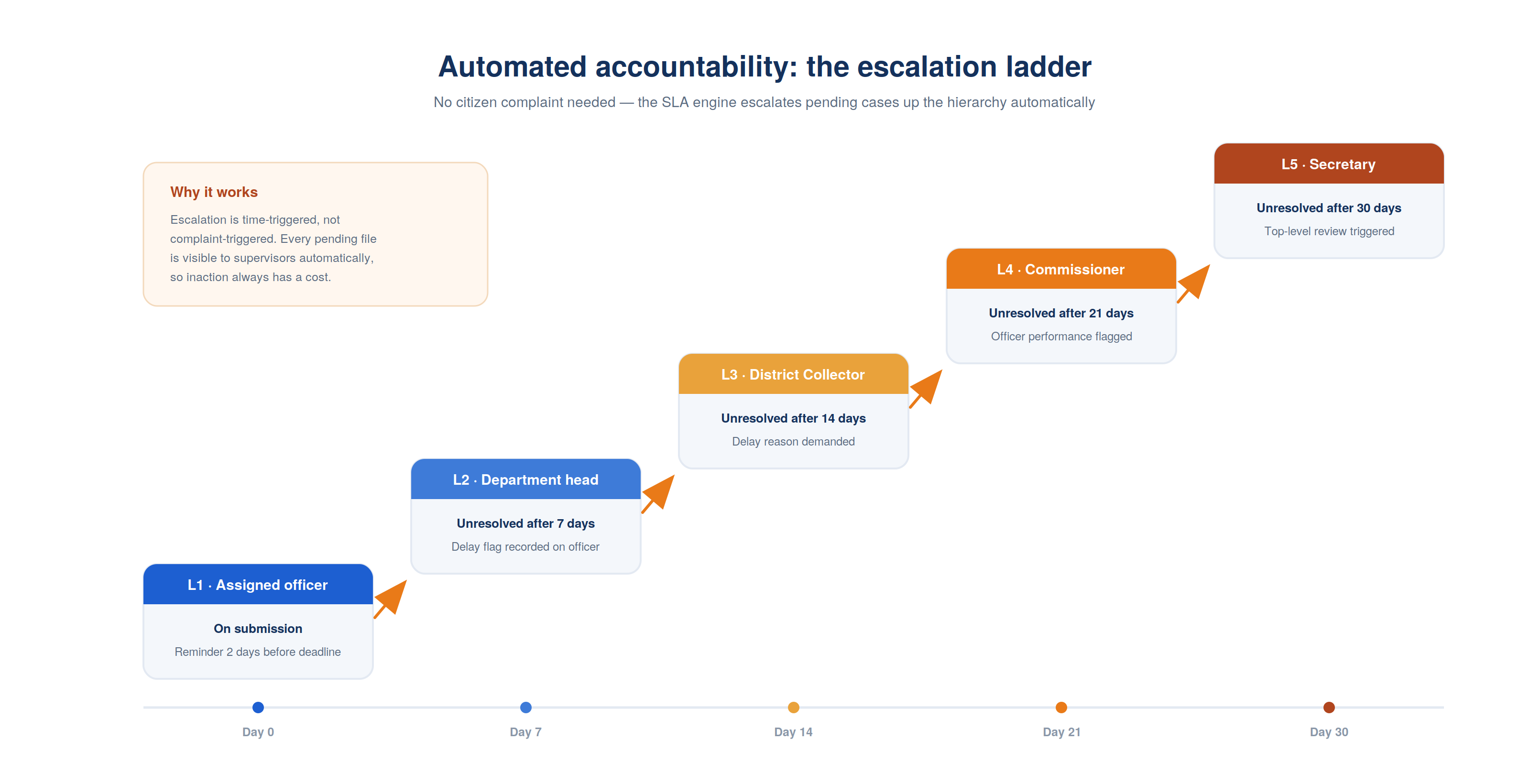
The escalation ladder:
| Level | Who | Triggers When |
| L1 | Assigned officer | On submission |
| L2 | Department head | Unresolved after 7 days |
| L3 | District Collector | Unresolved after 14 days |
| L4 | Commissioner | Unresolved after 21 days |
| L5 | Secretary | Unresolved after 30 days |
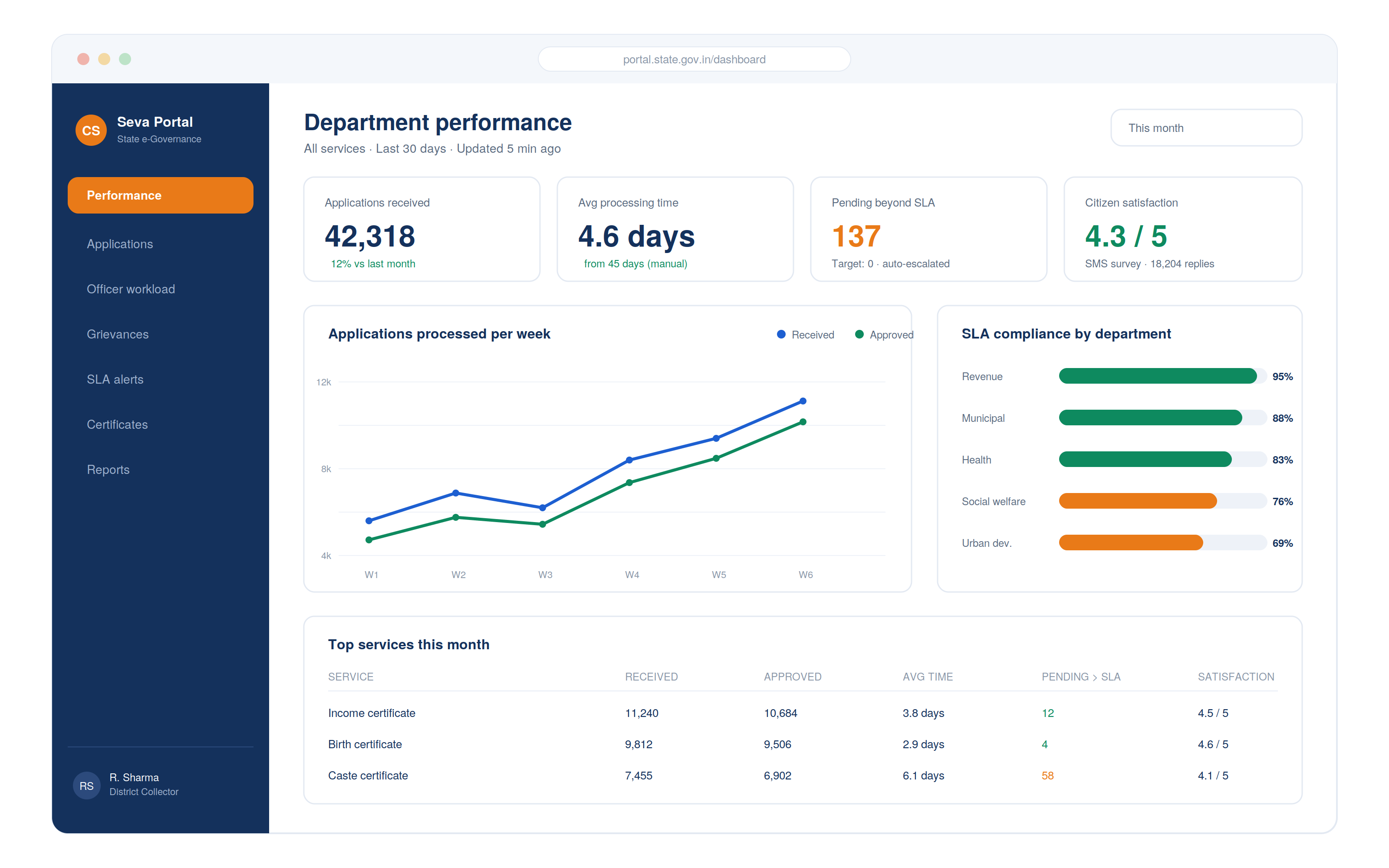
The department performance dashboard:
| Metric | Calculation | Target |
| Applications received | Volume by service, by period | Track trend |
| Applications processed | Volume approved, rejected, pending | |
| Average processing time | Mean days from submission to decision | < Committed SLA |
| Rejection rate | Rejections / total applications | Flag if > 15% |
| Pending beyond SLA | Applications exceeding committed time | Target: 0 |
| Grievances filed | Volume by department, by issue type | Track trend |
| Grievance resolution rate | Resolved within SLA / total | > 90% |
The citizen satisfaction survey:
After every service delivery, the citizen receives a 2-question SMS: “Did you receive your [certificate] on time? (Reply Y/N)” and “Are you satisfied with the service? (Reply 1–5).”
These responses feed the citizen satisfaction index per service and per department, giving the Chief Secretary real-time visibility into which departments are performing and which need intervention.
| Module | Cost Range (USD) | Notes |
| Citizen registration + Aadhaar eKYC | $8K – $15K | UIDAI API integration |
| DigiLocker integration (pull + push) | $6K – $12K | |
| Service catalogue engine | $5K – $10K | |
| Guided application forms (15 services) | $10K – $20K | Per service ~$700–$1,500 |
| Payment integration (UPI + net banking) | $5K – $10K | |
| Application routing + workflow engine | $8K – $15K | |
| Officer portal + case management | $8K – $15K | |
| SLA management + escalation engine | $5K – $10K | |
| Digital certificate generation + DSC + QR | $8K – $15K | Template library |
| Certificate verification portal | $4K – $8K | Public QR scan portal |
| Grievance management + escalation | $8K – $15K | |
| SMS + WhatsApp notification engine | $4K – $8K | |
| Analytics + performance dashboard | $6K – $12K | |
| NIC infrastructure integration (optional) | $5K – $10K | |
| AWS + VAPT + Year 1 ops | $5K – $10K | |
| Total | $95K – $185K | Full e-governance portal |
Contact: mayank@engineerbabu.com
DigiLocker is the Government of India’s official digital document repository, a cloud storage platform where government agencies issue digital documents directly to citizens’ accounts, which citizens can then share with other government or private organisations through authorised APIs. Integration with DigiLocker improves a citizen services portal in two critical ways. First, document pull, when a citizen applies for a service requiring proof of education, identity, or prior certificates, the portal pulls verified digital documents directly from DigiLocker, eliminating the need for the citizen to scan and upload physical documents and eliminating the need for officers to verify those scans manually. Second, certificate push, when a new certificate is issued by the portal, it is automatically deposited into the citizen’s DigiLocker account, making it accessible for all future applications without needing to carry physical copies.
Aadhaar eSign is a digital signature service that allows citizens and government officials to sign electronic documents using their Aadhaar-linked identity. The process works as follows: the document to be signed is prepared in PDF format, the signatory enters their Aadhaar number and receives an OTP on their Aadhaar-linked mobile number, they enter the OTP on the signing interface, and the system applies a digital signature certificate issued in real time by a licensed Certifying Authority against the signatory’s Aadhaar identity. The resulting signature is legally valid under the IT Act 2000 and the Aadhaar Act. For citizen services portals, Aadhaar eSign allows government officers to digitally sign certificates without requiring a physical DSC token, reducing the hardware dependency that slows down document issuance in field offices with limited IT infrastructure.
SLA management in a citizen services portal works through automated tracking and escalation. Every application has a committed processing time, defined in the service’s configuration and typically backed by the state’s Right to Service Act. The platform tracks elapsed time from submission and triggers a series of automated actions as deadlines approach: 2 days before deadline, officer receives a reminder alert; on the deadline day, officer and supervisor receive urgency alerts; if the deadline passes without action, the application is automatically escalated to the supervisor with a delay flag recorded against the officer; if unresolved after a further defined period, escalation moves up the hierarchy to the district collector. Critically, this escalation is automated, it does not require a citizen to call and complain or a supervisor to manually review the pending queue. The SLA engine monitors every application continuously and takes action based on time elapsed. This automated accountability is what reduces pendency, because officers and supervisors know that non-action generates automatic escalation visible to their supervisors.