How to Build a HIPAA-Compliant App in 2026, From Day 1, Not Day 1 of QA


Create engaging, high-performance mobile applications tailored to your business needs. We craft future-ready apps that offer smooth user experiences on all devices.
Build robust and scalable websites and CMS platforms that help you manage content effortlessly. Our development ensures a seamless digital presence.
Launch secure, feature-rich online stores with intuitive shopping experiences. We build tailored eCommerce platforms designed for growth.
Design captivating games with immersive gameplay and stunning graphics. From concept to launch, we build engaging experiences that players love.
Enhance your customer relationships with customized Salesforce implementations. Drive growth and efficiency with smarter CRM solutions.
Harness artificial intelligence and machine learning to automate workflows and gain actionable insights. Our AI transforms data into smart decisions.
Accelerate your software delivery lifecycle with continuous integration, delivery, and infrastructure automation to boost efficiency.
Hire app developers ready to turn your ideas into sleek, high-performing mobile apps for any platform.
Bring in frontend pros who craft smooth, beautiful, and user-friendly interfaces that your visitors will love.
Get backend developers who build fast, secure, and reliable systems to keep everything running behind the scenes.
Hire eCommerce developers who build secure, scalable online stores designed to offer seamless shopping and grow your sales.
Get dedicated developers committed to your projects, delivering consistent quality and speed as an extension of your team.
A Boston-based chronic care founder came to us in April 2021, seven months into a build with another agency. Series A. $9M raised. Board meeting in six weeks. Her compliance attorney had just discovered that her AWS S3 buckets, the ones storing patient encounter notes, were sitting outside any Business Associate Agreement.
Her previous agency had told her the product was HIPAA-compliant. They believed it. They were wrong. Not because they were dishonest. Because they treated HIPAA compliance as a checklist item, something you tick in the final sprint, rather than an architectural constraint that shapes every decision from Day 1.
The S3 migration, audit log backfill, and BAA renegotiation with AWS cost her $67,000 and eleven weeks. Her board meeting was pushed. Her Series A timeline slipped.
I have seen this story, in different cities, with different founders, at different funding stages, more times than I can count. The number changes. The lesson doesn’t.
Healthcare compliances, especially the HIPAA compliance is not a feature you add. It is a design constraint you start with. This guide is the playbook for doing it right from the beginning, so you never pay for it twice.
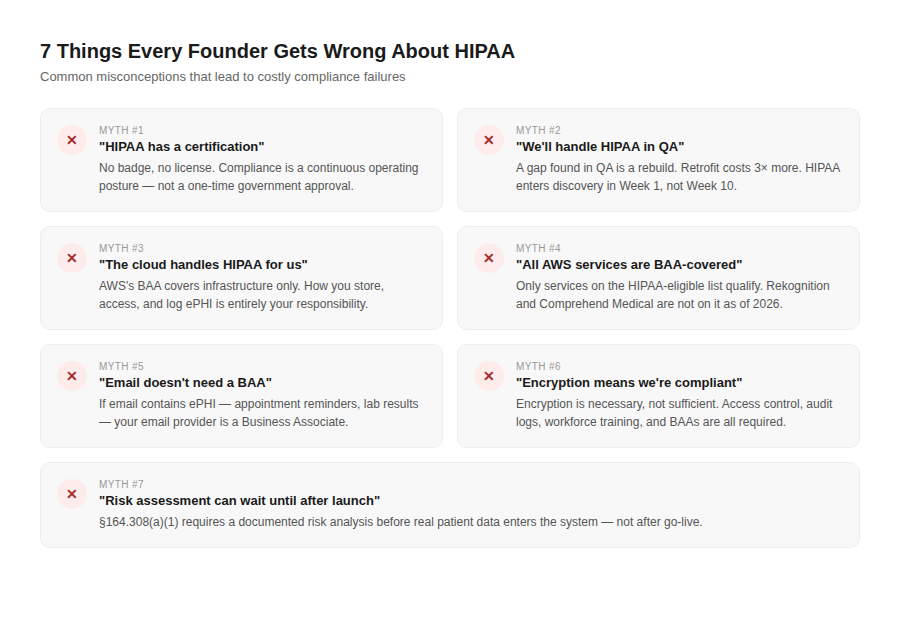
There is no HIPAA certification issued by the US Department of Health and Human Services. There is no badge, no license, no government approval. HIPAA compliance is a continuous operating posture, architecture, policies, contracts, training, and ongoing audit. Any agency that says they are “HIPAA certified” is either confused or misleading you.
An ePHI handling gap discovered in QA is a rebuild, not a fix. A data model that wasn’t designed for minimum necessary access requires schema changes that cascade through every API development, every UI component, every audit log entry. HIPAA enters the conversation in Week 1 of discovery, at the data classification step, or it costs you 3× as much to retrofit.
AWS, GCP, and Azure offer HIPAA-eligible services and will sign a Business Associate Agreement. But the HIPAA BAA covers the infrastructure layer only. Your application, how it stores ePHI, who can access it, how it logs access events, how it handles breaches, is your responsibility, not AWS’s. The cloud provider is a Business Associate. You are still the one building the compliant product.
They are not. AWS maintains a published list of HIPAA-eligible services at aws.amazon.com/compliance/hipaa-eligible-services-reference. Not every Lambda configuration, not every S3 setup, not every analytics service is on that list. The most common violation we see: founders using Amazon Comprehend Medical or Amazon Rekognition, not on the HIPAA-eligible list as of 2026, to process ePHI without realizing those services fall outside their BAA coverage.
If your app sends any email that contains ePHI, appointment reminders with patient names and visit details, lab result notifications, prescription confirmations, your email provider is a Business Associate. You need a HIPAA BAA with them before you send the first email. SendGrid offers a BAA under an enterprise plan. Mailgun offers one. Standard consumer Gmail does not.
Encryption is required. It is not sufficient. HIPAA’s Security Rule (45 CFR §164.302–318) covers administrative safeguards, physical safeguards, and technical safeguards. Encrypting data at rest and in transit covers a portion of the technical safeguards. It does not cover your access control model, your audit logging, your workforce training, your risk analysis, your incident response plan, or your BAA registry. Encryption is necessary. It is not the answer to the question.
164.308(a)(1) requires a risk analysis before you go live with real patient data, not after. The risk analysis identifies potential vulnerabilities to ePHI confidentiality, integrity, and availability. A product that goes live without one is in violation from Day 1 of launch, regardless of how technically sound the architecture is.
HIPAA is three rules that apply to your app. Here is what each one actually means for a product builder:
Governs who can use and disclose PHI, and under what conditions. For your app, the relevant principles are: minimum necessary access (§164.502(b), your app should only access, display, or transmit the PHI that is actually needed for the specific function being performed), patient rights (access to their own records, right to request corrections, right to know who has accessed their data), and permissible disclosures (treatment, payment, healthcare operations, and very specific conditions for anything else).
What this means in practice: your UI design, your API design, and your data access model are Privacy Rule decisions. A billing module that can see clinical notes is a Privacy Rule violation waiting to happen. Role-based access control that enforces minimum necessary access is not a nice UX feature, it is a Privacy Rule requirement.
Governs how you protect electronic PHI specifically. Three categories of safeguards:
What this means in practice: the Security Rule is where your engineering decisions live. Automatic session timeout (§164.312(a)(2)(iii)), unique user IDs (§164.312(a)(2)(i)), audit log of every ePHI access event (§164.312(b)), encryption at rest and in transit (§164.312(a)(2)(iv) and §164.312(e)(2)(ii)), these are direct Security Rule requirements, not best practices.
Requires notification to affected individuals within 60 days of discovering a breach of unsecured ePHI. Breaches affecting 500 or more individuals in a state require notification to the Secretary of HHS and to prominent media outlets in that state. Breaches affecting fewer than 500 individuals must be reported to HHS annually.
What this means in practice: your product needs breach detection, anomaly detection in your audit logs, alerting for unusual ePHI access patterns, and a documented incident response process. The 60-day clock starts from discovery, not from the breach event itself. Build detection in from Day 1 so you discover breaches quickly and respond faster than the legal minimum.
Any vendor who creates, receives, maintains, or transmits ePHI on your behalf is a Business Associate. You must have a signed BAA with every Business Associate before they touch ePHI. This includes: your cloud provider, your video infrastructure provider, your email delivery service, your analytics platform, your AI/LLM provider, your customer support platform, your error monitoring tool, if any of these touch ePHI, they need a BAA.
Compliance trap: Error monitoring tools, Sentry, Datadog, New Relic, often capture request payloads and stack traces. If your application includes ePHI in API responses (patient names, diagnosis codes, encounter IDs) and your error monitoring tool captures those payloads, you have a Business Associate without a BAA. Configure your error monitoring to scrub ePHI from captured data, or get a BAA with your error monitoring vendor. Most founders discover this in their first SOC 2 audit. Discover it now.
Before your engineering team opens a code editor, run through these twelve questions. Every “no” or “unsure” is a gap that will cost you more to fix after the fact than to address now.
HIPAA applies if your product creates, receives, maintains, or transmits PHI on behalf of a Covered Entity, a hospital, clinic, health plan, or healthcare clearinghouse. If you are a direct-to-consumer wellness app that never touches clinical data from a Covered Entity, HIPAA may not apply. This is a $500 healthcare attorney question. Answer it before you architect for HIPAA, or before you assume you don’t need to.
This is the ePHI data classification map. It is the most important document you will produce in discovery. Every architecture decision flows from it. If you haven’t produced it, you don’t know your HIPAA surface area.
Not your account generally. The specific services. Check the HIPAA-eligible services list for your cloud provider before you provision anything.
List every service: cloud infrastructure, video, email, SMS, analytics, error monitoring, LLM, customer support. For each one: does it touch ePHI? Does it have a BAA available? What plan or tier is the BAA on?
164.308(a)(1) requires a documented risk analysis identifying potential risks and vulnerabilities to ePHI. This must be done before go-live. It should be updated any time there is a significant change to the product architecture.
Who in your product can access what ePHI, under what conditions, and why is that the minimum necessary? This is both a Privacy Rule question (minimum necessary, §164.502(b)) and a Security Rule question (access controls, §164.312(a)).
Every access to, modification of, and deletion of ePHI must be logged. The audit log must be immutable, no application process should be able to delete or modify audit log entries. Retention: 6 years minimum (§164.530(j)).
AES-256 for data at rest. TLS 1.2+ for data in transit. Key management documented, where are the encryption keys stored, who has access, how are they rotated?
What happens when you discover a potential breach? Who is notified first? What is the investigation process? When and how do you notify affected individuals? What is your HHS reporting process? This plan must exist before you go live.
The Security Rule requires documented policies for: information access management, workforce training, incident procedures, contingency planning (backup, disaster recovery), evaluation, and business associate management. These are not optional. They are legally required and will be the first thing a payer’s procurement team or an OCR auditor asks for.
164.312(a)(2)(iii) requires automatic logoff from sessions containing ePHI after a period of inactivity. 15 minutes is the standard for clinical applications. This is a product requirement, not a security preference.
A documented list of every Business Associate, the services they provide, whether they handle ePHI, and the status of the BAA with each one. This registry must be maintained and updated. It is a required element of your HIPAA compliance program and a standard deliverable in any enterprise procurement process.
EB Index 2026: Across 140 US healthcare products we have shipped since 2020, founders who completed all twelve of these steps before build began had a median launch delay of 0 days attributable to compliance. Founders who skipped three or more of these steps had a median compliance-related launch delay of 7.3 weeks.
If there is one document in a HIPAA-compliant build that matters more than every other, it is the ePHI data classification map. It is produced in Week 1 of discovery. Every architecture decision, every vendor selection, every UI design, every API contract flows from it.
Here is what it contains:
Column 1: Data Element Every field your product creates, receives, maintains, or transmits. Patient name. Date of birth. Email address. Phone number. Diagnosis code (ICD-10). Medication name and dosage. Lab result. Appointment date and time. Insurance ID. Provider name. Clinical note text. Session transcript. Device reading (RPM).
Column 2: PHI Classification Is this data element PHI? PHI is individually identifiable health information, information that relates to an individual’s health condition, healthcare provision, or payment for healthcare, and that identifies or could identify the individual. The 18 HIPAA identifiers listed in §164.514(b)(2) are the safe harbor list, if your data includes any of these linked to health information, it is PHI.
The 18 identifiers: names, geographic data smaller than state, dates except year (birth dates, admission dates, discharge dates, death dates), telephone numbers, fax numbers, email addresses, Social Security numbers, medical record numbers, health plan beneficiary numbers, account numbers, certificate or license numbers, VINs and serial numbers, device identifiers, URLs, IP addresses, biometric identifiers, full-face photographs, any other unique identifying number or code.
Column 3: ePHI Classification Is this PHI stored or transmitted electronically? If yes, it is ePHI and the Security Rule applies.
Column 4: Storage Location Where does this data element live in your architecture? Which database, which table, which service?
Column 5: Access Roles Which user roles in the product can access this data element? Is that access minimum necessary for their function?
Column 6: Encryption Status Is this data element encrypted at rest? Encrypted in transit? With what algorithm and key management approach?
Column 7: Audit Log Requirement Does access to or modification of this data element require an audit log entry? (Answer: yes, for all ePHI.)
Column 8: BAA Coverage Which Business Associate handles this data element? Is the BAA in place?
Column 9: Retention and Deletion Policy How long is this data element retained? What is the deletion process? Who authorizes deletion?
From a US founder call: “I had never seen a document like the ePHI data classification map before Mayank’s team produced one in our first week. When I looked at it, I realized we had been planning to store appointment metadata, date, time, provider name, patient name, in our analytics platform for product analytics. That analytics platform had no BAA. We caught it before a single byte of real patient data went anywhere. That map saved us.”, Seed-stage telehealth founder, Austin.
What we’d cut: If you can design your MVP to operate without storing ePHI at all, by directing clinical data to the EHR rather than your own database, or by building a tool that processes ePHI transiently without retaining it, your HIPAA surface area shrinks dramatically.
We have helped 22 US healthcare founders design their ePHI scope down in v1, ship faster, and add the full clinical data layer in v2 after they have raised and validated the core product. Design the data classification map first. Then decide what you actually need to store.
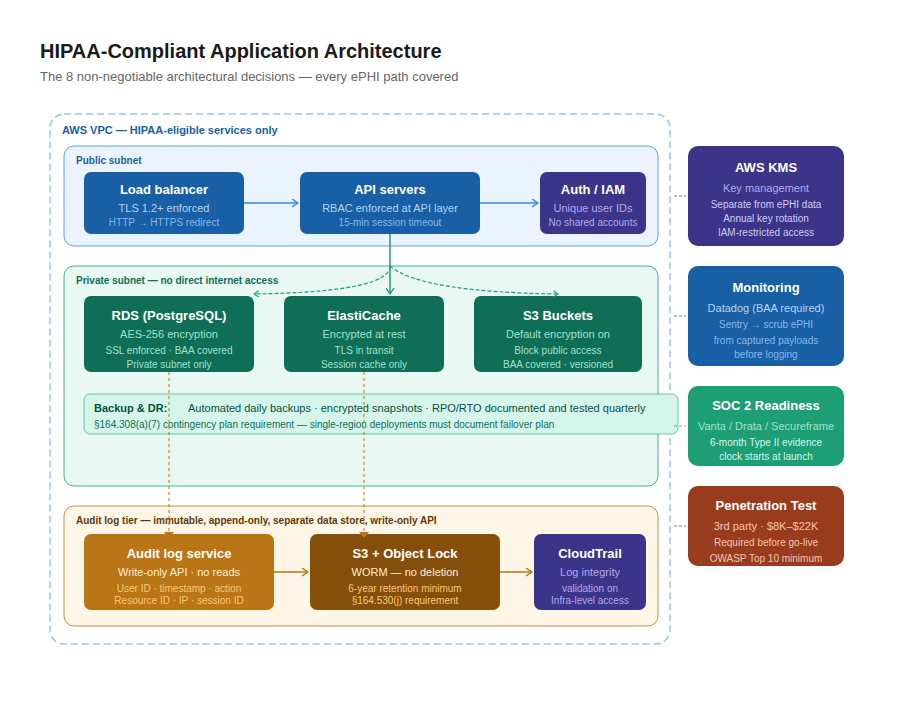
These are the architectural decisions that are not optional in a HIPAA-compliant product. They must be made explicitly, documented in an architecture decision record, and implemented before ePHI enters the system.
Every cloud service that will touch ePHI must be on your cloud provider’s HIPAA-eligible services list and covered under your BAA. This is not a one-time check, the list changes as cloud providers add and remove services. We check it at the start of every healthcare engagement and recheck it before adding any new cloud service to a production product.
For AWS: EC2, RDS, S3 (with specific configuration), ECS, EKS, Lambda (with specific configuration), API Gateway, KMS, CloudTrail, CloudWatch Logs, these are on the eligible list as of 2026. Check the current list. Do not assume.
Every database, every file storage system, every cache that contains ePHI must be encrypted at rest with AES-256. For AWS RDS: encryption at rest enabled at creation (cannot be enabled on an existing unencrypted RDS instance without a snapshot-and-restore migration, plan this from Day 1). For S3: default encryption enabled, bucket policies enforcing encrypted uploads. For Redis: Redis at-rest encryption enabled (available on ElastiCache).
Key management: AWS KMS for most cloud-hosted products. Keys rotated annually at minimum. Access to KMS keys restricted by IAM policy to only the services and roles that need them. Key rotation and access events logged in CloudTrail.
Every API call, every database connection, every service-to-service call that crosses a network boundary must use TLS 1.2 or higher. TLS 1.0 and 1.1 are deprecated and insufficient. HTTPS enforced at the load balancer, HTTP requests redirected, not served. Database connections over SSL only, enforce SSL in the RDS parameter group, not just in application configuration.
This is the decision most agencies get wrong. The audit log is not your application’s activity log. It is a separate, immutable, append-only record of every ePHI access, modification, and deletion event.
Architecture we use: a dedicated audit log service with a write-only API, application services can write audit events but cannot read, modify, or delete them. Audit events written to a separate database (not the application database) with a service account that has INSERT-only permissions.
Infrastructure-level audit events (who accessed the AWS console, who modified IAM policies, who accessed the S3 bucket) captured in CloudTrail with log integrity validation enabled. CloudTrail logs archived to S3 with Object Lock (WORM, Write Once Read Many) enabled to prevent deletion. Retention: 6 years minimum (§164.530(j)).
What the audit log records for every ePHI event: timestamp (UTC), user ID, user role, action (read / create / update / delete), resource type, resource ID, patient ID (where applicable), IP address, session ID, success or failure.
Every user role in your product maps to a specific set of ePHI access permissions. The mapping is documented in the data access matrix (part of the ePHI data classification map). The permissions are enforced in the application layer, not just in the UI, but in the API. A billing role that requests a clinical note via API gets a 403, not the note.
Common roles in healthcare products: patient, care coordinator, clinician, billing administrator, practice administrator, system administrator. Each role’s ePHI access is the minimum necessary for their function. No role has access to ePHI it doesn’t need.
164.312(a)(2)(iii) requires automatic logoff after inactivity. For clinical applications, EHR-adjacent tools, RPM dashboards, telehealth platforms, 15 minutes of inactivity triggers automatic session termination. The user must re-authenticate. This is a requirement, not a preference. Build it into the session management layer from Day 1.
ePHI databases, RDS, ElastiCache, any data store containing patient data, must never be directly accessible from the public internet. They live in private subnets within a VPC. The only access path is through the application layer (API servers in public or private subnets with appropriate security group rules) or through a bastion host for administrative access. No public-facing database endpoints. Ever.
164.308(a)(7) requires a contingency plan including data backup, disaster recovery, and emergency mode operation. For cloud-hosted products: automated daily backups of all ePHI data stores, backup encryption matching production encryption, backup retention for 6+ years, recovery point objective (RPO) and recovery time objective (RTO) documented and tested. We run a quarterly disaster recovery drill for every healthcare client on the dedicated pod model.
Red flag: Any agency that proposes a single-region, single-availability-zone architecture for a healthcare product without explicitly discussing backup, failover, and the RPO/RTO implications has not thought through the contingency planning requirement. A clinical product that goes down during a patient encounter is not just a UX problem, it is a potential patient safety event and a HIPAA contingency planning gap.
These three, encryption, audit logs, access control, are where the gap between a HIPAA-aware build and a HIPAA-compliant build lives. Every agency says they implement them. Here is what implementing them correctly actually looks like.
Gap 1: Encryption at rest enabled on the primary database, but not on read replicas, backup snapshots, or the analytics database that receives a copy of the data for reporting. Every copy of ePHI must be encrypted. Not just the primary.
Gap 2: Encryption keys stored in the application’s environment variables or in the database alongside the encrypted data. If the key lives next to the data, encryption provides almost no protection against an attacker who gains database access. Keys must live in a dedicated key management service, AWS KMS, HashiCorp Vault, separated from the data they protect.
Gap 3: TLS enforced at the load balancer but database connections inside the VPC running unencrypted. The assumption: “it’s inside our network, so it’s safe.” The Security Rule does not make this exception. Encrypt database connections. Enforce SSL in the RDS parameter group so that connections without SSL are rejected at the database level, not just discouraged at the application level.
Gap 1: Application activity logs (who logged in, what pages they visited, what API calls they made) conflated with ePHI audit logs. These are different things. An application activity log is useful for debugging. An ePHI audit log is a HIPAA requirement. It must be more granular (which specific patient record was accessed, not just which API endpoint was called), more durable (6+ year retention), and more tamper-evident (immutable, append-only).
Gap 2: Audit log entries stored in the application database, the same database that application developers can query, modify, and delete from. The audit log must be in a separate data store with a service account that has write-only access. No developer, no application process, no administrative script should be able to delete an audit log entry.
Gap 3: No audit log for infrastructure-level ePHI access. Who accessed the S3 bucket containing ePHI directly (bypassing the application layer)? Who modified the IAM policy that governs database access? Who accessed the AWS console? CloudTrail with log integrity validation enabled captures this. Most healthcare products we audit for the first time do not have CloudTrail configured correctly.
Gap 1: Access control enforced in the UI but not in the API. A billing administrator’s UI doesn’t show the clinical notes tab, but if they call the clinical notes API endpoint directly with their authenticated token, they get the data. Access control must be enforced at the API layer, not just the UI layer.
Gap 2: Shared user accounts or shared service accounts for ePHI access. §164.312(a)(2)(i) requires unique user identification, every person who accesses ePHI must do so under their own unique identifier so their activity can be attributed to them in the audit log. Shared accounts make attribution impossible.
Gap 3: No emergency access (“break glass”) protocol. What happens when a clinician needs urgent access to a patient record that falls outside their normal access permissions, during an emergency, when the primary provider is unavailable? The answer cannot be “they can’t get it”, that is a patient safety gap. The answer also cannot be “anyone can access anything in an emergency”, that is a Privacy Rule gap. The break glass protocol: an explicit, audited, time-limited elevation of access permissions, with notification to a supervisor and a documented reason. Build it into the access control architecture from Day 1.
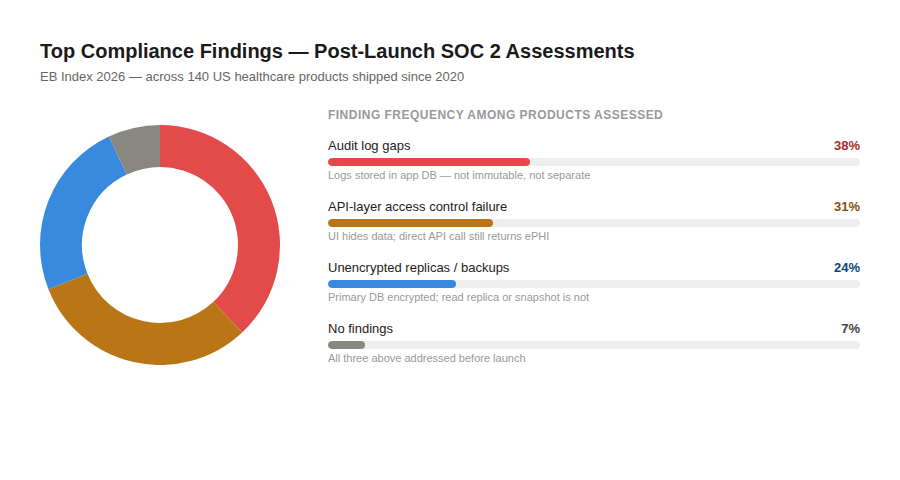
EB Index 2026: Of the 140 US healthcare products we have shipped since 2020, the three most common compliance findings identified during post-launch SOC 2 readiness assessments are: audit log gaps (38% of products), access control enforcement at the API layer only (31%), and unencrypted read replica or backup snapshots (24%). All three are preventable with architecture decisions made in Week 1 of discovery.
This is the section most agencies skip. It is also the section where most HIPAA violations are born.
Here is how to run the BAA audit for your product stack:
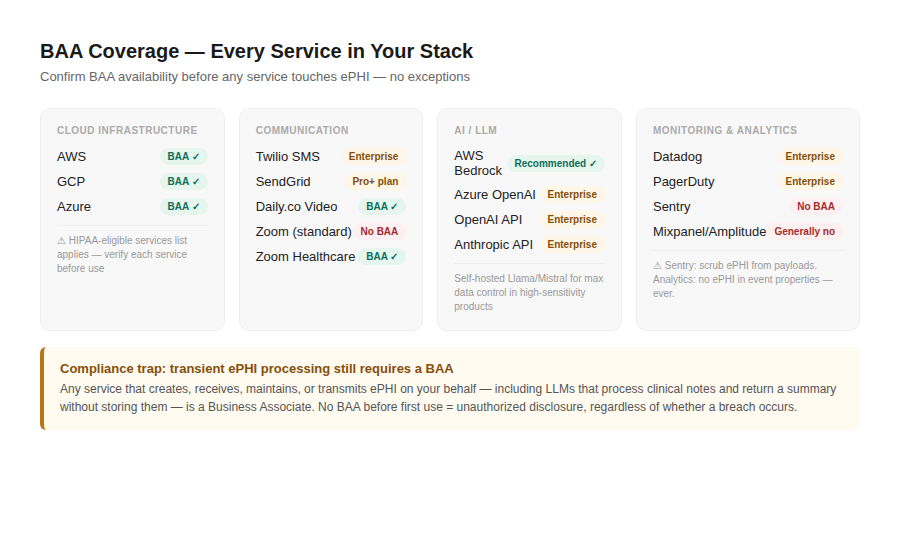
Here is our 2026 BAA availability reference for the services US healthcare founders use most:
| Service | BAA Available | Plan Required | Notes |
| AWS | Yes | Standard (any paid plan) | HIPAA-eligible services list applies, not all services covered |
| GCP | Yes | Standard (any paid plan) | Covered services list applies |
| Azure | Yes | Enterprise | HIPAA mode configuration required |
| Twilio (SMS/Voice) | Yes | Enterprise | BAA covers SMS, voice, Verify; check specific services |
| Twilio Video | Yes | Enterprise | Separate BAA from Twilio core |
| SendGrid | Yes | Pro plan or above | |
| Daily.co (Video) | Yes | Scale plan | Strong HIPAA posture for telehealth |
| Vonage Video | Yes | Enterprise | |
| Zoom (for clinical) | Yes | Healthcare plan specifically | Standard Zoom plan does NOT include HIPAA BAA |
| OpenAI API | Yes | Enterprise agreement | Review BAA scope carefully with legal counsel |
| Anthropic API | Yes | Enterprise agreement | Direct enterprise negotiation required |
| AWS Bedrock | Yes | Standard (covered under AWS BAA) | Default recommendation for clinical AI |
| Azure OpenAI | Yes | Enterprise with HIPAA mode | |
| Sentry (error monitoring) | No | N/A | Configure to scrub ePHI from captured payloads |
| Datadog | Yes | Enterprise | |
| PagerDuty | Yes | Enterprise | |
| Vanta (SOC 2 tooling) | Yes | Standard | |
| Drata (SOC 2 tooling) | Yes | Standard | |
| Stripe | No BAA | N/A | Payment data (PAN) is not PHI, HIPAA BAA not applicable, PCI-DSS applies instead |
| Intercom | No | N/A | Do not route ePHI through Intercom without BAA confirmation |
| Mixpanel / Amplitude | Generally No | Contact vendor | Configure to exclude ePHI from event properties |
Compliance trap: Product analytics platforms, Mixpanel, Amplitude, PostHog, capture event properties that your engineers define. If an engineer instruments an event with a patient ID, a diagnosis code, or any ePHI as an event property, that ePHI is now in your analytics platform. If that analytics platform has no BAA, you have an unauthorized disclosure. Implement a strict policy: no ePHI in analytics event properties. Use anonymized or pseudonymous identifiers for analytics instrumentation.
From a US founder call: “We were three weeks from launch when our new CTO joined and asked to see our BAA registry. We had a BAA with AWS. That was it. Our video provider, our email provider, our SMS vendor, our error monitoring tool, all touching patient data, none with BAAs. We spent two weeks on BAA negotiations and vendor substitutions. Mayank’s team now builds the BAA registry as a Week 2 deliverable on every engagement. It should always be that.”, Series A telehealth founder, Miami.
This is the full timeline for a HIPAA-ready MVP, from first conversation to launch. Not the timeline agencies pitch. The timeline that actually produces a compliant product.
Deliverable: ePHI data classification map. Vendor BAA status list. Initial HIPAA surface area definition.
Deliverable: BAA signed and in the registry. Architecture Decision Record. Data model with ePHI fields annotated. Encryption and key management plan. Audit log schema.
HIPAA-eligible cloud infrastructure provisioned. Encryption at rest enabled on every data store. TLS 1.2+ enforced at every network boundary. KMS configured with appropriate key access policies.
VPC, private subnets, security groups configured. CloudTrail with log integrity validation enabled. Audit log infrastructure deployed, separate data store, write-only service account. CI/CD pipeline configured with SAST (Semgrep or Snyk) running on every pull request.
Deliverable: Provisioned, encrypted, network-segmented infrastructure. CloudTrail enabled. Audit log service deployed. CI/CD pipeline with security scanning live.
First complete draft of the HIPAA risk analysis. Every identified risk to ePHI confidentiality, integrity, and availability documented. Risk likelihood and impact scored. Mitigation measures identified for each risk. Risk register created and assigned to owners.
This document is not a formality. It is a living document that will be updated at every significant architecture change and reviewed annually at minimum. It will be the first document a payer’s procurement team asks for and the first document an OCR auditor requests.
Deliverable: HIPAA risk assessment draft (v1). Risk register.
Feature build against the defined scope. Engineering rules that apply to every pull request in a HIPAA-regulated product:
Full test coverage for all ePHI flows. Security regression testing. HIPAA risk assessment updated to reflect the as-built product. Data flow diagrams produced, visual maps of every path ePHI takes through the system, from ingestion to storage to access to deletion. Every path verified against the BAA registry.
Any gap between the as-built product and the risk assessment is triaged and resolved before the penetration test begins.
Third-party penetration test, not our internal team. Budget $8K–$22K. Timeline 1–2 weeks including report. We pause deployment to production until the pen test is complete and all critical and high findings are remediated.
The pen test scope for a HIPAA-regulated product: network and infrastructure testing, web application testing (OWASP Top 10 at minimum), API testing, authentication and session management testing, access control testing (can a lower-privileged role access higher-privileged ePHI?), encryption testing (are ePHI data stores actually encrypted, or just configured to be?).
The pen test report becomes part of your SOC 2 audit evidence package and your enterprise procurement compliance folder. Budget for it. Do not skip it.
SOC 2 compliance automation platform (Vanta, Drata, or Secureframe) connected to your infrastructure. Policies written and signed. Evidence collection begins, the SOC 2 Type II observation period clock starts now.
You need at least 6 months of evidence before an auditor can issue a Type II report. Starting this clock at Week 13 of your build means your first SOC 2 Type II report is available approximately 9 months after product launch.
User acceptance testing with real users under appropriate consent frameworks. Clinical workflow validation. Edge case testing for HIPAA-specific UX requirements: session timeout behavior, minimum necessary access in the UI, patient consent flows.
Handover pack delivered. Launch. The handover pack is not a nice-to-have, it is a contractual deliverable in every EngineerBabu healthcare engagement. Contents in the next section.
AI in healthcare products is the most rapidly evolving area of HIPAA compliance in 2026. Here is the current state of the decisions you need to make.
Some AI features in healthcare apps do not touch ePHI. A symptom checker that asks general questions and provides general health information without collecting individually identifiable data is likely outside ePHI scope. A scheduling optimization tool that uses appointment metadata without patient identifiers may be outside ePHI scope.
Most useful clinical AI features do touch ePHI. A clinical scribe that processes a provider-patient conversation transcript is handling ePHI. An AI that summarizes a patient’s prior visit notes is handling ePHI.
An AI that generates a care plan based on a patient’s diagnosis and medication history is handling ePHI. For any of these: the LLM call itself is a Business Associate function and requires BAA coverage.
Our standard recommendation: AWS Bedrock. It is covered under the standard AWS BAA (confirmed against the HIPAA-eligible services list), it provides access to Claude (Anthropic), Llama, Mistral, and other models, and the BAA situation is unambiguous for most healthcare products.
When we use Azure OpenAI with HIPAA mode: when the product is already Azure-hosted and the Azure enterprise agreement is in place, or when GPT-4 class performance specifically is required and the founder has a Microsoft enterprise relationship.
When we use OpenAI API with Enterprise BAwhen the founder has an OpenAI Enterprise agreement and their healthcare attorney has reviewed the BAA scope and confirmed coverage for the specific use case.
When we use self-hosted open-source models (Llama, Mistral): when the clinical data sensitivity is high enough that the founder’s legal team or enterprise customers are not comfortable with any cloud LLM, even under a BAA. Self-hosting provides maximum data control but requires significant infrastructure investment and ongoing model management.
We recommend this for products handling psychiatric records, substance use disorder records (42 CFR Part 2), or HIV/AIDS status, categories where the sensitivity of the data warrants maximum control.
In a consumer app, a hallucinated product recommendation is an annoyance. In a clinical app, a hallucinated drug dosage, a misattributed diagnosis, or a fabricated clinical guideline is a patient safety event.
Every clinical AI feature we build includes:
Compliance trap: A clinical AI scribe that stores audio recordings of patient encounters needs a documented audio retention and deletion policy before it goes live. Under HIPAA minimum necessary (§164.502(b)), you may retain ePHI only as long as necessary for the purpose for which it was collected.
Audio of a patient encounter retained indefinitely is likely beyond minimum necessary. Define: how long is the audio retained? When is it deleted? Who authorizes deletion? Build the retention and deletion workflow before you build the transcription feature.
Most healthcare app development guides discuss testing as a QA step. For regulated products, testing has a compliance dimension that is distinct from QA.
Security testing in the CI/CD pipeline: Every pull request runs static application security testing (SAST), we use Semgrep for most projects, Snyk for dependency vulnerability scanning. Security findings are blocking, a PR with a critical security finding does not merge. This is a policy decision that must be made at the start of the engagement and enforced consistently. The cost of enforcing it in the CI/CD pipeline is zero. The cost of discovering the finding six months post-launch is not.
HIPAA-specific test cases: Beyond standard unit and integration tests, every HIPAA-regulated product we build includes a test suite specifically for HIPAA requirements:
Third-party penetration test: Covered in Section 9. Budget $8K–$22K. Do not skip it. Do not substitute it with your internal security review. A third-party pen test provides: an independent perspective, a signed report that can be shared with enterprise customers and SOC 2 auditors, and coverage for the access control gaps that internal teams, who built the system and know how it’s supposed to work, reliably miss.
Pre-launch compliance checklist: Before any real patient data enters the system:
Every EngineerBabu healthcare engagement ends with a handover pack. These are not promises. They are contractual deliverables listed in the SOW. If it is not in the SOW, we add it.
Launch is the beginning of compliance operations, not the end of compliance work. Here is what ongoing HIPAA compliance looks like for a post-launch digital health product.
The first in-house compliance hire: We recommend your first in-house compliance role when you reach any of these milestones: 10,000 active patients, first payer or health system enterprise contract, Series B fundraise, or SOC 2 Type II audit renewal.
The title is typically Head of Security and Compliance or VP of Engineering (with compliance in scope).
The CISO role comes at Series C+. Before that, a fractional CISO ($4K–$10K/month from a firm like Coalfire, Meditology, or ClearDATA) plus a compliance automation platform covers most operational needs.
There are regulatory layers above HIPAA that apply to specific healthcare product categories. If your product falls into any of these categories, HIPAA compliance is necessary but not sufficient.
Stricter than HIPAA. Applies to any product that stores records identifying a patient as having received substance use disorder treatment. The consent requirements for disclosure are more stringent, a general HIPAA authorization does not cover disclosure under Part 2. Most agencies miss this. Flag it in discovery if your product could possibly touch SUD treatment records.
If your software meets the FDA’s definition of a medical device under the 21st Century Cures Act, and clinical decision support software can meet this definition depending on how it is designed, you have an FDA regulatory pathway question that lives upstream of your engineering decisions.
Get a regulatory attorney’s opinion on SaMD classification before you finalize the product design. The cost of a regulatory opinion is $3K–$8K. The cost of discovering post-launch that your product required FDA clearance is incalculable.
Required by many large health systems and payers as a procurement condition, above and beyond SOC 2 Type II. Budget $80K–$150K for a HITRUST assessment and 12–18 months for the full certification process. Most Seed-stage healthcare companies should focus on SOC 2 Type II first and target HITRUST for the enterprise sales motion at Series A or B.
California’s CMIA (Confidentiality of Medical Information Act) imposes requirements that go beyond federal HIPAA in some areas. New York SHIELD Act. Texas Health & Safety Code Chapter 181. Illinois Personal Information Protection Act. If your product operates in multiple states, and most digital health products do, a healthcare attorney review of state-specific requirements is worth the investment.
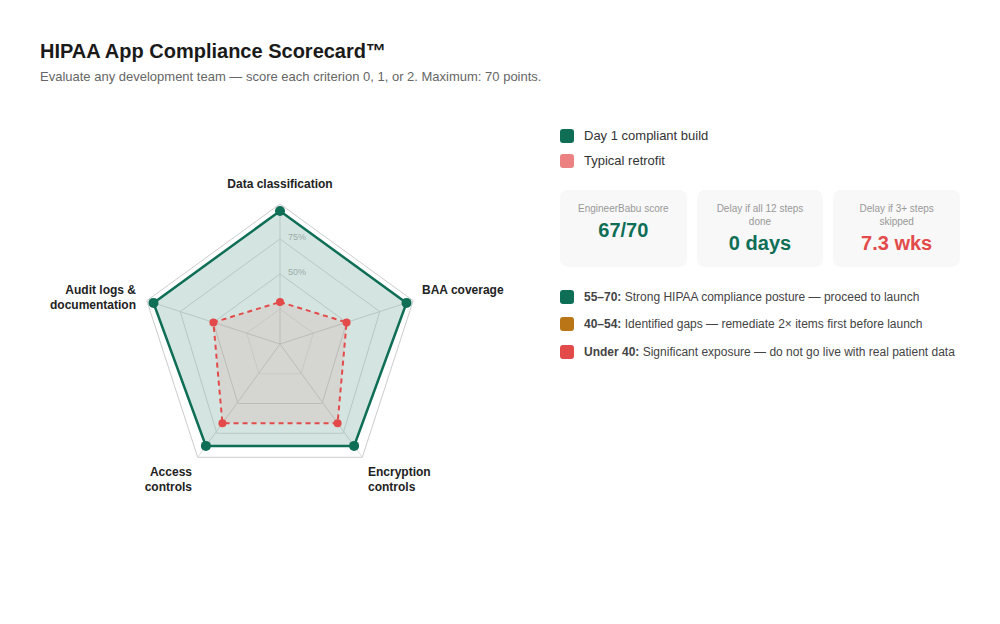
Use this to evaluate any development team, including ours. Score each row 0 (absent), 1 (partial), or 2 (fully present). Maximum score: 70.
| # | Criterion | Weight | Your Score |
| 1 | ePHI data classification map produced in Week 1 of discovery | 2× | /4 |
| 2 | BAA signed before any ePHI is shared or processed | 2× | /4 |
| 3 | BAA coverage confirmed for every sub-processor in the stack | 2× | /4 |
| 4 | HIPAA-eligible cloud services only (confirmed against published list) | 2× | /4 |
| 5 | AES-256 encryption at rest on every ePHI data store including read replicas and backups | 2× | /4 |
| 6 | TLS 1.2+ enforced at every network boundary | 2× | /4 |
| 7 | Immutable append-only audit log in separate data store with 6+ year retention | 2× | /4 |
| 8 | Access control enforced at API layer (not just UI) and tested | 2× | /4 |
| 9 | Automatic session timeout implemented (15 min for clinical) | 1× | /2 |
| 10 | HIPAA risk assessment completed before go-live | 2× | /4 |
| 11 | Incident response runbook delivered at handover | 2× | /4 |
| 12 | Third-party penetration test completed before go-live | 2× | /4 |
| 13 | System security plan delivered at handover | 1× | /2 |
| 14 | Data flow diagrams with ePHI annotated delivered at handover | 1× | /2 |
| 15 | SOC 2 readiness built into architecture from Day 1 | 2× | /4 |
| 16 | SAST security scanning in CI/CD pipeline | 1× | /2 |
| 17 | Backup and disaster recovery plan tested | 1× | /2 |
| 18 | 42 CFR Part 2 awareness documented for applicable products | 1× | /2 |
| 19 | LLM BAA coverage confirmed for clinical AI features | 1× | /2 |
| 20 | Hallucination guardrails implemented for clinical AI outputs | 1× | /2 |
| 21 | Unique user identification enforced (no shared accounts) | 1× | /2 |
| 22 | Emergency access (break glass) protocol designed and implemented | 1× | /2 |
| 23 | ePHI scrubbed from error monitoring tool payloads | 1× | /2 |
| 24 | Analytics instrumentation policy (no ePHI in event properties) | 1× | /2 |
| 25 | Workforce HIPAA training completed for all ePHI-accessing staff | 1× | /2 |
Score interpretation:
EB Index 2026: EngineerBabu scores 67/70 on this scorecard on a standard healthcare engagement. The 3 points we acknowledge as partial: workforce training completion (we complete it for our team; confirming completion for the founder’s own staff requires a separate HR process we facilitate but don’t own), and the break glass protocol (we design it; implementation for clinical products where the protocol involves on-call clinical staff requires coordination with the founder’s clinical operations team that extends beyond engineering).
Every HIPAA violation I have seen in twelve years of working with US healthcare founders had the same root cause: compliance was treated as something that happens after the product is built, not as a constraint that shapes how the product is built.
The founders who build it right the first time do not have a compliance superpower. They just start the data classification conversation in Week 1 instead of Week 10. They sign the BAA before the first line of code.
They treat the audit log as a core architectural component instead of a logging afterthought. They check the HIPAA-eligible services list before they architect, not after they launch.
These are not complex decisions. They are sequencing decisions. Do them first, and the rest of the build goes faster and costs less, because you are not rebuilding what the compliance gap exposed.
If you want to talk through your product, what data it touches, what your HIPAA surface area actually is, what it would cost to build it right, book 30 minutes with me or Aditi. No slides. No pitch. We look at what you are building and tell you the truth about what it takes.
Mayank Pratap Singh is the co-founder and CEO of EngineerBabu, a CMMI Level 5, Google AI Accelerator 2024 alumni product engineering studio based in Indore, India. EngineerBabu has shipped 1,200+ products since 2014, including 140+ HIPAA-aware products for US healthcare founders. Book a product audit at engineerbabu.com/discovery.
HIPAA applies if your app creates, receives, maintains, or transmits Protected Health Information on behalf of a Covered Entity, a hospital, clinic, health plan, or healthcare clearinghouse, or on behalf of another Business Associate. If you are a direct-to-consumer wellness app with no clinical data from a Covered Entity, you may be outside HIPAA’s scope. This is a healthcare attorney question, spend $500 on a one-hour consultation before you spend $200K on a build.
A BAA is a contract required by HIPAA (45 CFR §164.308(b)) between a Covered Entity or Business Associate and any vendor who handles ePHI on their behalf. Yes, you need one, with your cloud provider, your video infrastructure, your email provider, your LLM provider, and any other service that touches ePHI. Without a BAA, any ePHI you share with a vendor is an unauthorized disclosure, a HIPAA violation regardless of whether a breach occurs.
It means the app was designed with ePHI data classification done first, is built on HIPAA-eligible infrastructure under a BAA, implements AES-256 encryption at rest and TLS 1.2+ in transit, enforces minimum necessary access controls at the API layer, maintains immutable audit logs of every ePHI access event with 6+ year retention, has a completed HIPAA risk assessment, and has documented incident response procedures. It is an operating posture, not a certification.
Standard Google Analytics does not offer a HIPAA BAA. If your Google Analytics implementation captures any ePHI, patient identifiers in URLs, health condition data in event parameters, you have an unauthorized disclosure. The options: configure Google Analytics to exclude any ePHI (strict instrumentation policy), use a HIPAA-BAA-available analytics alternative, or use a self-hosted analytics solution. For clinical applications, we typically recommend Mixpanel under a strict no-ePHI-in-event-properties policy or a self-hosted PostHog instance.
The Office for Civil Rights (OCR) enforces HIPAA penalties on a tiered scale: unknowing violations ($127–$63,973 per violation), reasonable cause ($1,280–$63,973), willful neglect corrected ($12,794–$63,973), willful neglect not corrected ($63,973–$1,919,173). The annual cap per violation category is $1,919,173. Criminal penalties under HIPAA apply to individuals and can include fines up to $250,000 and imprisonment up to 10 years for knowing misuse of PHI. The OCR’s enforcement statistics are published at hhs.gov/ocr, they are worth reading before you decide whether compliance is optional.
The HIPAA Breach Notification Rule (45 CFR §164.412) requires notification to affected individuals without unreasonable delay and within 60 calendar days of discovering the breach. For breaches affecting 500 or more individuals in a state, you must also notify the Secretary of HHS and prominent media outlets in that state within 60 days. For breaches affecting fewer than 500 individuals, HHS notification is annual. The 60-day clock starts from discovery, build breach detection into your audit log architecture so you discover breaches quickly.
HIPAA compliance and SOC 2 Type II are separate things that overlap but do not substitute for each other. HIPAA is a legal requirement. SOC 2 is a voluntary framework, but it has become a de facto procurement requirement for selling to enterprise healthcare buyers. Most health systems, payers, and large medical groups will require a SOC 2 Type II report before signing a vendor contract. Build for SOC 2 readiness from Day 1, the SOC 2 controls map closely to HIPAA Security Rule requirements, so building for both simultaneously is far more efficient than doing them sequentially.