Remote Patient Monitoring App Development: What Healthcare Teams Get Wrong Before Writing a Single Line of Code


Create engaging, high-performance mobile applications tailored to your business needs. We craft future-ready apps that offer smooth user experiences on all devices.
Build robust and scalable websites and CMS platforms that help you manage content effortlessly. Our development ensures a seamless digital presence.
Launch secure, feature-rich online stores with intuitive shopping experiences. We build tailored eCommerce platforms designed for growth.
Design captivating games with immersive gameplay and stunning graphics. From concept to launch, we build engaging experiences that players love.
Enhance your customer relationships with customized Salesforce implementations. Drive growth and efficiency with smarter CRM solutions.
Harness artificial intelligence and machine learning to automate workflows and gain actionable insights. Our AI transforms data into smart decisions.
Accelerate your software delivery lifecycle with continuous integration, delivery, and infrastructure automation to boost efficiency.
Hire app developers ready to turn your ideas into sleek, high-performing mobile apps for any platform.
Bring in frontend pros who craft smooth, beautiful, and user-friendly interfaces that your visitors will love.
Get backend developers who build fast, secure, and reliable systems to keep everything running behind the scenes.
Hire eCommerce developers who build secure, scalable online stores designed to offer seamless shopping and grow your sales.
Get dedicated developers committed to your projects, delivering consistent quality and speed as an extension of your team.
Three months into building a remote patient monitoring platform, a health-tech founder walked me through their architecture with one burning complaint: Bluetooth vitals data arriving 4-6 seconds late. Not a disaster in isolation.
Except their system was triggering alerts 4-6 seconds after the threshold breach — and for a cardiac monitoring use case, that gap isn’t a latency issue, it’s a liability.
They had hired a solid engineering team. The app looked excellent. The backend was clean. The problem was that nobody had made a conscious architectural decision about real-time data pipelines early enough, so the system was built on request-response patterns instead of event-driven streaming. Fixing it required rebuilding 40% of the backend.
I’ve seen this exact mistake, in different forms, across 15+ health tech builds at EngineerBabu — a CMMI Level 5 certified product engineering company that has shipped 200+ VC-funded products across 20+ countries.
The mistake is never the feature you’d expect. It’s always an architectural assumption that seemed reasonable at month one and became expensive at month four.
This guide is what I tell founders before they write a single line of remote patient monitoring code.
Remote patient monitoring (RPM) app development is the process of building software systems that continuously collect, transmit, analyze, and act on patient health data from outside clinical settings — typically from wearable devices, home monitoring equipment, or mobile applications connected to biosensors.
The word “continuously” is doing a lot of work in that sentence. An RPM system isn’t an online consultation app with video calls. It’s a real-time data infrastructure that happens to have a clinical interface on top. That distinction matters enormously for every architectural decision you’ll make.
The global RPM market was valued at $27.72 billion in 2024 and is projected to reach $59+ billion by 2026 according to MarketsandMarkets research. The demand is real. The execution complexity is significantly underestimated.
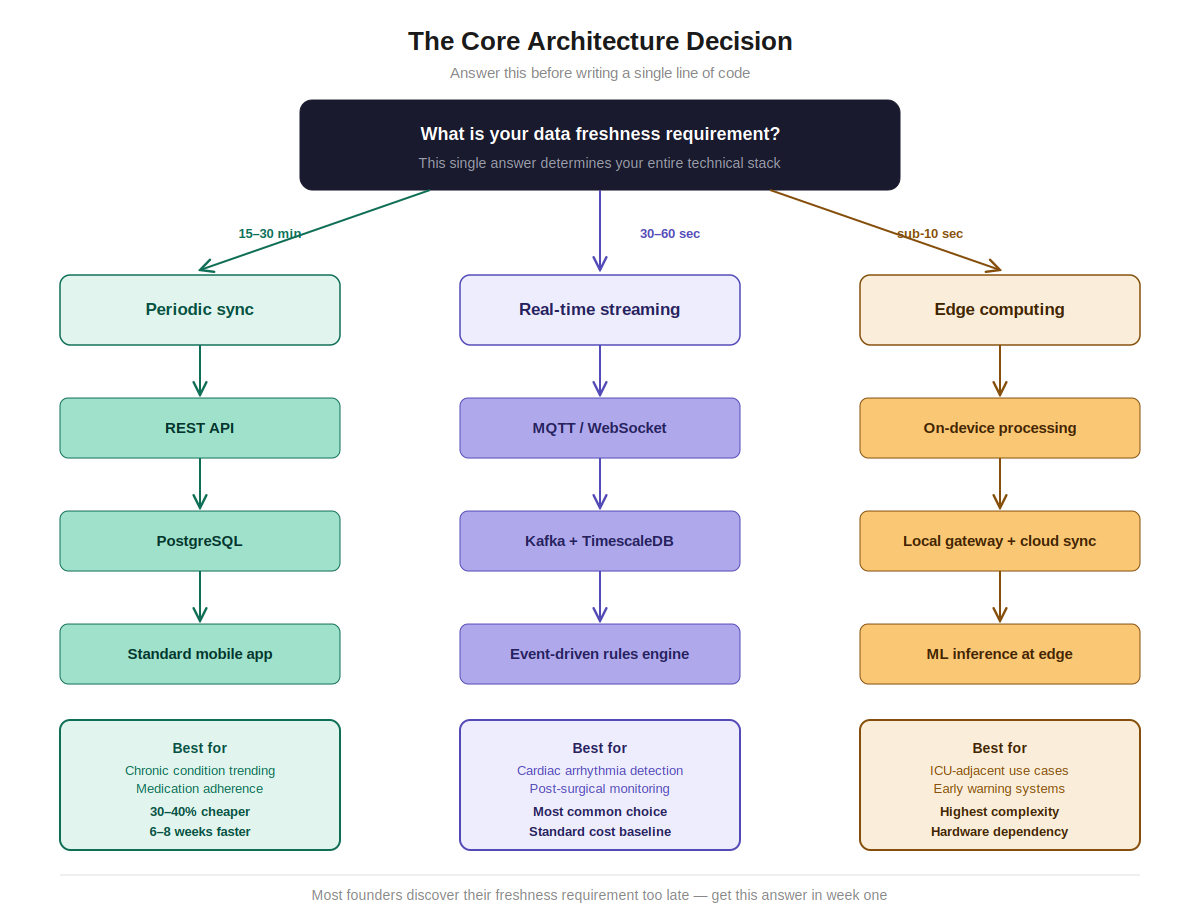
Before you think about features, you need to answer one question: what is your data freshness requirement?
This question determines your entire technical stack.
The EngineerBabu team has built all three. The cost and timeline differences are not incremental — they’re multiplicative. A periodic-sync RPM MVP development typically costs 30-40% less and ships 6-8 weeks faster than an equivalent real-time streaming architecture.
Most founders discover their freshness requirement late. Don’t let that be you.
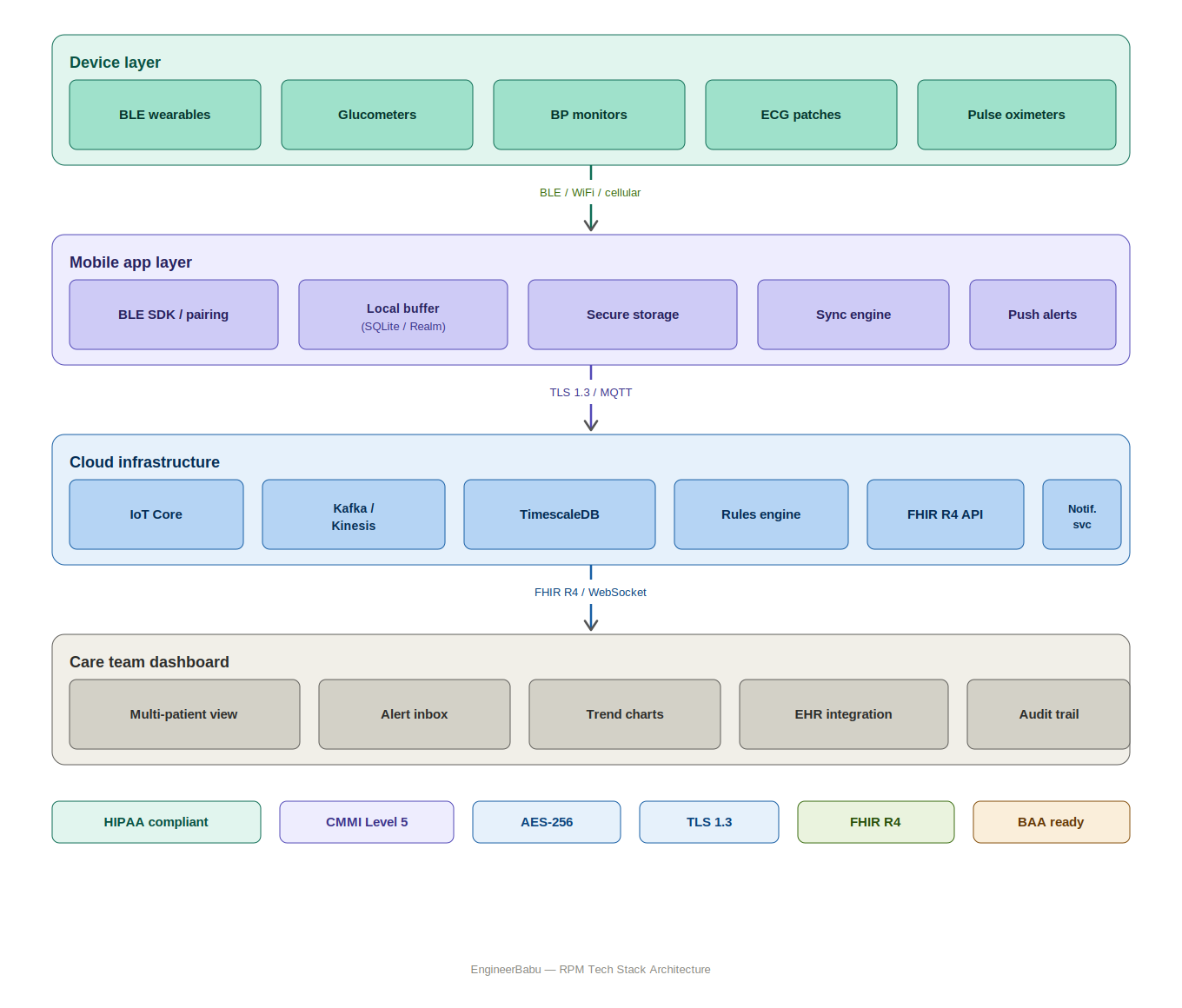
Wearable devices and biosensors communicate through a mix of Bluetooth Low Energy (BLE), Zigbee, cellular (CAT-M1/NB-IoT), and WiFi. Each has different range, power consumption, and reliability characteristics.
BLE is the most common for consumer wearables. The problem with BLE in clinical contexts is connection stability. A patient moves away from their phone, the connection drops, data is lost. Your system needs to handle this gracefully — local buffering on the device, re-sync on reconnect, gap detection in your data quality layer.
The device integration layer typically involves:
One thing I tell every RPM team: budget a dedicated 3-4 week sprint just for device integration work. Not alongside other feature development — dedicated. The hardware edge cases will eat your timeline if you fold device integration into general sprint work.
The mobile app in an RPM system has a different purpose than most consumer health apps. It’s less about engagement and more about reliability as a data conduit.
Your patients are often elderly, managing chronic conditions, not necessarily tech-native. The UI needs to be simple to the point of being obvious. But the engineering underneath needs to handle:
On framework choice: I’d recommend React Native if you have a tight budget and a single team that needs to ship both platforms simultaneously. But if your use case involves intensive BLE processing or you’re building for a patient population where iOS performance matters critically, native Swift/Kotlin is worth the additional cost.
This is where RPM differs most dramatically from standard health apps.
A typical RPM cloud backend needs:
On cloud vendor: AWS has the most mature IoT and healthcare ecosystem. Azure is strong if your hospital clients are Microsoft shops (many are). GCP is solid for ML-heavy use cases. Most RPM platforms I’ve seen end up on AWS.
The clinician-facing web dashboard has different UX requirements than consumer apps. Care team members are monitoring multiple patients simultaneously, triaging alerts, and documenting interventions.
Key dashboard features that matter clinically:
I’ve seen many teams build patient-facing apps well but build clinician dashboards like they’re designing a consumer product. Clinicians don’t want beautiful. They want fast, accurate, and auditable.
Every RPM system that handles US patient data is a HIPAA covered entity’s business associate. That means BAAs (Business Associate Agreements), and more importantly, it means your architecture has to be designed for HIPAA from day one, not retrofitted.
The things that catch teams late:
PHI must be encrypted at rest and in transit. End-to-end encryption for data moving from device to cloud. AES-256 for stored data. TLS 1.2+ for all API integration communication. This sounds basic, but the edge cases are real — what happens to data buffered locally on a patient’s phone when they lose it? Does your app have remote wipe or device-level encryption enforcement?
Every access to PHI needs to be logged. Who accessed which patient’s data, when, from which IP, what actions they took. This is not optional under HIPAA’s Security Rule. It also means your database schema needs audit tables or event sourcing from the start.
Role-based access control (RBAC) isn’t enough for HIPAA — you need attribute-based access control (ABAC) for patient-provider relationships. A cardiologist should only see their assigned patients’ cardiac data, not all patients’ data.
HIPAA requires PHI retention for a minimum of 6 years. But patients also have rights to request deletion in some contexts. Your data lifecycle management needs to handle both, including backup systems.
AWS, Azure, GCP, Twilio, Stripe — any vendor touching PHI needs a BAA. Major cloud vendors have BAA templates. Many SaaS tools don’t. Audit your entire vendor list.
If you’re building for the EU market or patients in multiple jurisdictions, add GDPR and potentially FDA SaMD (Software as a Medical Device) regulations to this list. The regulatory complexity multiplies fast.
The EngineerBabu team recommends a dedicated security and compliance sprint at the architecture phase — before development begins — not after your first pentest comes back with 47 findings.
The most common late-stage problem I see in RPM development is EHR integration underestimation.
Health systems operate on Epic, Cerner, Allscripts, Athenahealth, and others. Getting RPM vitals data flowing into a patient’s EHR record is a clinical requirement for most enterprise clients. And EHR integration is genuinely hard.
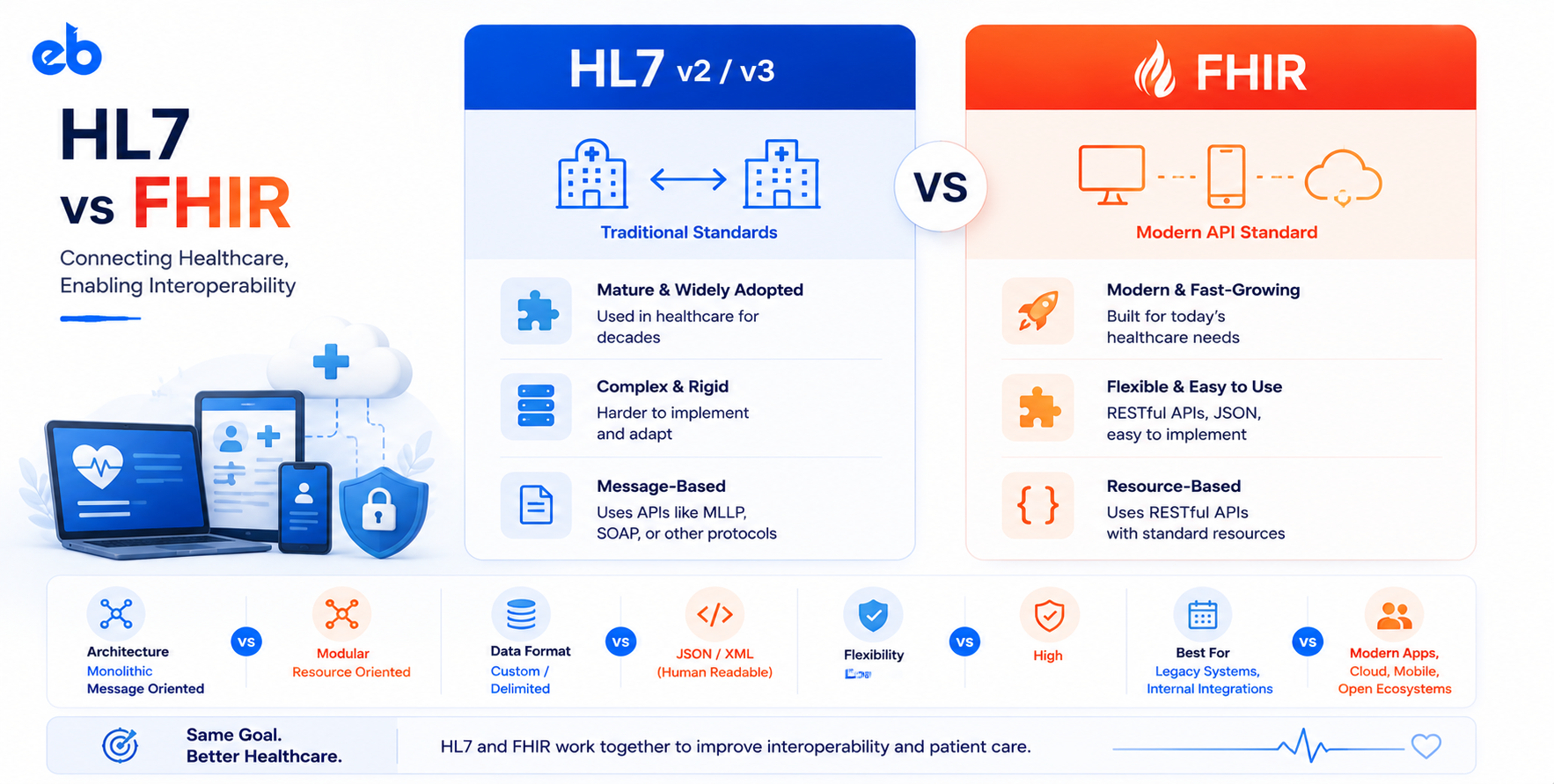
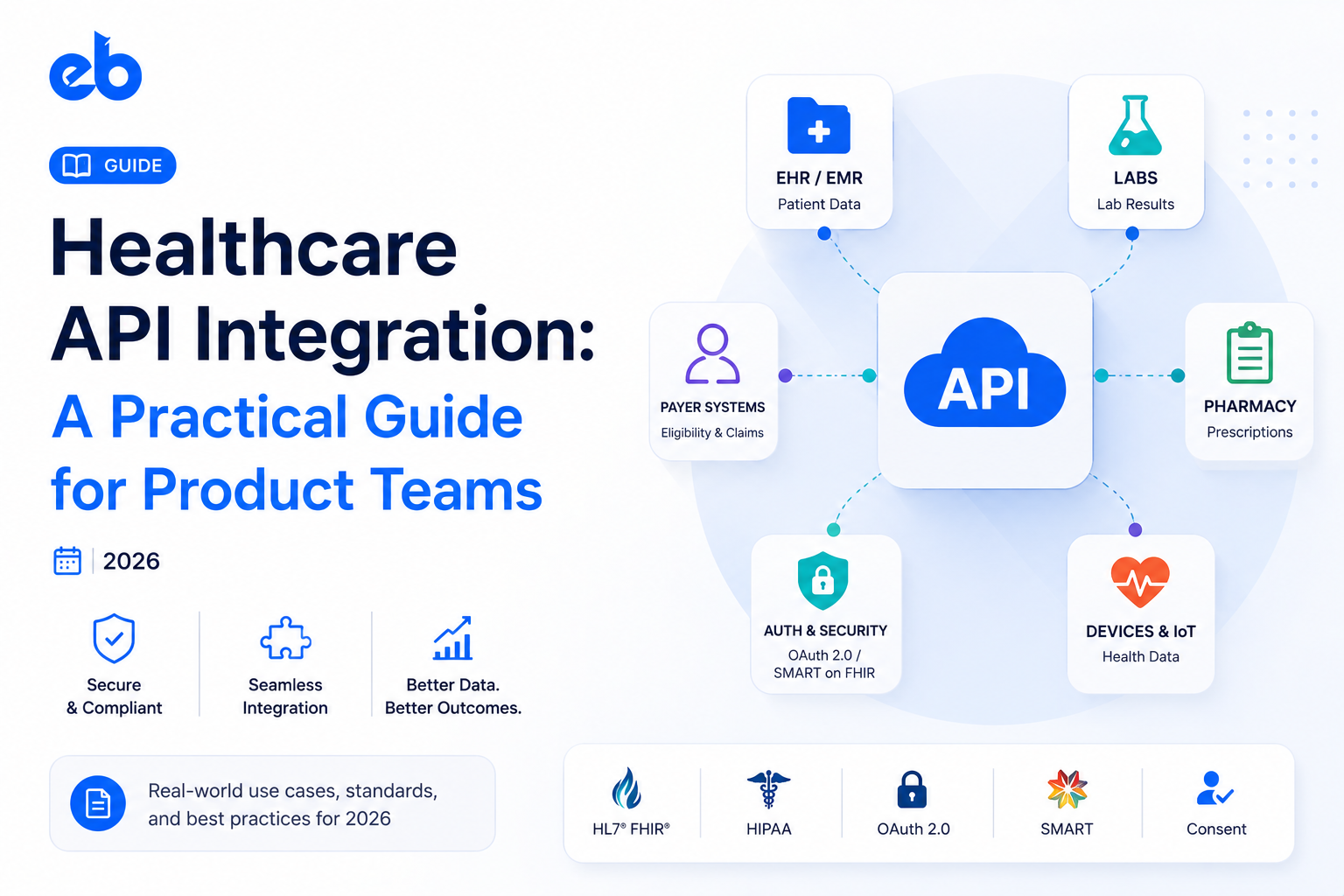
The modern standard is HL7 FHIR R4 with SMART on FHIR for authentication. Epic and Cerner have FHIR-compliant APIs — but they’re sandboxed heavily, the production approval process takes 8-16 weeks for Epic specifically, and the data models for vitals (Observation resources, Device resources) have nuances that require clinical informatics knowledge.
Older integration methods (HL7 v2 over MLLP, direct database connections, middleware like Mirth Connect) still exist at many health systems and are messier to work with.
What I tell founders: scope EHR integration as a separate work stream with a 12-16 week runway, not a 2-week sprint at the end. Identify your target EHR vendor on day one. Get into their developer sandbox program immediately. The integration timeline is determined more by vendor approval processes than by your engineering capacity.
The question I get often: should we build AI into our RPM system?
My answer: yes, but for specific, narrow use cases where the model output is decision support, not clinical decision-making.
The AI features that actually add value in RPM today:
What AI is NOT ready for in RPM: autonomous clinical decision-making, replacing human review, or anything marketed as diagnostic without going through FDA 510(k) or De Novo pathway.
If your RPM system includes AI features that influence clinical decisions, you’re almost certainly looking at FDA Software as a Medical Device (SaMD) classification. Build time for a regulatory pathway analysis before you write ML code.
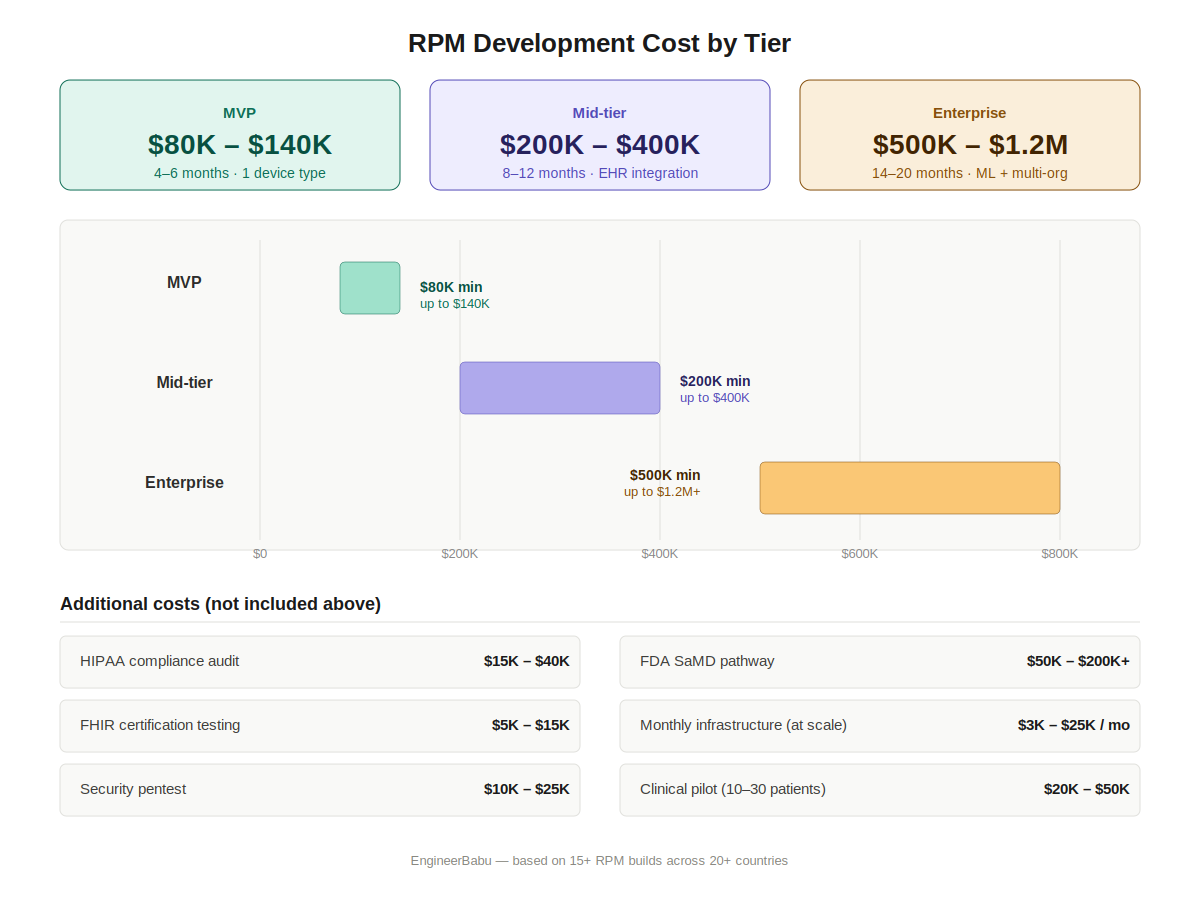
The question every founder asks. Here’s what I’ve seen across 15+ RPM builds at different complexity levels.
| System Complexity | Timeline | Cost Range (USD) |
| MVP (1 device type, basic vitals, alert SMS, simple dashboard) | 4-6 months | $80,000 – $140,000 |
| Mid-tier (3-5 device types, real-time streaming, EHR integration, care team dashboard) | 8-12 months | $200,000 – $400,000 |
| Enterprise (multi-org, custom clinical workflows, ML anomaly detection, full FHIR integration) | 14-20 months | $500,000 – $1,200,000 |
A few things those ranges don’t include:
The numbers founders most consistently underestimate: compliance ($30K-$50K minimum), EHR integration (adds 2-3 months), and infrastructure costs after launch as patient volume scales.
After seeing enough of these builds, patterns emerge. These are the mistakes I see repeatedly.
There are mature white-label RPM platforms available today — Current Health (now Best Buy Health), Biofourmis, Health Recovery Solutions, TytoCare, and others. For many health systems, the right answer is not custom development.
Here’s a simple framework I use with founders:
Build custom RPM when:
Buy/white-label when:
The hybrid path — building on top of an FDA-cleared RPM platform’s APIs while customizing the clinical workflow layer — is often underexplored. It’s worth mapping before committing to full custom development.
For teams that have decided to build, here’s the process the EngineerBabu team follows:
The clinical pilot step is non-negotiable. Every RPM system I’ve seen that launched without a clinical pilot had expensive post-launch issues that a 6-week pilot would have caught.
If you’re evaluating remote patient monitoring app development and want to talk through the architecture decisions before you commit to a vendor or timeline, I’m usually the one on those calls.
The things I care about on those calls: your clinical use case, your data freshness requirement, your device strategy, your regulatory exposure, and whether your team structure matches what you’re trying to build.
No deck. No sales process. Just an honest conversation about whether what you’re planning will work.
You can reach me directly: mayank@engineerbabu.com
Mayank Pratap Co-founder, EngineerBabu, 14 years building technology products | Google AI Accelerator Top 20 (2024) | CMMI Level 5 | NASSCOM Member | 500+ projects delivered across 20+ countries.
Common integrations include pulse oximeters (Nonin, Masimo), blood pressure monitors (Omron, iHealth), glucometers (Dexcom, Abbott FreeStyle), weight scales (Withings), ECG patches (AliveCor KardiaMobile, BioTel Heart), thermometers, and spirometers.
Each device type has different SDK requirements, connectivity protocols (BLE, WiFi, cellular), and data formats. Most RPM platforms support 5-15 device types at launch; enterprise platforms may support 30+.
A basic MVP with one device type, core vitals display, and SMS alerts takes 4-6 months. A production-ready system with real-time streaming, care team dashboard, and EHR integration typically takes 10-14 months. The single largest timeline variable is EHR integration — Epic production API approval alone takes 8-16 weeks.
If your RPM app transmits or stores individually identifiable health information and works with HIPAA-covered entities (hospitals, insurers, healthcare providers) or their business associates, HIPAA compliance is required.
This includes Business Associate Agreements with all vendors, technical safeguards for PHI, audit controls, and transmission security. Apps serving only individual consumers directly (not through a healthcare provider) operate under a different regulatory framework, though state-level health privacy laws still apply.