Android TV App Development Company | Build Smart TV Apps — EngineerBabu


Create engaging, high-performance mobile applications tailored to your business needs. We craft future-ready apps that offer smooth user experiences on all devices.
Build robust and scalable websites and CMS platforms that help you manage content effortlessly. Our development ensures a seamless digital presence.
Launch secure, feature-rich online stores with intuitive shopping experiences. We build tailored eCommerce platforms designed for growth.
Design captivating games with immersive gameplay and stunning graphics. From concept to launch, we build engaging experiences that players love.
Enhance your customer relationships with customized Salesforce implementations. Drive growth and efficiency with smarter CRM solutions.
Harness artificial intelligence and machine learning to automate workflows and gain actionable insights. Our AI transforms data into smart decisions.
Accelerate your software delivery lifecycle with continuous integration, delivery, and infrastructure automation to boost efficiency.
Last month, a media company CEO called me. They’d spent $180,000 with an agency building an Android TV app for their streaming platform. Six months of development. Beautiful mockups. The app launched, got 14,000 downloads in the first week, and had a 94% abandonment rate within 3 minutes.
The problem wasn’t the code. The problem was that nobody on their development team had ever actually built for a television. They’d taken their mobile app, stretched it to fit a 55-inch screen, added a remote control navigation layer on top, and called it done.
I’ve been building technology products for 14 years. The EngineerBabu team has shipped 500+ products across 20+ countries, and in the last three years, connected TV development has become one of the fastest-growing segments in our pipeline. Not because we chased it — because the market came to us. Media companies, fitness brands, e-commerce platforms, IPTV operators — all discovering that the TV screen is the last unconquered real estate in their product ecosystem.
Here’s everything I’ve learned about Android TV app development — the architecture decisions, the cost realities, the mistakes that burn six figures, and the strategic thinking that separates apps people use from apps people delete.
Android TV app development is the process of building applications specifically designed for television screens running Android TV OS or Google TV. It uses the Android SDK but requires a fundamentally different approach to user interface, navigation, input handling, and performance optimization compared to mobile or tablet development.
The critical distinction that most development teams miss: a TV is not a phone with a bigger screen. It’s a shared device, viewed from 10 feet away, controlled with a D-pad remote or voice commands, running on hardware that’s often 3-4x less powerful than a mid-range phone. Every architectural decision — from the UI framework to the media pipeline to the navigation model — has to account for these constraints.
Google currently maintains two primary UI frameworks for TV development.
The Leanback library is the legacy approach — battle-tested, well-documented, and what most existing TV apps are built on.
Compose for TV (released as stable in 2024) is the modern alternative, built on Jetpack Compose, and what I’d recommend for any new project starting today. The Compose approach gives you a reactive UI model, significantly less boilerplate code, and better alignment with Google’s future roadmap.
The difference between Android TV and Google TV is worth clarifying because every client asks.
Android TV is the underlying operating system. Google TV is a software layer that sits on top of Android TV, adding a more content-forward launcher, deeper Google Assistant integration, and a unified content recommendation engine. When you build for Android TV, your app works on both. When you optimize for Google TV, you unlock features like the “Watch Next” channel and home screen content tiles that drive organic discovery.
The connected TV market isn’t emerging anymore. It’s arrived.
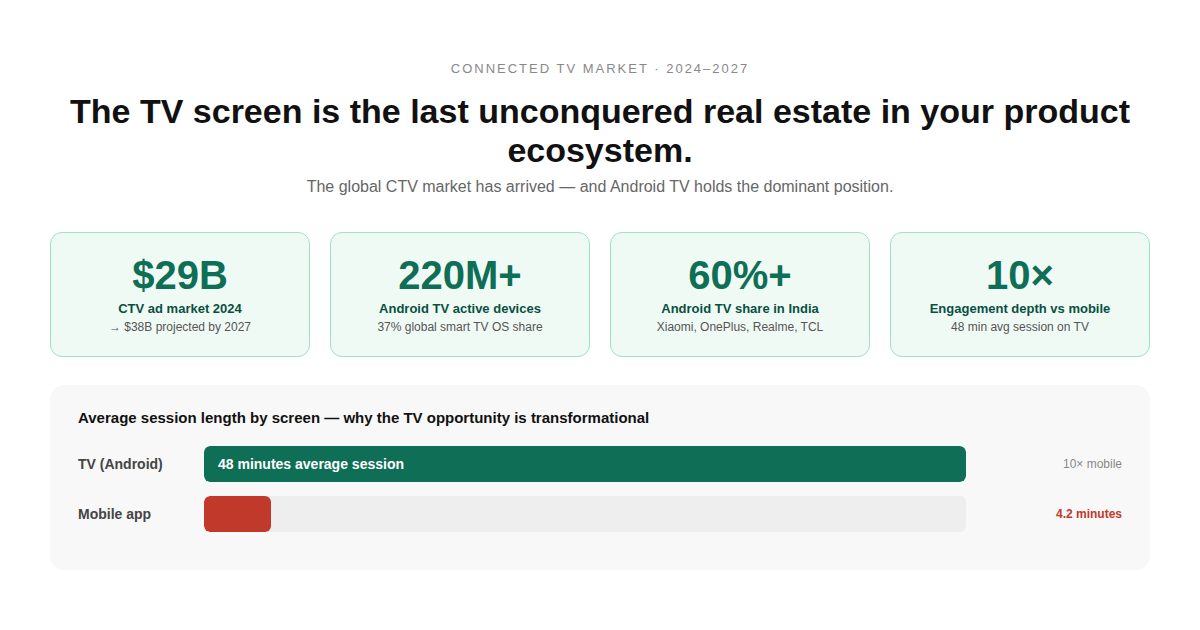
The global CTV advertising market crossed $29 billion in 2024 and is projected to reach $38 billion by 2027. Android TV holds roughly 37% of the smart TV OS market globally — that’s over 220 million active devices. In India, where most of our clients operate alongside us, Android TV’s market share exceeds 60%, driven by affordable smart TVs from Xiaomi, OnePlus, Realme, and TCL.
But here’s the number that matters most for product teams: average TV viewing session length is
48 minutes. Compare that to 4.2 minutes for a mobile app session. The engagement depth on a TV screen is 10x what you get on a phone. For content companies, fitness platforms, e-commerce brands, and educational products, this isn’t incremental — it’s transformational.
Three client categories are driving the majority of Android TV development demand right now:
OTT and IPTV platforms — This is the largest segment by far. Regional streaming services, sports networks, and telecom operators building their own content platforms. The EngineerBabu team has built streaming apps that handle adaptive bitrate delivery, DRM protection using Widevine and PlayReady, multi-profile management, and offline-to-TV sync.
Fitness and wellness brands — The pandemic accelerated this permanently. Yoga, workout, and meditation apps that started on mobile are now building TV-first experiences. The 10-foot UI is actually perfect for follow-along exercise content. We built a fitness app where the TV displays the workout while the companion mobile app tracks heart rate and rep counts.
E-commerce and T-commerce — This is the emerging category. Shopping on TV screens — driven by QR code scanning, second-screen checkout flows, and shoppable content during live streams. Amazon and Flipkart have been experimenting with this for two years.
Most blog posts about Android TV development give you a feature list. Let me give you the architecture decisions instead — because these are what determine whether your app works well or falls apart under real user load.
If you’re starting a new Android TV project today, I’d go with Compose for TV. Not because it’s newer, but because the development velocity is measurably faster. In our last two TV projects, the Compose-based app took 35% less development time than the Leanback equivalent — primarily because of the declarative UI model and built-in focus management system.
That said, if you’re extending an existing mobile app that already uses Views (not Compose), Leanback might make more sense for consistency. Migrating your entire mobile codebase to Compose just to build the TV variant creates unnecessary risk.
This is where most agencies lose $50,000+ in debugging time. The media pipeline for TV apps must handle:
ExoPlayer (now part of Media3) is the standard choice. But the configuration for TV is different from mobile. You need to optimize buffer sizes for TV’s typically slower network chips, configure adaptive bitrate switching to be less aggressive (TV viewers notice quality drops more than mobile users), and handle HDMI-CEC commands that can pause/resume playback from the TV remote.
DRM is non-negotiable for any premium content. Widevine L1 for HD and 4K content, with fallback to L3 for devices that don’t support hardware-level DRM. PlayReady if you’re also targeting Xbox or Windows. The EngineerBabu team has implemented multi-DRM wrappers that negotiate the highest available security level per device — this alone took 3 weeks on one project because the documentation doesn’t tell you about the edge cases.
TV navigation is D-pad based — up, down, left, right, select, back. No touch. No swipe. No pinch. Every element on screen needs a clear focus state, and the focus traversal order has to be logical even when your layout is complex.
The biggest mistake I see: teams that build their TV UI like a website with clickable elements. On TV, you need to think in terms of focus zones — large, clearly bounded areas that the D-pad can navigate between predictably. Compose for TV handles this significantly better than Leanback because focus management is built into the composition model.
Google TV’s home screen is the most underutilized acquisition channel in app development. You can push content recommendations to the user’s home screen — directly on the “Watch Next” row — through the Android TV Content Provider API. This means your app’s content appears without the user even opening your app.
I’ve seen this single feature increase daily active users by 22% on one streaming platform we built. It’s free distribution. And yet, maybe 30% of TV apps on the Play Store actually implement it.
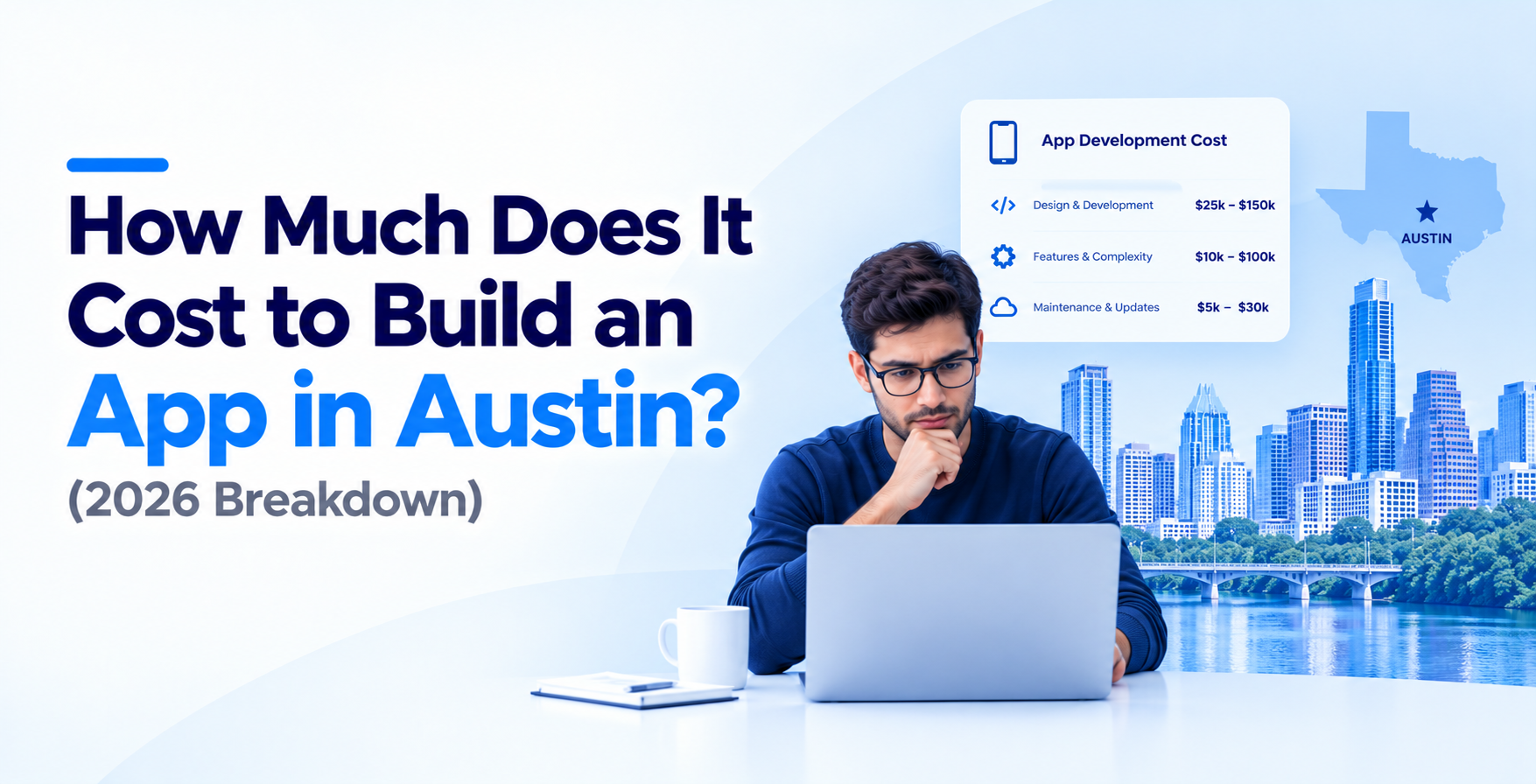
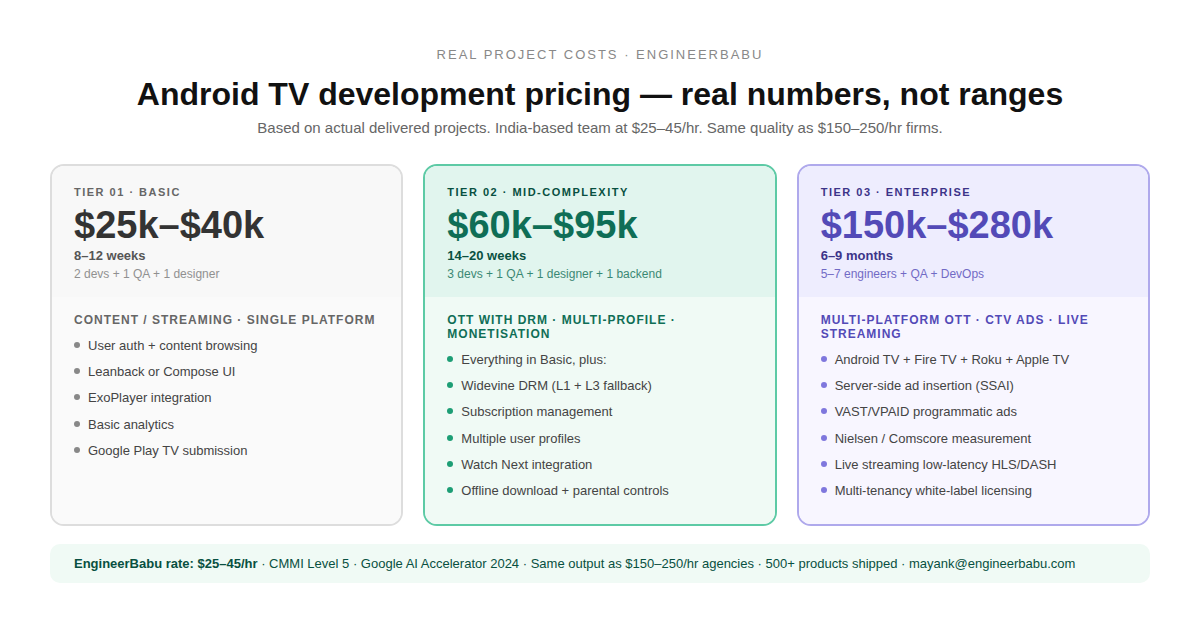
Every blog post on this topic gives you “$15,000 to $300,000 depending on complexity.” That’s useless. Here’s what things actually cost, based on projects the EngineerBabu team has delivered:
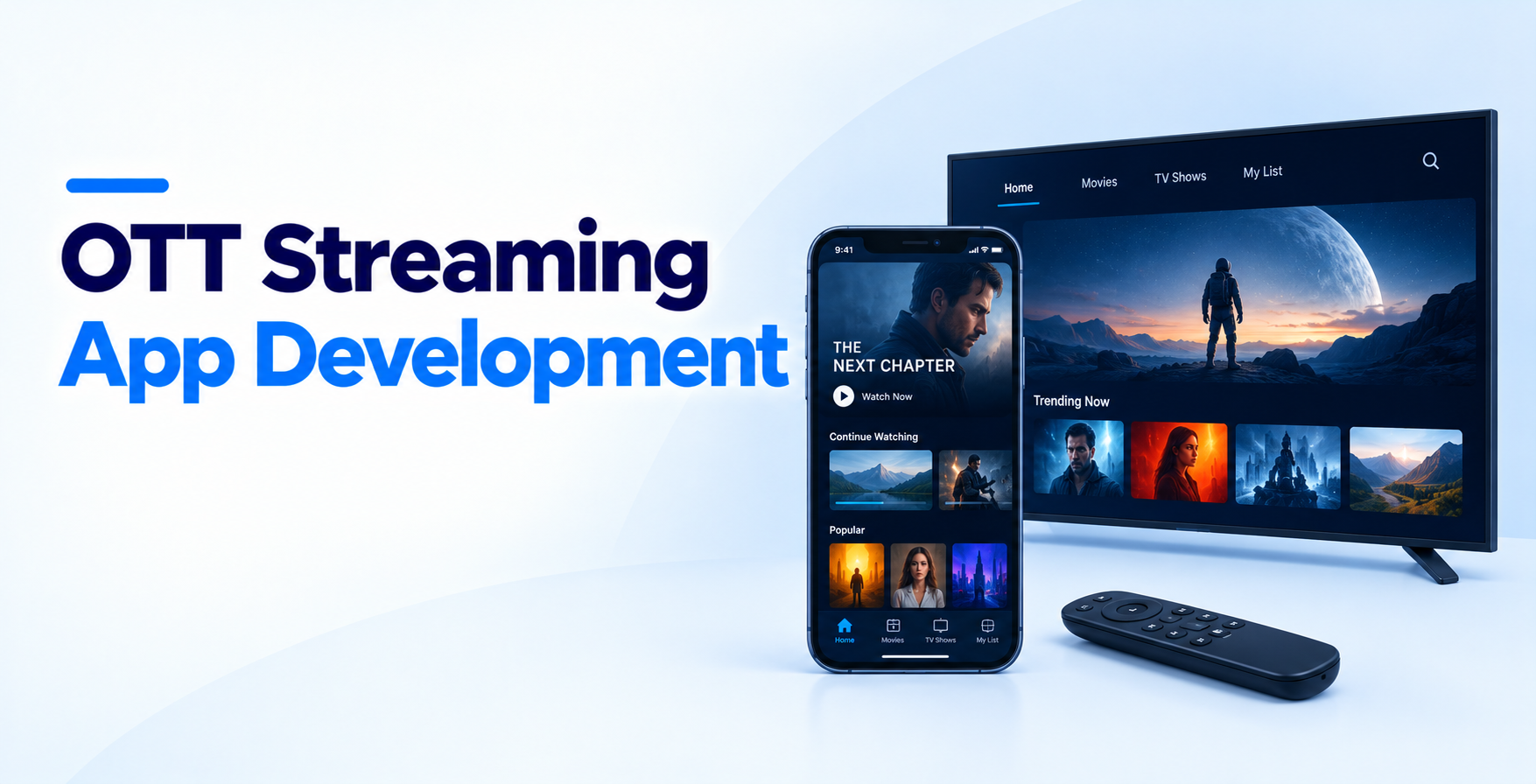
Basic Android TV App (Content/Streaming – Single Platform) User auth, content browsing with Leanback or Compose UI, ExoPlayer integration, basic analytics, Google Play submission. Timeline: 8-12 weeks | Team: 2 developers + 1 QA + 1 designer Cost: $25,000-$40,000
Mid-Complexity TV App (OTT with DRM, Multi-Profile, Monetization) Everything above plus: Widevine DRM, subscription management, multiple user profiles, content recommendation engine, Watch Next integration, offline download capability, parental controls. Timeline: 14-20 weeks | Team: 3 developers + 1 QA + 1 designer + 1 backend engineer Cost: $60,000-$95,000
Enterprise TV App (Multi-Platform OTT with CTV Ads) Everything above plus: multi-platform (Android TV + Fire TV + Roku + Apple TV), server-side ad insertion (SSAI), programmatic ad integration (VAST/VPAID), Nielsen or Comscore measurement SDK, live streaming with lowlatency HLS/DASH, multi-tenancy for white-label licensing. Timeline: 6-9 months | Team: 5-7 engineers + dedicated QA + DevOps Cost: $150,000-$280,000
Why India-based development changes these numbers: EngineerBabu is CMMI Level 5 certified and was selected for Google’s AI Accelerator program (Top 20 globally, 2024). Our engineering quality is benchmarked at the same level as firms charging $150-250/hour. Our effective rate is $25-45/hour. That’s not a quality compromise — it’s a geography advantage. The EarlySalary lending stack we built now processes ₹10,000 crore in disbursements. The Simba Beer inventory system handles real-time field intelligence across hundreds of retail points. Same engineering discipline, applied to TV app development.
I’m not going to give you a generic “discover, design, develop, test, deploy” process. Here’s what actually happens when the EngineerBabu team builds an Android TV app:
Before writing any code, we identify the exact TV devices our client’s users own. This isn’t theoretical — we pull device distribution data from their existing mobile app analytics or market research. An app targeting Indian users needs to run smoothly on a ₹12,000 Xiaomi TV with 1.5GB RAM. An app targeting US users might optimize for Nvidia Shield and Chromecast with Google TV. The hardware target determines every performance decision downstream.
We design for the couch, not the desk. Large text (minimum 16sp for body, 24sp+ for titles), high contrast ratios (TV screens have more ambient light interference), oversized touch targets adapted for D-pad focus states, and content grids that show enough to browse but don’t overwhelm. We build interactive prototypes on actual TV hardware — not just on emulators — because color rendering, text readability, and animation smoothness look completely different on a 50-inch LED panel.
If the app involves video or audio, this is the most critical technical phase. We select and configure the media player (ExoPlayer/Media3), define adaptive bitrate streaming profiles (typically 480p/720p/1080p/4K tiers), integrate DRM if required, build the buffering strategy for TV-grade network conditions, and configure analytics events for playback quality monitoring. This phase happens in parallel with UI design.
The actual build. We use Compose for TV for new projects, Kotlin as the primary language, MVVM architecture with Repository pattern, Hilt for dependency injection, and Room for local caching. Firebase handles crash reporting, remote config, and analytics. We build the companion mobile app (if needed) in parallel — the TV and mobile apps share a common backend but have independent frontends.
This is where TV apps live or die. We have a dedicated QA phase for navigation — testing every screen with D-pad only, ensuring no focus traps (where the user gets stuck with no way to navigate out), verifying that the Back button behavior follows Android TV guidelines, and testing with Google Assistant voice commands. We test on at least 5 different physical TV devices and 3 different remote types.
Google’s TV app review process is stricter than mobile. There’s a dedicated TV app quality checklist that’s surprisingly specific — banner requirements (320×180 dp), mandatory Leanback launcher intent, no touchscreen requirement declaration, proper handling of the TV-safe zone (5% margin around screen edges). We’ve seen apps rejected 3 times for edge cases that aren’t in the documentation. Having done this across multiple projects, we now have an internal checklist of 47 submission requirements that goes beyond Google’s official list.
TV app analytics are different from mobile. Session lengths are longer but sessions are less frequent. We track content discovery paths (how many steps to the first play), playback start time (under 2 seconds is the target), buffering ratio (under 1% is acceptable), and remote control error rates (how often users press Back when they meant something else). The first 30 days post-launch typically involve 2-3 optimization sprints based on this data.
After seeing dozens of TV app projects — ours and competitors’ failures that clients bring to us for rescue — here are the patterns I keep seeing:
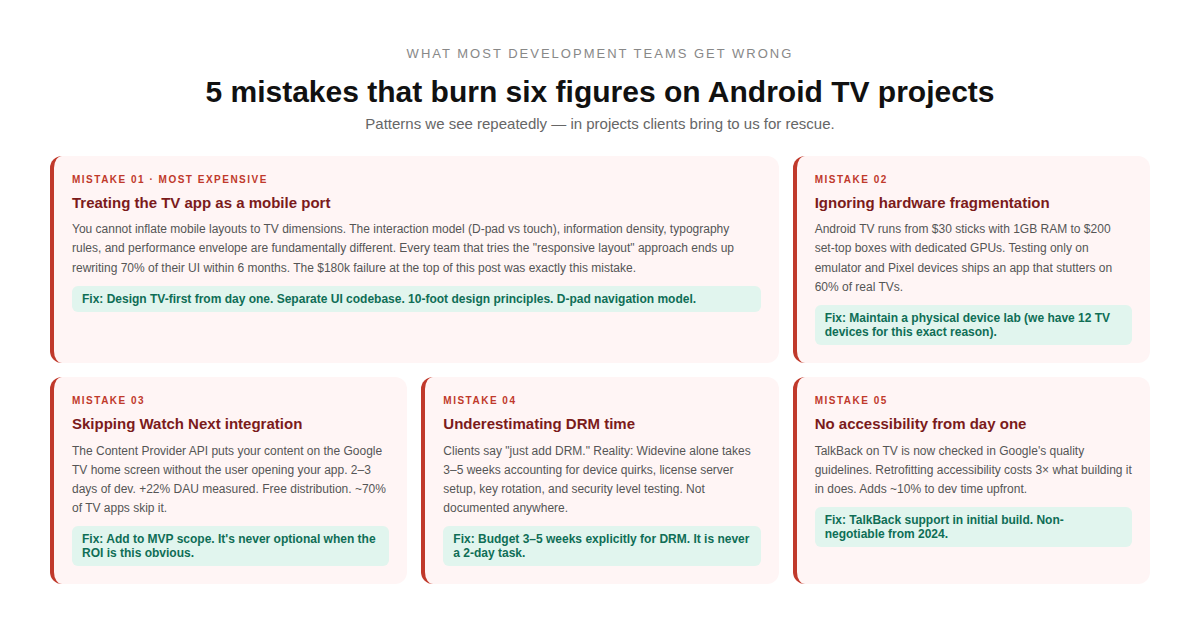
Mistake 1: Treating the TV app as a mobile port. You can’t just inflate your mobile layouts to TV dimensions. The interaction model, information density, typography, and performance envelope are fundamentally different. Every team that tries the “responsive layout” approach ends up rewriting 70% of their UI within 6 months.
Mistake 2: Ignoring hardware fragmentation. Android TV runs on devices ranging from $30 streaming sticks with 1GB RAM to $200 set-top boxes with dedicated GPUs. If you only test on the emulator and a Pixel device, you’ll ship an app that stutters on 60% of real-world TVs. We maintain a device lab of 12 TV devices specifically for this reason.
Mistake 3: Skipping the content recommendation integration. The Watch Next channel and home screen tiles are free user acquisition. It takes about 2-3 days of development to implement the Content Provider. The ROI is massive. Yet most teams skip it because it’s not in the “MVP feature list.”
Mistake 4: Underestimating DRM implementation time. Every client says “just add DRM.” In reality, Widevine integration alone takes 3-5 weeks of dedicated engineering when you account for device-specific quirks, license server setup, key rotation, and testing across security levels. Budget for it upfront.
Mistake 5: No accessibility implementation. TalkBack on TV is increasingly important — both for compliance and for the growing visually impaired user base. Google’s TV app quality guidelines now explicitly check for accessibility. Most competitors skip this entirely. Building it in from day one adds maybe 10% to development time. Retrofitting it later costs 3x that.
Clients always ask whether they should build for Android TV first, or Roku, or Apple TV, or Fire TV. Here’s my honest take based on real project data:
Largest global footprint (220M+ devices). Kotlin/Java development using familiar Android tools. Google Play distribution. Best choice for India, Southeast Asia, Europe, and emerging markets. Biggest weakness: hardware fragmentation across hundreds of TV manufacturers.
Second largest globally (~80M active devices). Based on Android, so about 70% of your Android TV codebase ports directly. Dominant in the US market. Has its own app store and content ecosystem. The EngineerBabu team has done several simultaneous Android TV + Fire TV builds — shared backend, shared media pipeline, platform-specific UI layers.
Biggest in the US and Canada. Uses BrightScript (a proprietary language), which means zero code reuse from Android. If US is your primary market, Roku is unavoidable. If you’re starting with global reach, Android TV first, Roku second.
Premium users, highest ARPU. Swift/SwiftUI development. Smallest device base but highest engagement and monetization metrics. Usually the third platform clients add.
My recommendation for most clients: Start with Android TV. Get the product-market fit. Then port to Fire TV (fast, 70% code reuse), then Roku (full rebuild, budget accordingly), then Apple TV (if premium market justifies it).
Here’s something I don’t see in any competitor blog: how TV app monetization actually works at the technical level.
Subscription (SVOD): Integrate with Google Play Billing for TV. Note: TV billing flows are different from mobile — the user enters their Google account password on the TV keyboard, which has a terrible UX. Smart implementation uses a QR code on the TV screen that the user scans with their phone to complete payment. We’ve seen this increase subscription conversion by 34%.
T-Commerce: The newest revenue model. QR code overlays during content, shoppable product cards during live streams, and voice-initiated purchases through Google Assistant. This requires a real-time inventory sync between the TV app and the e-commerce backend. The
EngineerBabu team built a t-commerce prototype for a fashion brand where the TV displayed a live fashion show and viewers could scan product QR codes in real-time. The conversion rate on that prototype was 3.2% — higher than their website.
A basic streaming TV app costs $25,000-$40,000. A mid-complexity OTT platform with DRM, subscriptions, and multi-profile support runs $60,000-$95,000. Enterprise multi-platform builds with CTV advertising and live streaming are $150,000-$280,000. These are real numbers from EngineerBabu projects, not theoretical ranges.
A basic TV app takes 8-12 weeks. A full OTT platform takes 14-20 weeks. Enterprise multi-platform projects take 6-9 months. The most common delay is DRM integration — budget 3-5 weeks for Widevine alone. Google Play for TV submission takes 1-2 weeks for first-time apps due to their stricter review process.
Partially. Your backend, API layer, authentication, and business logic port directly. Your UI does not. Android TV requires a completely different navigation model (D-pad vs. touch), layout approach (10-foot UI vs.
handheld), and media pipeline configuration. Expect to reuse 30-40% of your mobile codebase and rebuild the rest for TV.
Android TV is the operating system. Google TV is a software layer on top of Android TV that adds a content-aggregation launcher, deeper Google Assistant integration, and a unified content recommendation system. Building for Android TV means your app works on both. Optimizing for Google TV unlocks features like the Watch Next channel and home screen content cards.
Kotlin is the primary language — Google officially recommends it for all Android development including TV. Java works but is becoming legacy. For the UI layer, Compose for TV (built on Jetpack Compose) is the modern framework, though the Leanback library (XML-based) is still widely used in existing apps. The media pipeline typically uses ExoPlayer (Media3) regardless of UI framework.
Significantly. The core language (Kotlin) and architecture patterns (MVVM, Hilt, Room) are the same, but the UI framework, navigation model, input handling, performance constraints, and submission requirements are all different. TV apps use D-pad navigation instead of touch, require 10-foot UI design principles, must handle hardware that’s 3-4x less powerful than phones, and go through a separate Google Play review process with TV-specific quality criteria.
Implement the Watch Next Content Provider API and the home screen channel API. This lets your app’s content appear directly on the user’s Google TV home screen without opening your app. It takes 2-3 days of development and typically increases daily active users by 15-25%. Most competitors skip this — it’s a genuine competitive advantage.
If you’re evaluating Android TV app development — whether it’s a new OTT platform, extending your mobile app to TV, or exploring CTV advertising — I’m usually the one on those early architecture calls.
No pitch deck. No sales team. Just a conversation about what you’re building, what the technical tradeoffs look like, and whether we’re the right team for it.
mayank@engineerbabu.com
— Mayank Pratap Co-Founder, EngineerBabu · Google AI Accelerator 2024 · CMMI Level 5 · 500+ Products · 20+ Countries